Brand awareness is vital in cybersecurity because buyers—often risk-averse professionals like CISOs, IT managers, and procurement teams—rely on trusted brands when researching tools to protect their organizations.
https://www.backbox.org/wp-content/uploads/2018/09/website_backbox_text_black.png00https://www.backbox.org/wp-content/uploads/2018/09/website_backbox_text_black.png2024-12-17 13:07:382024-12-17 13:07:38Cybersecurity Marketing Predictions for 2025 Business Growth
https://www.backbox.org/wp-content/uploads/2018/09/website_backbox_text_black.png00https://www.backbox.org/wp-content/uploads/2018/09/website_backbox_text_black.png2024-12-17 13:07:372024-12-17 13:07:37Organizations Warned of Rise in Okta Support Phishing Attacks
Experts say the catchall term for online fraud furthers harm against victims and could dissuade people from reporting attempts to bilk them out of their money.
https://www.backbox.org/wp-content/uploads/2018/09/website_backbox_text_black.png00https://www.backbox.org/wp-content/uploads/2018/09/website_backbox_text_black.png2024-12-17 12:06:592024-12-17 12:06:59FBI Warns of HiatusRAT Attacks on Cameras, DVR Systems
The Cybersecurity and Infrastructure Security Agency (CISA) has published the draft update to the National Cyber Incident Response Plan (NCIRP) for public comment on the Federal Register. Developed through collaboration with the Joint Cyber Defense Collaborative (JCDC) and in close coordination with the Office of the National Cyber Director (ONCD), this update addresses new changes in cybersecurity and incorporates significant changes in policy, law, and operational processes since the plan’s initial release in 2016.
The NCIRP serves as the strategic framework guiding the U.S. response to cyber incidents. It aligns efforts across government agencies, private sector entities, state and local governments, tribal and territorial authorities, and international partners. The plan outlines four critical lines of effort (LOEs) to ensure a cohesive and coordinated approach to incident response: Asset Response, Threat Response, Intelligence Support, and Affected Entity Response. These efforts aim to manage cyber incidents of varying severity and ensure timely actions during the response lifecycle.
The release of this draft update marks an important step in enhancing the nation’s ability to respond effectively to cyber threats‘ growing complexity and sophistication. CISA has worked closely with government and industry partners to create an agile, actionable framework that keeps pace with their rapid evolution.
Key Updates to the National Cyber Incident Response Plan
Several critical updates have been introduced in this draft version of the NCIRP, which are designed to improve coordination and responsiveness during cyber incidents. These changes include:
Defined Path for Non-Federal Stakeholder Participation: This update clarifies the process by which non-federal stakeholders, including private sector entities, can participate in cyber incident response efforts. Given the growing role of the private sector in cybersecurity, this path ensures more comprehensive engagement in the event of a major cyber incident.
Improved Usability: The plan has been streamlined to enhance its usability. The updated version aligns with the operational lifecycle of incident response, making it more straightforward for agencies and organizations to implement during real-world incidents.
Incorporation of Legal and Policy Changes: The draft incorporates the latest legal and policy developments impacting the roles and responsibilities of agencies involved in cyber incident response. These updates ensure that the plan is in line with current regulatory frameworks and legal requirements.
Predictable Update Cycle: The NCIRP will now undergo regular updates, ensuring that it remains relevant as the threat landscape evolves. The predictable cycle will allow for continual refinement based on feedback, emerging threats, and changing technological realities.
In her statement on the publication of the draft update, CISA Director Jen Easterly emphasized the necessity of a seamless, agile, and effective incident response framework. She noted that “Today’s increasingly complex threat environment demands that we have a seamless, agile, and effective incident response framework” and encouraged public comment to refine the document further.
Overview of the National Cyber Incident Response Plan
The NCIRP is an important guide for coordinating responses to cyber incidents that could affect national security, the economy, or public health. The plan was initially published in 2016 and is an essential component of the U.S. government’s broader cybersecurity strategy. The 2023 National Cybersecurity Strategy called for the update to reflect new cyber threats, organizational changes, and policy shifts.
The NCIRP is not a step-by-step guide but rather a flexible framework for coordinating efforts during a cyber incident. It defines the roles and responsibilities of various stakeholders, including federal agencies, state, local, tribal, and territorial (SLTT) governments, private sector entities, and civil society organizations. By laying out these roles and mechanisms, the NCIRP fosters coordinated action across sectors and jurisdictions, ensuring that resources are deployed effectively during a crisis.
Four Lines of Effort for Cyber Incident Response
The NCIRP outlines four primary lines of effort that guide the U.S. government’s response to cyber incidents. These are:
Asset Response: Led by CISA, this effort focuses on helping affected entities protect their assets and mitigate the impacts of a cyber incident. It includes providing technical assistance to organizations and supporting them in securing critical infrastructure.
Threat Response: The Department of Justice (DOJ), the FBI, and the National Cyber Investigative Joint Task Force (NCIJTF) are responsible for leading efforts to neutralize cyber threats and track down cybercriminals. The FBI, in particular, plays a central role in law enforcement response and investigations.
Intelligence Support: The Office of the Director of National Intelligence (ODNI), through the Cyber Threat Intelligence Integration Center (CTIIC), provides essential intelligence to guide response efforts. This line of effort helps ensure that the U.S. government has the latest information on adversary tactics, techniques, and procedures (TTPs).
Affected Entity Response: In cases where a federal agency or private sector organization is directly impacted, it is responsible for leading its own response, though it coordinates with CISA, the Department of Defense (DOD), or other federal partners as needed. This effort is vital for managing the operational continuity of affected entities.
These lines of effort are managed through structured coordination bodies such as the Cyber Unified Coordination Group (Cyber UCG), which brings together stakeholders from across the government and the private sector to ensure unified, cohesive action. The Cyber Response Group (CRG) focuses on broader policy and strategic coordination, ensuring alignment with national cybersecurity priorities.
The Detection and Response Phases
Cyber incident response is broken down into two main phases: Detection and Response.
Detection: This phase involves continuous monitoring, analysis, and engagement with critical infrastructure owners to validate whether an incident is significant enough to require a full-scale response. Detection includes analyzing anomalies, working with the cybersecurity community, and validating the severity of the incident.
Response: Once an incident has been confirmed as significant, the response phase begins. This phase focuses on containment, eradication, and recovery, as well as supporting law enforcement in their efforts to attribute and hold perpetrators accountable. The response efforts also include supporting affected entities as they recover and restore services.
In both phases, the roles of federal agencies, SLTT governments, and private sector entities are critical. The JCDC plays a central role in coordinating public-private collaboration, ensuring that both sectors are aligned in their efforts to defend against and recover from cyber incidents.
Conclusion
The updated National Cyber Incident Response Plan (NCIRP) emphasizes continuous improvement and collaboration. After an incident, the Cyber Response Group (CRG) reviews the response and prepares a report, which helps refine future efforts. The Cyber Safety Review Board also provides independent recommendations to strengthen cybersecurity.
CISA is committed to regularly updating the NCIRP, incorporating feedback from the public and private sectors, and adapting to new threats and technologies. The Joint Cyber Defense Collaborative (JCDC) plays a key role in ensuring coordinated efforts. The updated NCIRP aims to strengthen national preparedness and ensure effective response to future cyber incidents.
https://www.backbox.org/wp-content/uploads/2018/09/website_backbox_text_black.png00https://www.backbox.org/wp-content/uploads/2018/09/website_backbox_text_black.png2024-12-17 12:06:492024-12-17 12:06:49CISA Reveals Draft Update to National Cyber Incident Response Plan for Public Feedback
As Windows 10 approaches its end-of-life (October 2025), organizations are facing the need to adjust their security infrastructure to be better aligned with Windows 11. A malware sandbox, an isolated environment for analyzing malicious files and URLs, is a key tool for this transition.
Here are the benefits of deploying a Windows 11 sandbox and how you can do it.
What is a malware sandbox?
A malware sandbox is an isolated virtual environment designed to safely analyze cyber threats by detonating, observing, and interacting with them.
This controlled setting allows cybersecurity professionals to understand the behavior of malware post-infection, including file modifications, network calls, and registry changes.
A malware sandbox helps organizations and individual researchers to:
Safely explore malicious files and URLs to validate threat alerts or proactively identify cyber threats.
Observe detonation of malware and phishing attacks in real time to see how they are carried out in a live system.
Replicate specific network and system environments to assess the potential impact on the existing infrastructure.
Extract indicators of compromise from malware samples to enhance threat detection capabilities.
Intercept and analyze command and control communications to gather crucial IOCs.
Study malware behavior in depth to uncover tactics, techniques, and procedures (TTPs) to respond to security incidents or prepare for future attacks more effectively.
Analyze malware and phishing in ANY.RUN’s Windows 11 sandbox
Which sandbox to choose? Built-in, on-premises, cloud-based
When it comes to choosing your sandbox, there are several options you can consider. Let’s focus on the three main ones.
Built-In Sandbox Feature Included with Windows 11
Windows 11 provides built-in sandbox functionality completely for free. This tool works well for quick checks, such as opening malicious links received via phishing emails or downloading and running suspicious files.
A limitation of this type of sandbox is its inability to provide verdicts on detonated malicious content or log system and network activities. This can make it difficult to accurately assess the threat level of evasive and complex malware. There are also no reports generated after the analysis.
These aspects make the built-in Windows sandbox an unsuitable option for professional use.
On-premises Windows 11 Sandbox
For more advanced analysis, organizations can opt for building their own sandbox environment, configured to their specific needs. Virtualization software like VirtualBox can be used here. Yet, this approach is generally recommended only if you need to reverse-engineer malware source code or analyze it with custom tools.
There are also a several things to take into consideration:
Complex Setup: Requires technical expertise to set up and configure.
Potential Risks: Misconfiguration can lead to malware escaping the sandbox and infecting the host system.
Resource-Intensive: Can be demanding on system resources.
For professional malware analysis, a cloud sandbox is the best choice. These services offer all the benefits of virtualization software but with much less tinkering and setup, making it easier to gather deep insights. There’s also no chance to misconfigure something and let the malware escape the sandbox’s confines and infect the host.
The ANY.RUN sandbox is a tool that lets you configure and deploy a fully-interactive Windows 11 environment in seconds. It also provides you with the ability to engage with the system just like on a standard computer: launch programs, download attachments, browse web pages, and type.
Some malware families may rely on specific tools and mechanisms present in certain OS versions; running them on the wrong version may not trigger their malicious actions. That is why, apart from Windows 11, ANY.RUN provides other operating systems, including Windows 7, 10, and Ubuntu, letting you switch between them with ease.
Benefits of ANY.RUN’s Interactive Sandbox:
Quick and Easy Setup: Simply upload your file or link and start the analysis process in seconds.
Real-time Insights: Get an in-depth view of malicious activities, including network events, registry changes, dropped files, script execution, as they occur.
Interactivity: Perform user actions and see how threats respond in a live system.
Comprehensive Reporting: Collect detailed reports on analysis results, such as indicators of compromise (IOCs), malware families config info, and other actionable info.
VM Customization: Configure VM settings, enabling custom VPN, MITM Proxy, FakeNet, and other features for targeted investigations.
Privacy Control: Choose between public and private analysis based on data sensitivity.
Team Management: Invite, manage, and remove team members, with options for temporary access and productivity tracking.
Learn to analyze cyber threats
See a detailed guide to using ANY.RUN’s Interactive Sandbox for malware and phishing analysis
Read full guide
How to Set up a Windows 11 Sandbox
Let’s demonstrate how you can quickly get started with ANY.RUN’s Interactive Sandbox.
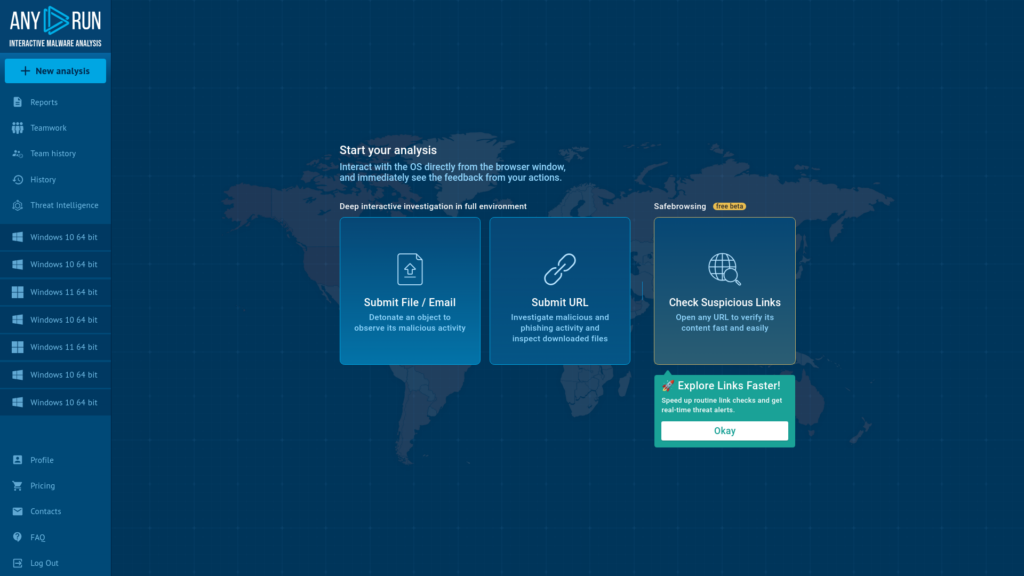
Step 1: Upload a Sample
ANY.RUN home screen lets you quickly upload your sample
As an example, let’s upload a .bin file to the service.
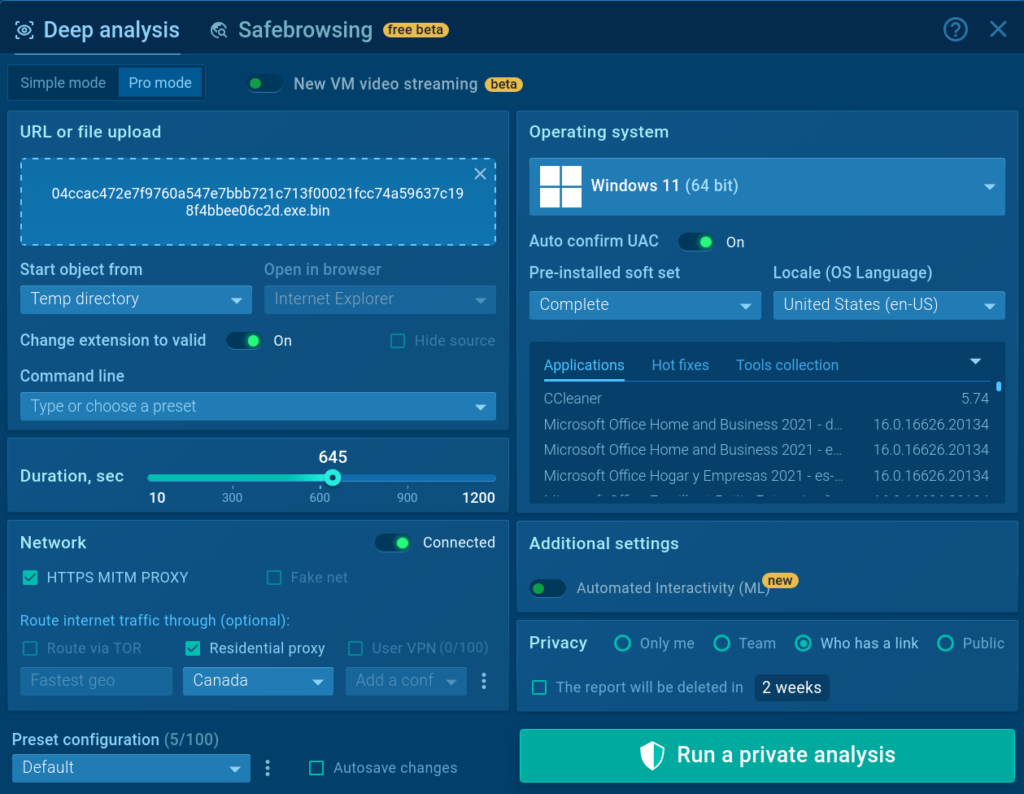
Step 2: Configure the VM
ANY.RUN allows you configure your analysis systemfor each session
Once we submit the sample, we’ll be able to customize the analysis environment to fit our needs. Check out the ultimate guide to the ANY.RUN sandbox to learn more about the features available in the setup window.
For now, let’s select Windows 11 from the list of operating systems, set the privacy mode of the session, and run the analysis.
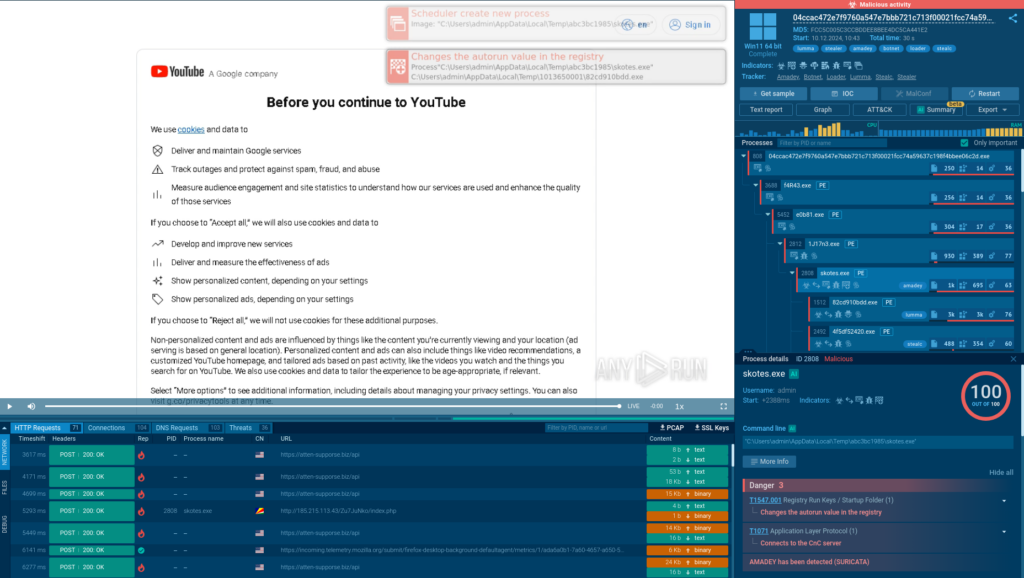
Step 3: Analyze the Threat
Analysis of a malicious file in the ANY.RUN sandbox
Once the session starts, the sandbox detonates the sample, allowing us to see how the system gets infected with the Amadey malware.
ANY.RUN identifies any malicious activities related to the spawned processes
Thanks to the Process Tree, we can discover that after the initial infection, Amadey continues to deploy additional malware, Lumma and Stealc.
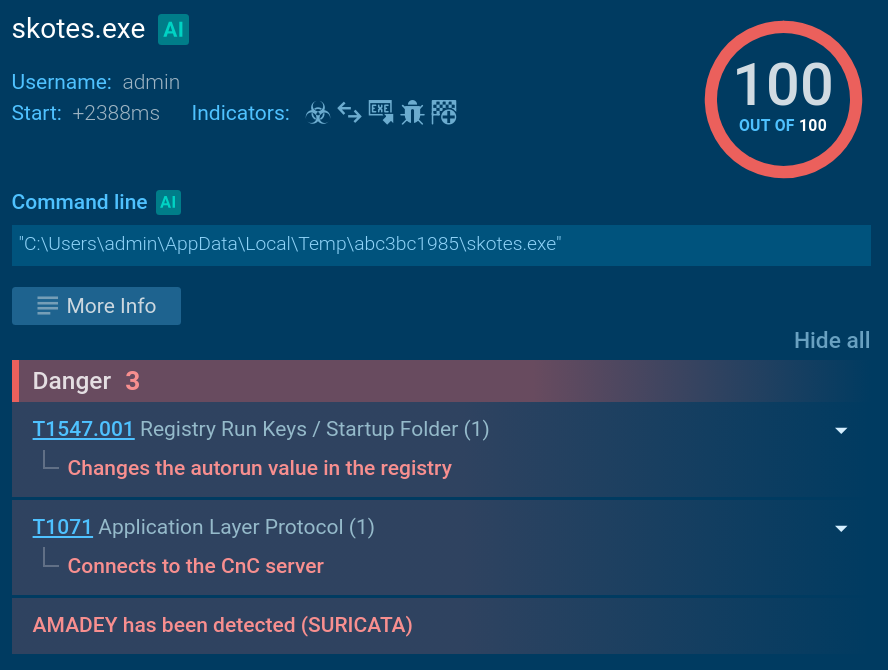
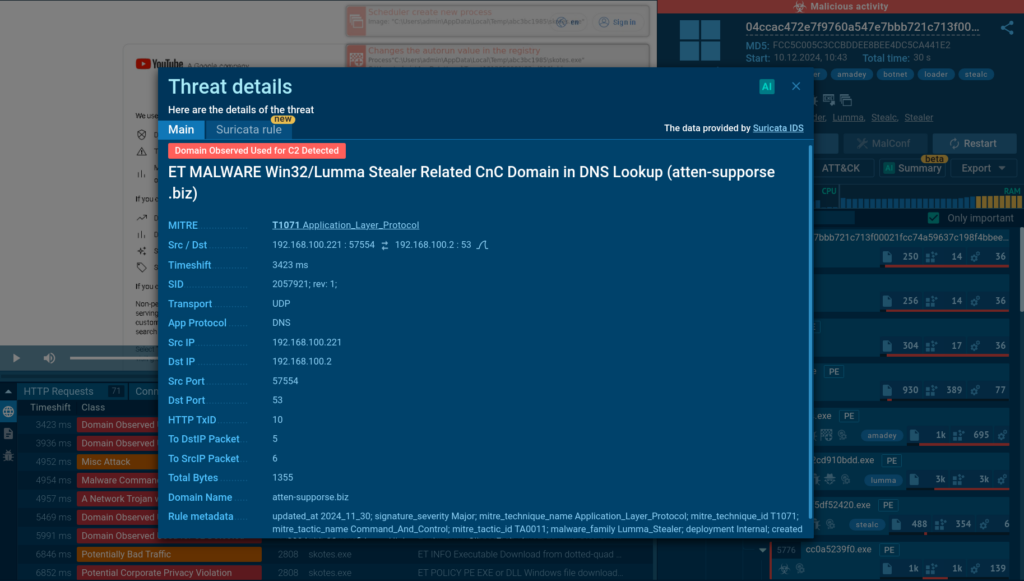
Suricata IDS ruleused for detecting C2 connections of the Lumma Stealer
Once these threats gain foothold on the system, they connect to their command and control (C2) servers, receive commands from threat actors, and begin to exfiltrate stolen data.
Conclusion
By providing a safe and isolated environment for analyzing malicious files and URLs, a malware sandbox helps enhance threat investigations and improve security. Organizations transitioning to Windows 11 need to utilize a reliable sandbox solution to effectively examine emerging malware and phishing attacks.
About ANY.RUN
ANY.RUN helps more than 500,000 cybersecurity professionals worldwide. Our interactive sandbox simplifies malware analysis of threats that target both Windows and Linux systems. Our threat intelligence products, TI Lookup, YARA Search and Feeds, help you find IOCs or files to learn more about the threats and respond to incidents faster.
With ANY.RUN you can:
Detect malware in seconds
Interact with samples in real time
Save time and money on sandbox setup and maintenance
https://www.backbox.org/wp-content/uploads/2018/09/website_backbox_text_black.png00https://www.backbox.org/wp-content/uploads/2018/09/website_backbox_text_black.png2024-12-17 12:06:492024-12-17 12:06:49How to Set up a Windows 11 Malware Sandbox
Bogus software update lures are being used by threat actors to deliver a new stealer malware called CoinLurker.
“Written in Go, CoinLurker employs cutting-edge obfuscation and anti-analysis techniques, making it a highly effective tool in modern cyber attacks,” Morphisec researcher Nadav Lorber said in a technical report published Monday.
The attacks make use of fake update alerts that employ
https://www.backbox.org/wp-content/uploads/2018/09/website_backbox_text_black.png00https://www.backbox.org/wp-content/uploads/2018/09/website_backbox_text_black.png2024-12-17 11:08:582024-12-17 11:08:58CISA Warns of Exploited Adobe ColdFusion, Windows Vulnerabilities
Red Teaming engagements are “realistic” attack simulations designed to test the security posture of an organization and its Blue Team. This term is used in many different ways, so if you’re not sure where to draw the line, Michael Schneier’s latest blog post provides a good comparison of different types of assessment.
Anyway, when doing attack simulations or red teaming engagements, we often want to run code on a victim machine of our customer. Due to the presence of an Endpoint Detection and Response (EDR) software, this is not an easy task. However, a combination of some well-known techniques will usually do the trick for what we call initial access.
But what do we do when the known techniques fail and we cannot use known initial access methods? In that case, we need to develop a custom payload. Since it’s nice to run our code in a signed process to better blend in, we then check the installed software.
A wild screenshot tool appears
In a recent engagement, we found an outdated screenshot tool running on startup on our victim machine that allowed users to install plugins. Double-clicking on a file with a custom extension would extract its (zipped) contents and the software would load the plugin DLL. No mark-of-the-web, no execution restrictions, etc. Nice.
First attempt: Replace the plugin DLL
Can we just make a fake plugin with our malicious DLL? No. Plugins contain a manifest and the plugin DLL has to be signed by the vendor of the software, so it’s secure, right?
Second attempt: Replace the dependency DLL
We were lucky enough to find an existing plugin that was signed by the vendor, which in turn would load an unsigned DLL. My first thought is, let’s build a dumb payload with a dllmain, replace the unsigned DLL, win.
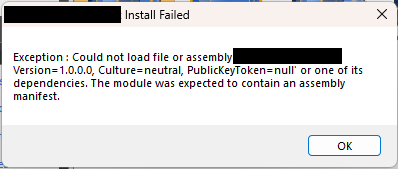
This unsigned DLL is a managed (.NET ) DLL, which means that when it is loaded, the CLR will check its manifest before anything else. Hm, how do we execute code then? A couple of ideas came to mind.
Third attempt: Decompile, add code, recompile
It’s .NET, right? Simple: decompile, add code recompile. That might work, but when we decompile we notice something annoying. The DLL is used for interoperation with COM and contains only interfaces. Interfaces cannot contain code.
Fourth attempt: Module initializer
Can we not run static code in C#? The answer is that we can, it’s called a module initializer. Let’s create a class and a method that will execute our shellcode:
using System;
using System.IO;
using System.Runtime.InteropServices;
using Microsoft.Win32;

internal static class ModuleInitializer
{
    internal static void Run()
    {
		ModuleInitializer.MessageBox(IntPtr.Zero, "Burp!=B33F", "Burp!=B33F", 1U);
	}

	[DllImport("user32.dll", SetLastError = true, CharSet= CharSet.Auto)]
	public static extern int MessageBox(IntPtr hWnd, String text, String caption, uint type);
}
The plugin is installed successfully but the code is not executed. When we use the functionality provided by the plugin (i.e. some parts of the .NET module are actually used), our code (and our shellcode) is executed. This is fine, but not perfect, we would prefer to have the code run on the first click.
Adding a PE native entry point to our DLL could do the trick. It would run as soon as the DLL is loaded, which as we can see using Process Monitor happens when the plugin is installed.
Result, it works, our (shell)code runs on plugin installation!
Conclusion
This (rather long) journey allowed us to have a simple payload, that we could deliver via a web page (using HTML smuggling) and which, when double-clicked, would run our shellcode in the signed process of the screenshot tool. Nifty!
Here are our key takeaways:
Custom extension handlers are a nice way to phish.
Living in a signed and known process confuses both EDR and Blue Team
Sometimes you have to get past the first four failed attempts!
We’ve discovered a new scheme of distribution of the Mamont (Russian for mammoth) Trojan banker. Scammers promise to deliver a certain product at wholesale prices that may be considered interesting to small businesses as well as private buyers, and offer to install an Android application to track the package. However, instead of a tracking utility, the victim installs a Trojan that can steal banking credentials, push notifications, and other financial information.
Scheme details
The attackers claim to sell various products at fairly attractive prices via number of websites. To make a purchase, the victim is asked to join a private Telegram messenger chat, where instructions for placing an order are posted. In essence, these instructions boil down to the fact that the victim needs to write a private message to the manager. The channel itself exists to make the scheme look more convincing: participants of this chat ask clarifying questions, receive answers, and comment on things. Probably, there are both other victims of the same scheme and bots that create the appearance of active trading in this chat.
The scheme is made more credible by the fact that the scammers don’t require any prepayment — the victim gets the impression that they’re not risking anything by placing an order. But some time after talking to the manager and placing an order, the victim receives a message that the order has been sent, and its delivery can be tracked using a special application. A link to the .apk file and the tracking number of the shipment are included. The message additionally emphasizes that to pay for the order after receiving it, you must enter a tracking number and wait while the order is loading (which can take more than 30 minutes).
The link leads to a malicious site that offers to download a tracker for the sent parcel. In fact, it’s not a tracker, but the Mamont banking malware for Android. When installed, the “tracker” requests permission to operate in the background, as well as work with push notifications, SMS and calls. The victim is required to enter a code, supposedly for tracking the parcel, and wait.
What is this malware and why is it dangerous?
In fact, after the victim enters the received “track code”, which is apparently used as the victim’s identifier, the Trojan begins to intercept all push notifications received by the device (for example, confirmation codes for banking transactions) and forward them to the attackers’ server. At the same time, Mamont establishes a connection with the attackers’ server and waits for additional commands. Upon command, it can:
change the application icon to a transparent one to hide it from the victim;
forward all incoming SMS messages of the last three days to the attackers;
open an interface for uploading a photo from the phone’s gallery to the attackers’ server;
send an SMS to an arbitrary number.
In addition, the attackers can show the victim arbitrary text with boxes for entering additional information — this way they can manipulate the victim to submit additional credentials, or simply collect more information for further attacks using social engineering (for example, for threatening letters from regulators or law enforcement agencies). They probably steal photos from the gallery for the same purpose. This is especially dangerous if the victim is a small business owner: they often use their phone camera to quickly take photos of business information.
Our security solutions detect the malware distributed during this attack as Trojan-Banker.AndroidOS.Mamont.*. A more detailed technical description of the malware, as well as indicators of compromise, can be found in the dedicated Securelist blog post.
Targets of this scheme
This campaign is aimed exclusively at Russia-based users of Android smartphones. The attackers emphasize this and refuse to “deliver goods” anywhere else. However, cybercriminals’ tools often become freely available on the darknet, so it’s impossible to guarantee that users from other countries are immune to this threat.
How to stay safe
We recommend following simple safety rules to avoid infecting your smartphone with this (or any other) malware. This is especially true if the phone is used not only for personal needs, but also for business. Here are these simple safety rules:
be skeptical of especially-favorable offers of goods and services on the internet (if the price is significantly lower than the usual market price it means the seller’s benefiting in some other way);
do not run .apk files obtained from unknown sources – they should be installed from official stores or from the official resource of a specific service;
use a reliable security solution, which will prevent malware from being installed on your device and block malicious links.
https://www.backbox.org/wp-content/uploads/2018/09/website_backbox_text_black.png00https://www.backbox.org/wp-content/uploads/2018/09/website_backbox_text_black.png2024-12-17 09:06:482024-12-17 09:06:48Mamont banker under the guise of a tracking app | Kaspersky official blog