How DFIR Analysts Use ANY.RUN Sandbox

Recently, DFIR consultant & content creator/educator Steven from the YouTube channel MyDFIR released a new video showing how DFIR professionals can leverage the ANY.RUN Sandbox to efficiently analyze malware and extract actionable intelligence.  

The video provides a step-by-step guide on investigating real-world threats, including how to quickly identify and analyze Indicators of Compromise (IOCs) and uncover key behavioral insights. 

If you’re looking to improve your investigation workflows and see practical examples of malware analysis in action, we highly recommend watching the video to follow along with the expert’s process. 

Here’s our overview of the key highlights covered in the video. 

About ANY.RUN Sandbox 

The ANY.RUN Sandbox is an interactive malware analysis platform that enables security professionals to analyze malicious files in a live, user-driven environment. It allows DFIR professionals to: 

  • Uncover the behaviors and tactics of malware. 
  • Quickly gather critical Indicators of Compromise (IOCs). 
  • Explore malware configurations and identify threats in real time. 

By providing detailed insights through features like process trees, network monitoring, and integrated ATT&CK mapping, ANY.RUN helps analysts stay ahead of emerging threats and streamline investigations. 

Analyze malware and phishing threats
in ANY.RUN’s Interactive Sandbox for free 


Sign up now


Use Case 1: Investigating Formbook Infostealer 

Formbook is a widespread infostealer that targets credentials, cookies, and other sensitive data. Here’s how DFIR professionals can use ANY.RUN to analyze it. 

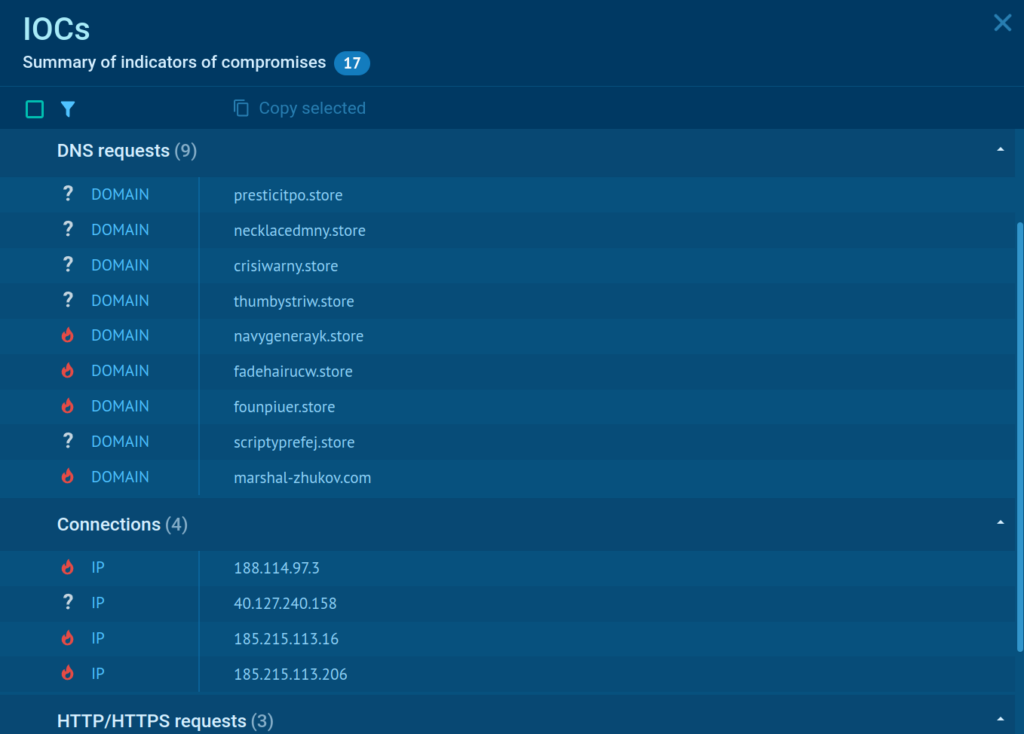
Imagine you have received the following alert: malware detected and quarantined. 

The alert also provides details such as: 

  • Hostname: SALESPC-01 
  • User: Bobby  
  • Filename: suchost.exe  
  • Current Directory: C:UsersBobbyDownloads 
  • SHA256: 472a703381c8fe89f83b0fe4d7960b0942c5694054ba94dd85c249c4c702e0cd 

Use this information to initiate your investigation. 

Check Previous Analyses 

The first thing you should do is check if ANY.RUN analyzed this file previously. Navigate to ANY.RUN’s Reports section, located on the left-hand side.  
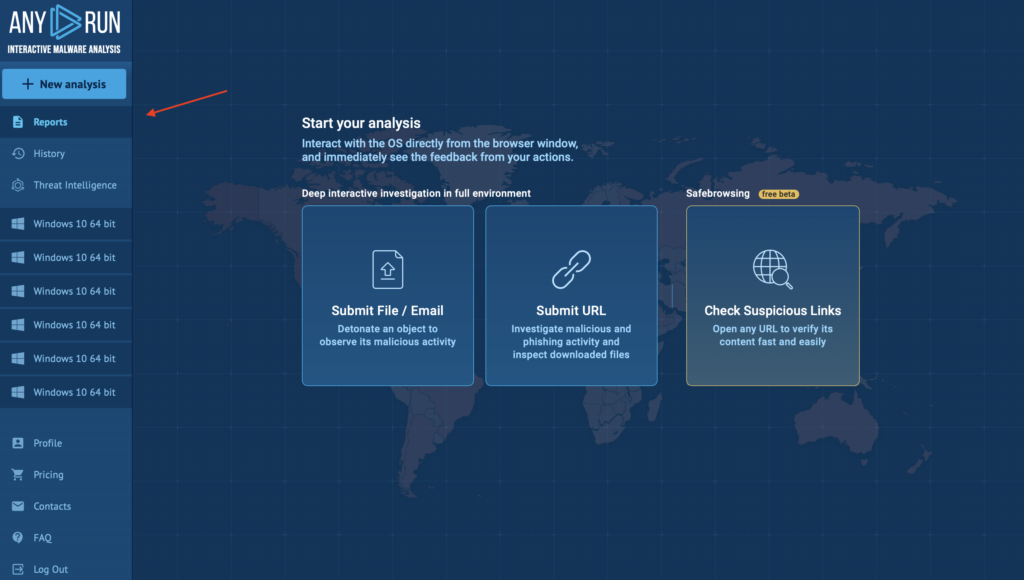
Reports section inside ANY.RUN

Search for the hash of the flagged file. If the file has already been analyzed, review the existing reports. Otherwise, upload the file to initiate a fresh analysis. 

In our case, there are 2 analysis sessions found from October 2024. Let’s choose the first report and look closer at what’s inside.  

After clicking on the existing entry, you’ll be redirected to the ANY.RUN sandbox presented with a lot of useful information. 
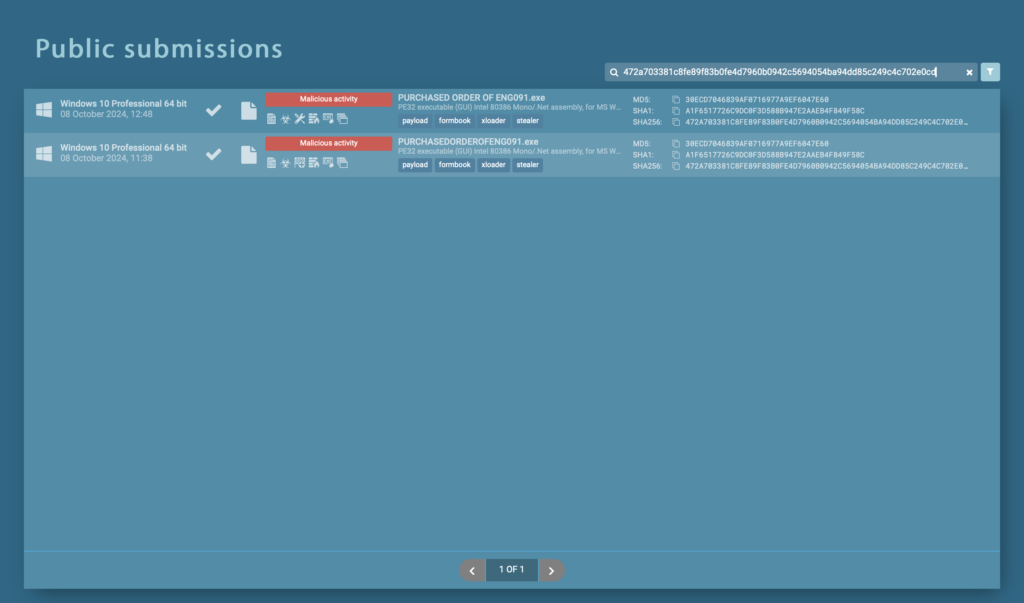
Public submissions related to specific IOC 

Let’s use this analysis to see how the sandbox can help us. 

Examine Initial Results 

ANY.RUN provides an overview of the analysis, including malicious activity indicators, the operating system used for analysis (e.g., Windows 10 64-bit), and a suite of options, such as: 

  • Get Sample: Download the file for deeper analysis. 
  • IOC Tab: View all related IOCs. 
  • MalConf: Explore indicators extracted from the malware’s configuration. 
  • Restart: Re-run the analysis if needed. 
  • Text Report: Get a detailed overview of findings. 
  • Graph: Visualize the process tree and events. 
  • ATT&CK Tab: Review associated tactics, techniques, and procedures (TTPs). 
  • AI Summary: Summarize key findings. 
  • Export Options: Save results in various formats like STIX or MISP JSON. 
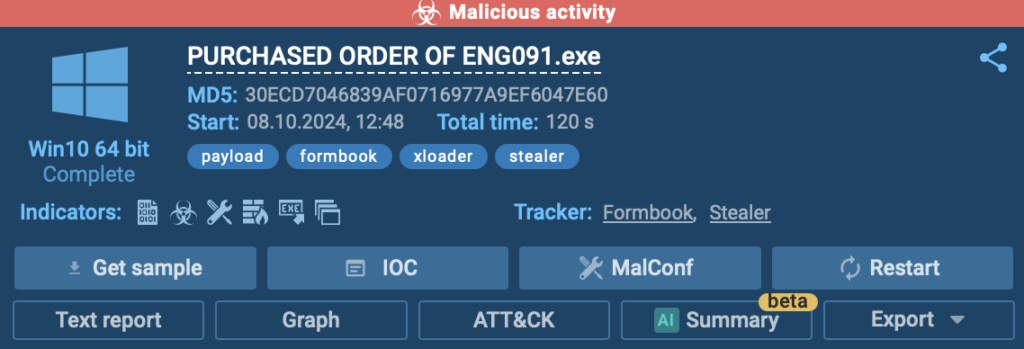
Malicious activity identified by ANY.RUN sandbox 

Analyze the Process Tree 

Study the parent-child relationship in the process tree to understand how the file behaves.  
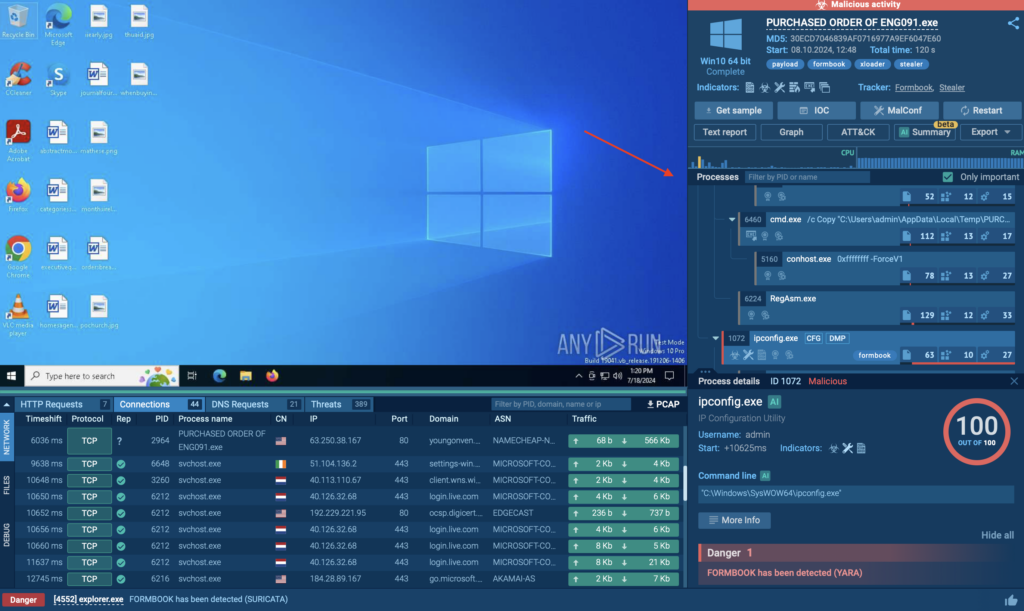
Process tree inside ANY.RUN

For example, Formbook may create a registry key to establish persistence. By clicking on the process, you can view command-line details and trace the registry key creation and file execution paths. 
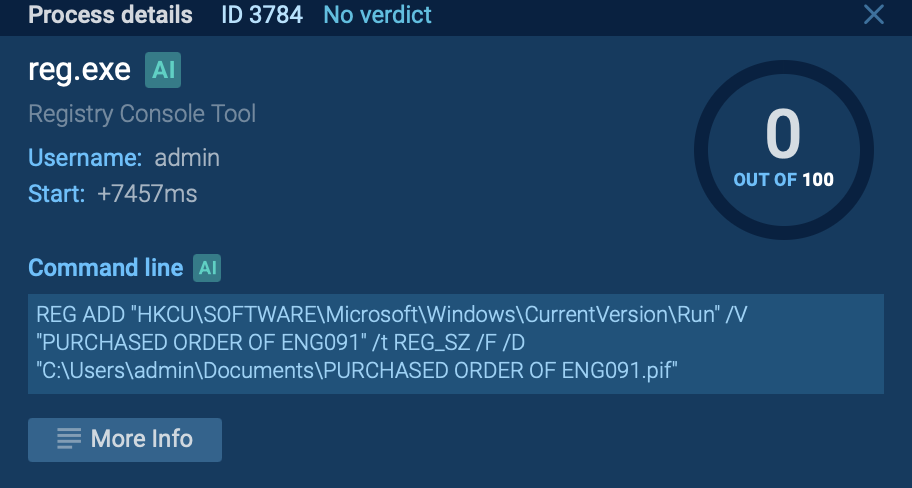
Process of creating registry key displayed inside ANY.RUN sandbox

Investigate Network Activity 

Use the network-related tabs to track events like HTTP requests and connections. ANY.RUN simplifies this by flagging requests with reputation icons: 

  • Green checkmark: Known and safe. 
  • Question mark: Unknown. 
  • Fire icon: Malicious. Document any flagged IOCs, such as suspicious IP addresses or domains, and cross-check them within your environment. 
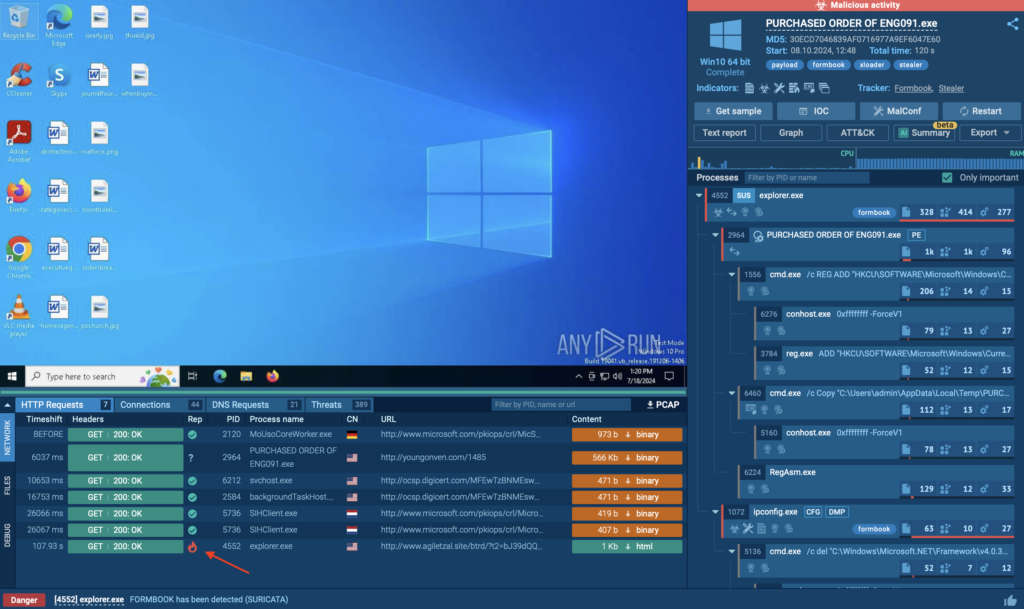
Reputation icons for faster malware analysis

Leverage Threat Hunting Features 

Utilize tabs like MalConf and ATT&CK to uncover additional insights. For instance, MalConf may reveal hardcoded strings or configurations that can aid in threat hunting.  
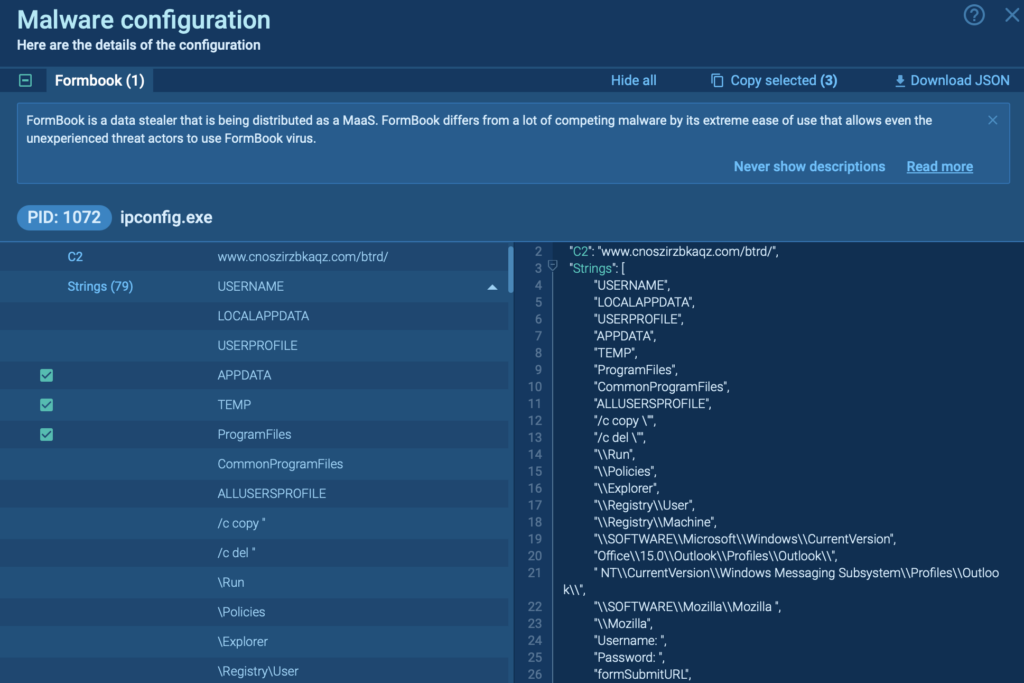
Malware configuration tab displayed in ANY.RUN sandbox

The ATT&CK tab provides a breakdown of associated TTPs, helping analysts understand how the malware evades detection or escalates privileges. 

In the current analysis session, these are the TTPs the sandbox identified: 
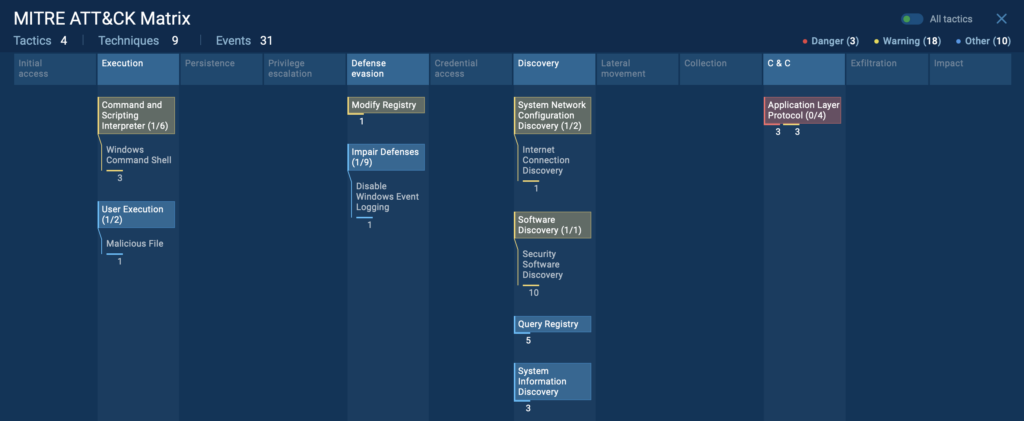
TTPs related to Formbook analysis session

AI Summary 

The AI-powered summary distills the technical findings into easy-to-understand insights. This is particularly beneficial for: 

  • Quickly understanding the file’s behavior without diving into the technical minutiae. 
  • Assisting junior analysts or teams new to malware analysis by providing clear explanations of what the file is doing. 
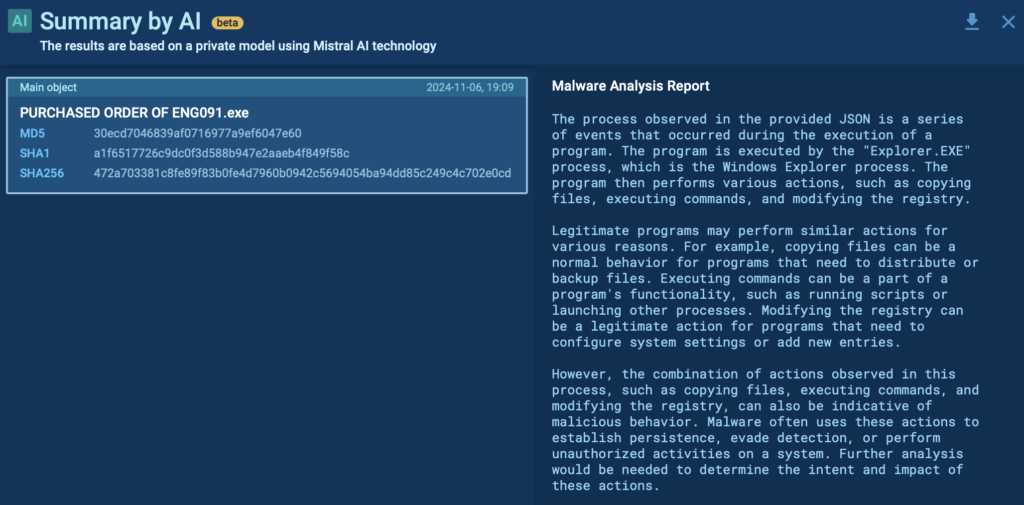
AI summary of processes inside ANY.RUN sandbox

By leveraging these features, DFIR professionals can perform detailed, thorough, and efficient malware analysis, tailoring their investigations to the specific needs of their organization. 


Learn to analyze malware in a sandbox

Learn to analyze cyber threats

See a detailed guide to using ANY.RUN’s Interactive Sandbox for malware and phishing analysis


Use Case 2: Analyzing Lumma Stealer with Advanced Features 

The next use case focuses on analyzing a file using the ANY.RUN sandbox, specifically targeting a different infostealer called Luma Stealer. The latter is another malware aimed at exfiltrating data. 

For this demonstration, the free plan is used, but comparisons to the paid plan capabilities will also be highlighted. 

Uploading a File to ANY.RUN 

To analyze a file in ANY.RUN, start by selecting Submit File option from the available 3 options.  

When uploading a file, keep in mind that as a free user Analysis will be public, meaning anyone can view it. Avoid uploading sensitive data. Always consult with your team if unsure. 

The free plan, however, offers privacy options to restrict access to your analysis. 

After selecting the file, you’ll see two key options: 

  1. Deep analysis: Ideal for file-based malware investigations. 
  2. Safebrowsing: Suitable for URL-based fast analysis. 

For this case, we’re performing Deep Analysis on the Luma Stealer sample.  

Explore the entire analysis session 
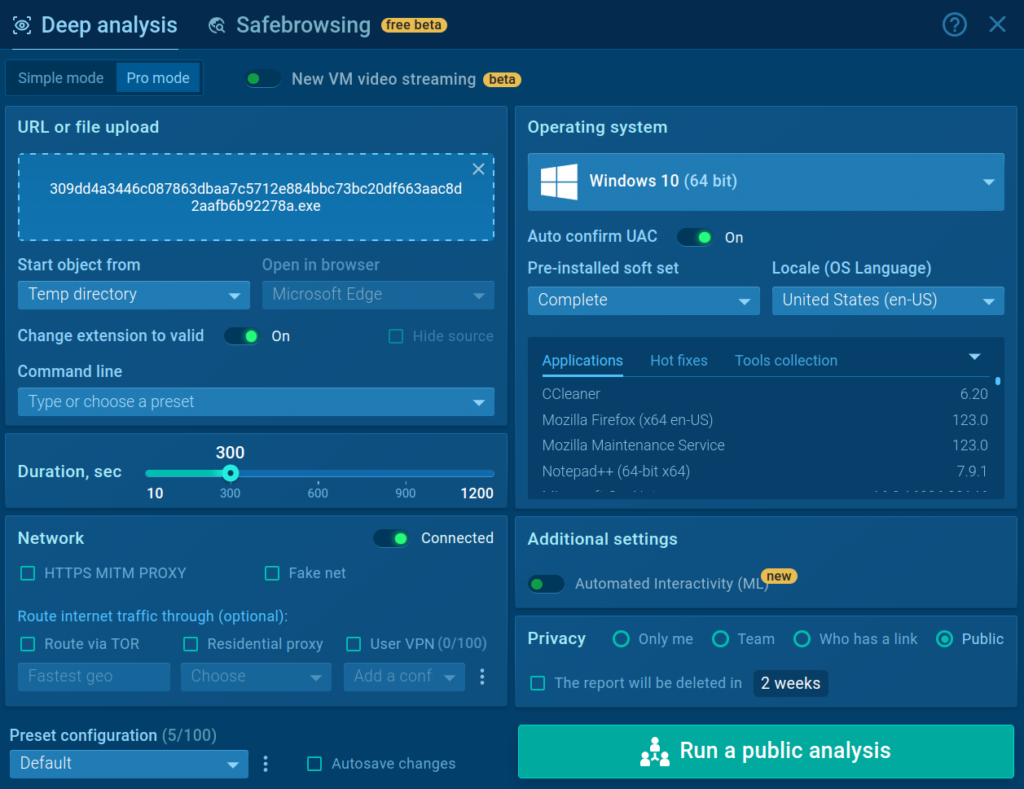
Configuration options for new analysis session 

Configuration Options 

ANY.RUN allows you to customize execution and environment settings to simulate real-world scenarios. For instance, you can specify custom command-line arguments to trigger specific malware behaviors. 

  • The free plan offers 60 seconds of analysis.  
  • With the paid plan, you can extend to 10+ minutes for deeper analysis. 

You can also choose where you want to execute the file, for instance, temp directory, desktop, downloads directory, AppData, and more. 

For the network traffic the following options are available: 

  • FakeNet: Simulates network traffic. 
  • TOR Routing: Routes traffic through Tor for anonymity. 
  • Residential Proxy: Assigns a residential IP to your VM. 

Then, choose the operating system, such as Windows 7 (32-bit), Windows 10 (64-bit), and Ubuntu 22.04. The paid plan also offers Windows 11

Running the Analysis 

Once configurations are set, click Run Analysis. If you decide to go with the Public mode, a warning will remind you that the analysis data will be publicly accessible. To make your analysis private, you will need to get a Hunter or Enterprise plan subscription. 

The sandbox begins dynamic analysis, executing the file and recording all processes, behaviors, and network activities. 

A timer (top-right) shows the remaining analysis duration. You can add time to capture extended malware behaviors. 

Observing Results in Real Time 

Once the analysis begins, you can interact with the sandbox environment. Have a look at the parent-child relationships of processes generated by the malware. 

On the right corner you can already see the sandbox identifies the processes as Lumma malware and possible phishing. 

Besides, we can note that the sandbox also detected a domain used for C2 connection: 
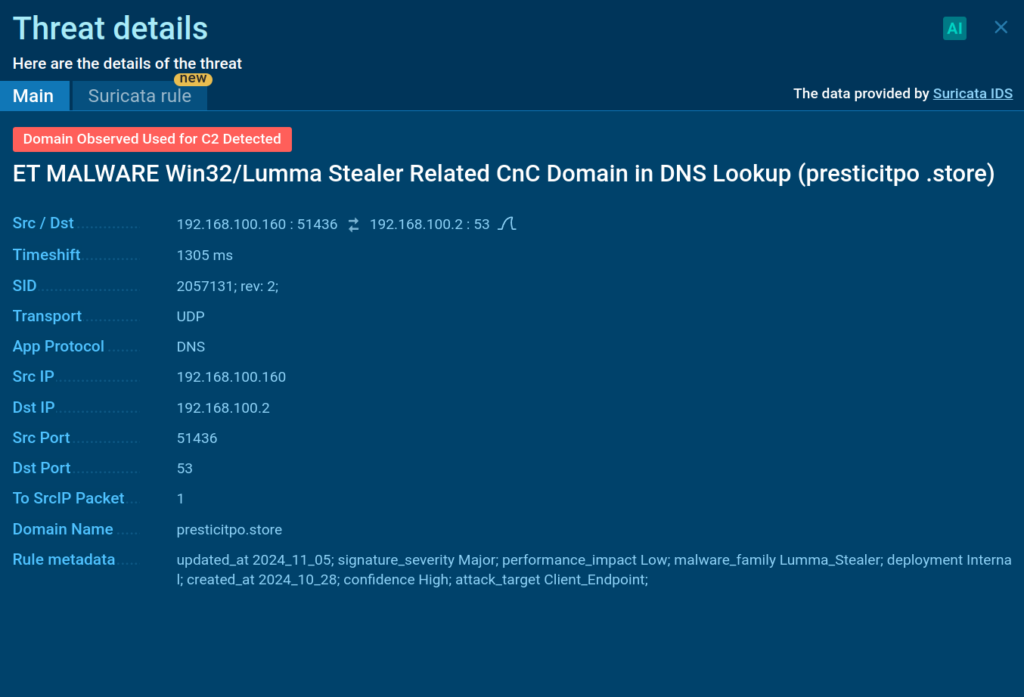
Suricata rule triggered by Lumma malware

With the paid plan you can also see how this particular Suricata rule was generated: 
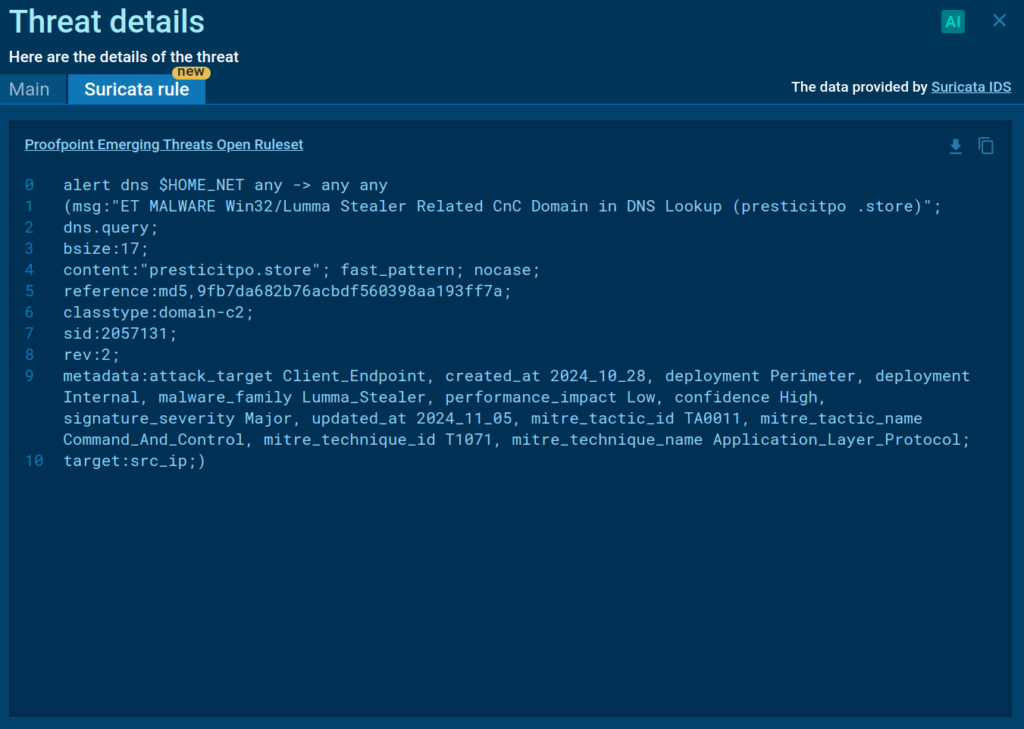
Suricata rule details available for Hunter and Enterprise users

Extracting IOCs and Key Artifacts 

The sandbox lists malicious IOCs that can be used to detect the threat

Once the analysis completes, go to the IOC tab to extract key indicators, including: 

  • IP addresses 
  • Domains 
  • File hashes 
  • URLs   

Why DFIR Professionals Rely on ANY.RUN 

ANY.RUN’s real-time, interactive capabilities make it a favorite among DFIR experts. Here’s why: 

  • Speed: Analyze malware behavior and extract IOCs faster than ever. 
  • Ease of use: Its intuitive interface works for both seasoned analysts and newcomers. 
  • Flexibility: From free plans to enterprise solutions, ANY.RUN fits teams of all sizes. 
  • Threat intelligence integration: Enrich your investigations with additional context to ensure thorough results. 

About ANY.RUN  

ANY.RUN helps more than 500,000 cybersecurity professionals worldwide. Our interactive sandbox simplifies malware analysis of threats that target both Windows and Linux systems. Our threat intelligence products, TI Lookup, YARA Search and Feeds, help you find IOCs or files to learn more about the threats and respond to incidents faster.  

With ANY.RUN you can: 

  • Detect malware in seconds
  • Interact with samples in real time
  • Save time and money on sandbox setup and maintenance
  • Record and study all aspects of malware behavior
  • Collaborate with your team 
  • Scale as you need

Get 14-day free trial of ANY.RUN’s Interactive Sandbox →

The post How DFIR Analysts Use ANY.RUN Sandbox appeared first on ANY.RUN’s Cybersecurity Blog.

ANY.RUN’s Cybersecurity Blog – ​Read More

Measures for safe development and use of AI | Kaspersky official blog

Today, AI-based technologies are already being used in every second company — with another 33% of commercial organizations expected to join them in the next two years. AI, in one form or another, will soon be ubiquitous. The economic benefits of adopting AI range from increased customer satisfaction to direct revenue growth. As businesses deepen their understanding of AI systems’ strengths and weaknesses, their effectiveness will only improve. However, it’s already clear that the risks associated with AI adoption need to be addressed proactively.

Even early examples of AI implementation show that errors can be costly — affecting not only finances but also reputation, customer relationships, patient health, and more. In the case of cyber-physical systems like autonomous vehicles, safety concerns become even more critical.

Implementing safety measures retroactively, as was the case with previous generations of technology, will be expensive and sometimes impossible. Just consider the recent estimates of global economic losses due to cybercrime: $8 trillion in 2023 alone. In this context, it’s not surprising that countries claiming 21st century technological leadership are rushing to set up AI regulation (for example, China’s AI Safety Governance Framework, the EU’s AI Act, and the US Executive Order on AI). However, laws rarely specify technical details or practical recommendations — that’s not their purpose. Therefore, to actually apply regulatory requirements such as ensuring the reliability, ethics, and accountability of AI decision-making, concrete and actionable guidelines are required.

To assist practitioners in implementing AI today and ensuring a safer future, Kaspersky experts have developed a set of recommendations in collaboration with Allison Wylde, UN Internet Governance Forum Policy Network on AI team-member; Dr. Melodena Stephens, Professor of Innovation & Technology Governance from the Mohammed Bin Rashid School of Government (UAE); and Sergio Mayo Macías, Innovation Programs Manager at the Technological Institute of Aragon (Spain). The document was presented during the panel “Cybersecurity in AI: Balancing Innovation and Risks” at the 19th Annual UN Internet Governance Forum (IGF) for discussion with the global community of AI policymakers.

Following the practices described in the document will help respective engineers — DevOps and MLOps specialists who develop and operate AI solutions — achieve a high level of security and safety for AI systems at all stages of their lifecycle. The recommendations in the document need to be tailored for each AI implementation, as their applicability depends on the type of AI and the deployment model.

Risks to consider

The diverse applications of AI force organizations to address a wide range of risks:

  • The risk of not using AI. This may sound amusing, but it’s only by comparing the potential gains and losses of adopting AI that a company can properly evaluate all other risks.
  • Risks of non-compliance with regulations. Rapidly evolving AI regulations make this a dynamic risk that needs frequent reassessment. Apart from AI-specific regulations, associated risks such as violations of personal-data processing laws must also be considered.
  • ESG risks. These include social and ethical risks of AI application, risks of sensitive information disclosure, and risks to the environment.
  • Risk of misuse of AI services by users. This can range from prank scenarios to malicious activities.
  • Threats to AI models and datasets used for training.
  • Threats to company services due to AI implementation.
  • The resulting threats to the data processed by these services.

“Under the hood” of the last three risk groups lie all typical cybersecurity threats and tasks involving complex cloud infrastructure: access control, segmentation, vulnerability and patch management, creation of monitoring and response systems, and supply-chain security.

Aspects of safe AI implementation

To implement AI safely, organizations will need to adopt both organizational and technical measures, ranging from staff training and periodic regulatory compliance audits to testing AI on sample data and systematically addressing software vulnerabilities. These measures can be grouped into eight major categories:

  • Threat modeling for each deployed AI service.
  • Employee training. It’s important not only to teach employees general rules for AI use, but also to familiarize business stakeholders with the specific risks of using AI and tools for managing those risks.
  • Infrastructure security. This includes identity security, event logging, network segmentation, and XDR.
  • Supply-chain security. For AI, this involves carefully selecting vendors and intermediary services that provide access to AI, and only downloading models and tools from trusted and verified sources in secure formats.
  • Testing and validation. AI models need to be evaluated for compliance with the industry’s best practices, resilience to inappropriate queries, and their ability to effectively process data within the organization’s specific business process.
  • Handling vulnerabilities. Processes need to be established to address errors and vulnerabilities identified by third parties in the organization’s system and AI models. This includes mechanisms for users to report detected vulnerabilities and biases in AI systems, which may arise from training on non-representative data.
  • Protection against threats specific to AI models, including prompt injections and other malicious queries, poisoning of training data, and more.
  • Updates and maintenance. As with any IT system, a process must be built for prioritizing and promptly eliminating vulnerabilities, while preparing for compatibility issues as libraries and models evolve rapidly.
  • Regulatory compliance. Since laws and regulations for AI safety are being adopted worldwide, organizations need to closely monitor this landscape and ensure their processes and technologies comply with legal requirements.

For a detailed look at the AI threat landscape and recommendations on all aspects of its safe use, download Guidelines for Secure Development and Deployment of AI Systems.

Kaspersky official blog – ​Read More

Exploitation of Recent Critical Apache Struts 2 Flaw Begins

Researchers warn of malicious attacks exploiting a recently patched critical vulnerability in Apache Struts 2 leading to remote code execution (RCE).

The post Exploitation of Recent Critical Apache Struts 2 Flaw Begins appeared first on SecurityWeek.

SecurityWeek – ​Read More

AI Regulation Gets Serious in 2025 – Is Your Organization Ready?

While the challenges are significant, organizations have an opportunity to build scalable AI governance frameworks that ensure compliance while enabling responsible AI innovation.

The post AI Regulation Gets Serious in 2025 – Is Your Organization Ready? appeared first on SecurityWeek.

SecurityWeek – ​Read More

INTERPOL Pushes for “Romance Baiting” to Replace “Pig Butchering” in Scam Discourse

INTERPOL is calling for a linguistic shift that aims to put to an end to the term “pig butchering,” instead advocating for the use of “romance baiting” to refer to online scams where victims are duped into investing in bogus cryptocurrency schemes under the pretext of a romantic relationship.
“The term ‘pig butchering’ dehumanizes and shames victims of such frauds, deterring people from coming

The Hacker News – ​Read More

Hacker Leaks Cisco Data

IntelBroker has leaked 2.9 Gb of data stolen recently from a Cisco DevHub instance, but claims it’s only a fraction of the total. 

The post Hacker Leaks Cisco Data appeared first on SecurityWeek.

SecurityWeek – ​Read More

ACSC Warns of Remote Code Execution Risk in Apache Struts2

Cyble Apache Struts2

Overview

The Australian Cyber Security Center (ACSC) has alerted organizations about a severe vulnerability in the Apache Struts2 Framework. The vulnerability, CVE-2024-53677, has been identified in the Framework, posing a critical risk to organizations that use, develop, or support Java-based applications built on this widely adopted framework. 

This vulnerability primarily affects versions of Apache Struts2 before 6.4.0 and can lead to severe security breaches, including remote code execution (RCE). Australian organizations using these versions must take immediate action to mitigate the risks posed by this flaw.

CVE-2024-53677 is a critical file upload vulnerability in the Apache Struts2 Framework. It allows attackers to exploit path traversal flaws and manipulate file upload parameters. The flaw is found in the deprecated File Upload Interceptor component.

Under certain circumstances, this can lead to the uploading of malicious files that could be executed remotely, potentially giving attackers full control over the affected system. The issue is particularly concerning for enterprise Java applications that rely on Apache Struts2.

Details of Apache Struts2 Framework Vulnerability (CVE-2024-53677)

According to the Apache advisory, the affected versions of Struts include Struts 2.0.0 through 2.3.37 (end-of-life versions), Struts 2.5.0 through 2.5.33, and Struts 6.0.0 through 6.3.0.2. The vulnerability has been classified as “critical,” with a CVSSv3 score of 9.8, reflecting its potential for exploitation. 

This issue is not isolated; Apache Struts vulnerabilities have been popular targets for threat actors, with two major incidents occurring in 2017 and 2023. As such, CVE-2024-53677 must be taken seriously by organizations that continue to use older versions of Struts.

Organizations using Java applications that leverage the affected versions of Apache Struts2 are at high risk of exploitation. This includes various industries such as government, telecommunications, finance, and e-commerce, where the framework remains integral to business operations.

The critical nature of CVE-2024-53677 lies in its ability to facilitate remote code execution. Once an attacker successfully uploads a malicious file—often a web shell—through the vulnerable file upload mechanism, they can execute arbitrary commands, steal sensitive data, and further compromise the system.

Recommendations for securing your systems

Organizations are strongly advised to take the following steps to mitigate the risks associated with CVE-2024-53677:

  • The most effective way to address the vulnerability is to upgrade to Apache Struts 6.4.0 or a later version. This version replaces the deprecated File Upload Interceptor with the more secure Action File Upload Interceptor, which significantly reduces the risk of exploitation. However, migrating to this new file upload mechanism requires modifications to the existing code, as the old File Upload Interceptor is no longer secure.
  • If upgrading to Struts 6.4.0 is not immediately feasible, organizations should apply any available patches for affected versions of Struts. Additionally, continuous monitoring of systems for suspicious activity is crucial. Logs should be reviewed regularly for any indications of attempts to exploit the vulnerability.
  • Organizations should audit their Java-based applications to determine whether they are using the affected versions of Apache Struts. They should also verify whether the vulnerable File Upload Interceptor component is being used. Applications that do not rely on this component are not affected by CVE-2024-53677.
  • Given the critical nature of this vulnerability, organizations must stay updated on vendor advisories and any new patches or security releases. Apache’s security bulletins should be regularly checked to ensure that any new information or mitigation strategies are quickly applied.

Conclusion 

CVE-2024-53677 presents a critical risk of remote code execution (RCE), allowing attackers to exploit file upload vulnerabilities and gain unauthorized control over systems. Organizations using Struts2 versions prior to 6.4.0 must upgrade immediately and migrate to the new Action File Upload Interceptor.

Prompt patching and monitoring are essential to prevent exploitation. To strengthen defenses, businesses can turn to Cyble’s AI-powered cybersecurity solutions like Cyble Vision, which offer advanced threat intelligence, dark web monitoring, and proactive risk detection. Discover how Cyble Vision can enhance your cybersecurity strategy by booking a free demo today.

References:

https://www.cyber.gov.au/about-us/view-all-content/alerts-and-advisories/critical-security-vulnerability-affecting-apache-struts2-below-6-4-0

The post ACSC Warns of Remote Code Execution Risk in Apache Struts2 appeared first on Cyble.

Blog – Cyble – ​Read More

Patch Alert: Critical Apache Struts Flaw Found, Exploitation Attempts Detected

Threat actors are attempting to exploit a recently disclosed security flaw impacting Apache Struts that could pave the way for remote code execution.
The issue, tracked as CVE-2024-53677, carries a CVSS score of 9.5 out of 10.0, indicating critical severity. The vulnerability shares similarities with another critical bug the project maintainers addressed in December 2023 (CVE-2023-50164, CVSS

The Hacker News – ​Read More

Meta Fined €251 Million for 2018 Data Breach Impacting 29 Million Accounts

Meta Platforms, the parent company of Facebook, Instagram, WhatsApp, and Threads, has been fined €251 million (around $263 million) for a 2018 data breach that impacted millions of users in the bloc, in what’s the latest financial hit the company has taken for flouting stringent privacy laws.
The Irish Data Protection Commission (DPC) said the data breach impacted approximately 29 million

The Hacker News – ​Read More

CISA orders federal agencies to secure Microsoft cloud systems after ‘recent’ intrusions

The Cybersecurity and Infrastructure Security Agency (CISA) issued a binding directive on Tuesday giving federal agencies a series of deadlines to identify cloud systems, implement assessment tools and abide by the agency’s Secure Cloud Business Applications (SCuBA) secure configuration baselines.

The Record from Recorded Future News – ​Read More