Retail CISOs Take on More Risk to Foster Innovation
CISOs in consumer and retail organizations appear to accept greater risks to allow for more innovation, which could be a model for future growth.
darkreading – Read More

CISOs in consumer and retail organizations appear to accept greater risks to allow for more innovation, which could be a model for future growth.
darkreading – Read More
Relyance AI has raised $32 million in Series B funding to develop its data governance platform and scale operations.
The post Relyance AI Raises $32 Million for Data Governance Platform appeared first on SecurityWeek.
SecurityWeek – Read More
Octo2 malware is targeting Android devices by disguising itself as popular apps like NordVPN and Google Chrome. This…
Hackread – Latest Cybersecurity, Tech, Crypto & Hacking News – Read More
HiddenLayer details ShadowLogic, a new method of creating codeless backdoors in AI models by manipulating their graphs.
The post ShadowLogic Attack Targets AI Model Graphs to Create Codeless Backdoors appeared first on SecurityWeek.
SecurityWeek – Read More
Fitness apps, by their very nature, have access to a wealth of personal data, especially data that tracks outdoor activities — primarily running. During tracking, they collect a ton of data — heart rate and other physical activity metrics, step count, distance covered, elevation changes, and, of course, geolocation — to give you a detailed analysis of your workout.
And people rarely jog in random locations; their routes usually repeat and are often close to home, work, school, military base… Essentially, places they go to often and, most likely, at regular times. What happens if this information falls into the wrong hands?
The consequences can be catastrophic. For instance, a few years ago, a map published by a certain running app revealed the locations of several secret military facilities. And in the summer of 2023, a hitman allegedly used this data to shoot to death Russian submarine commander Stanislav Rzhitsky during his run.
Of course, the leakage of geolocation data can be dangerous not only for military personnel. It’s easy to imagine scenarios where it could lead to trouble not only for obvious targets — such as celebrities, political figures, or top company executives — but for ordinary people too.
Once they’ve got their hands on your movement data, attackers can readily use it for blackmail and intimidation. If the victim hears that the criminal knows all their movements and where they live, they’re significantly more likely to get scared and comply with any demands.
In addition to direct threats, geolocation info complements perfectly data leaked from other apps, or collected through doxing — making targeted attacks much more potent. Don’t think that you’re not important enough for scammers to prepare a complex attack: anyone can become a victim, and the criminals’ end goal isn’t always financial gain.
But it’s not just geolocation data that running apps collect and analyze. Like all fitness apps, they monitor activity and physical condition, which can reveal a lot about a person’s health. This information can also be used in a social engineering attack — because the more an attacker knows about their victim, the more sophisticated and effective their actions can be.
So, it’s essential to take due care when choosing your running app and setting up its privacy — and our tips will help you do just that.
The first thing you absolutely shouldn’t do is install every running tracker in existence and then choose the one you like best. This way, you’ll hand over your personal data to everyone, significantly increasing the risk of it falling into the wrong hands. The fewer apps you use, the lower the risk of a data leak — but remember, no company can guarantee 100% data security.
Some companies invest more in the security of their users than others, and preference should be given to those who take data protection and anonymization seriously. To ensure this, carefully read the privacy policy of your chosen app: responsible developers will specify what data the app collects, for what purpose, which data might be shared with third parties, and what rights users have regarding their personal data. It’s also worth searching online or asking an AI assistant if the app you’re interested in has been involved in any data leaks — simply type the app’s name plus “data breaches” or “data leak” into a search engine. And, of course, checking user reviews is also a must.
Once you’ve chosen and installed an app, the next thing to do is configure its privacy settings. Unfortunately, many running apps share collected data — including your geolocation — with the entire internet by default. You’ll find links to detailed instructions on how to set up privacy for the most popular running apps — Strava, Nike Run Club, MapMyRun, adidas Running, and ASICS Runkeeper — at the end of this post.
As with any other app, it’s a good idea to use your smartphone’s operating system features to minimize tracking. For example, on iOS, when you first launch the app, you can block it from tracking your activity in other apps. Don’t ignore this option.
In addition, don’t grant the running app access to data that it doesn’t need to function — such as photos, calls, messages, or contacts. To reduce the amount of location data collected, don’t allow fitness trackers (or most other apps, for that matter) to monitor your geolocation continuously — choose the “Only while using the app” option, available on iOS and the latest versions of Android. You can set this when you first launch the app, or later by reviewing all the app’s permissions in your smartphone’s settings or, for Android devices, in Kaspersky for Android.
In general, it’s a good idea to regularly check your smartphone’s privacy and security settings to see which apps have access to which data.
Keep in mind that privacy settings won’t protect you from being tracked if someone guesses your account password. Unfortunately, none of the most popular running apps currently support two-factor authentication — although they really should. Therefore, the best thing you can do to protect your account is to create a long and complex password — preferably at least 16 characters long. Of course, it should be unique. To ensure you don’t forget this combination of characters, save it in a password manager — which, by the way, can also generate a highly secure random password for you.
We’ve selected the most popular jogging apps and prepared recommendations on how to set up privacy in each of them. Subscribe to our blog to make sure you don’t miss the instructions for your running tracker. As we publish the privacy setup guides, we’ll be updating this post with the relevant links. The following apps will be covered:
Strava
Nike Run Club
MapMyRun
adidas Running (formerly Runtastic)
ASICS Runkeeper
To learn how to set up privacy for other apps — from browsers and social networks to operating systems — visit our website Privacy Checker.
Kaspersky official blog – Read More
In a previous post about the privacy of running apps in general, we explained why these apps are a goldmine of personal data for scammers and criminals of all kinds: unfortunately, by default they share sensitive data — including one’s precise location — with virtually anyone. As we mentioned, the consequences can be dire — from leaking the locations of secret facilities, to stalking and even assassination attempts.
In the mentioned previous we also shared detailed instructions on general smartphone settings to minimize these risks. In this and subsequent posts, we discuss specific privacy settings for the most popular running apps. Let’s start with Strava.
Strava (available for Android and iOS) is arguably the most popular app for tracking running, cycling, and hiking workouts. And it’s also the only one that has remained independent: all other major running apps have already been acquired by sportswear giants. Incidentally, Strava has been at the center of several data privacy controversies — including the famous heatmap incident that exposed the location of numerous secret military facilities.
Strava is also often criticized whenever questions arise about how users can track each other through fitness apps. Frankly, these criticisms are still valid: Strava’s default settings are far from private — the app actively encourages you to share your data with the entire internet.
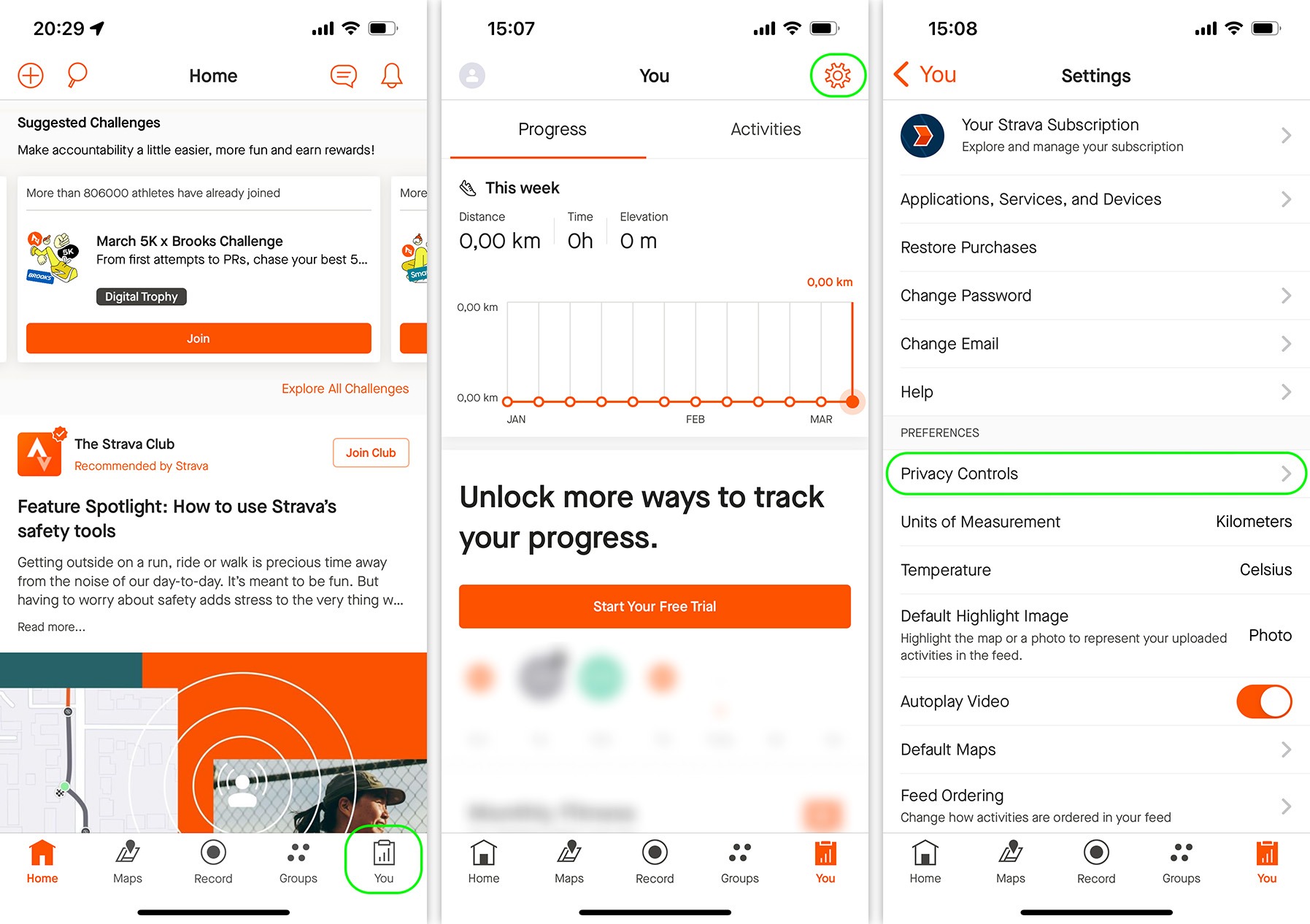
Thankfully, this can be fixed: Strava offers a decent range of privacy settings. To access them, tap You in the bottom-right corner of the screen, then tap the gear icon in the top right corner, and in the window that opens, select Privacy Controls.
First, make your profile private by selecting Profile Page and changing its visibility to Followers. Next, go through the options Activities, Group Activities, Flybys, Local Legends, and Mentions — and set them all to either Followers or — even better — Only You or No One.
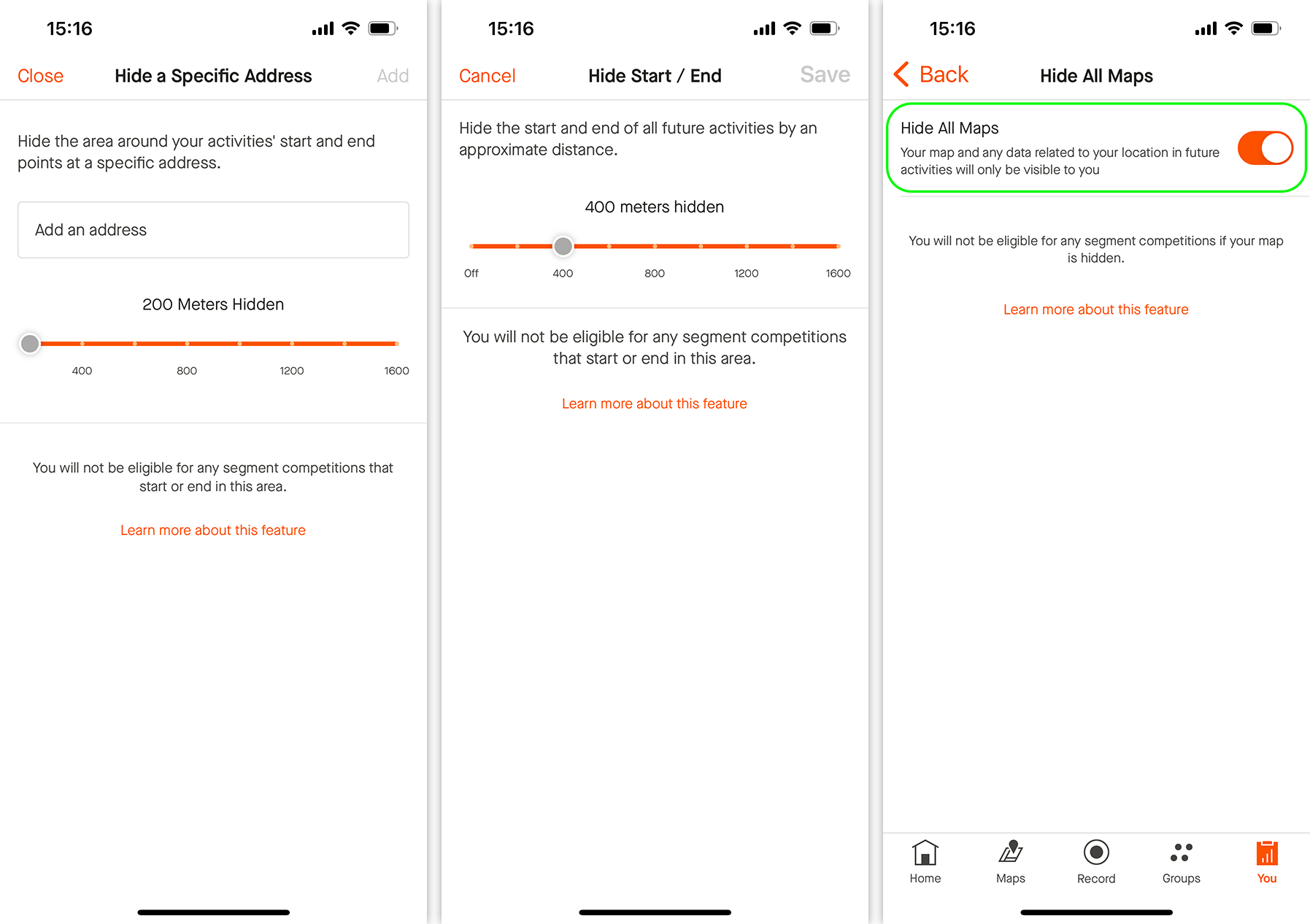
Now, we recommend going to Map Visibility and selecting one of the ways the app will hide your run/ride maps:
Hide the start and end points of activities that happen at specific address. This feature allows you to use an address and a radius around it in meters to define an area where your movements will be hidden. This way, you can mask your regular start and finish locations — such as your home address.
Hide the start and end points of activities no matter where they happen. Simply select a radius in meters, and any start and end points will automatically be hidden. This option is more convenient than the first one — and you won’t have to share your address with the app.
Hide your activity maps from others completely. If you choose this option, all location data from your future (but not past) workouts will only be visible to you.
How to hide your activity location data in the Strava app: You → Settings → Privacy Controls → Map Visibility
Keep in mind that, if you use Strava frequently, hiding only the start and end points might not be enough. A study published in late 2022 demonstrates a method for pinpointing hidden locations with 85% accuracy. Therefore, we recommend choosing the third option: Map Visibility → Hide your activity maps from others completely → Hide All Maps.
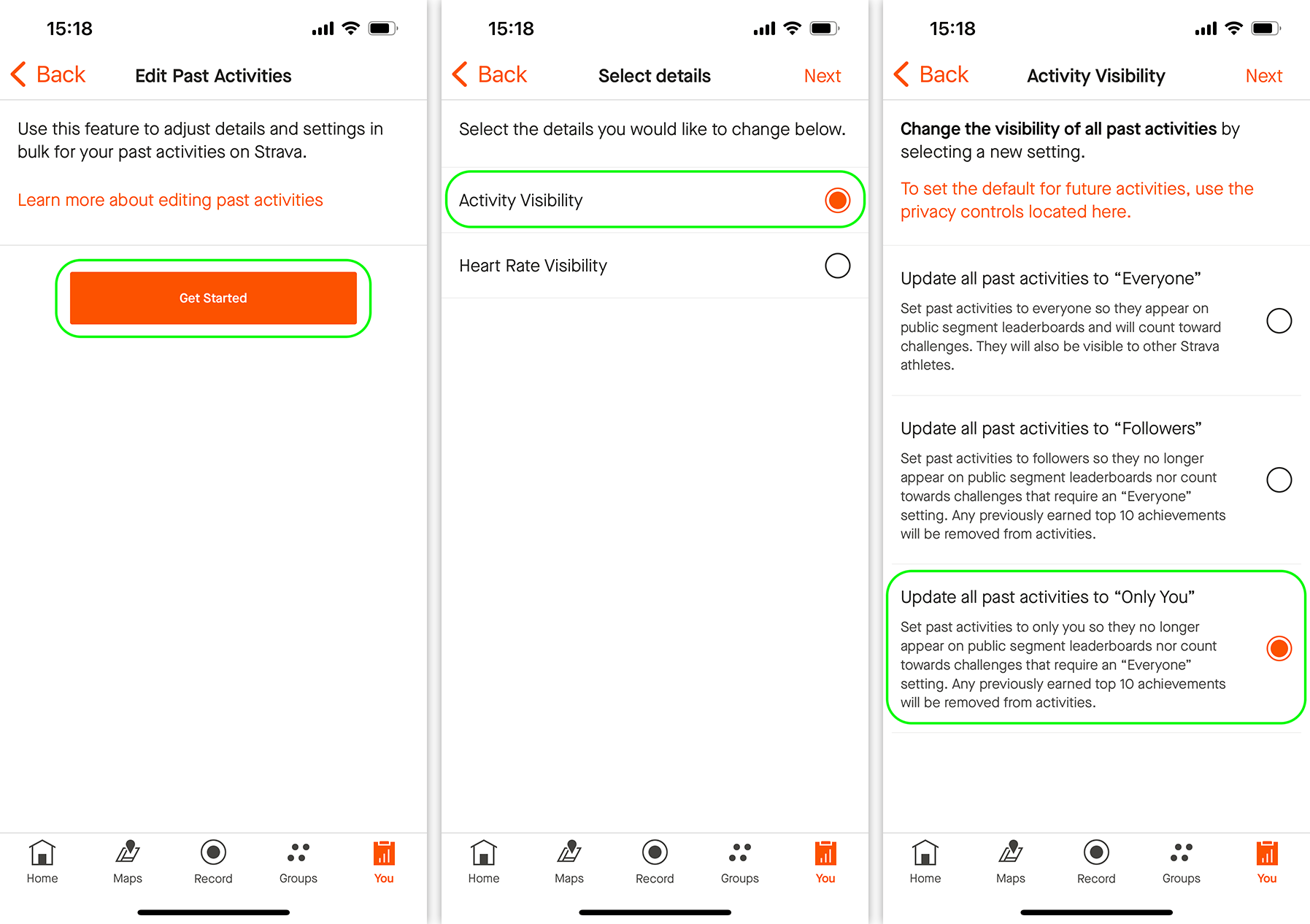
Note that the privacy settings in Strava aren’t retroactive. If you’ve previously recorded some workouts in the app, the hiding features won’t apply to them. To fix this, go to the Edit Past Activities section, tap Get Started, select Activity Visibility, and tap Next. In the next window, choose either Followers or Only You and tap Next again. After a while (not instantly), your past activities will be hidden.
How to hide past activities in the Strava app: You → Settings → Privacy Controls → Edit Past Activities
The next tip is for those who regularly exercise at sensitive locations and don’t want to accidentally expose them. Go to Aggregated Data Usage and toggle off Contribute your activity data to de-identified, aggregate data sets. After this, your runs won’t appear in places like Strava Metro, the Global Heatmap (the one that leaked the military base locations), Points of Interest, Start Points, or Community Generated Routes.
Go to Public Photos on Routes and disable Share photos with the community. If your profile is private and your activities are hidden from the public, photos you add to your runs shouldn’t be visible anyway. But just in case Strava decides to change things, it’s best to disable this feature explicitly.
Finally, go to Do Not Share My Personal Information and toggle on the switch. This will prevent Strava from selling your data to third parties for targeted advertising (or whatever else those parties might be up to).
Congratulations, you’ve now properly set up your privacy in Strava!
You can learn how to set up privacy in other apps — from social media to browsers — on our website Privacy Checker.
And Kaspersky Premium will maximize your privacy and protect you from digital identity theft on all your devices.
Don’t forget to subscribe to our blog for more how-to guides and helpful articles to always stay one step ahead of scammers.
Kaspersky official blog – Read More
The latest GitLab update resolves eight vulnerabilities, including critical- and high-severity pipeline execution flaws.
The post GitLab Patches Pipeline Execution, SSRF, XSS Vulnerabilities appeared first on SecurityWeek.
SecurityWeek – Read More
Fidelity Investments is informing 77,000 individuals that their personal information was compromised in a data breach.
The post Fidelity Investments Data Breach Impacts 77,000 Customers appeared first on SecurityWeek.
SecurityWeek – Read More
Sophos warns of ransomware operators exploiting a critical code execution vulnerability in Veeam Backup & Replication.
The post Recent Veeam Vulnerability Exploited in Ransomware Attacks appeared first on SecurityWeek.
SecurityWeek – Read More
ESET Research shares new findings about Telekopye, a scam toolkit used to defraud people on online marketplaces, and newly on accommodation booking platforms
WeLiveSecurity – Read More