
Docusign-themed phishing emails | Kaspersky official blog

Phishers are forever devising new tricks and finding new services to exploit and impersonate in their phishing campaigns. Today we talk about phishing emails that appear to come from Docusign, the world’s most popular e-signature service.

How Docusign-themed phishing works

The attack begins with an email, typically designed to resemble a legitimate Docusign communication. In this particular scheme, phishers don’t generally bother meticulously forging or masking the sender address, because genuine Docusign emails can originate from any address due to the service’s customization options.

In most cases, the victim is notified that they need to electronically sign a document — usually a financial one — the exact purpose of which isn’t entirely clear from the text of the email.
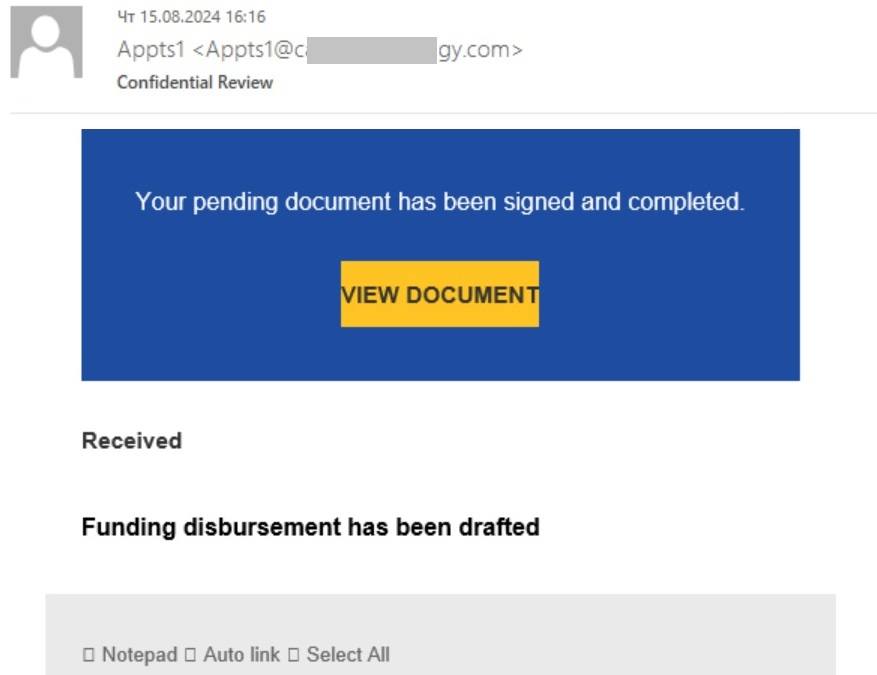
Example of a phishing email supposedly from Docusign: in this case, the link to the phishing page is located right in the body of the email

In some cases, phishers employ an additional trick we’ve covered in a separate post before: the email contains a PDF attachment with a QR code inside.
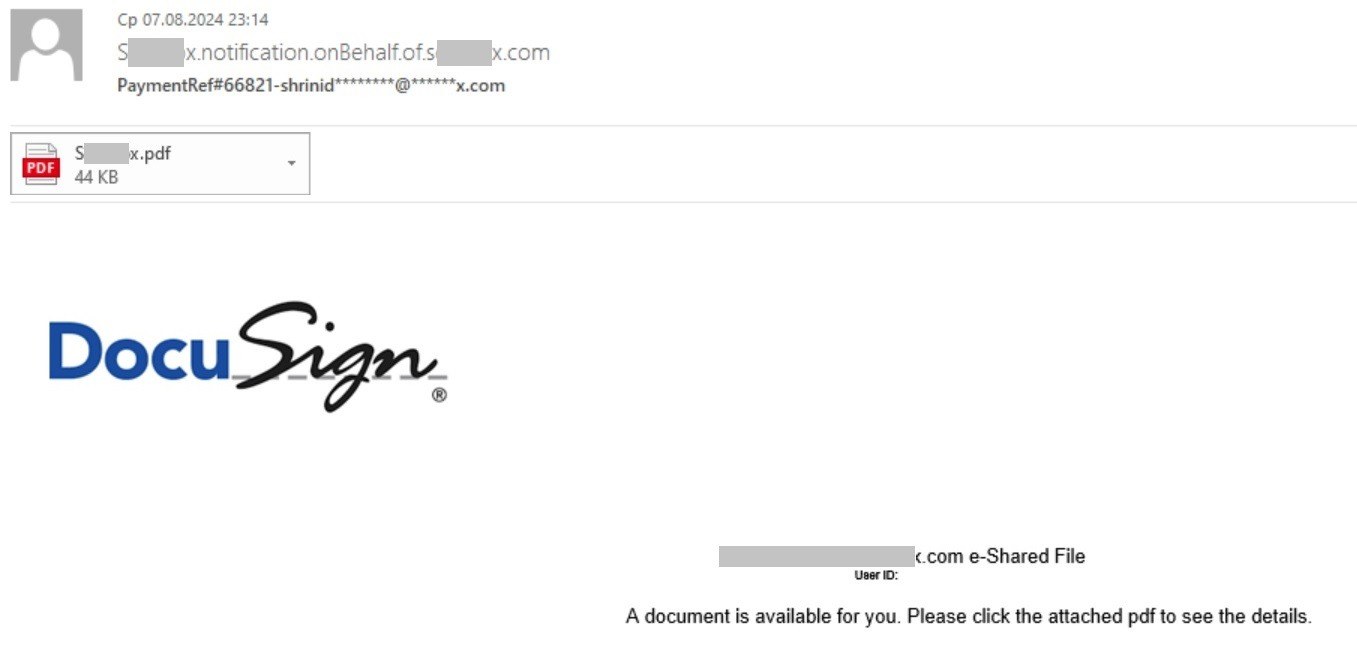
Example of a phishing email supposedly from Docusign with a PDF attachment instead of a link

The victim is prompted to scan this QR code — supposedly to access the document for signing. In reality, the QR code leads to a phishing website. This method tricks users into opening the malicious link not on their computers, but on their smartphones — where phishing URLs are harder to detect, and security software might not be installed.

Sometimes the email doesn’t mention Docusign at all. In one version of the PDF-with-QR-code scam, which we recently discussed in a post about spearphishing techniques in mass emails, only inside the PDF is Docusign mentioned.
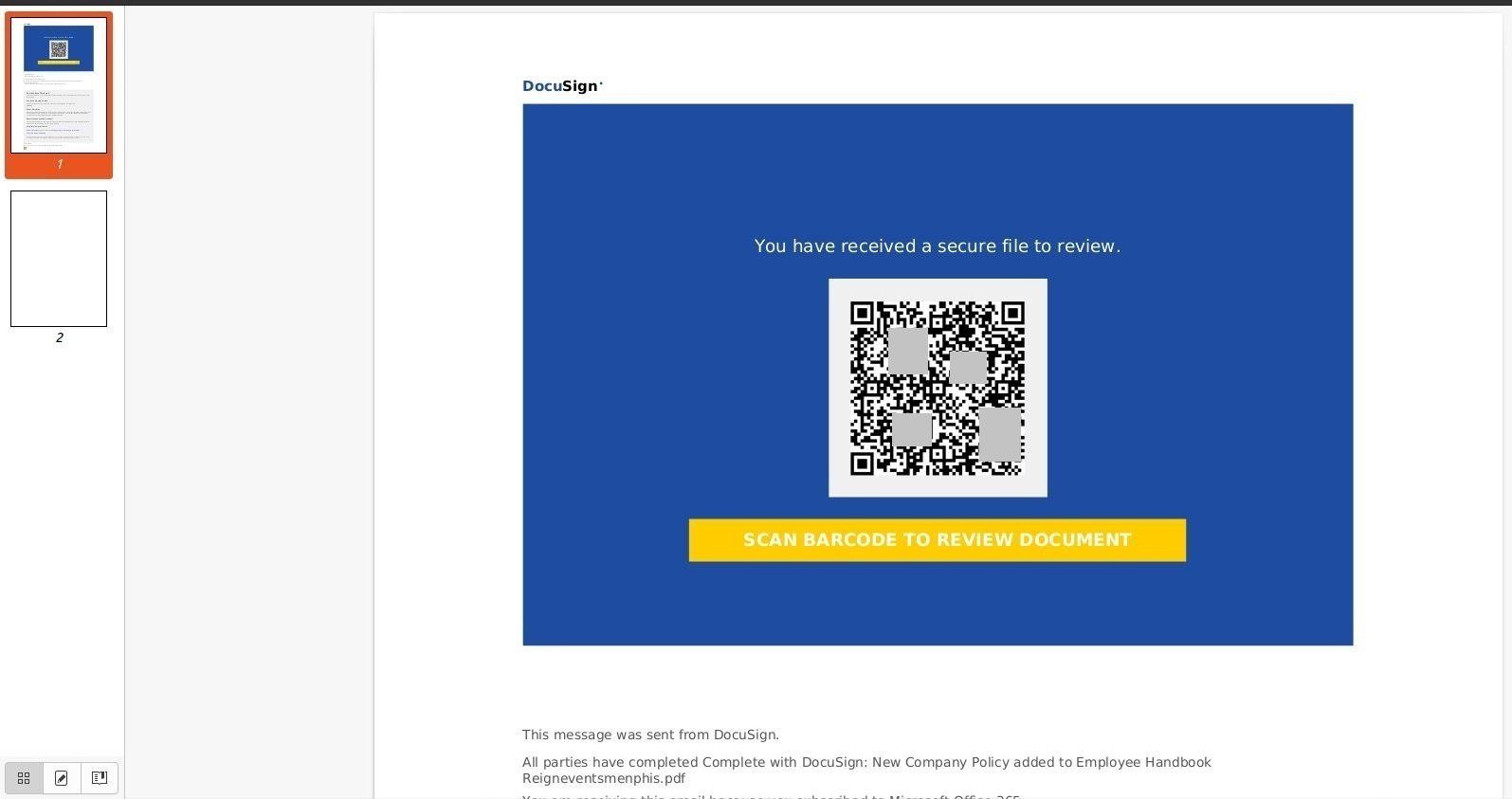
Another example of a phishing PDF attachment with a link hidden in a QR code

Sometimes the cybercriminals take care to replicate the appearance of a legitimate Docusign email — complete with a security code at the foot of the email:
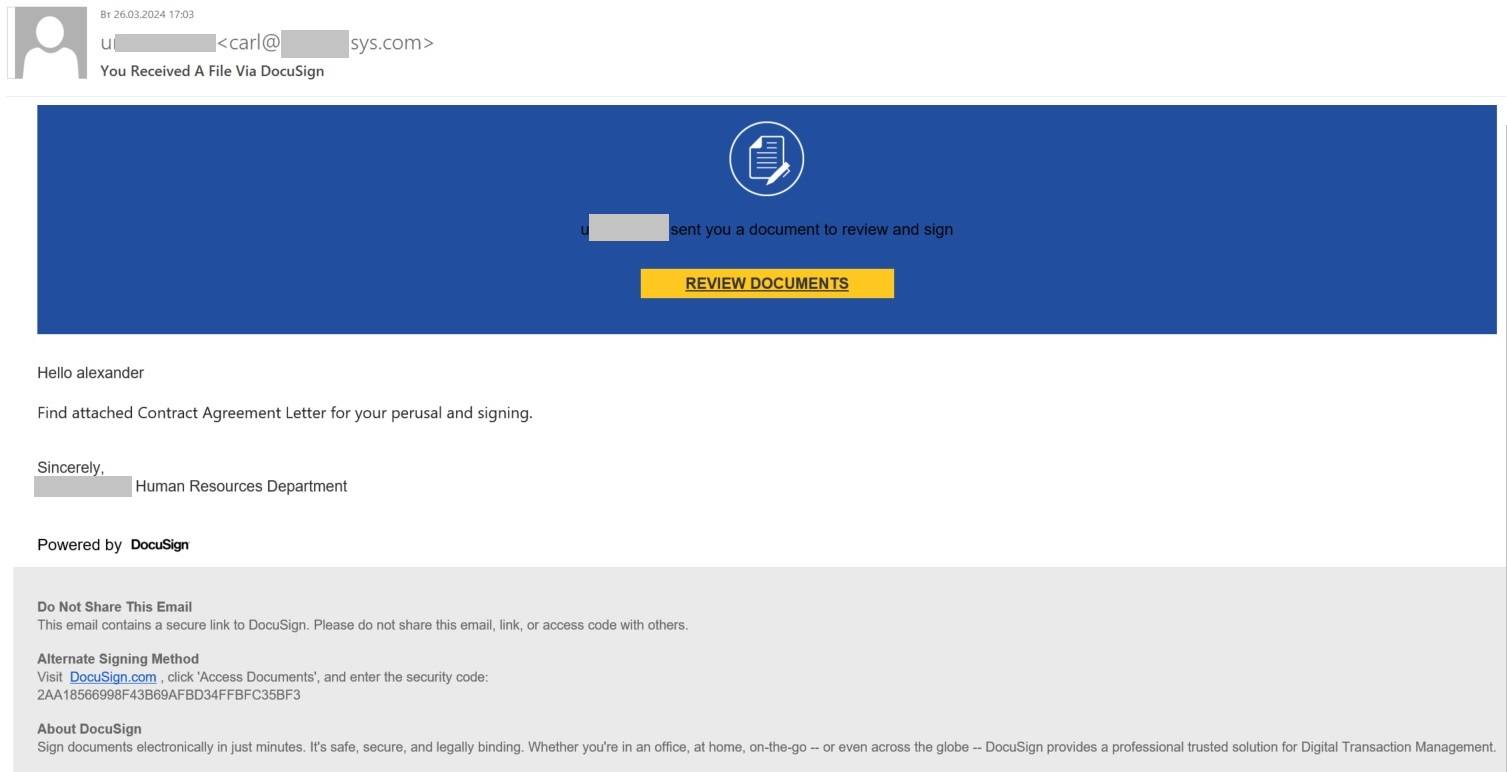
High-quality fake Docusign email

In some cases, phishers mimic Docusign integration with Microsoft SharePoint:
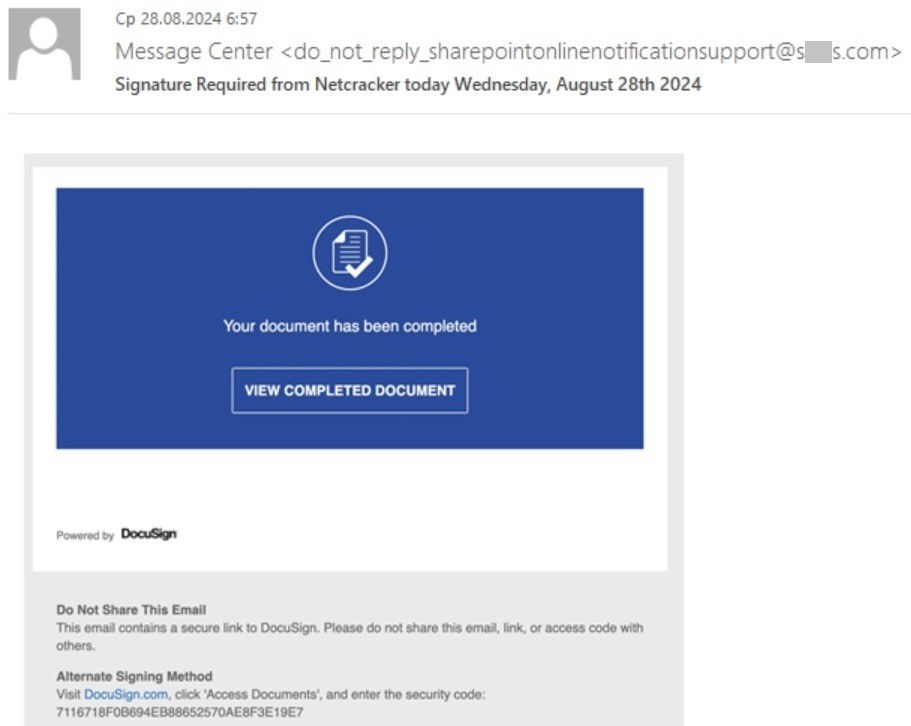
Example of phishers mimicking Docusign integration with Microsoft SharePoint

And in other cases, scam emails have nothing in common with the genuine ones. Here, for instance, the phishers were too lazy even to add the Docusign logo:
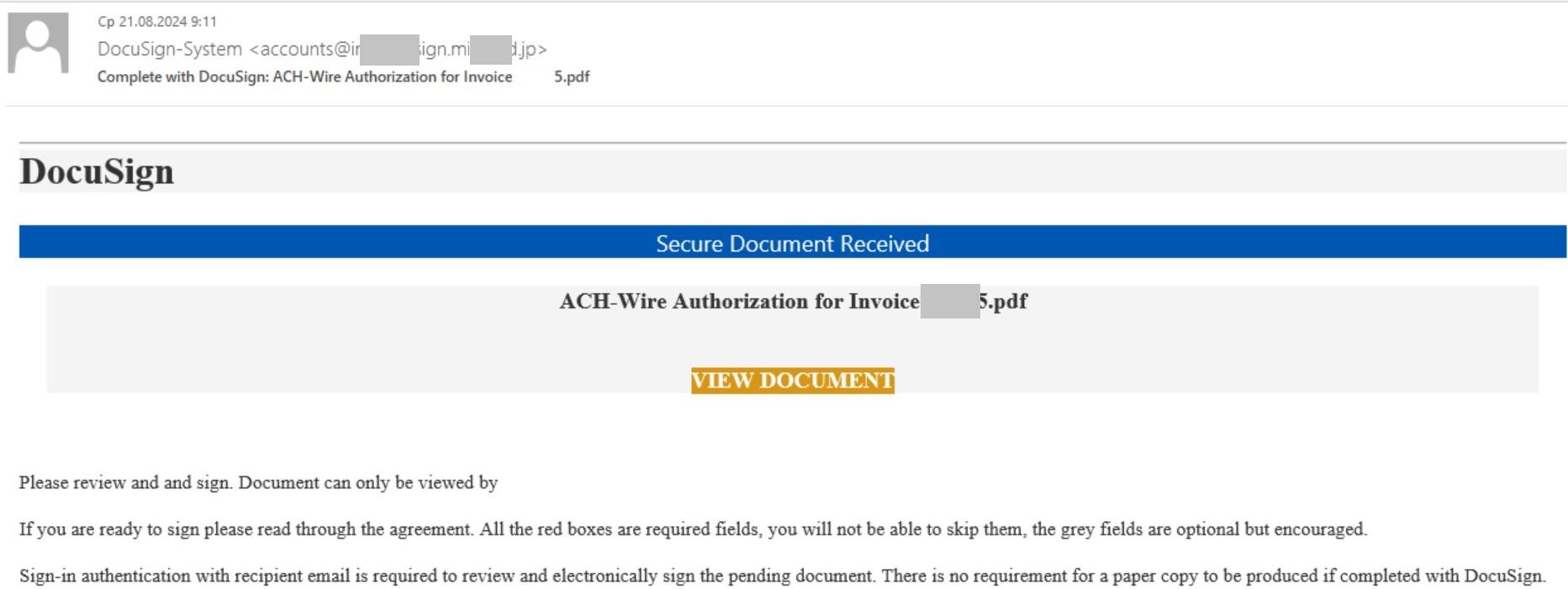
This phishing email doesn’t even have the Docusign logo

In short, the tactics and quality of execution can vary from email to email. However, the core principle remains the same: phishers rely on the recipient not understanding how e-signing with Docusign actually works.

The inattentive victim follows the link (or QR code) to the phishing page and enters their work login credentials, which go straight to the attackers.

Usernames and passwords harvested through successful phishing attacks are often compiled into databases sold on illicit dark web marketplaces, and later used to attack organizations.

How e-signing with Docusign actually works

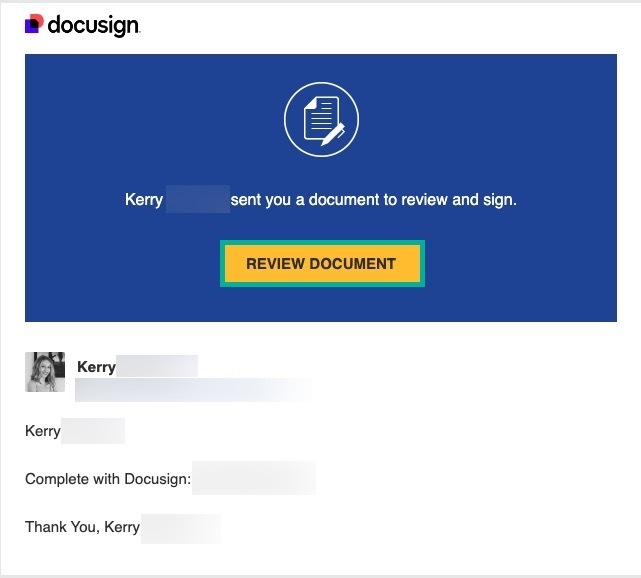
The actual process of signing a document with Docusign for the regular user is simplicity itself. You receive an email from the party requesting the signature — which contains an unmissable big yellow <em>Review Document</em> button.

A genuine Docusign email looks something like this. Source

Clicking this button redirects you through a unique link to the Docusign website (on the docusign.net domain). The page that opens displays a short message from the initiating party, flanked by a <em>Continue</em> button, similarly large and yellow.
Clicking the button in the email immediately opens the document-signing page at Docusign.com. Source

The document for signing is available immediately — without entering any passwords. You simply review it, maybe add some details (such as name, date, and so on) in the appropriate fields, apply your signature, and click the <em>Finish</em> button (which is — you guessed it — also big and yellow). All done. No further actions required.

Now for what Docusign will NEVER do:

Send a PDF attachment with a link to a document to be signed. Bona fide Docusign notifications have no attachments, and display the <em>Review Document</em> button directly in the body of the email.
Give you no choice but to scan a QR code. Docusign works on both mobile devices and computers, so a link is always provided to access the document — not a QR code.
Require you to enter work login credentials. All the information Docusign needs is contained within the unique link sent in the email, so regular users aren’t required to undergo authentication to sign a document.
Force you to register with or log in to Docusign. After you sign the document, Docusign might suggest creating an account, but it’s entirely optional.

Remember that the whole purpose of Docusign is to make it as easy as possible for companies and individuals to exchange electronically-signed documents.

Any additional steps or restrictions — such as creating an account, entering credentials, opening attachments, or using only a smartphone to sign — go against this principle. Therefore, Docusign asks for none of this and strives to make the signing process as quick and simple as possible.

How to guard against phishing

To protect your organization from phishing attacks that impersonate Docusign or other popular services, consider the following measures:

Filtering out suspicious and unwanted email at the gateway level — our comprehensive solution Kaspersky Security for Mail Servers will do this for you.
Protecting endpoints from phishing redirects with Kaspersky Small Office Security or Kaspersky Next — depending on the size of your organization.
Raising employee awareness of cyberthreats with specialized training. Such training is easy to deliver using our educational Kaspersky Automated Security Awareness Platform.

Kaspersky official blog – ​Read More

From Cloud to Home: Is Self-Hosting Right for You?

There are many reasons nowadays to consider getting rid of cloud storage completely. In one recent example, Google Cloud wiped out a customer account and its backups. At stake were millions of Australians’ pension funds, and the affected party was UniSuper, a $135 billion pension account. Without getting into technical details, when the news hit it turned out it was a misconfiguration or human…

Source

TechSplicer – ​Read More

Recent Firefox Zero-Day Exploited Against Tor Browser Users

Tor browser version 13.5.7 is rolling out with patches for an exploited zero-day vulnerability recently addressed in Firefox.

The post Recent Firefox Zero-Day Exploited Against Tor Browser Users appeared first on SecurityWeek.

SecurityWeek – ​Read More

Juniper Networks Patches Dozens of Vulnerabilities

Juniper Networks has announced patches for dozens of vulnerabilities in Junos OS, Junos OS Evolved, and third-party components.

The post Juniper Networks Patches Dozens of Vulnerabilities appeared first on SecurityWeek.

SecurityWeek – ​Read More

Casio Confirms Data Breach as Ransomware Group Leaks Files

Casio has shared more information on the recent cyberattack, for which a ransomware group has now taken credit.

The post Casio Confirms Data Breach as Ransomware Group Leaks Files appeared first on SecurityWeek.

SecurityWeek – ​Read More

Critical Veeam Vulnerability Exploited to Spread Akira and Fog Ransomware

Threat actors are actively attempting to exploit a now-patched security flaw in Veeam Backup & Replication to deploy Akira and Fog ransomware.
Cybersecurity vendor Sophos said it has been tracking a series of attacks in the past month leveraging compromised VPN credentials and CVE-2024-40711 to create a local account and deploy the ransomware.
CVE-2024-40711, rated 9.8 out of 10.0 on the

The Hacker News – ​Read More

America First Policy Institute, a Group Advising Trump, Says Its Systems Were Breached

A group helping to lay the groundwork for a future Donald Trump administration said its computer systems were breached.

The post America First Policy Institute, a Group Advising Trump, Says Its Systems Were Breached appeared first on SecurityWeek.

SecurityWeek – ​Read More

Cyble Sensors Detect Attacks on SAML, D-Link, Python Framework

Key Takeaways


Cyble honeypot sensors detected several new cyberattacks in recent days, targeting vulnerabilities in the Ruby SAML library, D-Link NAS devices, the aiohttp client-server framework, a WordPress plugin, and more.

Cyble’s Vulnerability Intelligence unit also discovered new phishing campaigns and brute-force attacks.

Clients are urged to address the vulnerabilities identified in the report and apply best practices.

Overview

The Cyble Vulnerability Intelligence unit identified several new cyberattacks during the week of Oct. 2-8.

Among the targets are the Ruby SAML library, several D-Link NAS devices, the aiohttp client-server framework used for asyncio and Python, and a popular WordPress plugin used by restaurants and other businesses.

Cyble sensors also uncovered more than 350 new phishing email addresses and thousands of brute-force attacks.

Vulnerabilities Targeted by Threat Actors

The full report for clients looked at more than 40 vulnerabilities under active exploitation by threat actors. Here are four new attacks identified in the report.

Ruby SAML Improper Verification of Cryptographic Signature Vulnerability

The Ruby SAML library implements the client side of SAML authorization. Ruby-SAML in versions up to 1.12.2 and 1.13.0 up to 1.16.0 does not properly verify the signature of the SAML Response. By exploiting the 9.8-severity vulnerability CVE-2024-45409, an unauthenticated attacker with access to any signed SAML document (by the IdP) can forge a SAML Response/Assertion with arbitrary contents. This would allow the attacker to log in as an arbitrary user within the vulnerable system. The vulnerability is fixed in 1.17.0 and 1.12.3.

aiohttp Path Traversal

CVE-2024-23334 is a Path Traversal vulnerability in aiohttp, an asynchronous HTTP client/server framework for asyncio and Python. When using aiohttp as a web server and configuring static routes, it is necessary to specify the root path for static files. Additionally, the option ‘follow_symlinks’ can be used to determine whether to follow symbolic links outside the static root directory. When ‘follow_symlinks’ is set to True, there is no validation to check if reading a file is within the root directory. This can lead to directory traversal vulnerabilities, resulting in unauthorized access to arbitrary files on the system, even when symlinks are not present. Disabling follow_symlinks and using a reverse proxy are recommended mitigations. Version 3.9.2 fixes this issue.

D-Link NAS Devices Hard-Coded Credentials Vulnerability

A 9.8-severity vulnerability, CVE-2024-3272, is being targeted in end-of-life D-Link NAS devices DNS-320L, DNS-325, DNS-327L, and DNS-340L up to 20240403. The issue affects some unknown processing of the file /cgi-bin/nas_sharing.cgi of the component HTTP GET Request Handler. The manipulation of the argument user with the input messagebus leads to hard-coded credentials. The attack may be initiated remotely, and the exploit has been disclosed to the public. The associated identifier of this vulnerability is VDB-259283. The vendor was contacted early and confirmed immediately that the product is end-of-life. It should be retired and replaced.

PriceListo SQL Injection Vulnerability

CVE-2024-38793 is an improper Neutralization of Special Elements used in an SQL Command (‘SQL Injection’) vulnerability in the PriceListo Best Restaurant Menu WordPress plugin, allowing for SQL Injection attacks. The issue affects Best Restaurant Menu by PriceListo through 1.4.1.

Previously reported vulnerabilities in PHP (CVE-2024-4577), GeoServer (CVE-2024-36401) and AVTECH IP cameras (CVE-2024-7029) also remain under active attack by threat actors.

Brute-Force Attacks

Cyble sensors also detected thousands of brute-force attacks. Among the top 5 attacker countries, Cyble researchers observed attacks originating from Vietnam targeting ports 22 (43%), 445 (32%), 23 (17%), and 3389 (8%). Attacks originating from Russia targeted ports 3389 (58%), 5900 (35%), 1433 (5%), 3306 (1%) and 445 (1%). Greece, Colombia, and Bulgaria majorly targeted ports 1433, 5900, and 445.

Security Analysts are advised to add security system blocks for the attacked ports (such as 22, 3389, 443, 445, 5900, and 3306).

New Phishing Campaigns Identified

Cyble sensors also detected 351 new phishing email addresses. Below are six phishing scams of note identified by Cyble:

E-mail Subject 
Scammers Email ID 
Scam Type 
Description 

Claim Directives 
info@szhualilian.com 
Claim Scam 
Fake refund against claims 

DEAR WINNER 
contact@wine.plala.or.jp 
Lottery/Prize Scam 
Fake prize winnings to extort money or information 

GOD BLESS YOU…. 
info@advanceairsystem.com 
Donation Scam 
Scammers posing as a Donor to donate money 

CHOSEN- EMAIL 
test@mps.elnusa.co.id 
Investment Scam 
Unrealistic investment offers to steal funds or data 

Order 3038137699167518: cleared customs 
support@otm4n3-recrypto.to   
Shipping Scam 
Unclaimed shipment trick to demand fees or details 

UN Compensation Fund 
info@usa.com 
Government Organization Scam 
Fake government compensation to collect financial details 

Cyble Recommendations

Cyble researchers recommend the following security controls:


Blocking target hashes, URLs, and email info on security systems (Cyble clients received a separate IoC list).

Immediately patch all open vulnerabilities listed here and routinely monitor the top Suricata alerts in internal networks.

Constantly check for Attackers’ ASNs and IPs.

Block Brute Force attack IPs and the targeted ports listed.

Immediately reset default usernames and passwords to mitigate brute-force attacks and enforce periodic changes.

For servers, set up strong passwords that are difficult to guess.

The post Cyble Sensors Detect Attacks on SAML, D-Link, Python Framework appeared first on Cyble.

Blog – Cyble – ​Read More

Teraleak: Pokémon Developer Game Freak Hacked; Decades of Data Leaked

Game Freak’s “Teraleak” appears to expose nearly 1 terabyte of sensitive Pokémon data, including source code, cancelled games,…

Hackread – Latest Cybersecurity, Tech, Crypto & Hacking News – ​Read More

Meet the Chinese ‘Typhoon’ hackers preparing for war

Of the cybersecurity risks facing the United States today, few loom larger than the potential sabotage capabilities posed by China-backed hackers, which top U.S. officials have described as an “epoch-defining threat.” In recent months, U.S. intelligence officials said Chinese government-backed hackers have been burrowing deep into the networks of U.S. critical infrastructure, including water, energy […]

© 2024 TechCrunch. All rights reserved. For personal use only.

Security News | TechCrunch – ​Read More