OT Risk Management Firm DeNexus Raises $17.5 Million

DeNexus offers an AI and ML-driven data analytics platform that focuses on managing the cyber risk to the underserved operational technology of critical industries.

The post OT Risk Management Firm DeNexus Raises $17.5 Million appeared first on SecurityWeek.

SecurityWeek – ​Read More

Protecting major events: An incident response blueprint

Ensuring the cybersecurity of major events — whether it’s sports, professional conferences, expos, inter-government meetings or other gatherings — is a complex and time-intensive task.  

It requires a comprehensive approach and collaboration among various stakeholders, including vendors, hospitality teams, and service providers, to establish a consistent cybersecurity strategy across the entire event ecosystem. 

In our latest version of the “Protecting major events: An incident response blueprint” whitepaper, Cisco Talos Incident Response outlines the essential steps organizations should take to secure any major event. This paper highlights 13 critical focus areas that will guide organizing committees and participating businesses, offering key questions and actionable answers to help ensure robust event security. 

Cisco Talos Blog – ​Read More

From Misuse to Abuse: AI Risks and Attacks

AI from the attacker’s perspective: See how cybercriminals are leveraging AI and exploiting its vulnerabilities to compromise systems, users, and even other AI applications
Cybercriminals and AI: The Reality vs. Hype
“AI will not replace humans in the near future. But humans who know how to use AI are going to replace those humans who don’t know how to use AI,” says Etay Maor, Chief Security

The Hacker News – ​Read More

CISA Flags Critical SolarWinds Web Help Desk Bug for In-the-Wild Exploitation

CISA warns that a critical-severity hardcoded credentials vulnerability in SolarWinds Web Help Desk is exploited in attacks.

The post CISA Flags Critical SolarWinds Web Help Desk Bug for In-the-Wild Exploitation appeared first on SecurityWeek.

SecurityWeek – ​Read More

AI Models in Cybersecurity: From Misuse to Abuse

Exploring differences in AI models on security measures and unveiling threat actor tactics.

The post AI Models in Cybersecurity: From Misuse to Abuse appeared first on SecurityWeek.

SecurityWeek – ​Read More

Cyber Information Gathering: Techniques and Tools for Effective Threat Research 

To stay safe from cyber attacks, organizations need effective ways to gather information about threats before they cause irreparable damage. Let’s look at several methods for gathering threat intelligence (TI) to see how they can help you gain a better view of the current threat landscape. 

Why is Threat Intelligence Important? 

Threat intelligence is important for several reasons: 

Proactive Awareness: Knowing about potential threats helps organizations take steps to deal with them before they escalate. 

Quick Response: When an attack happens, having threat intelligence allows teams to respond faster and more effectively. 

Better Risk Management: Understanding vulnerabilities helps organizations prioritize where to focus their security efforts. 

How to Collect Cyber Threat Intelligence 

Gathering threat intelligence isn’t just about knowing where to look; it’s about understanding how to use those sources effectively. Let’s explore key methods for collecting threat intelligence, diving into the techniques and tools that can help cybersecurity professionals. 

Integrating Threat Intelligence Feeds 

Threat intelligence feeds provide real-time streams of data on malware, vulnerabilities, and emerging risks. By using these feeds, organizations can stay up-to-date with the latest threats and trends. To effectively gather intelligence: 

Automate Data Collection: Integrate feeds with your cybersecurity tools (like SIEM) for continuous monitoring. 

Correlate Information: Use multiple feeds to cross-reference threats and identify patterns. 

Customize for Relevance: Focus on feeds that provide the most pertinent information for your industry or organization’s needs. 

Using Threat Intelligence Portals 

Threat intelligence portals centralize data and allow for comprehensive threat analysis. ANY.RUN‘s TI Lookup is an example of a tool that helps with such analysis. Using TI Lookup, users can: 

Investigate Indicators: Enter suspicious IP addresses, domains, or file hashes to gain insights into potential threats. 

Search for Known Threats: Use the portal to research malware, attack methods, or Indicators of Compromise (IOCs). 

Analyze Attack Techniques: The tool can also be used to link threats to known tactics and vice versa, such as those in the MITRE ATT&CK framework, helping users understand the nature of the threats they face. 

Try Threat Intelligence
from ANY.RUN

Explore TI Feeds and TI Lookup
to see how they can help you achieve better threat visibility.


Monitoring Dark Web Forums 

The Dark Web is often a hub for cybercriminal activities. Monitoring these forums can yield valuable information about planned attacks, new exploit techniques, and stolen data. Key steps include: 

Forum Monitoring Tools: Use automated tools to track conversations on Dark Web forums, collecting insights into new attack vectors. 

Analyze Discussions: Gather intelligence on specific threat actors, potential targets, and trends emerging in cybercrime

By keeping an eye on dark web forums, organizations can stay aware of evolving threats before they escalate. 

Reviewing Publicly Available Reports 

Cybersecurity organizations regularly release reports and threat research that provide detailed analyses of recent attacks and vulnerabilities. These reports are invaluable for keeping up with emerging threats. To use them effectively: 

Review Reports for Trends: Look for trends in the attacks, methods, and vulnerabilities discussed. 

Implement Recommendations: Use insights from these reports to adjust security practices and defense strategies. 

Data Mining for Threat Intelligence 

Data mining is a powerful method for extracting useful intelligence from large datasets. It allows security teams to identify patterns and anomalies that indicate potential threats: 

Anomaly Detection: By analyzing network traffic and system logs, data mining techniques can reveal suspicious behavior that may indicate an attack in progress. 

Predictive Analytics: Historical data can be analyzed to predict future attack trends, helping organizations take preventative measures. 

Deploying Honeypots 

Honeypots are decoy systems set up to attract cybercriminals. These fake targets are used to observe attackers and gather intelligence on their tactics and methods. To use honeypots effectively: 

Simulate Real Systems: Honeypots should mimic genuine vulnerabilities to lure attackers. 

Gather Attack Data: Record all interactions with the honeypot to study the attackers’ methods, tools, and behaviors in a controlled environment. 

Honeypots provide invaluable insights into how attackers operate, enabling organizations to improve their defensive strategies based on real-world data. 

Crowdsourcing Threat Intelligence 

Collaboration is another valuable tool for collecting threat intelligence. Crowdsourcing allows organizations to benefit from the collective knowledge of the broader cybersecurity community: 

Threat Intelligence Sharing: Platforms like ISACs (Information Sharing and Analysis Centers) enable the exchange of threat data across industries.

Collaborative Investigations: Participating in shared investigations can help identify complex threats and provide faster, more accurate responses.

Threat Sample Databases: There sources like ANY.RUN’s Public submissions database, containing millions of public sandbox analyses of the latest malware and phishing samples.

Crowdsourcing creates a network of shared defense, helping organizations quickly identify emerging threats and stay updated on the latest attack vectors. 

How to Gather Cyber Threat Intelligence with TI Lookup

Gathering cyber threat intelligence involves utilizing various tools and techniques.

ANY.RUN’s TI Lookup simplifies this process by offering a centralized repository of millions of IOCs, extracted from ANY.RUN’s extensive database of interactive malware analysis sessions.

You can use over 40 search parameters to investigate search this database, turning isolated data points into a comprehensive understanding of persistent and emerging threats. 

Key Benefits of TI Lookup for researchers: 

Comprehensive Threat Data: Access detailed threat intelligence by analyzing processes, files, network traffic, and more. TI Lookup links related IOCs, helping you fully understand the scope and impact of an attack. 

Fast and Accurate Searches: With 2-second response time and 1,000 new entries daily, TI Lookup provides swift access to the latest threat intelligence. 

Seamless Integration: Whether using the web interface or API, TI Lookup integrates easily with your existing security tools like Splunk

By using ANY.RUN TI Lookup, your security team can efficiently investigate threats, reduce risks, and enhance your overall cybersecurity posture.  

Here are a few examples using ANY.RUN TI Lookup: 

Analyzing Destination IPs

You can enter a suspicious IP address into TI Lookup to see if it is linked to any threat. 

TI Lookup results related to a suspicious IP address

The tool will display details such as the IP’s location and any associated indicators, samples, and sandbox sessions, giving you crucial insights into potential risks. 

Threat Name Investigation 

You can also identify the latest samples of a known threat using its name. 

TI Lookup results related to the Lumma Stealer malware

You will receive detailed information about the threat, including its behavior and Indicators of Compromise. This helps in understanding how the threat operates. 

Identifying Threats via MITRE ATT&CK TTPs

ANY.RUN’s TI Lookup lets you search using specific tactics or techniques of the MITRE ATT&CK framework. 

TI Lookup results related to a specific TTP

The tool will show relevant examples of how these techniques are used in attacks, helping you understand their application in real-world scenarios. 

Using ANY.RUN TI Lookup, cybersecurity teams can efficiently gather threat intelligence, investigate malware behavior, and equip themselves with the knowledge needed to combat emerging threats. 

Learn to investigate threats

Discover a practical guide
to gathering Threat Intelligence with TI Lookup from a seasoned researcher.

See real-world use cases


Wrapping up 

Gathering cyber threat intelligence is essential for understanding and combating cyber threats. By using various sources like threat intelligence feeds, dark web forums, publicly available reports, and tools like ANY.RUN TI Lookup, organizations can improve their awareness of potential risks. Being informed about these threats is a key part of a strong cybersecurity strategy. 

About ANY.RUN     

ANY.RUN helps more than 500,000 cybersecurity professionals worldwide. Our interactive sandbox simplifies malware analysis of threats that target both Windows and Linux systems. Our threat intelligence products, TI Lookup, YARA Search and Feeds, help you find IOCs or files to learn more about the threats and respond to incidents faster.

Request free trial of ANY.RUN’s products →

The post Cyber Information Gathering: Techniques <br>and Tools for Effective Threat Research  appeared first on ANY.RUN’s Cybersecurity Blog.

ANY.RUN’s Cybersecurity Blog – ​Read More

Security and privacy settings in Nike Run Club | Kaspersky official blog

We’ve talked before about why it’s crucial to configure your privacy settings in fitness apps before you even start using them, and shared a detailed guide on general smartphone settings to minimize data risks.

The fact is, fitness tracking apps share your sensitive information — including your precise location. Strava in particular stands out, since it shares almost all your training data by default. We’ve already covered how to set privacy in Strava in detail.

Other running apps have fewer privacy settings than Strava — and they are stricter by default (at least for new users signing up now). Nevertheless, it’s worth reviewing these settings as well, as there are a few things you might want to turn off.

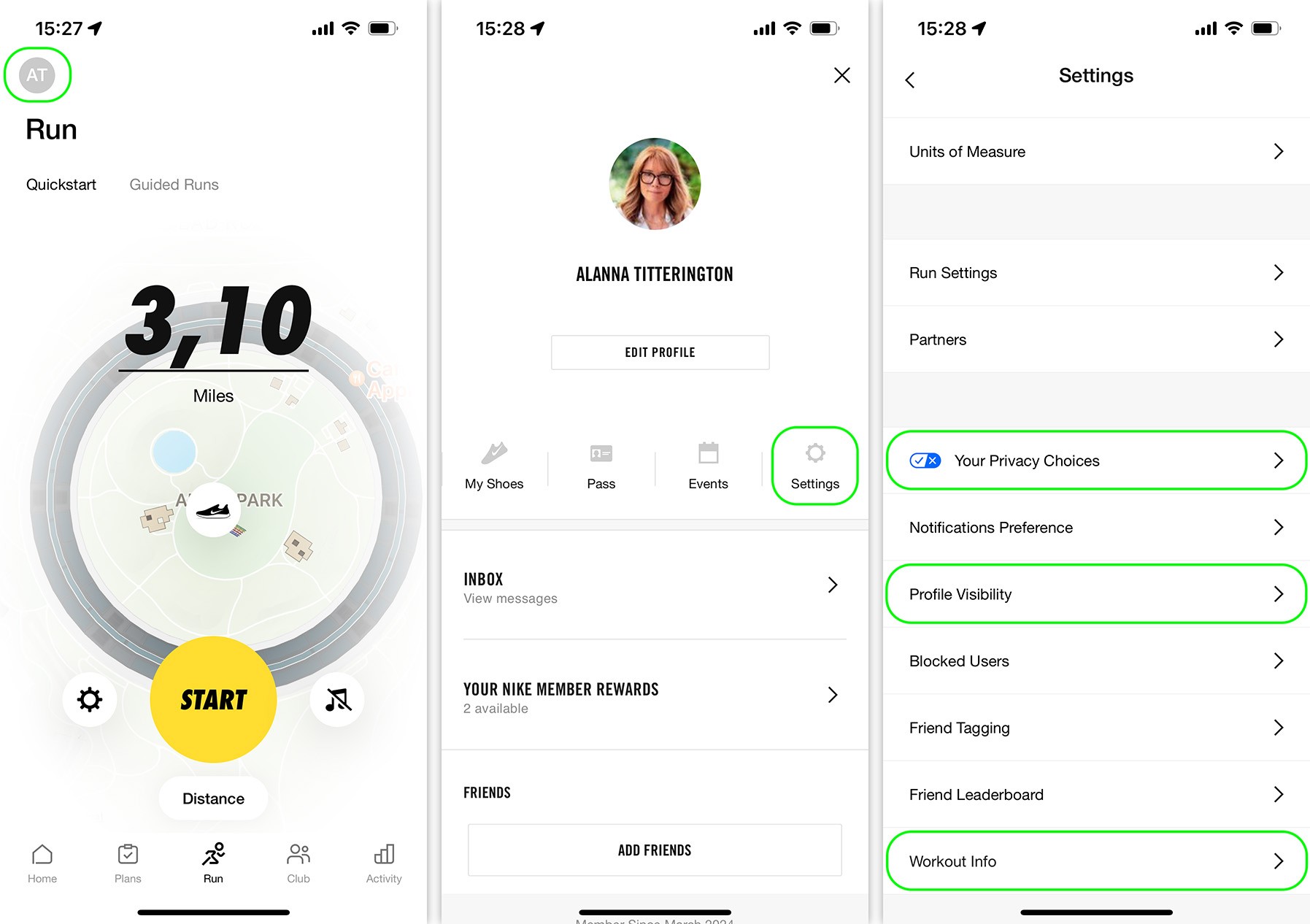
The app of the world’s largest sportswear manufacturer — Nike Run Club (available for both Android and iOS) — tucks its privacy settings away in a not-so-obvious place. Here’s how to find them: in the top left corner, tap the gray round icon with your initials. Then, tap Settings. In the window that opens, you won’t find some “Privacy” section; instead, the relevant settings are scattered throughout.

Where to find privacy settings in the Nike Run Club app

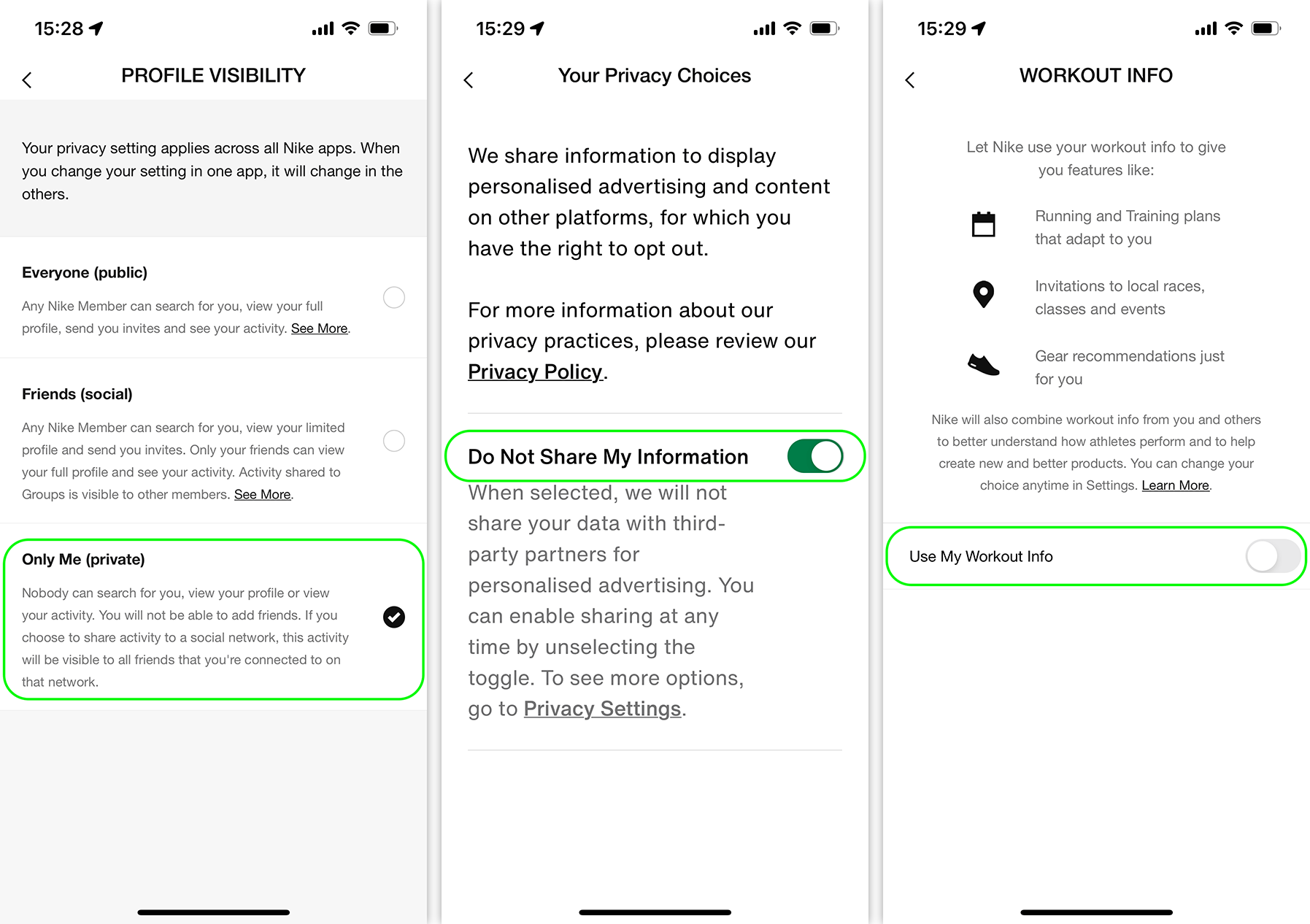
Firstly, make sure your profile isn’t public: to do this, tap Profile Visibility, and check where the tick mark is. The best choice from a privacy perspective would be Friends (social), or even better, Only Me (private).

Secondly, prevent Nike from selling your data for “personalized advertising”. To do this, go to Your Privacy Choices and turn on the Do Not Share My Information toggle switch.

Thirdly, prevent Nike itself from using your data for internal purposes. To do this, go to the innocuously named Workout Info section and turn off the Use My Workout Info toggle switch.

Don’t overlook these key Nike Run Club settings

You may also want to look at Notifications Preference, Friend Tagging, and Friend Leaderboard. And if at some point you decide to quit Nike Run Club altogether, don’t forget to delete your profile by tapping Delete Account at the bottom of the settings list.

Using other running apps to track your workouts? We’ve got you covered with privacy guides for:

Strava
MapMyRun
adidas Running (formerly Runtastic)
ASICS Runkeeper

You can also find guides on setting up privacy in other apps — from social networks to browsers — on our website Privacy Checker.

And Kaspersky Premium will maximize your privacy and safeguard you from digital identity theft on all your devices.

Don’t forget to subscribe to our blog for more how-to guides and useful articles to always stay one step ahead of scammers.

Kaspersky official blog – ​Read More

CISA Issues Urgent Advisory on Vulnerabilities Affecting Multiple Products

Overview

The Cybersecurity and Infrastructure Security Agency (CISA) has released a critical advisory report highlighting vulnerabilities recently added to the Known Exploited Vulnerability (KEV) catalog. These vulnerabilities pose risks to organizations and require immediate attention.

CISA categorizes vulnerabilities based on the Common Vulnerabilities and Exposures (CVE) naming standards and the Common Vulnerability Scoring System (CVSS). This system classifies vulnerabilities into high, medium, and low categories. High vulnerabilities are assigned scores ranging from 7.0 to 10.0; medium vulnerabilities receive scores between 4.0 and 6.9, and low vulnerabilities score between 0.0 and 3.9.

The advisory outlines specific vulnerabilities and the products they affect, including SolarWinds, Mozilla Firefox, and Microsoft Windows.

Vulnerability Details

One of the critical vulnerabilities identified is CVE-2024-28987, which affects the SolarWinds Web Help Desk (WHD) software, specifically version 12.8.3 HF1 and all earlier versions. This vulnerability is classified as critical, with a CVSS score of 9.1. It allows remote, unauthenticated users to access internal functionalities and modify data due to hardcoded credentials in the software.

Public proof-of-concept exploits for this vulnerability are readily available, highlighting its severity. According to Cyble’s ODIN scanner, approximately 920 internet-facing instances of SolarWinds WHD have been identified, primarily located in the United States.

Another vulnerability, CVE-2024-9680, affects multiple versions of Firefox and Thunderbird and has a critical CVSS score of 9.8. This vulnerability arises from a use-after-free flaw in Animation timelines, enabling an attacker to execute arbitrary code. Mozilla has acknowledged reports of this vulnerability being exploited in the wild, further emphasizing the need for immediate remediation.

The third vulnerability, CVE-2024-30088, impacts various Windows products, including Windows Server 2016 and multiple Windows 10 and 11 versions. It has a CVSS score of 7.0, classifying it as high severity. This vulnerability exploits a race condition within the Windows kernel, allowing attackers to gain SYSTEM privileges. Researchers from Trend Micro have reported observing the Advanced Persistent Threat (APT) group APT34 leveraging this vulnerability for privilege escalation in targeted systems.

Recommendations


Organizations should apply the latest patches from official vendors.

Establish a routine schedule for regularly updating all software and hardware systems.

Ensure critical updates are prioritized for immediate application to reduce exposure to exploits.

Isolate sensitive assets from less secure areas to minimize risk and reduce the attack surface.

Implement firewalls, Virtual Local Area Networks (VLANs), and access controls to limit threat exposure.

Develop and regularly update an incident response plan for detecting, responding to, and recovering from security incidents.

Conduct regular tests of the incident response plan to ensure its effectiveness against evolving threats.

Use comprehensive monitoring and logging solutions to detect and analyze suspicious activities across the network.

Utilize Security Information and Event Management (SIEM) systems for real-time threat detection and response by aggregating and correlating logs.

Proactively identify and plan for the timely upgrades or replacements of End-of-Life (EOL) products to mitigate associated risks.

Conclusion

The addition of these vulnerabilities to CISA’s KEV catalog highlights the urgent need for organizations to address them immediately. The fact that these vulnerabilities are actively exploited signifies that organizations with affected systems face heightened risks, including potential data breaches, ransomware attacks, and privilege escalation.

Organizations must promptly patch these vulnerabilities to safeguard their systems from malicious actors. By following these recommendations, organizations can significantly strengthen their cybersecurity and protect against critical vulnerabilities.

The post CISA Issues Urgent Advisory on Vulnerabilities Affecting Multiple Products appeared first on Cyble.

Blog – Cyble – ​Read More

Oracle Patches Over 200 Vulnerabilities With October 2024 CPU

Oracle has released 334 new security patches to address roughly 220 unique CVEs as part of its October 2024 Critical Patch Update.

The post Oracle Patches Over 200 Vulnerabilities With October 2024 CPU appeared first on SecurityWeek.

SecurityWeek – ​Read More