Splunk’s Latest Advisory: Addressing Multiple Vulnerabilities in Splunk Enterprise

Overview

Splunk has recently issued an advisory detailing multiple vulnerabilities discovered in its Splunk Enterprise software. The advisory categorize vulnerabilities into three primary classifications based on their CVSS base scores. In total, there are two vulnerabilities classified as High, with a risk score deemed Critical. The Medium category includes eight vulnerabilities, while there is one vulnerability classified as Low.

The advisory identifies several CVE IDs associated with these vulnerabilities, specifically: CVE-2024-45731, CVE-2024-45732, CVE-2024-45733, CVE-2024-45734, CVE-2024-45735, CVE-2024-45736, CVE-2024-45737, CVE-2024-45738, CVE-2024-45739, CVE-2024-45740, and CVE-2024-45741. Importantly, Splunk has confirmed that patches are available for all identified vulnerabilities, urging users to implement them promptly to mitigate potential risks.

Detailed Vulnerability Analysis

CVE-2024-45731 addresses a critical remote code execution vulnerability, receiving a CVSS score of 8.0, classified as high. This vulnerability affects Splunk Enterprise for Windows in versions below 9.3.1, 9.2.3, and 9.1.6. A low-privileged attacker can exploit this vulnerability by writing a file to the Windows system root directory if Splunk is installed on a separate drive. This action could allow the attacker to load a malicious DLL, leading to remote code execution. To mitigate this risk, users should ensure that Splunk is not installed on a separate disk.

CVE-2024-45732 is categorized as a medium vulnerability, with a CVSS score of 6.5. It impacts various versions below 9.3.1 for both Splunk Enterprise and Splunk Cloud Platform. In this case, a low-privileged user may run searches as the “nobody” Splunk user, potentially gaining access to restricted data. Users are advised to modify the local.meta file to restrict write access and can consider disabling Splunk Web as a workaround.

Another medium vulnerability, CVE-2024-45733, also scores 6.5 and affects Splunk Enterprise for Windows in versions below 9.2.3 and 9.1.6. This vulnerability allows for remote code execution due to insecure session storage configurations. To address this issue, users should disable Splunk Web on indexers in distributed environments where logins are not necessary.

CVE-2024-45734 is classified as medium, with a CVSS score of 4.3, and affects versions of Splunk Enterprise below 9.2.3 and 9.1.6. This vulnerability can be exploited through the PDF export feature, enabling users to view local images from the machine running Splunk Enterprise. Turning off Splunk Web may serve as a mitigation strategy for this risk.

Another instance of improper access control, CVE-2024-45735, also has a CVSS score of 4.3 and affects various versions below 9.2.3 and 9.1.6, including Splunk Secure Gateway versions. This vulnerability allows a low-privileged user to view deployment configurations and keys within the Splunk Secure Gateway App. Users can mitigate this risk by disabling the app if it is not needed or by ensuring proper security settings are in place.

CVE-2024-45736, which scores 6.5 and falls into the medium category, involves uncontrolled resource consumption. This vulnerability can cause the Splunk daemon to crash if a crafted search query is executed. Organizations are advised to implement monitoring and alerting on search query behaviors to identify potential exploit attempts.

CVE-2024-45737 is a low-severity vulnerability, scoring 3.5, affecting various versions below 9.3.1 and 9.2.3. An attacker could exploit this vulnerability through cross-site request forgery (CSRF) to change the maintenance mode state of the App Key Value Store. Turning off Splunk Web may serve as a potential workaround.

Two vulnerabilities, CVE-2024-45738 and CVE-2024-45739, both classified as medium with a CVSS score of 4.9, affect various versions below 9.3.1, 9.2.3, and 9.1.6. These vulnerabilities could expose sensitive HTTP parameters and plaintext passwords due to verbose logging configurations. Users are recommended to adjust logging levels and remove sensitive logs from the internal index to mitigate these risks.

Lastly, CVE-2024-45740 and CVE-2024-45741, both scoring 5.4 and categorized as medium vulnerabilities, affect various versions below 9.2.3 and 9.1.6. These vulnerabilities can be exploited to execute unauthorized JavaScript in user browsers. Disabling Splunk Web can help mitigate these risks.

Recommendations for Organizations


Regularly update all software systems with the latest vendor patches to mitigate vulnerabilities.

Develop a comprehensive strategy that includes inventory management, assessment, testing, and verification of patches.

Isolate critical assets from less secure areas using firewalls, VLANs, and access controls to limit exposure.

Maintain an up-to-date incident response plan to effectively address security incidents as they arise.

Implement robust monitoring solutions to detect and analyze suspicious activities across the network.

Proactively assess critical systems for potential upgrades or replacements to avoid risks associated with outdated software.

Conclusion

Splunk Enterprise and its associated cloud platform are essential tools for organizations focused on advanced log management and security analytics. However, the recent disclosure of multiple vulnerabilities highlights the critical importance of maintaining software updates and installing security patches. 

Organizations that neglect to apply these patches may find themselves exposed to risks, including unauthorized access and data breaches. Thus, users need to stay vigilant and proactive in implementing the recommended mitigations and updates.

The post Splunk’s Latest Advisory: Addressing Multiple Vulnerabilities in Splunk Enterprise appeared first on Cyble.

Blog – Cyble – ​Read More

Spate of ransomware attacks on German-speaking schools hits another in Switzerland

The Vocational Training Center, or Berufsbildungszentrum (BBZ), in the canton of Schaffhausen reported a ransomware attack, making it the latest in a wave against German-speaking schools and universities.

The Record from Recorded Future News – ​Read More

Security and privacy settings in MapMyRun | Kaspersky official blog

We’ve previously explained why it’s essential to configure privacy settings before using training trackers — both on your phone in general and within the app itself. Doing so minimizes the risk of exposing your personal data, including your location, to the public. You wouldn’t want just anyone to be able to follow your runs and know exactly where and when to find you offline, would you?

You can check out our already published guides on configuring smartphones and the popular running apps Strava and Nike Run Club. Today, we’re focusing on privacy settings in MapMyRun.

MapMyRun (available for Android and iOS) has a rather interesting history. In September 2024, it was acquired as part of the MapMyFitness suite of apps by the media company Outside (led by CEO Robin Thurston) from the American sportswear manufacturer Under Armour. And Under Armour, in turn, had acquired this suite for $150 million back in 2013 from… Robin Thurston, the very same person who founded MapMyFitness in 2007! So, after 11 years, Thurston regained the company he had founded 17 years earlier.

Setting up privacy in MapMyRun

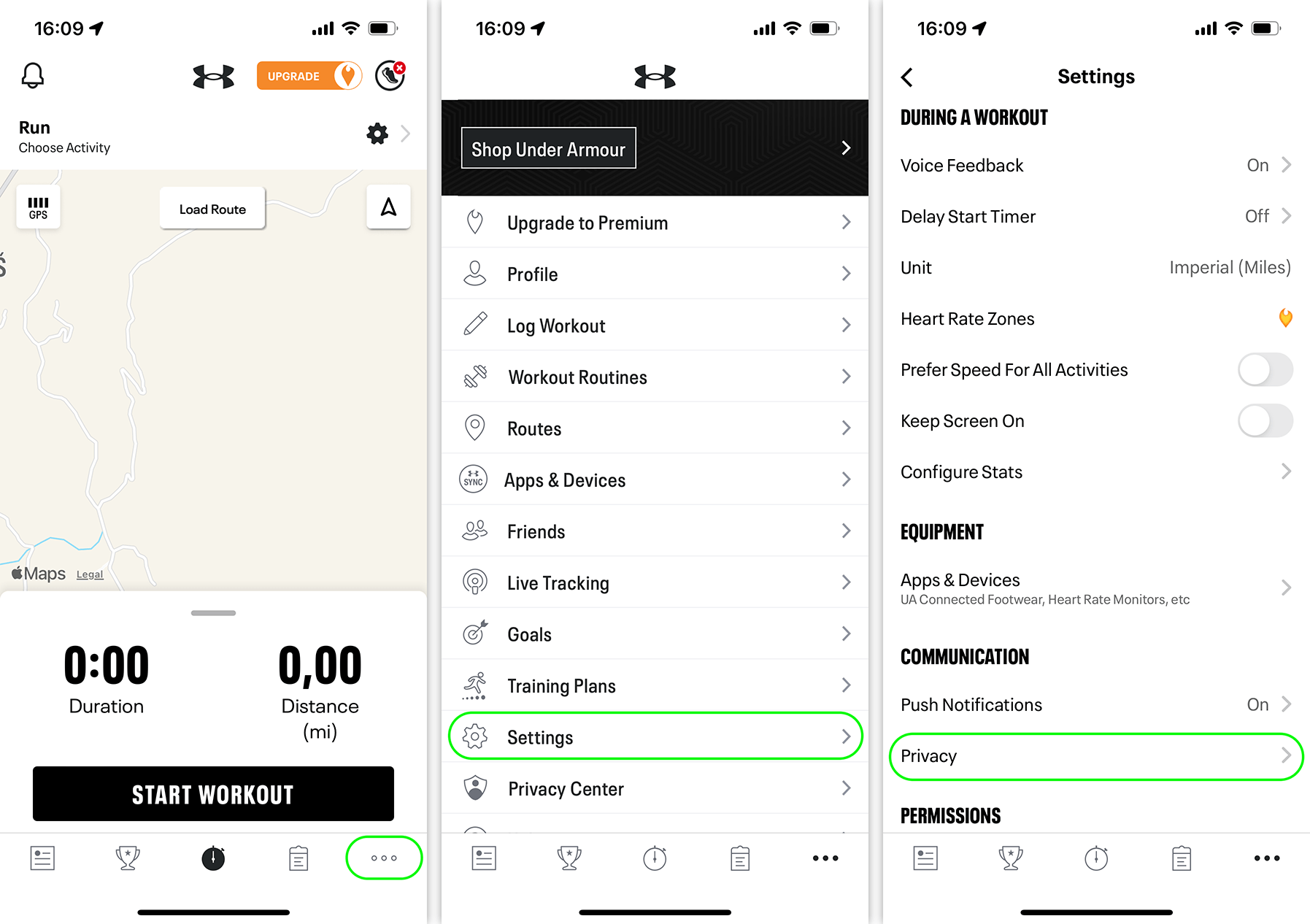
Unlike many apps, you won’t find the privacy settings under the usual cog icon in the top right corner of the main screen – that’s for workout settings. Instead, tap the three dots in the bottom right corner for iOS, or the three-line “burger” menu in the top left corner for Android, then select Settings (not Privacy Center — that’s something else). On the next screen, choose Privacy.

Where to find privacy settings in MapMyRun: ••• → Settings → Privacy

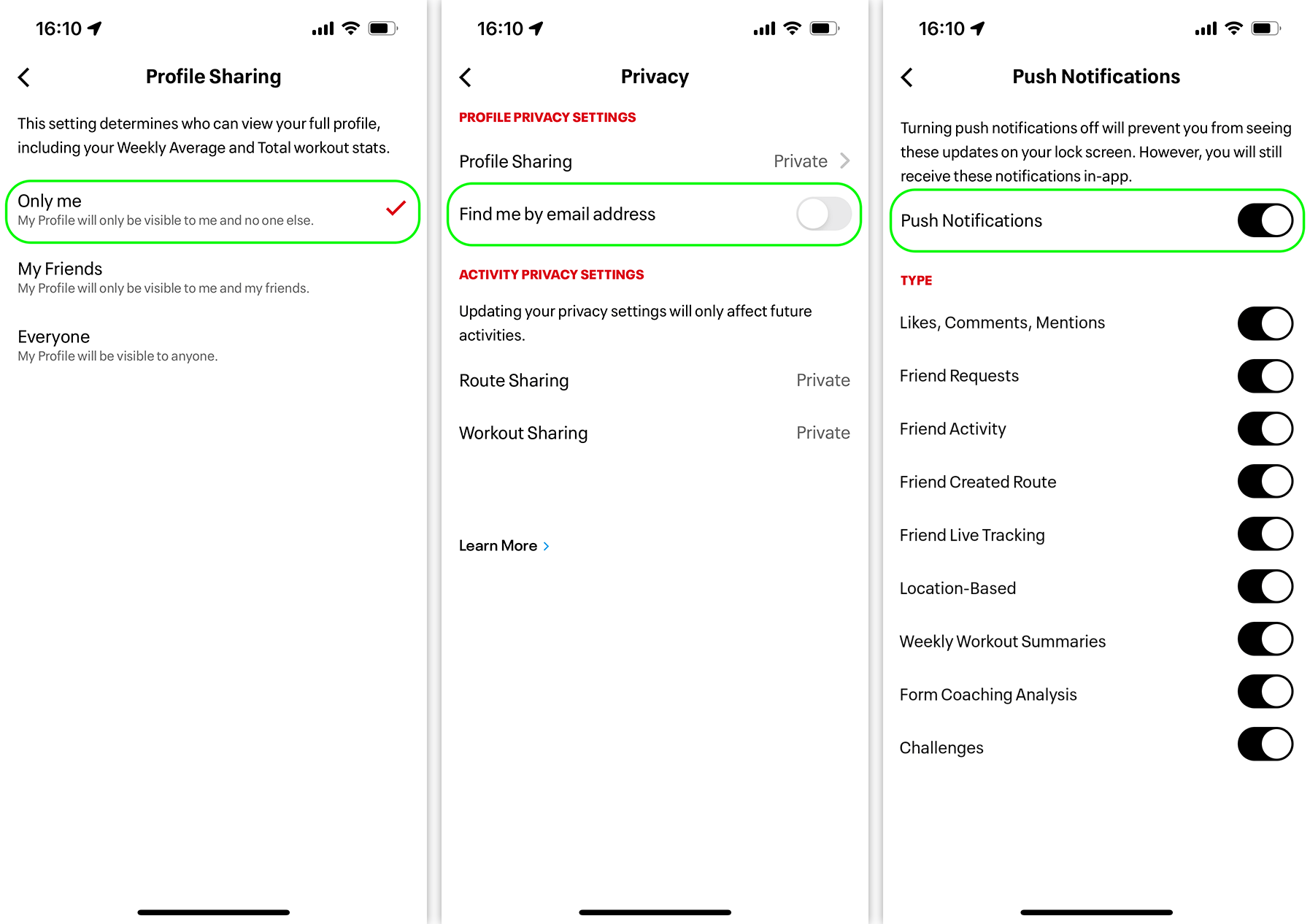
What should you configure here? First, under Profile Sharing, make sure it’s set to My Friends or, even better, Only me. It’s also a good idea to toggle off the switch next to Find me by email address so people can’t do just that.

Next, check Route Sharing and Workout Sharing and ensure they’re also set to My Friends or, preferably, Only me. Finally, go back to Settings, find Push Notifications, and disable any unnecessary notifications — or just turn them all off with the toggle at the top.

Configuring privacy in MapMyRun

If you decide to stop using MapMyRun, it’s a good idea to delete your account. To do this, navigate to SettingsPrivacy Center and choose Delete Account.

If you use other fitness apps to track your workouts, you can set their privacy settings using our guides:

Strava
Nike Run Club
adidas Running (formerly Runtastic) – still to come
ASICS Runkeeper (ditto)

You can also learn how to configure privacy in other apps — from social networks to browsers — on our website Privacy Checker.

And Kaspersky Premium will maximize your privacy protection and shield you from digital identity theft on all your devices.

Don’t forget to subscribe to our blog to stay ahead of scammers with more guides and helpful articles.

Kaspersky official blog – ​Read More

Electric Motor Giant Nidec Confirms Data Stolen in Ransomware Attack

Electric motor manufacturer Nidec confirms business and internal documents were stolen in a ransomware attack.

The post Electric Motor Giant Nidec Confirms Data Stolen in Ransomware Attack appeared first on SecurityWeek.

SecurityWeek – ​Read More

Atlassian Patches Vulnerabilities in Bitbucket, Confluence, Jira

Atlassian has released patches for high-severity vulnerabilities in Bitbucket, Confluence, and Jira Service Management.

The post Atlassian Patches Vulnerabilities in Bitbucket, Confluence, Jira appeared first on SecurityWeek.

SecurityWeek – ​Read More

Weekly Industrial Control System (ICS) Intelligence Report: 54 New Vulnerabilities in Siemens, Rockwell Automation, and Delta Products

Overview

Cyble Research & Intelligence Labs (CRIL) has released its latest Weekly Industrial Control System (ICS) Vulnerability Intelligence Report, sharing multiple vulnerabilities observed by the Cybersecurity and Infrastructure Security Agency (CISA) between October 8 and October 14, 2024. This week’s analysis focuses on security advisories and vulnerabilities that affect critical industrial infrastructure.

The Cybersecurity and Infrastructure Security Agency (CISA) has published 21 security advisories specifically targeting Industrial Control Systems (ICS). These advisories encompass a total of 54 distinct vulnerabilities affecting major vendors, including Siemens, Rockwell Automation, Schneider Electric, and Delta Electronics. Among these, Siemens has reported the highest number of vulnerabilities, totaling 34, while Rockwell Automation follows with 13. 

The report particularly emphasizes vulnerabilities within Siemens’ Tecnomatix Plant Simulation software, which has implications for energy sector applications. A total of 14 vulnerabilities have been identified within this software, with most receiving a high CVSS3 score of 7.8. If exploited, these vulnerabilities could allow attackers to execute arbitrary code or trigger a denial of service, posing a serious threat to operational integrity.

Among the most concerning findings is an Improper Authentication vulnerability linked to Siemens’ SENTRON 7KM PAC3200 (CVE-2024-41798). This power monitoring device, which measures and displays electrical parameters, is susceptible to attacks that exploit its Modbus TCP interface. Attackers can bypass authentication protections through brute-force methods or by monitoring cleartext communications. The advisory from Siemens indicates that “currently no fix is planned,” urging users to ensure that affected devices operate in secure environments to mitigate potential risks.

Vulnerabilities Details

The recent analysis by Cyble Research & Intelligence Labs (CRIL) provides a comprehensive overview of key vulnerabilities that organizations should prioritize for effective patch management and mitigation efforts. Notably, several vulnerabilities have been identified across various vendors, including Siemens, Rockwell Automation, and Delta Electronics.

One of the most intriguing vulnerabilities is CVE-2024-46886, associated with Siemens’ SIMATIC S7-1500 and S7-1200 CPUs, which pose an open redirect risk and are classified as medium severity. Another critical issue is CVE-2024-41981, found in multiple versions of Siemens’ Simcenter Nastran software, which is affected by a heap-based buffer overflow, designated as high severity. Similarly, CVE-2024-47046, also linked to Simcenter Nastran, involves improper memory buffer operations and carries a high severity rating.

Perhaps the most interesting vulnerability identified is CVE-2024-41798, related to Siemens’ SENTRON 7KM PAC3200. This issue involves improper authentication and is classified as critical, highlighting the potential for exploitation. Additionally, CVE-2024-47194, affecting Siemens’ ModelSim, reveals an uncontrolled search path element and is rated medium in severity. Another critical vulnerability, CVE-2024-47553, relates to the SINEC Security Monitor from Siemens, which faces an argument injection risk.

On the Rockwell Automation side, CVE-2024-7952 highlights a serious concern in the DataMosaix Private Cloud, where sensitive information exposure is rated as high severity. Delta Electronics also reported CVE-2024-47962, which involves a stack-based buffer overflow in its CNCSoft-G2 software, classified as high severity as well.

An overview of the vulnerabilities indicates a pronounced prevalence of high-severity issues among the disclosed vulnerabilities. Furthermore, a closer examination of vulnerabilities disclosed by vendors shows that the majority stem from companies engaged in critical infrastructure sectors, particularly Siemens and Rockwell Automation.

Recommendations and Mitigations

Given the identified vulnerabilities and their potential impacts, Cyble offers some important recommendations for organizations to strengthen their cybersecurity posture:


Regularly monitor security advisories and alerts from vendors and authorities to remain aware of potential vulnerabilities.

Implement a risk-based vulnerability management strategy to minimize the risk of exploitation, complemented by a Zero-Trust security model.

Encourage threat intelligence analysts to assist in the patch management process by continuously tracking critical vulnerabilities.

Ensure that your patch management strategy encompasses inventory management, patch assessment, testing, deployment, and verification. Automate these processes where feasible to enhance consistency and efficiency.

Effective network segmentation can limit attackers’ ability to perform reconnaissance and lateral movement within critical environments.

Periodically perform audits, vulnerability assessments, and penetration testing to identify and rectify security weaknesses.

Establish ongoing monitoring and logging capabilities to detect network anomalies and potential threats early.

Leverage SBOM to gain visibility into the individual components and libraries in use, along with their associated vulnerabilities.

Implement physical controls to restrict unauthorized personnel from accessing critical devices and networks.

Develop and regularly update an incident response plan that outlines procedures for detecting, responding to, and recovering from security incidents.

Conclusion

Addressing the vulnerabilities highlighted in the report requires a collaborative approach. Organizations should not only implement internal security measures but also engage with vendors and industry peers to share information and best practices. By adhering to the recommendations outlined above, organizations can better protect their assets and ensure the integrity of their critical infrastructure operations to remain ahead of online vulnerabilities and security trends.

The post Weekly Industrial Control System (ICS) Intelligence Report: 54 New Vulnerabilities in Siemens, Rockwell Automation, and Delta Products appeared first on Cyble.

Blog – Cyble – ​Read More

US Government Says Relying on Chinese Lithium Batteries Is Too Risky

A new document shows the Department of Homeland Security is concerned that Chinese investment in lithium batteries to power energy grids will make them a threat to US supply chain security.

Security Latest – ​Read More

AI and Hardware Hacking on the Rise

Bugcrowd’s Inside the Mind of a Hacker report surveys the thoughts of one of the world’s largest hacker communities.

The post AI and Hardware Hacking on the Rise appeared first on SecurityWeek.

SecurityWeek – ​Read More

Internet Archive Hacked Again During Service Restoration Efforts

The Internet Archive has suffered an email hack while working to restore services impacted by the recent cyberattacks.

The post Internet Archive Hacked Again During Service Restoration Efforts appeared first on SecurityWeek.

SecurityWeek – ​Read More

Malware Analysis Report in One Click

Editor’s note: The current article was originally published on August 16, 2022, and updated on October 21, 2024.

Malware analysis is a challenge as it is. But after your hard work on cracking a new sample, it is important to present all your results to the company and colleagues. And today, we will talk about how to write a malware analysis report in one click. 

How to write a malware analysis report?

To write a typical malware analysis report, you should cover the following points:

Summary. Provide the highlights of your research with the malicious program’s name, origin, and main characteristics.  

General information. Include malware type, file’s name, size, and current antivirus detection capabilities. Don’t forget about hashes: MD5, SHA1, SHA256, and SSDEEP. And if a sample has different family names, it’s worth mentioning them, too. 

Characteristics. Write how the sample infects a system, self-preserves, distributes, communicates with servers, collects data, etc. 

Dependencies. Note malware functionality with the required OS version, software set, executables and initialization files, DLLs, list of URLs, and scripts.

Behavior activities. Give a review of the behavior activities like what executable files malware drops, if it checks the language, runs injected code in another process, or changes any settings.

Static information. Code analysis results, headers information.

Additional data. Attach screenshots, logs, string lines excerpts, etc. 

IOCs. Show indicators of compromise that are necessary for successful detection and future prevention.

Get an automated malware analysis report with ANY.RUN 

It’s essential to save and share your reports for further cybersecurity strategy and investigation. And ANY.RUN sandbox allows you to do it effortlessly and with just one click. 

You can download text reports with detailed information, get PCAP and SSL keys, check request/response content, copy malware config information from the memory dump, use the process graph and MITRE ATT&CK matrix. Besides that, you can export data in JSON format.

We took the RedLine malware sample to show all report examples. 

1. Text reports

Our HTML report is a one-click option to get all data about a sample. It’s a ready-made solution, so you don’t need to write a malware report by yourself. Information is displayed conveniently, so you can easily find whatever you need. 

You can also adjust the document online, share and print it. Also, get the report via API. 

The text report includes all data from the task: 

created processes

events and files in the registry

information about network activity

IOCs

screenshots 

process behavior graph

Depending on your goal, you can customize an HTML report and choose what sections to include. 

Text malware report

2. JSON reports

Download a summary of all task information in JSON format. You can parse the maximum information with this file and analyze precisely the data you need. Then include it in the final report to show all malware footprints.

JSON summary

Easily generate detailed malware reports in ANY.RUN 


Register for free


3. STIX reports

ANY.RUN lets you export collected threat data in the Structured Threat Information eXpression (STIX) format. It is a standardized language used to transfer cyber threat intelligence in a consistent and machine-readable format.

The provided report contains a variety of data related to the threat analysis, including the link to the sandbox session, hashes, network traffic details, file system modifications, TTPs, and more.

Click Export → STIX to download threat data

To export data in STIX:

Run your analysis in the ANY.RUN sandbox or open any report from Public submissions.

Click Export.

Choose STIX from the list of options.

These reports can be ingested by Security Information and Event Management (SIEM) systems and other automated tools, enabling faster and more efficient threat detection and response.

Using STIX reports, your analysts and incident response teams can share threat data across different platforms in a more convenient way.

4. PCAP and SSL keys

One of ANY.RUN features is to intercept network traffic. SSL Keys and network dump in a PCAP format are available for your report and further analysis. Just download it from the task and include it in your final report.

PCAP and SSL keys

5. Request/response content

Take a look at the content from HTTP/HTTPS requests and responses. Besides, connection streams are also available. You can also investigate the header’s query. And this data should be highlighted in the report. 

Request/response content

6. Malware configuration 

ANY.RUN extracts the content of the malicious process’s memory dump, so you can dive into analysis with malware configuration: encrypted strings, IP addresses, ports that communicate with the C2 server, family name, version, mutex, and other data.  

Malware configuration

7. Process graph 

One of the most effective ways to get a summary of malicious execution is to use a process graph of behavior activities. All processes are presented clearly and logically, especially if the process tree is large. The graph gives you a new angle to look at the processes’ relations and maybe discover something new.  Also, it helps to point out the conclusion about the program’s behavior quickly. 

Process graph

8. MITRE ATT&CK matrix

Research sample’s tactics and techniques. In ANY.RUN, you can analyze malware functionality with the MITRE ATT&CK matrix.

MITRE ATT&CK matrix

Check how to get free malware samples and reports from ANY.RUN’s 6 million database. It will help to see other versions of malware samples and provide a more profound investigation for your research.

9. AI reports 

AI reports are highly useful when you need a detailed, easy-to-understand perspective on the threat at hand. These reports detail what occurred during the interactive session and highlight traits that may indicate malicious activity, explaining the rationale behind such assessments.

AI report

To generate a comprehensive report on any specific event registered during the malware’s execution, click the AI icon next to it. 

Wrapping up 

Check how to get free malware samples and reports from ANY.RUN’s 6 million database. It will help to see other versions of malware samples and provide a more profound investigation for your research. 

About ANY.RUN

 ANY.RUN is a cloud malware sandbox that handles the heavy lifting of malware analysis for SOC and DFIR teams. Every day, 300,000 professionals use our platform to investigate incidents and streamline threat analysis.      

Request a demo today and enjoy 14 days of free access to our Enterprise plan.     

Request demo →  

The post Malware Analysis Report in One Click appeared first on ANY.RUN’s Cybersecurity Blog.

ANY.RUN’s Cybersecurity Blog – ​Read More