https://www.backbox.org/wp-content/uploads/2018/09/website_backbox_text_black.png00https://www.backbox.org/wp-content/uploads/2018/09/website_backbox_text_black.png2024-11-12 13:07:092024-11-12 13:07:09Bitwarden vs. 1Password: Which password manager is best?
Enterprise spend on cloud services continues to go up, up, up — to the tune of $675 billion this year — thanks to organizations’ firm embrace of software-as-a-service, the popularity of distributed working, and the arrival of compute-intensive tech like AI. A startup called PointFive that believes it has found a better way to get […]
https://www.backbox.org/wp-content/uploads/2018/09/website_backbox_text_black.png00https://www.backbox.org/wp-content/uploads/2018/09/website_backbox_text_black.png2024-11-12 13:07:092024-11-12 13:07:09PointFive snaps up $20M for breakthrough tech to track usage across multiple clouds
Contrary to the popular belief that anything online stays online, the internet doesn’t remember everything. In a previous post in this series, we examined no fewer than nine scenarios in which you could lose access to online content. We also provided a detailed guide to what information you absolutely must (and preferably quickly) back up to your computer and how to do it. Today, we’ll discuss how to easily save web pages to your computer, how to organize these archives, and what to do if your favorite site has gone AWOL.
Let’s say you want to save a blog post with a recipe, compile a bibliography for your research paper, or even preserve a specific online publication for legal purposes. All of the above are published as web pages — which have a tendency to disappear at the wrong moment. Want to reminisce about music news and gossip from 2005? Good luck with that — the MTV News site shut down and all its articles and interviews are no longer available. Check references in Wikipedia articles? 11% of them lead nowhere, even though they were working when the article was published. This phenomenon of “link rot” — the gradual deletion or relocation of online content — is rapidly becoming a major problem. 38% of pages that existed ten years ago are no longer accessible today. So, if there’s a web page out there that you like or need, the wise move would be to create a backup.
How to save a web page to your computer
Since a web page consists of dozens or even hundreds of files, backing it up will require a bit of effort. Here are the main ways to do it:
Save only the text as an HTML file. Select the “Save page as…” menu command or button in your browser and then select “Webpage, HTML Only”. This will only save the text of the web page, without any graphics or other eye candy.
Save text and images. The “Webpage, Complete” option will create, besides an HTML file, a folder with the same name containing all graphic elements, styles, and scripts from the page. A downside of this option is that saving a lot of auxiliary files clutters your drive. The “Webpage, Single File” option is more convenient, bundling the web page and all its resources into a single .mhtml file. This will open freely in Chrome or Edge, but other browsers may have issues. This option is not available in all browsers, but if you install the SingleFile extension (available for most browsers), you can save the entire web page and its media content as a single HTML file that opens perfectly fine in all modern browsers.
Print to PDF. To preserve the main content of the page, but scrap menus and banners, your best option is Print to PDF. The resulting file will open on any computer.
With any of these options, make sure that the main text that you actually want to keep is still readable when you open the document.
An easier way to save a web page
The methods described above are a bit time-consuming and create clutter on your hard drive. For greater convenience, use a dedicated service such as Pocket (formerly Read It Later), wallabag, or Raindrop.io. They all work the same way: you send a link from which the service retrieves a document with all the illustrations, cleans the page of anything unnecessary, and saves it in your personal online storage. Even if the original page gets deleted or modified, the version you want will remain in your archive. These services allow you to group and sort your links, search for text inside, and view your saved pages on any device. For desktop, there’s an extension available for all the major browsers; and for mobile, there’s an app.
All these services offer an “eternal” archive only with a premium subscription, meaning you’ll have to pay for the convenience. That said, Wallabag is open-source — you can install it on your own server and not pay for third-party services or worry about the service getting shut down.
Some note-taking apps can also save complete web pages. These include Evernote, where the feature is called “Web Clipper”.
How to save a web page for others
If it’s not just a copy for yourself that you need, but to share a certain version of the page with others, you’ll need a public-archiving service.
The best-known is the Internet Archive (archive.org) and its Wayback Machine. Other options include archive.today (aka archive.is), perma.cc, and megalodon.jp. They all work on a similar principle: either at the user’s request or automatically they visit web pages and save a copy on their servers.
To request archiving of a web page, go to web.archive.org and enter the full address in the Save Page Now box. After you click Save, a window appears describing all of the page’s loaded components, followed by a permanent link to the site in its preserved state. It looks like this: https://web.archive.org/web/20240924045754/https://www.kaspersky.com/blog. The link shows both the address of the saved page and the exact time of saving — perfect for archival purposes.
Registering on archive.org lets you manage a collection of such links, take screenshots of saved sites, and download copies of them in the special web-archiving format.
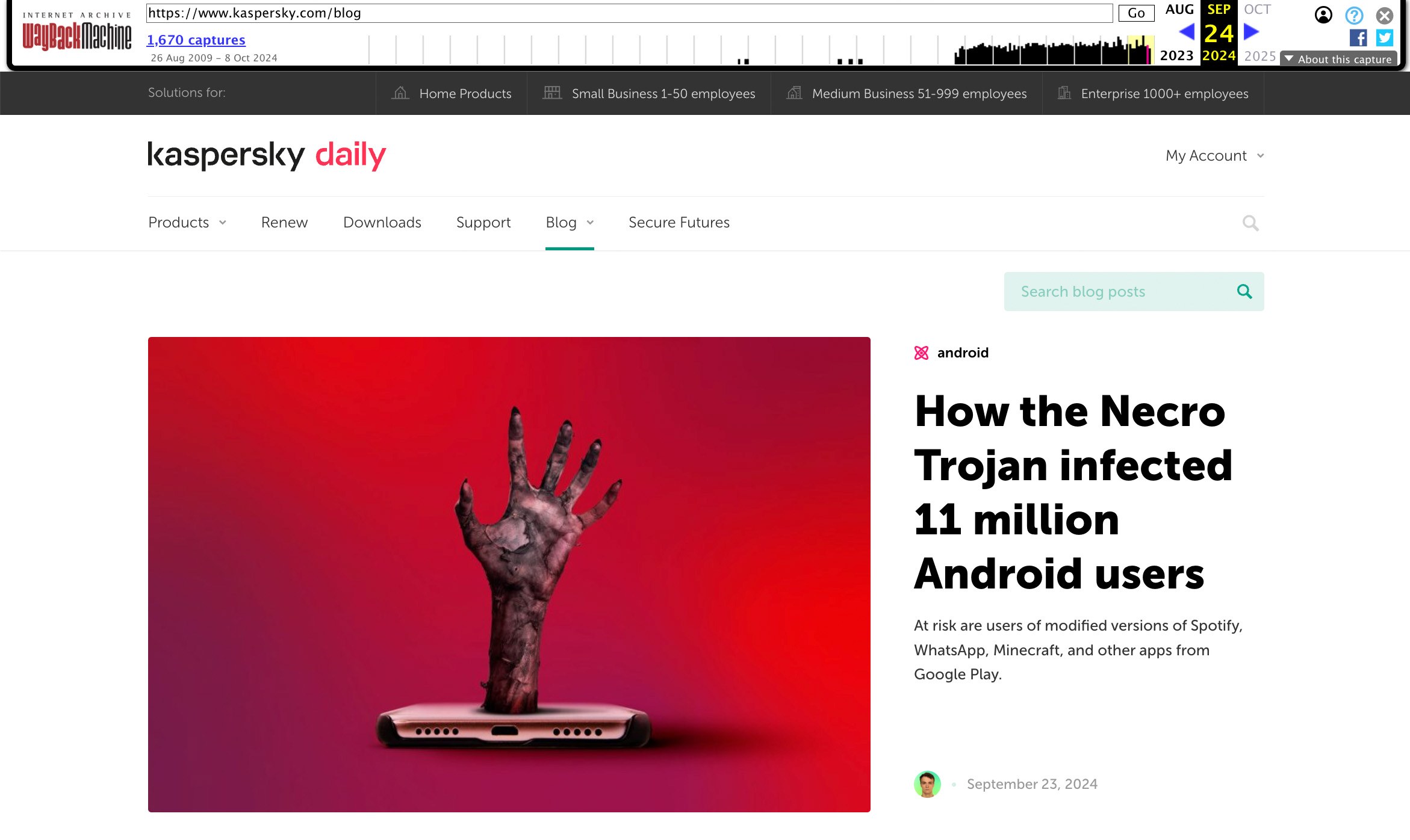
On archive.org, you can view previously saved versions of websites and save the current state of any site — for example, our blog
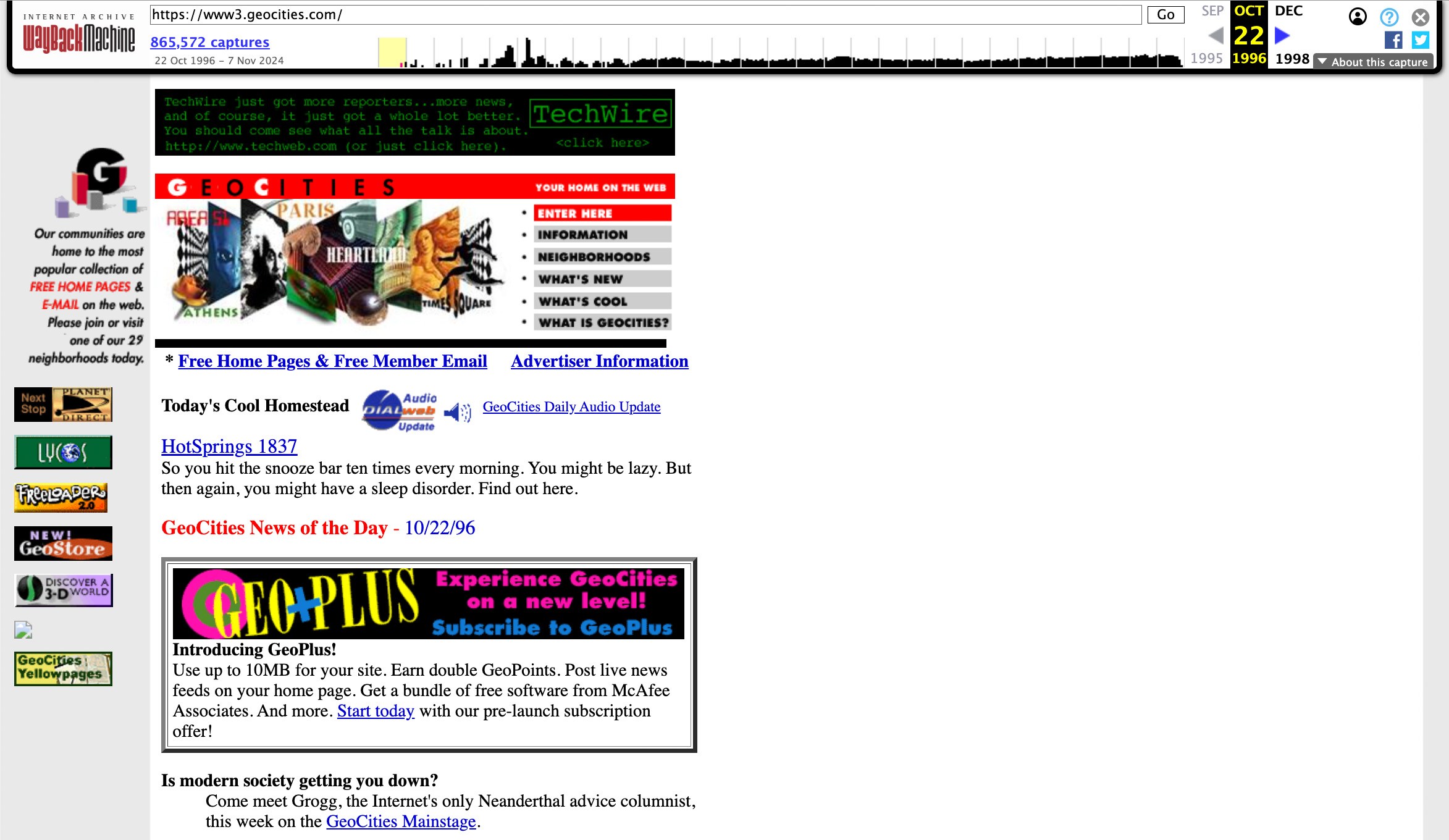
On opening the archive link, you’ll see the saved page with a timestamp indicating when the snapshot was taken. This feature is useful for tracking and demonstrating changes in website data: price fluctuations, product description updates, edited news reports, and deleted information. The latter is particularly important for historical and cultural researchers based on defunct websites. Below, you can check out one of the first versions of GeoCities, a once popular web-hosting service that let you create “home pages”, express yourself, and find friends with shared interests long before social networks. It’s only thanks to the Wayback Machine that we can see it now — the site closed shop in 2016.
A gift for the old-timers: one of the earliest versions of GeoCities.com
How to find deleted internet content or an old version of a website
Enter the full address of the website or a specific page in the box next to the logo and click Enter. If the exact URL is unknown, you can enter the name of the website or words that describe it well.
Select the desired website from the list. The results show at a glance how many copies are archived and for what period.
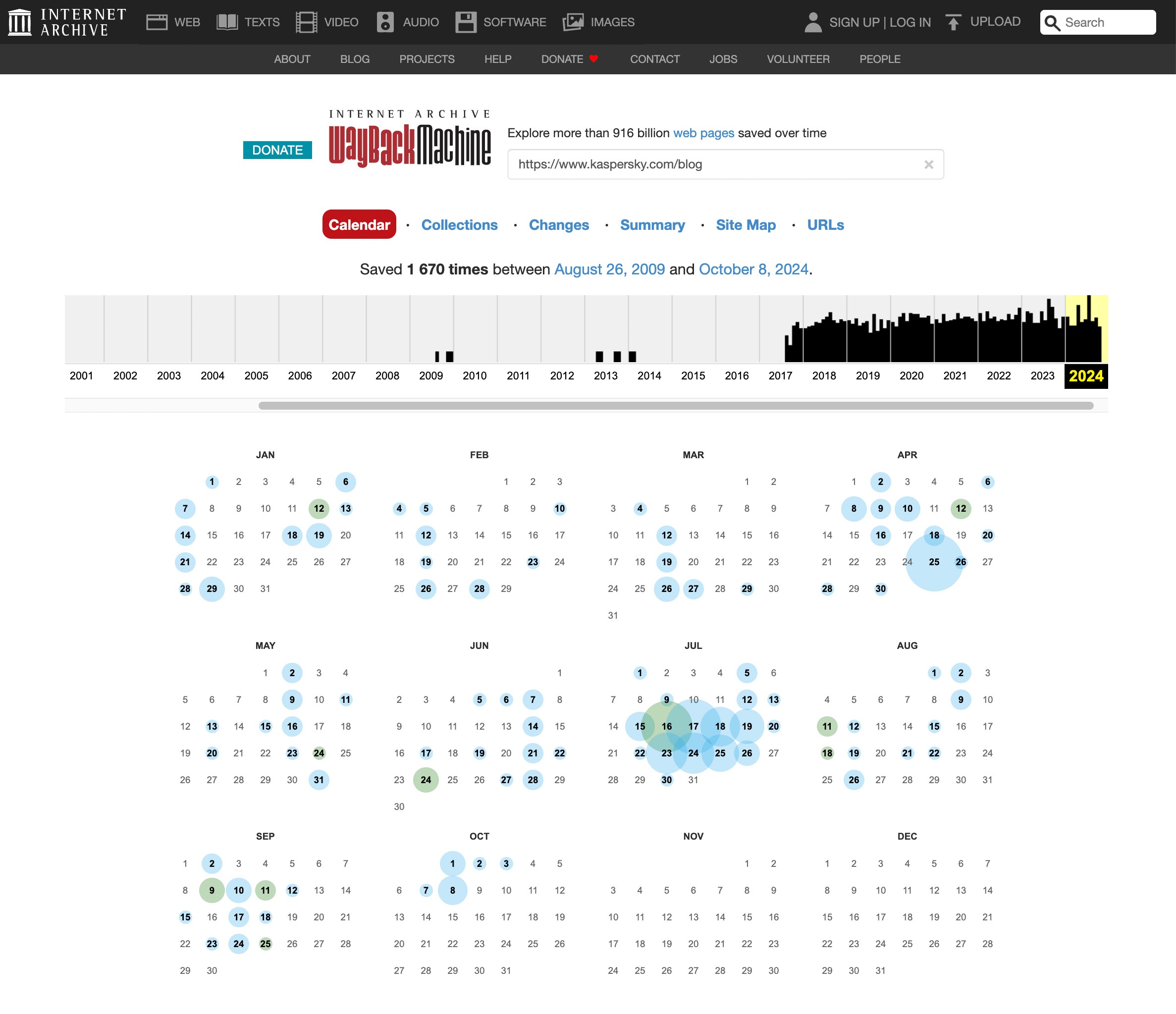
Use the calendar to select which of the saved copies of the site you wish to view. Dates for which there is a saved copy are circled — the larger the circle, the more copies were made that day.
Click the desired date and inspect the saved site. Note that loading a copy from the archive may take a few minutes.
The calendar graph above the site copy lets you navigate to older and newer copies.
How to explore old versions of sites at web.archive.org
You can copy the link to the retrieved copy from the address bar to access the archived site directly, bypassing the search interface.
What if archive.org can’t help
The foundation behind archive.org sometimes complies with the requests of copyright holders and other authorized parties to exclude certain sites from the Wayback Machine. Also, the service never aimed to preserve the entire internet, so it may happen that the page you need was never indexed. In such cases, try looking for it in other time capsules.
Archive.today (aka archive.is) doesn’t automatically save pages — it does so only at the request of users. Among other things, this does away with having to follow instructions for search robots (robots.txt), and means that the archive contains documents that aren’t available in the Wayback Machine.
Another important web-archiving project is perma.cc, created by a consortium of major world libraries. However, it’s only free for participating organizations. Individual users can subscribe to a paid plan, with pricing based on the number of archived links.
A powerful alternative to specialized archives is search engines’ cached content. To index any web page, search engines retrieve its text, so a crude but readable version of almost any page can be found there. For a long time, Google’s cache was the most accessible, but in early 2024, the search giant removed the direct link to its cache from search results. The service still works, but accessing it directly is very difficult.
Therefore, it’s better to use browser extensions that make internet archives easier to work with. For example, if a link takes you to a deleted page or a defunct website, the Web Archives extension redirects you straight to an archived copy of this page at web.archive.org, archive.today, or perma.cc, or shows a cached version of it from Google, Bing, or Yandex.
How to save data from other online services
Besides web pages, there are many other online services — from photo albums and notes to social networks — that hold data you also may want to save. Of course, recommendations vary for different types of data and specific services, but for your convenience, we’ve grouped all related instructions under the backup tag. You can read about creating backups for:
https://www.backbox.org/wp-content/uploads/2018/09/website_backbox_text_black.png00https://www.backbox.org/wp-content/uploads/2018/09/website_backbox_text_black.png2024-11-12 13:06:592024-11-12 13:06:59How to save web pages permanently or find content from deleted sites | Kaspersky official blog
Donald Trump has vowed to deport millions and jail his enemies. To carry out that agenda, his administration will exploit America’s digital surveillance machine. Here are some steps you can take to evade it.
https://www.backbox.org/wp-content/uploads/2018/09/website_backbox_text_black.png00https://www.backbox.org/wp-content/uploads/2018/09/website_backbox_text_black.png2024-11-12 12:07:472024-11-12 12:07:47The WIRED Guide to Protecting Yourself From Government Surveillance
https://www.backbox.org/wp-content/uploads/2018/09/website_backbox_text_black.png00https://www.backbox.org/wp-content/uploads/2018/09/website_backbox_text_black.png2024-11-12 12:07:472024-11-12 12:07:47Amazon Employee Data Leaked by Hacker
https://www.backbox.org/wp-content/uploads/2018/09/website_backbox_text_black.png00https://www.backbox.org/wp-content/uploads/2018/09/website_backbox_text_black.png2024-11-12 11:07:342024-11-12 11:07:34The Real Problem With Banning Masks at Protests
On October 23, we hosted a webinar “How to Improve Threat Investigations with TI Lookup”. The session was led by Dmitry Marinov, CTO at ANY.RUN, who showed the audience effective methods for collecting the latest threat intelligence.
Here is a quick rundown of the main topics and examples of investigations covered during the event.
What is Threat Intelligence Lookup
Threat Intelligence (TI) Lookup is a centralized service for threat data exploration, collection, and analysis. It contains fresh threat data extracted from public malware and phishing samples uploaded to ANY.RUN’s Interactive Sandbox over the past 180 days. Each search request you make returns results that provide expanded context related to the threat data in your query.
Key features of TI Lookup include:
Search results take just 5 seconds for events spanning the last six months. You can quickly get in-depth information about how events work, whether they are linked to a threat, and how they are related to that threat.
With over 40 search parameters, TI Lookup provides examples and context from other investigations to help with decision-making. Unlike other solutions where you can work only with IOCs, Lookup can search among events and YARA rules, which is extremely helpful.
TI Lookup has a large amount of data from the ANY.RUN sandbox, where cybersecurity analysts from around the world analyze threats. New samples are uploaded and analyzed daily, providing data that you cannot find in any other open sources.
How TI Lookup Sources Data
A core component of the suite is the Public submissions database. It is a vast repository that houses millions of unique malware and phishing samples submitted daily by a global community of over 500,000 security professionals from different spheres and industries using ANY.RUN.
Every time a user runs a public analysis in the sandbox, the systems capture the key data from that analysis. This data is then immediately sent to Threat Intelligence Lookup. As a result, Threat Intelligence Lookup becomes a centralized hub where you can search through threat data extracted from millions of malware and phishing analysis sessions launched in the ANY.RUN sandbox.
Collect threat intel on the latest malware and phishing campaigns with TI Lookup
The first part of the query, threatName:”lumma”, instructs the search engine to find sandbox sessions where Lumma was detected.
The second part of the query, domainName:””, tells the system to retrieve all domain names identified in those sandbox sessions. The empty field essentially acts as a wildcard, indicating that you are interested in all domain names associated with the threat.
The service returns numerous domains that match our request. At the top, you can see domains with the malconf tag, which tells you that these domains were extracted directly from the configs of Lumma samples, the most reliable source of indicators of compromise. We can easily copy each indicator or download all of them in JSON format.
As you can see, apart from domains, the service also provides a large number of other types of indicators, including events, files, URLs, and others. That’s one of TI Lookup’s unique advantages – the diversity of data it provides.
Use Cases of TI Lookup
To demonstrate how TI Lookup can be used in real-world investigations, Dmitry outlined several use cases where the service can be particularly useful.
Checking a Suspicious IP Address
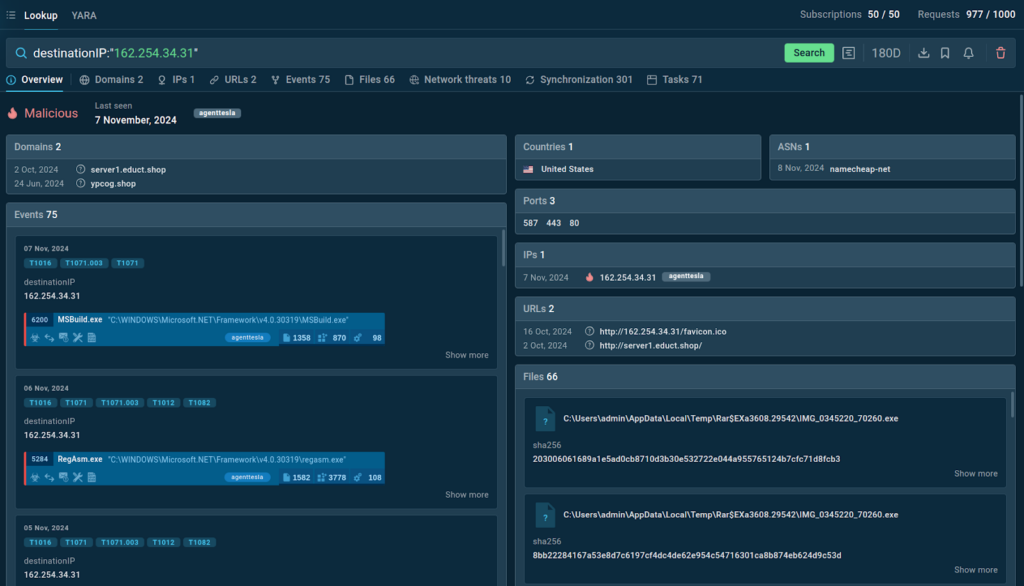
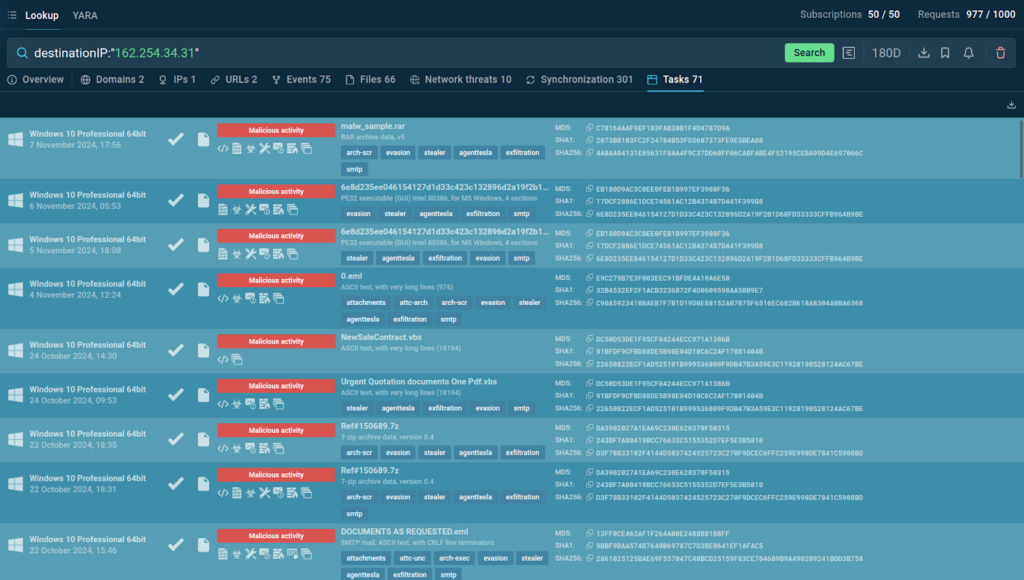
One of the most straightforward use cases is identifying threats using a suspicious IP address. For example, if you receive an alert about a connection to a suspicious IP address (e.g., 162.254.34.31) coming from one of the machines on your network, TI Lookup can quickly check if this IP address has been used in other malware attacks.
The service marks the queried IP address as malicious and offers extra context
TI Lookup provides a list of sandbox sessions where the IP address was detected
It also provides related indicators, including processes, files, and most importantly, sandbox sessions where you can see the analysis of actual attacks and collect more data.
Identifying a Malware Family Using a Mutex
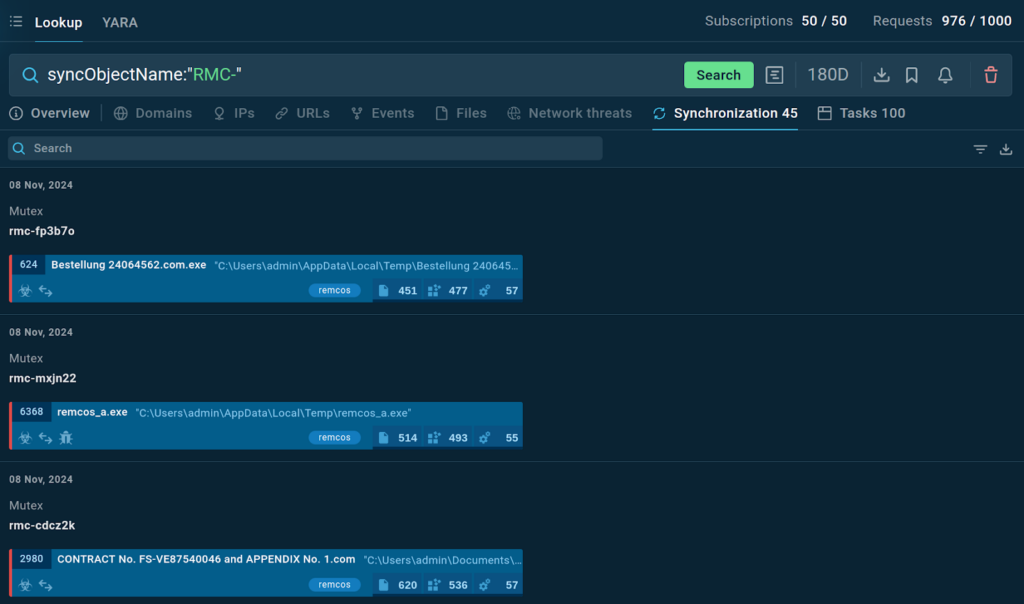
Another way to use TI Lookup is to identify a threat by using unique indicators such as mutexes. For instance, you can use mutexes to identify the Remcos malware.
Synchronization events found in TI Lookup’s database with corresponding sandbox sessions
By entering the query syncObjectName:”RMC-“, the service shows specific mutexes and provides a list of sandbox sessions to explore the threat further.
Learn to Track Emerging Cyber Threats
Check out expert guide to collecting intelligence on emerging threats with TI Lookup
Read full guide
Uncovering a Threat Using a File Path
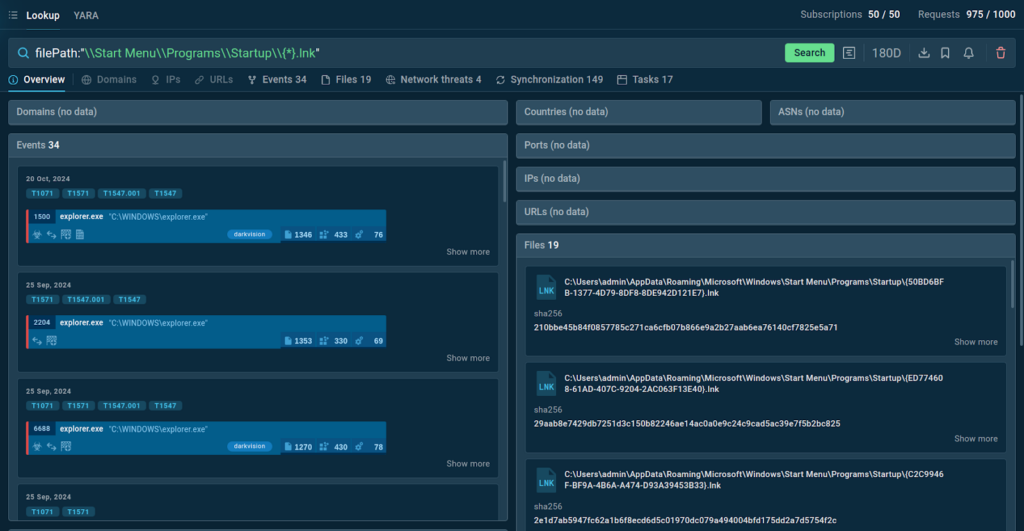
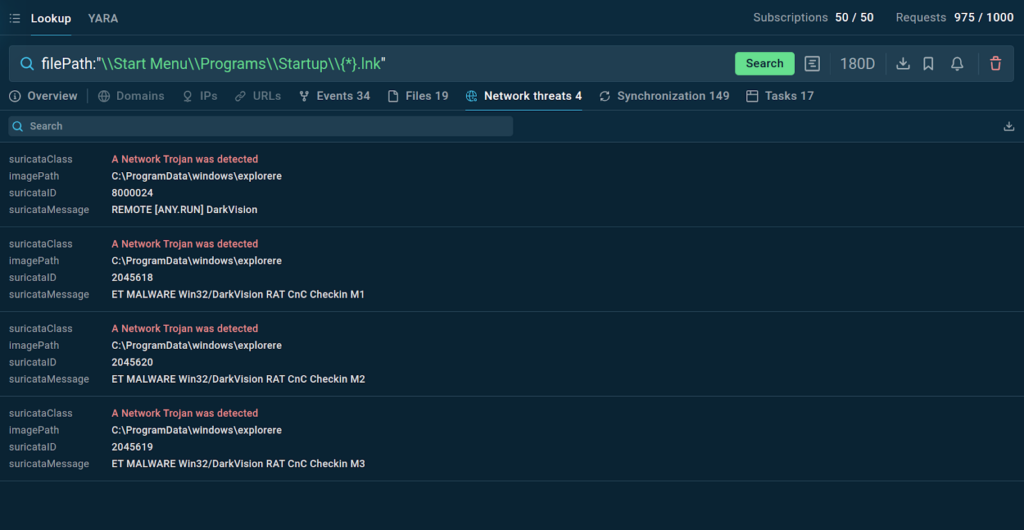
You can also find threats using a file path.
The service provides a list of files that match the query and events with the tag “darkvision”
The service also returns Suricata IDS rules triggered in relation to the requested files’ activity
This allows you to see the context and related sandbox sessions for further investigation.
Connecting Unrelated Data Points
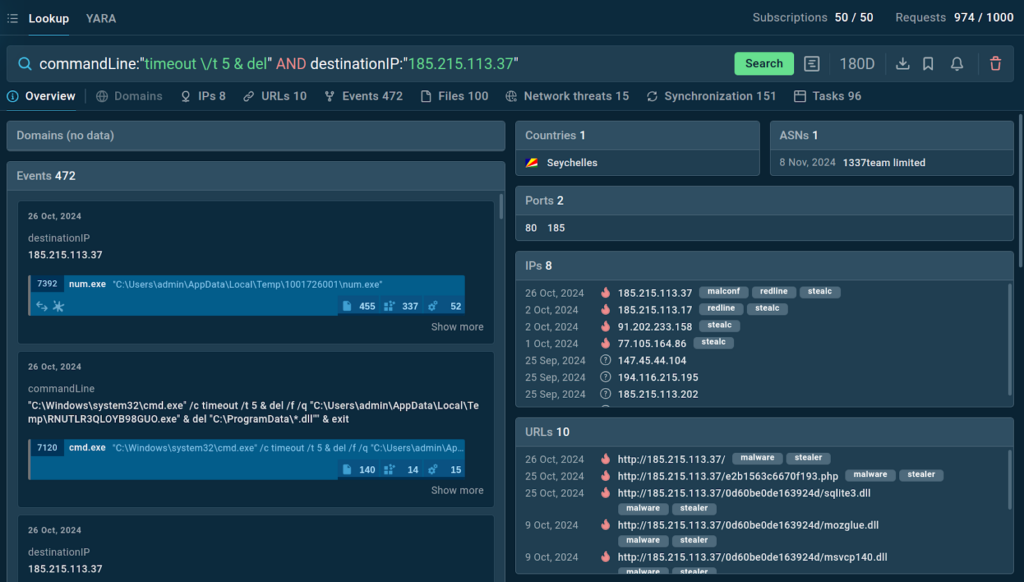
One of the most powerful features of TI Lookup is its ability to connect pieces of data that may seem unrelated. Consider a scenario where you have a command line artifact and a network artifact.
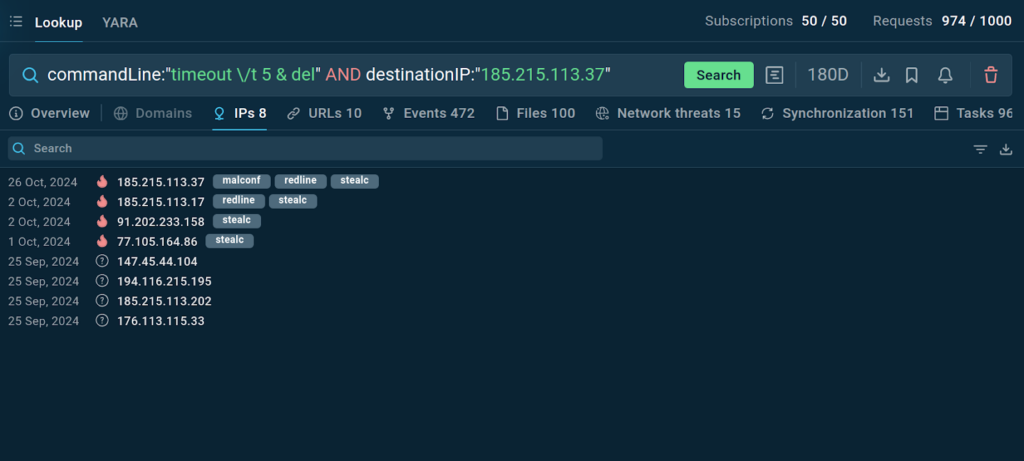
The command line artifact might be commandLine:”timeout /t 5 & del”, which indicates a command that delays execution for 5 seconds and then deletes a file. The network artifact might be destinationIP:”185.215.113.37″, which represents an IP address that the system is communicating with.
TI Lookup generates relevant results, offering instant threat context
The service provides plenty of context and shows that the malware in question is StealC. Some of the additional indicators provided include malicious IPs and URLs, which were used in StealC attacks.
You can always go back to the source by navigating to a sandbox session of your interest to observe the threat’s behavior, and even rerun the analysis using your own VM settings.
Collecting Fresh Samples with YARA Rules
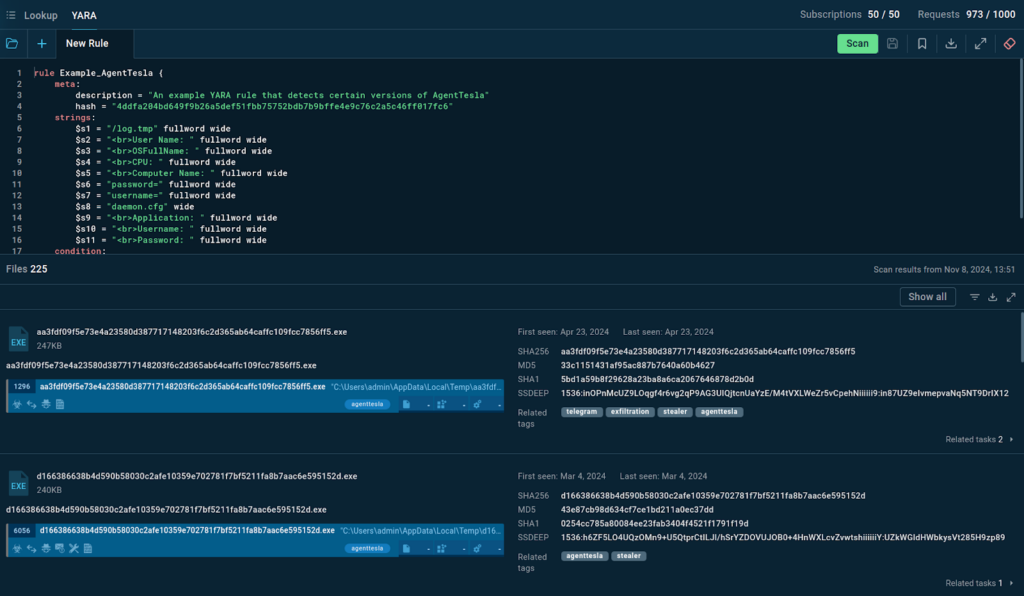
Another handy feature of TI Lookup is YARA Search. Thanks to the built-in editor, you can create, edit, store, and use YARA rules to find samples that match them.
The YARA rule search TI Lookup’s database for matching samples
For example, using a YARA rule for AgentTesla, which is available by default in TI Lookup, the search returns numerous files that can be filtered by date. You can explore each result in detail by clicking on them and navigating to the sandbox session where it was detected.
You can also download a JSON file containing file hashes along with links to corresponding sandbox sessions.
Conclusion
The webinar gave a detailed look at TI Lookup, showing how it can help improve threat investigations. The tool’s ability to provide fast results, offer a wide range of search options, and give access to real samples and the latest data makes it very useful for cybersecurity professionals.
Stay tuned for more webinars from ANY.RUN by following us on social media like X, Facebook, and Discord. Subscribe to ANY.RUN’s YouTube channel for the upcoming release of a video recording of the webinar.
About ANY.RUN
ANY.RUN helps more than 500,000 cybersecurity professionals worldwide. Our interactive sandbox simplifies malware analysis of threats that target both Windows and Linux systems. Our threat intelligence products, TI Lookup, YARA Search and Feeds, help you find IOCs or files to learn more about the threats and respond to incidents faster.
With ANY.RUN you can:
Detect malware in seconds
Interact with samples in real time
Save time and money on sandbox setup and maintenance
https://www.backbox.org/wp-content/uploads/2018/09/website_backbox_text_black.png00https://www.backbox.org/wp-content/uploads/2018/09/website_backbox_text_black.png2024-11-12 11:07:132024-11-12 11:07:13How to Improve Threat Investigations with TI Lookup: Webinar Recap
https://www.backbox.org/wp-content/uploads/2018/09/website_backbox_text_black.png00https://www.backbox.org/wp-content/uploads/2018/09/website_backbox_text_black.png2024-11-12 10:06:532024-11-12 10:06:53IP Spoofing Attack Tried to Disrupt Tor Network
Cyble Research and Intelligence Lab (CRIL) has identified a sophisticated campaign employing PowerShell in a multi-stage infection process.
The attack initiates with a suspicious LNK file, which activates a PowerShell script designed to download and execute malicious payloads. This layered strategy enhances stealth, evades detection, and ensures prolonged persistence within the target system.
In the first stage, the LNK file runs an initial remote obfuscated PowerShell script that establishes persistence by deploying and executing a secondary PowerShell script and batch files.
The second-stage PowerShell script continues communication with the command-and-control (C&C) server and executes a third-stage PowerShell script.
The third and final stage PowerShell script sends requests for command chains and includes routines to execute received commands as directed by the C&C server.
An analysis of the Network infrastructure reveals the presence of a Chisel DLL, suggesting the Threat Actor (TA) may leverage the Chisel client for further C&C communications and to enable lateral movement operations within the compromised network.
The TA also likely utilizes the Netskope proxy for command and control (C&C) communication with the Chisel server.
Executive Summary
CRIL has recently identified a campaign engaging in a multi-stage infection chain. This chain employs several techniques, starting with the execution of PowerShell scripts. The campaign begins with a malicious LNK file that triggers the execution of a first-stage remote PowerShell script. This script aims to establish persistence on the victim’s system by dropping and running a second-stage PowerShell script. The second-stage script maintains communication with the C&C server, allowing it to download and execute an additional third-stage PowerShell script.
The third-stage script continuously interacts with the C&C server to receive command chains. It executes these commands based on the instructions provided, enabling a variety of malicious activities, such as data exfiltration or lateral movement. The presence of a Chisel DLL on the remote server suggests that the TA may utilize Chisel for advanced operations, including setting up a SOCKS proxy and facilitating lateral movement within the infected network, further strengthening their foothold and enabling stealthy communications.
Technical details:
The infection chain begins when the user inadvertently executes a malicious LNK (shortcut) file. However, the initial infection vector of the LNK file remains unidentified. This LNK file is crafted to run a PowerShell command, which downloads another Base64 encoded PowerShell command from the remote server and then executes it.
The Powershell command uses techniques to bypass Windows security mechanisms, such as setting the PowerShell execution policy to “Bypass,” which allows the script to run without restrictions typically enforced by the system’s security settings. Additionally, the PowerShell window is executed in hidden mode, ensuring that the user does not see any visual indicators of the malicious activity. Following is the PowerShell command:
The figure below shows the property of the shortcut file.
Figure 1 – Malicious Shortcut File
The figure below displays the Base64-encoded PowerShell script, highlighting the sophisticated methods used to conceal its true functionality.
Figure 2 – Base64 Encoded PowerShell Script
This de-obfuscated PowerShell script is a sophisticated piece of code engineered to establish persistence and download a PowerShell script from the C&C server. It employs various obfuscation techniques to evade detection and execute its malicious activities stealthily. The figure below shows the de-obfuscated PowerShell script.
In the First Stage, the PowerShell Script performs the following tasks
Initially, the PowerShell script creates a Hidden directory at “C:UsersMalWorkstationAppDataRoamingMicrosoftLogs” and sets the variable “$HASH” with a seemingly random string, “bdhbzaibdiBKJBJIBDI67869686806656..”. While the exact purpose of this variable is unclear, it could be a placeholder for future use.
To ensure secure communications, the PowerShell script configures the security protocol to TLS 1.2
It then retrieves the system’s hostname with the “hostname” command and proceeds to obfuscate this information, converting it to a Base64-encoded string
This command attempts to retrieve the proxy settings for the specified URL, “hxxp://google.es/,” and constructs the authorization header, appending Base64-encoded hostname.
If a proxy is configured on the victim’s machine, it uses the proxy to send a request to “hxxps://c2.innov-eula.com/” with the constructed Authorization header. If no proxy is configured, it sends the same request directly without using a proxy.
The response from the request is stored in the $R variable, which contains a PowerShell script. This script is then saved in the “Logs” folder with the filename “Log_29109314.ps1.” and then executed subsequently.
The PowerShell script creates two batch files, “Log_29109317.bat” and “Log_29109318.bat,” in the Logs folder. The “Log_29109317.bat” file runs the “Log_29109314.ps1” script, while the “Log_29109318.bat” file moves “Log_29109317.bat” to the startup folder for persistence.
The figure below shows the content of the Logs Folder.
Figure 4 – Contents of the Folder
Second Stage PowerShell Script
The second-stage PowerShell script operates similarly to the first one, establishing a connection to the C&C server using the proxies. Once connected, it retrieves the next stage of the attack, which is a PowerShell script encoded in Base64. The script then decodes and executes this Base64-encoded PowerShell script, continuing the attack chain. The figure below shows the contents of the second-stage PowerShell script.
Figure 5 – De-obfuscated Second Stage PowerShell Script
Third Stage PowerShell Script
In the Third Stage, the PowerShell Script performs the following tasks
The PowerShell script initializes critical variables like “$CHAIN” and “$JITTER” to control its operation. The “$CHAIN” variable tracks the current status of the communication with the Command and Control (C&C) server, while “$JITTER” introduces random delays at various stages to avoid detection by security systems.
The script then retrieves and encodes the infected machine’s hostname in Base64 and uses it to construct a web request for the system’s proxy settings via “hxxp://google.es/”.
If “$CHAIN” is “0”, it prepares an Authorization header with the hostname and retrieves data from “hxxps://c2.innov-eula.com/”, using proxy settings if needed. The response is stored in “$CHAIN” to establish communication with the remote server.
Next, the PowerShell script checks if “$CHAIN” contains invalid characters. If it does, it resets “$CHAIN” to “0” and introduces a random delay. Otherwise, it prepares an Authorization header with “$CHAIN” and hostname and sends a request to “hxxps://c2.innov-eula.com/”.
The server’s response is split and stored in “$CMD”. If the command is not “WAIT,” it executes a PowerShell command encoded in “$CMD[1]”. The response is then processed and split into chunks, which are sent back to the server in multiple requests.
The process continues, handling each chunk until the “END” command is received. The PowerShell script is shown below.
The figure below shows the de-obfuscated third-stage PowerShell script.
Figure 6 – De-obfuscated Third Stage PowerShell Script
Open Directory
At the time of execution, we were not able to observe any commands from the C&C server. However, after checking for the network infrastructure, we came across an open directory, “hxxps:/credit-agricole.webdev.innov-eula[.]com”, hosting the malicious LNK file along with other files as shown in the figure below.
Figure 7 – Open Directory
Chisel
The open directory contains a suspicious file named chisolo.dll, which is identified as Chisel—a fast TCP/UDP tunneling tool written in Go. Chisel operates over HTTP and is secured via SSH. It uses a single executable for both the client and server, making it particularly effective for bypassing firewalls.
Chisel has been widely adopted by various threat actors as a powerful tunneling tool, enabling them to pivot into compromised environments with stealth and efficiency. Notable groups such as Sandworm APT, Lorenz Ransomware, and Pysa Ransomware have leveraged Chisel in their campaigns to facilitate lateral movement and maintain persistence.
The Threat Actor can leverage the Chisel tool for various malicious purposes.
Scanning the Internal Network
After compromising the system using the previously mentioned infection, the TA deploys and executes the Chisel client on the compromised machine. This allows the TA to use the infected machine as a SOCKS proxy, enabling them to scan the internal network with tools like Nmap.
Accessing Protected Internal Networks
Once the internal networks are identified, the TA can use the compromised machine to create a tunnel using the Chisel client. This tunnel provides access to networks that are otherwise shielded from external connections, allowing the TA to infiltrate internal systems not exposed to the outside.
Enabling External Connections for Isolated Machines
The TA can also leverage the Chisel client to enable internet access for machines that are otherwise unable to connect. This allows the TA to download additional malicious samples for further exploitation and maintain persistence within the network.
The chisel client sample identified in this campaign has three export functions, as shown below.
Figure 8 – Chisel Client Export Functions
The export functions main and xlAutoOpen have code to start the Chisel client on the infected machine, as shown below.
Figure 9 – Routine to Start Chisel Client
Interestingly, the Threat Actor (TA) is using the IP address 163.116.128[.]80 over port 8080, associated with Netskope, as an explicit proxy. By routing their traffic through this Netskope proxy, we suspect that the TA is likely using this to obfuscate their communications with the C&C server – hxxps://ligolo.innov-eula[.]com.
This approach allows them to bypass traditional network defenses and evade detection, making it difficult for security teams to identify and block malicious C&C traffic. The figure below shows a code snippet used by the Chisel client containing a proxy IP address and C&C URL.
Figure 10 – Chisel Client C&C Routine
Although direct commands from the C&C server were not observed, the TA likely uses the C&C to issue commands to download and execute the Chisel client on the compromised machine. Once the Chisel tunnel is established between the C&C server and the victim’s machine, this tunnel enables the TA to control the compromised system more effectively. Through this channel, the TA can send specific commands to identify the internal network, move laterally across connected systems, and download additional malicious payloads. These actions enhance the TA’s control and facilitate further malicious activities within the internal environment. The setup effectively provides the TA with a hidden and flexible pathway into internal systems that would otherwise be isolated from external access.
Threat hunting Packages
Our exclusive threat-hunting packages, which include YARA and Sigma rules specifically designed to detect campaigns involving the Chisel tool and related malicious activities.
Additionally, our threat-hunting packages empower organizations to proactively identify and mitigate cyber threats, enabling them to stay ahead of cybercriminals. These packages help detect potential risks and malicious activities before they can cause harm, ensuring a stronger defense against evolving cyber threats.
We have over 15,000 threat-hunting packages and growing. To learn more about how you can gain access to our latest actionable threat intel, click here.
Conclusion
This sophisticated multi-stage PowerShell campaign uses an LNK file to activate a sequence of obfuscated scripts, which maintain persistence and ensure stealth by connecting with a command-and-control (C&C) server. The attack involves Chisel and a Netskope proxy for covert communication, enabling lateral movement within the network. This setup reflects advanced threat actor tactics aimed at prolonged control and evasion, suggesting a highly organized or financially motivated campaign.
Recommendations
Deploy endpoint detection and response (EDR) solutions that can identify and stop unusual PowerShell activity. Ensure that all endpoints are configured to log PowerShell command executions and unusual file behaviors, such as LNK file executions from non-standard locations.
Limit access to PowerShell and other scripting tools based on user roles. Where possible, apply “constrained language mode” to restrict the types of commands that can be executed.
Monitor network traffic for unusual connections, particularly those using uncommon ports or protocols (such as Chisel’s tunneling). Network segmentation can limit lateral movement, restricting an attacker’s access even if they compromise one segment.
Train users to recognize and avoid suspicious links or files, particularly those delivered via email or other messaging platforms. Regular phishing simulations and awareness training can help prevent the initial compromise.
Implement MFA on all sensitive systems. It can help prevent unauthorized access, even if credentials are compromised. This is especially important for privileged accounts that can execute PowerShell or access sensitive segments of the network.
Integrate threat intelligence feeds that include indicators of compromise (IOCs) related to C&C servers, known malicious IP addresses, and techniques like Chisel tunneling. This intelligence can aid in detecting and blocking attacks that match these patterns.