Invoices for delivery of non-existent correspondence | Kaspersky official blog

At the end of the year, before the Christmas and New Year holidays, the accounting departments of many companies are busy — to put it mildly; especially in countries where the fiscal year is aligned with calendar year. Accountants are busy with financial reporting, planning budgets for the next financial period, and so on. And all that despite the pre-holiday fever where corporate parties are common and colleagues are often not so much in the mood for work. So, of course, cybercriminals can’t ignore this situation: they’re actively sending fake invoices to random employees of companies, in the hope that someone will approve payment in the midst of document flood.

Fraudulent email red-flags

Firstly, the very fact that an email was sent to a random employee, and not directly to the accounting department, should get alarm bells ringing. Criminals usually have no means to obtain the real email addresses of corporate accountants; they use spam mailing databases, consisting primarily of publicly available contacts — so those emails are usually received by employees in HR, PR, technical support, and so on.

Sometimes the senders of the fraudulent emails write that they’ve lost the correct address, or made a typo while writing it down, so they ask to forward the invoice to accounting, or sometimes they don’t bother themselves with explanations. Anyway, this cannot be an excuse for sending an email to a random address. If the invoice is really needed by one of the company’s employees, they would contact the sender themselves, find out the reasons for the delay in delivery and, if necessary, clarify the email address of the accounting department.

Forwarding unexpected emails to colleagues may do more harm than good, for a fraudulent email forwarded by a co-worker is more likely to work. If you forward an invoice to accountants, they may think that you want it to be paid. And in general, an email from an employee of the same company arouses less suspicion than external correspondence.

Secondly, criminals understand that demanding a large amount of money is a bad idea. It’s less likely that such an invoice will be paid without additional enquiries. That’s why they issue invoices for relatively small amounts — insignificant by the standards of a large company.

Thirdly, in the vast majority of cases these kinds of invoices are for correspondence delivery services. Moreover, the accompanying email is written as vaguely as possible so that it’s not always clear whether the invoice was issued directly by the sender of some documents or by the delivery company.

What are the scammers counting on?

As mentioned earlier, criminals count on the year-end’s heavy workload, folks’ general inattention, and non-specialists “help” in forwarding such emails to the accounting department. But the main reason why such schemes work is impunity. By and large, they’re not afraid of legal consequences. Fraudsters register a real company and send out invoices. Legally, this is a service that was paid for but not provided. Yet if someone were to take this to court, they’d probably be found guilty. But will anyone go to court over such trifling amounts of money?

If you try to search the internet by the name of the company that issued the invoice, you’ll probably find a whole host of indignant comments from businesses that were deceived in a similar way. Presumably, from time to time, criminals change the legal entity trifling amounts — closing one company through bankruptcy and opening another one.

How to stay safe?

To begin with, we highly recommend using security solutions with effective anti-spam technologies at the corporate mail gateway level. As a rule, attackers send such emails in large quantities, which allows us timely classify such emails as spam.

In addition, you should inform employees that an email received unexpectedly from someone unknown demanding a payment or personal data is a definitely a suspicious email. And if they want to forward it somewhere, they should send it only to the information security department with the comment “possible fraud”.

Ideally, it’s a good idea to periodically increase employee security awareness; for example, using the automated online Kaspersky Automated Security Awareness Platform. This would allow employees to be prepared for unexpected emails from attackers, be they simple fraudulent spam emails or sophisticated spearphishing.

Kaspersky official blog – ​Read More

Malicious browser extensions in 2023 | Kaspersky official blog

We often write here on these blog pages about how browser extensions can be very dangerous. To illustrate this fact, we decided to dedicate an article to it. In this post, we’ll look at the most interesting, unusual, widespread, and dangerous cases involving malicious extensions in 2023. We’ll also discuss what these extensions were capable of — and, of course, how to protect yourself from them.

Roblox extensions with a backdoor

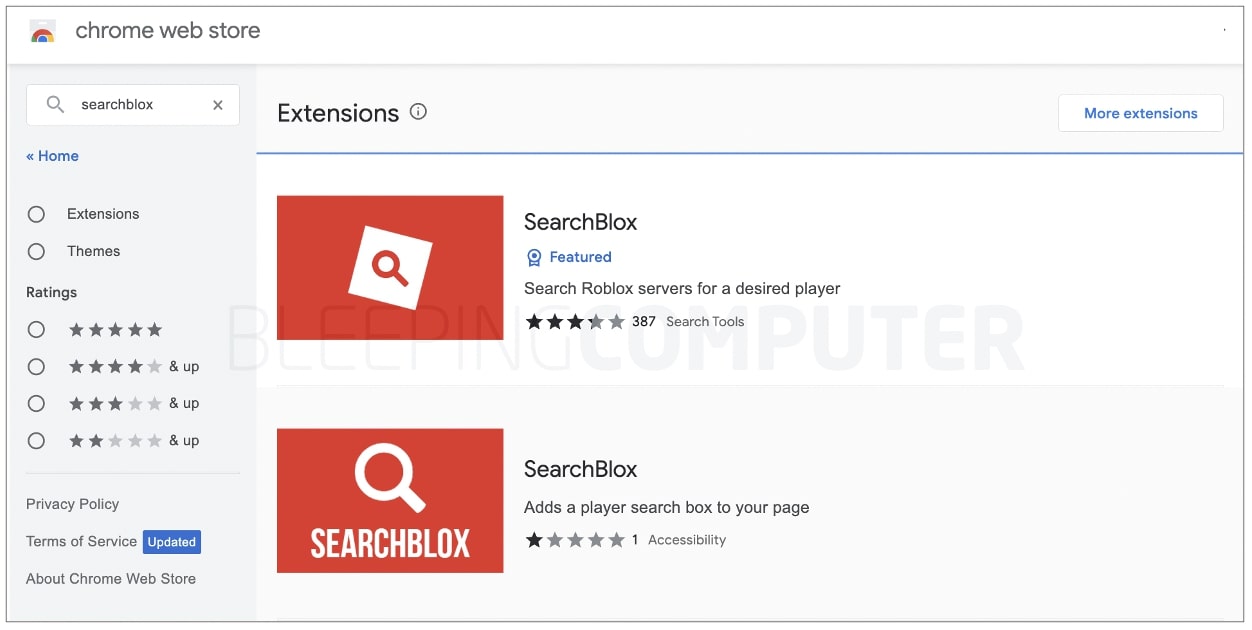
To set the tone and also highlight one of the biggest concerns associated with dangerous extensions, let’s start with a story that began last year. In November 2022, two malicious extensions with the same name — SearchBlox — were discovered in the Chrome Web Store, the official store for Google Chrome browser extensions. One of these extensions had over 200,000 downloads.

The declared purpose of the extensions was to search for a specific player on the Roblox servers. However, their actual purpose was to hijack Roblox players’ accounts and steal their in-game assets. After information about these malicious extensions was published on BleepingComputer, they were removed from the Chrome Web Store, and automatically deleted from the devices of users who’d installed them.

Malicious SearchBlox extensions published in the Google Chrome Web Store hijacked Roblox players’ accounts. Source

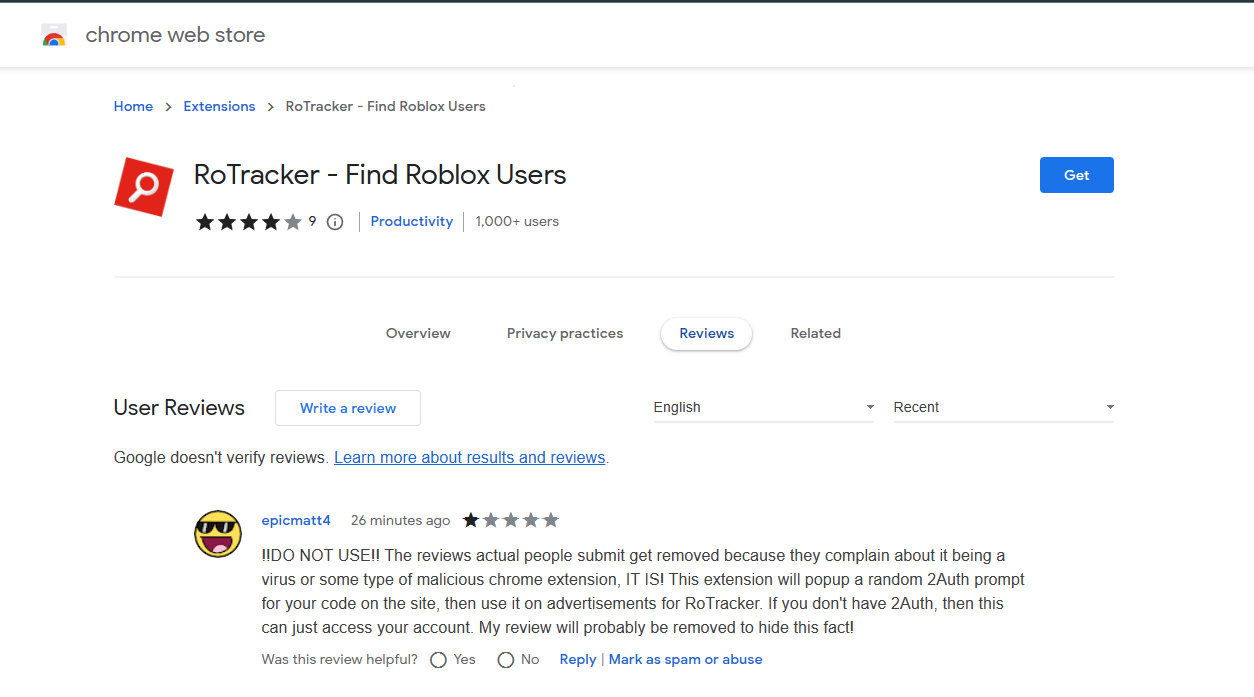
However, the Roblox story doesn’t end there. In August 2023, two more malicious extensions of a similar nature — RoFinder and RoTracker — were discovered in the Chrome Web Store. Just like SearchBlox, these plugins offered users the ability to search for other players on the Roblox servers, but in reality had a backdoor built into them. The Roblox user community eventually managed to get these extensions removed from the store as well.

The RoTracker malicious extension, also hosted on the Google Chrome Web Store. Source

This suggests that the quality of moderation at the world’s most official platform for downloading Google Chrome extensions leaves much to be desired, and it’s easy enough for creators of malicious extensions to push their creations in there. To get moderators to spot dangerous extensions and remove them from the store, reviews from affected users are rarely sufficient — it often requires efforts from the media, security researchers, and/or a large online community.

Fake ChatGPT extensions hijacking Facebook accounts

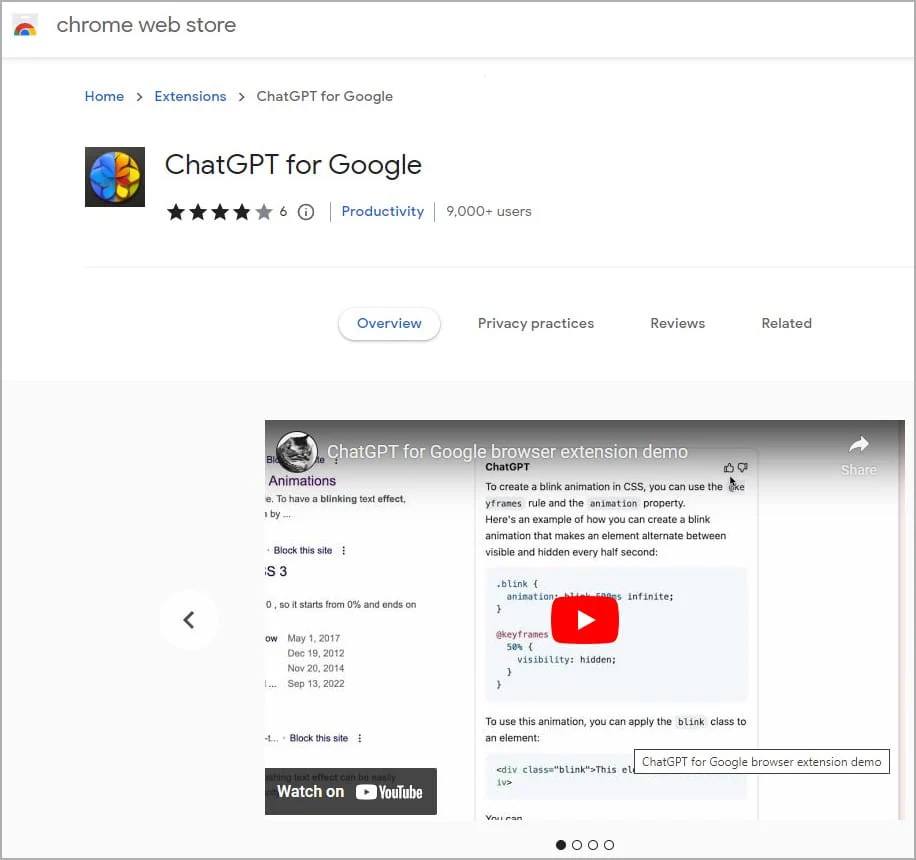
In March 2023, two malicious extensions were discovered in the Google Chrome Web Store within a few days of each other — both taking advantage of the hype surrounding the ChatGPT AI service. One of these was an infected copy of the legitimate “ChatGPT for Google” extension, offering integration of ChatGPT’s responses into search engine results.

The infected “ChatGPT for Google” extension was uploaded to the Chrome Web Store on February 14, 2023. Its creators waited for some time and only started actively spreading it precisely a month later, on March 14, 2023, using Google Search ads. The criminals managed to attract around a thousand new users per day, resulting in over 9000 downloads by the time the threat was discovered.

The infected version of “ChatGPT for Google” looked just like the real thing. Source

The trojanized copy of “ChatGPT for Google” functioned just like the real one, but with extra malicious functionality: the infected version included additional code designed to steal Facebook session cookies stored by the browser. Using these files, the attackers were able to hijack the Facebook accounts of users who’d installed the infected extension.

The compromised accounts could then be used for illegal purposes. As an example, the researchers mentioned a Facebook account belonging to an RV seller, which started promoting ISIS content after being hijacked.

After being hijacked, the Facebook account started promoting ISIS content. Source

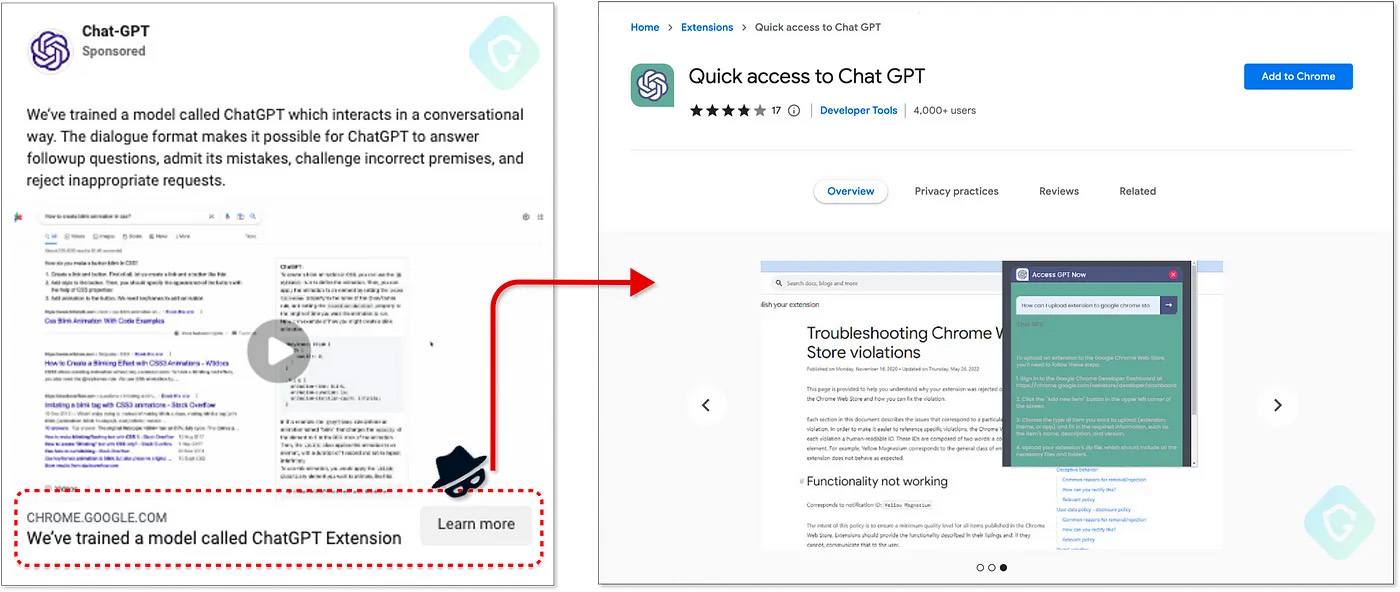
In the other case, fraudsters created a completely original extension called “Quick access to Chat GPT”. In fact, the extension actually did what it promised, acting as an intermediary between users and ChatGPT using the AI service’s official API. However, its real purpose was again to steal Facebook session cookies, allowing the extension’s creators to hijack Facebook business accounts.

“Quick access to Chat GPT” malicious extension. Source

Most interestingly, to promote this malicious extension, the perpetrators used Facebook ads, paid for by — you guessed it — the business accounts they’d already hijacked! This cunning scheme allowed the creators of “Quick access to Chat GPT” to attract a couple of thousand new users per day. In the end, both malicious extensions were removed from the store.

ChromeLoader: pirated content containing malicious extensions

Often, creators of malicious extensions don’t place them in the Google Chrome Web Store, and distribute them in other ways. For example, earlier this year researchers noticed a new malicious campaign related to the ChromeLoader malware, already well-known in the cybersecurity field. The primary purpose of this Trojan is to install a malicious extension in the victim’s browser.

This extension, in turn, displays intrusive advertisements in the browser and spoofs search results with links leading to fake prize giveaways, surveys, dating sites, adult games, unwanted software, and so on.

This year, attackers have been using a variety of pirated content as bait to make victims install ChromeLoader. For example, in February 2023, researchers reported the spread of ChromeLoader through VHD files (a disk image format) disguised as hacked games or game “cracks”. Among the games used by the distributors were Elden Ring, ROBLOX, Dark Souls 3, Red Dead Redemption 2, Need for Speed, Call of Duty, Portal 2, Minecraft, Legend of Zelda, Pokemon, Mario Kart, Animal Crossing, and more. As you might guess, all these VHD files contained the malicious extension installer.

A few months later, in June 2023, another group of researchers released a detailed report on the activities of the same ChromeLoader, detailing its spread through a network of sites offering pirated music, movies, and once again, computer games. In this campaign, instead of genuine content, VBScript files were downloaded onto victims’ computers, which then loaded and installed the malicious browser extension.

One of the sites that distributed the ChromeLoader malware under the guise of pirated content. Source

Although the altered search results quickly alert victims to the presence of the dangerous extension in their browser, getting rid of it isn’t so easy. ChromeLoader not only installs the malicious extension but also adds scripts and Windows Task Scheduler tasks to the system that reinstall the extension every time the system reboots.

Hackers reading Gmail correspondence using a spy extension

In March 2023, the German Federal Office for the Protection of the Constitution and the South Korean National Intelligence Agency issued a joint report on the activities of the Kimsuky cybercriminal group. This group uses an infected extension for Chromium-based browsers — Google Chrome, Microsoft Edge, as well as the South Korean browser Naver Whale — to read the Gmail correspondence of their victims.

The attack begins with the perpetrators sending emails to specific individuals of interest. The email contains a link to a malicious extension called AF, along with some text convincing the victim to install the extension. The extension starts working when the victim opens Gmail in the browser where it’s installed. AF then automatically sends the victim’s correspondence to the hackers’ C2 server.

Thus, Kimsuky manages to gain access to the contents of the victim’s mailbox. What’s more, they don’t need to resort to any tricks to hack into this mailbox; they simply bypass the two-factor authentication. As a bonus, this method allows them to do everything in a highly discreet manner — in particular, preventing Google from sending alerts to the victim about account access from a new device or suspicious location, as would be the case if the password were stolen.

Rilide: malicious extension stealing cryptocurrency and bypassing two-factor authentication

Criminals also often use malicious extensions to target cryptocurrency wallets. In particular, the creators of the Rilide extension, first discovered in April 2023, use it to track cryptocurrency-related browser activity of infected users. When the victim visits sites from a specified list, the malicious extension steals cryptocurrency wallet info, email logins, and passwords.

In addition, this extension collects and sends browser history to the C2 server and lets the attackers take screenshots. But Rilide’s most interesting feature is its ability to bypass two-factor authentication.

When the extension detects that a user is about to make a cryptocurrency transaction on one of the online services, it injects a script into the page that replaces the confirmation code input dialog, and then steals that code. The payment recipient’s wallet is replaced with one belonging to the attackers, and then, finally, the extension confirms the transaction using the stolen code.

How the malicious Rilide extension was promoted on X (Twitter) under the guise of blockchain games. Source

Rilide attacks users of Chromium-based browsers — Chrome, Edge, Brave, and Opera — by imitating a legitimate Google Drive extension to avoid suspicion. Rilide appears to be freely sold on the black market, so it’s used by criminals unrelated to one another. For this reason, various distribution methods have been discovered — from malicious websites and emails to infected blockchain game installers promoted on Twitter X.

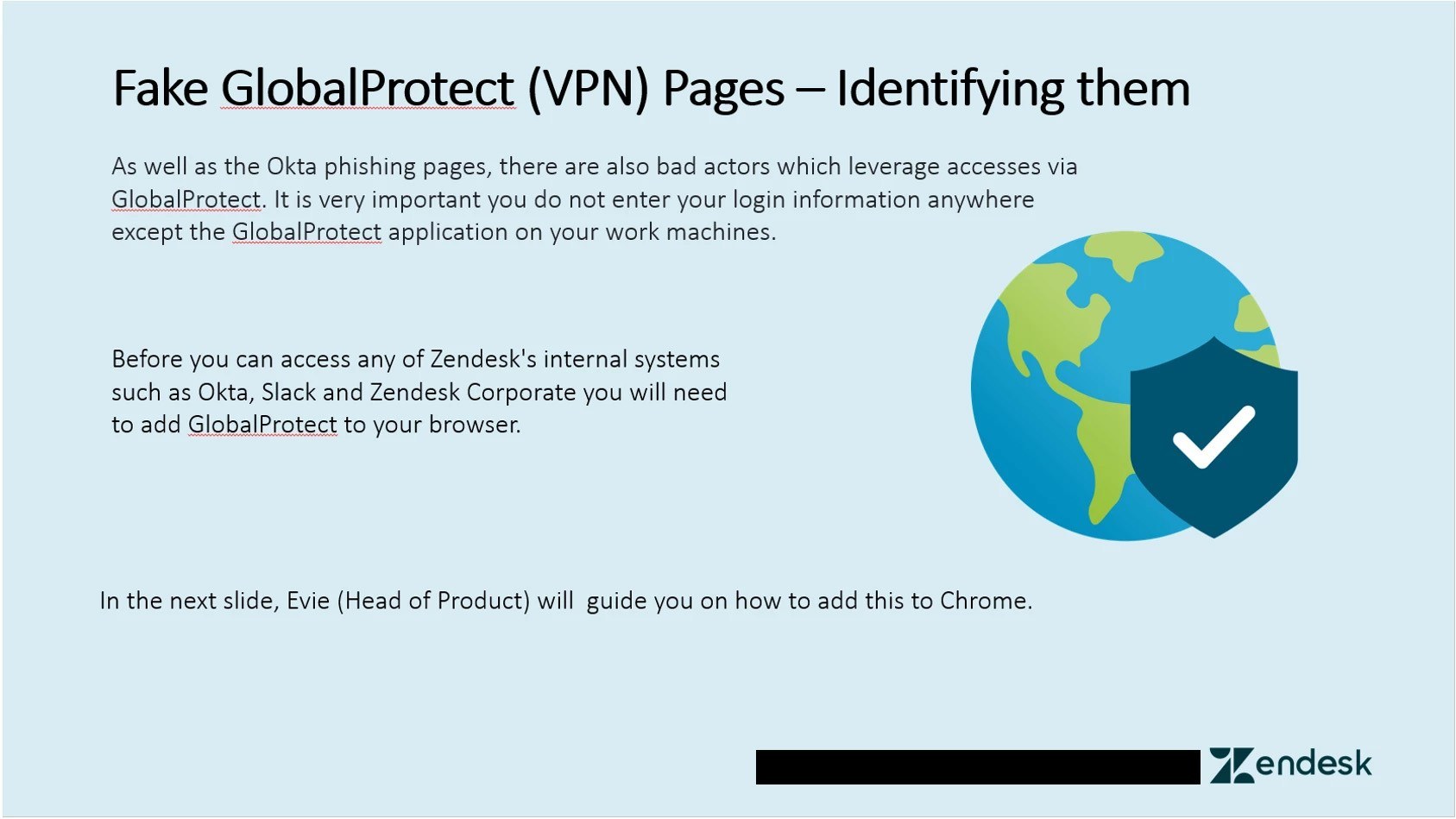
One of the particularly interesting Rilide distribution methods was through a misleading PowerPoint presentation. This presentation posed as a security guide for Zendesk employees, but was actually a step-by-step guide for installing the malicious extension.

A step-by-step guide for installing the malicious extension, disguised as a security presentation for Zendesk employees. Source

Dozens of malicious extensions in the Chrome Web Store — with 87 million downloads combined

And, of course, one cannot forget the story of the summer when researchers discovered several dozen malicious extensions in the Google Chrome Web Store, which collectively had more than 87 million downloads from the store. These were various kinds of browser plugins — from tools for converting PDF files and ad blockers to translators and VPNs.

The extensions were added to the Chrome Web Store as far back as 2022 and 2021, so by the time they were discovered they’d already been there for several months, a year, or even longer. Among reviews of the extensions, there were some complaints from vigilant users who reported that the extensions were spoofing search results with advertisements. Unfortunately, the Chrome Web Store moderators ignored these complaints. The malicious extensions were only removed from the store after two groups of security researchers brought the issue to Google’s attention.

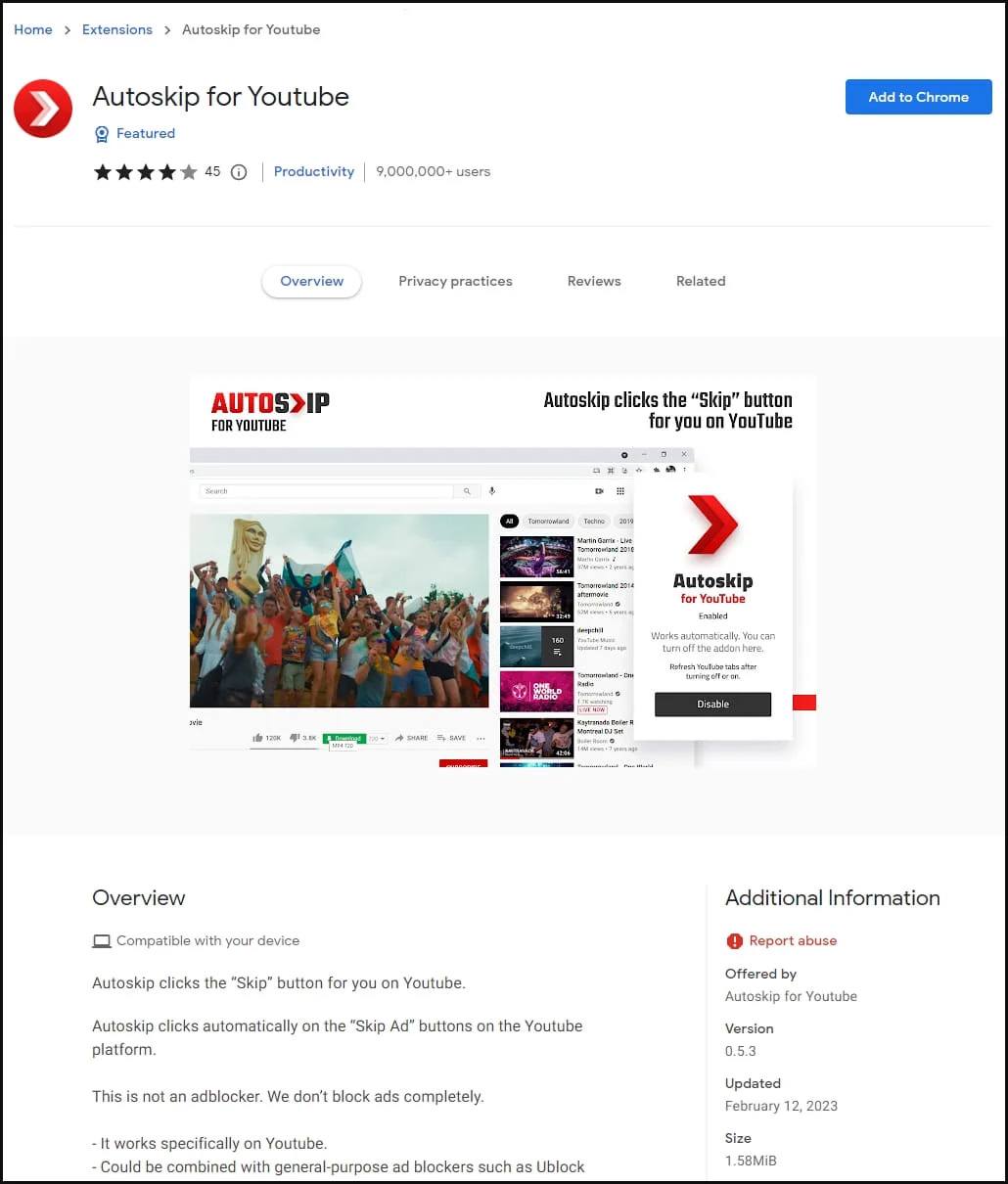
The most popular of the malicious extensions — Autoskip for YouTube — had over nine million downloads from the Google Chrome Web Store. Source

How to protect yourself from malicious extensions

As you can see, dangerous browser extensions can end up on your computer from various sources —including the official Google Chrome Web Store. And attackers can use them for a wide range of purposes — from hijacking accounts and altering search results to reading correspondence and stealing cryptocurrencies. Accordingly, it’s important to take precautions:

Try to avoid installing unnecessary browser extensions. The fewer extensions you have in your browser, the better.
If you do install an extension, it’s better to install it from an official store rather than from an unknown website. Sure, this doesn’t eliminate the risk of encountering dangerous extensions completely, but at least the Google Chrome Web Store does take its security seriously.
Before installing, read reviews of an extension. If there’s something wrong with it, someone might have already noticed it and informed other users.
Periodically review the list of extensions installed in your browsers. Remove any you don’t use — especially ones you don’t remember installing.
And be sure to use reliable protection on all your devices.

Kaspersky official blog – ​Read More

Transatlantic Cable podcast, episode 328 is an AI overload episode! Story of the year – AI, EU regulation on AI & much more! | Kaspersky official blog

The latest episode of the Transatlantic Cable podcast kicks off with news that the EU are the next major governmental body to impose AI regulations, as countries around the world race to stay ahead of the technology. From there, the team discuss news that the BBC were able to make a version of ChatGPT which was capable of writing spam and phishing emails.

From there the team discuss Securelist’s story of the year: Generative A.I and it’s impact on cyber-security.

If you liked what you heard, please consider subscribing.

EU agrees landmark deal on regulation of artificial intelligence
ChatGPT tool could be abused by scammers and hackers
Story of the year: the impact of AI on cybersecurity

Kaspersky official blog – ​Read More

Scamming investors through apps from official stores | Kaspersky official blog

As the popularity of online investing grows, so does the number of related online scams. A few months back, we took a look at some fake investment apps that we’d found in the App Store. After that, we decided to dig a little deeper and see where else such apps are lurking. And our search yielded much more curious results than we expected.

This post is about our most interesting findings: fake “gas” apps in Android store recommendations; “oil investment” apps in the App Store and on Google Play; as well as a series of fake videos in which “Erdogan”, “Musk”, and other famous people promote non-existent investment platforms.

Gas scammers in Android app stores

First of all, let’s outline the scale of the problem. We discovered several hundred scam apps in different languages — more than 300 in total — offering investments in natural resources, “quantum investment algorithms”, and other fancy things that purport to turn a small sum into untold riches.

Such apps can be found crawling all over stores that are pre-installed on phones of various brands: for example, GetApps on Xiaomi smartphones, or Palm Store on Tecno devices.

Hundreds of scam investment apps in GetApps and Palm Store for Android

One of the stores even included a number of scam apps in the list of recommendations shown to the user when they open it, and those apps were even pre-checked — so the store itself encourages the user to install them!

Scam investment apps in Palm Store’s recommended list

Some Android advertising apps were found to contain ads for either “gas” and “quantum” apps, or scam sites offering the same: natural resources, investment algorithms, and other sure-fire ways of earning hundreds of dollars a day without lifting a finger.

Ad for “gas” and “quantum” scam apps for Android

Fake videos: “Musk” and “Erdogan” advertise investment platforms

Besides such apps and sites themselves, we uncovered some massive information campaigns promoting various “investment platforms”.

In particular, these spread fake news about how ordinary users got rich through investments, and each campaign was tailored to the target region in the style of leading local media and featuring the names of famous politicians and businesspeople.

Fake news content about earnings on investment platforms

Also discovered were many (around 800) fake videos, localized for almost all regions of the world and “starring” well-known politicians, actors, businesspeople, and others.

Naturally, the media persons themselves don’t even suspect that their images are being exploited for such purposes. The creators of the videos use real footage of an official nature — interviews with national TV stations, public speeches and the like that are familiar to the regional target audience. In this way, the scammers maximize the number of victims likely to be persuaded by such fakes.

The videos, it must be said, are made quite well. Overlaid on top of the edited video footage are audio tracks that sound very convincing — strongly suggesting the use of audio deepfakes. The audio is also carefully subtitled, so the videos can be watched without sound.

In addition, the scammers use company names similar to ones everyone’s heard of. For instance, a Russian-language video promotes the “Tesla X investment platform”, allegedly created by Elon Musk as a by-product of developing a vehicle autopilot system. The operating principle of this investment algorithm is “like a multicooker: you put in the ingredients and get a ready dinner” (indirect quote).

Scam video with Musk, DiCaprio, and the “Tesla X investment platform”

In another video in Turkish, the main character is… the president of Türkiye, who appears to unveil an “investment platform” promising big bucks. All it takes is to “invest” just 5000 lira (around $170, or €160) in supposed shares of a Turkish state-owned oil-and-gas pipeline company.

“Recep Tayyip Erdoğan” offers a get-rich opportunity by “investing” just 5000 lira

Next up is a video in Spanish. In it, Mexican billionaire Carlos Slim “advises” his fellow citizens to invest in oil through an “investment platform” called Oil Profit.

Carlos Slim appears to promote an “investment” app called Oil Profit

Such videos, created for a host of countries and regions, are myriad, and most give the impression of being endorsed by national or regional heads, who “encourage” investing money in large public and private projects — which, of course, in reality goes straight into the scammers’ pockets.

Citizens of Moldova are promised a juicy rate of return from Moldindconbank, because “payments are guaranteed by the head of the Central Bank!” Citizens of Kazakhstan are advised to “invest” in KazMunayGas, and citizens of Romania — in Romgaz; in both videos, the lead character is the country’s president. Meanwhile, Korean citizens are invited to invest in a fake “national-level investment platform” seemingly from Samsung, and Bulgarian citizens — in a no-less fake scheme from Bulgarian Energy Holding. And the list goes on…

Not by gas alone: “oil” scammers in the App Store and on Google Play

Researching the case of Carlos Slim seemingly promoting investments in oil, we discovered several more apps in the App Store and on Google Play with the name “Oil Profit” in the title (the creators’ own spelling and punctuation are retained):

Oil Profit – Trading Insignts [sic]
Oil – Profit, Trade, News
Oil Profit – News & Help
Oil Profit : Ai Technology

Scam Oil Profit apps on Google Play and in the App Store

These “oil” apps work in roughly the same way as their “gas” cousins, only in English — although analysis of the code points to the campaign being aimed at Arab countries, Mexico, France, Italy, and Poland. First, the potential victim is shown videos promising out-of-this-world enrichment. Next, they’re asked to complete a survey in the form of a conversation with a chatbot (“the Oil Profit system’s AI”), after which they’re told to expect a whopping rate of return of $777 per day!

The internal mechanics of the scam Oil Profit app: an enticing video, a survey with the promise of vast riches, and an offer to take a call from a “representative”

This, naturally, is followed by an offer to take another call, this time from a “specialist” who’ll be in touch within one business day. During this call, of course, the victim is persuaded to part with their money under one pretext or another.

How to stay protected

When someone offers you a pile of cash for nothing, it’s a sure sign you’ll end up giving them money rather than the other way round. To guard against scam apps and mobile malware, secure all your devices with comprehensive protection, such as our Kaspersky Premium.

Kaspersky official blog – ​Read More

Can you trust Windows Hello biometric authentication | Kaspersky official blog

Due to mass password leaks, user forgetfulness, and other problematic areas of modern information security, alternative ways of logging in to systems and corporate software are gaining ground. Besides the familiar authenticator apps and various contactless cards and USB tokens, fingerprint-based biometric authentication is a popular choice — especially since laptop keyboards these days often come with built-in scanners.

This method does seem rather reliable at first glance; however, a recent report by Blackwing Intelligence casts doubt upon this assertion. The authors managed to hack the biometric authentication system and log in to Windows using Windows Hello on Dell Inspiron 15 and Lenovo ThinkPad T14 laptops, as well as using the Microsoft Surface Pro Type Cover with Fingerprint ID keyboard for Surface Pro 8 and Surface Pro X tablets. Let’s have a look at their findings to see whether you should update your cyberdefense strategy.

Anatomy of the hack

First of all, we must note that this was a hardware hack. The researchers had to partially disassemble all three devices, disconnect the sensors from the internal USB bus, and connect them to external USB ports through a Raspberry PI 4 device that carried out a man-in-the-middle attack. The attack exploits the fact that all chips certified for Windows Hello must store the fingerprint database independently, in the on-chip memory. No fingerprints are ever transmitted to the computer itself — only cryptographically signed verdicts such as “User X successfully passed verification”. In addition, the protocol and the chips themselves support storing multiple fingerprints for different users.

The researchers were able to perform the spoofing, although attacks varied for different laptop models. They uploaded onto the chip additional fingerprints, supposedly for a new user, but were able to modify the data exchange with the computer so that information about the successful verification of the new user would be associated with the ID of the old one.

The main reason the spoofing worked was that all verified devices deviate to some degree from the Secure Device Connection Protocol (SDCP), which Microsoft developed specifically to head off such attacks. The protocol takes account of many common attack scenarios — from data spoofing to replaying a data exchange between the operating system and the chip when the user is not at the computer. Hacking the implementation of the security system on a Dell (Goodix fingerprint scanner) proved possible due to the fact that the Linux driver doesn’t support SDCP, the chip stores two separate databases for Windows and Linux, and information about the choice of database is transmitted without encryption. Lenovo (Synaptics chip) uses its own encryption instead of SDCP, and the authors managed to figure out the key generation mechanism and decrypt the exchange protocol. Rather jaw-droppingly, the Microsoft keyboard (ELAN chip) doesn’t use SDCP at all, and the standard Microsoft encryption is simply absent.

Main takeaways

Hardware hacks are difficult to prevent, yet equally if not more difficult to carry out. This case isn’t about simply inserting a USB flash drive into a computer for a minute; skill and care are required to assemble and disassemble the target laptop, and throughout the period of unauthorized access the modifications to the computer are obvious. In other words, the attack cannot be carried out unnoticed, and it’s not possible to return the device to the rightful user before the hack is complete and the machine is restored to its original form. As such, primarily at risk are the computers of company employees with high privileges or access to valuable information, and also of those who often work remotely.

To mitigate the risk to these user groups:

Don’t make biometrics the only authentication factor. Complement it with a password, authenticator app, or USB token. If necessary, you can combine these authentication factors in different ways. A user-friendly policy might require a password and biometrics at the start of work (after waking up from sleep mode or initial booting), and then only biometrics during the working day;
Use external biometric scanners that have undergone an in-depth security audit;
Implement physical security measures to prevent laptops from being opened or removed from designated locations;
Combine all of the above with full-disk encryption and the latest versions of UEFI with secure boot functions activated.

Lastly, remember that, although biometric scanners aren’t perfect, hacking them is far more difficult than extracting passwords from employees. So even if biometrics aren’t not the optimal solution for your company, there’s no reason to restrict yourself to just passwords.

Kaspersky official blog – ​Read More

Digital gifts for Christmas and New Year | Kaspersky official blog

The festive season is upon us, and that means it’s time to think about presents again. And not just for close friends and loved ones, but everyone else in your world: coworkers, relatives, and so on. And that means figuring out what to buy for them all, then heading to the stores in the pre-Christmas crush to do battle with fellow shoppers.

Can’t spare the time for this seasonal ritual? Digital gifts could be the solution. This post talks about the benefits of doing so — with tips on the best options.

Six reasons to go digital

Let’s take a look at six good reasons why digital gifts are increasingly popular, and why they could be a great choice for you this Christmas and New Year.

You can give remotely. You won’t have time to see everyone in the flesh, but you still want to give something special and/or useful. Some folks you might not even especially want to see in person, but for whatever reason they still need a present. No problem: you can send them a digital gift even if they live at the South Pole.
No need to wait in line. An obvious advantage of digital gifts is that they are, by definition, sold online. So you don’t have to brave the endless traffic jams and waiting lines with the other pre-holiday masochists. You can sit at home in a comfy armchair, sip hot tea, and order everything in a few clicks.
Always in stock. Sure, you can try to order something physical from an online store, but the closer you are to Christmas and New Year, the more likely it is that all the good stuff has sold out. This isn’t an issue with digital gifts: the supply is endless, so there’s something for everyone.
Instant (and free!) delivery. Another problem with pre-holiday online shopping for physical purchases is delivery. If you don’t sort out gifts in advance, chances are they won’t arrive in time. No such hassle with digital gifts: they get delivered in milliseconds. Beat that, Santa.
Environmentally friendly. Let’s be honest: the Christmas and New Year tradition of gift-giving is not all that great for the environment. Millions of Christmas reindeer sweaters to be worn a couple of times (if at all) — and squillions of pairs of “funny” socks that go straight in the trash — do not help save the planet. Again, no such problem with digital gifts. Even if the gift wasn’t a hit, it’s okay: no need to recycle it.
Can be very last-minute. Christmas is tomorrow (yikes!), and you’ve forgotten to buy someone a present or couldn’t get to the store before closing time? A digital gift will save the day! As mentioned, it’s ready in milliseconds after clicking or tapping that Pay button. So you can buy and give in real time.

Top-5 digital gifts for Christmas and New Year

Now that we’ve established why digital presents are good, let’s talk about what those digital presents can be.

Movies. Blockbusters, documentaries, sporting events, TV shows, educational videos, cartoons, yoga classes — these days just about everyone, young and old, eats a slice of digital video content on a daily basis. So a subscription to an online movie theater or streaming service is an excellent gift that can’t fail to raise a smile.
Music. Digital music is another gift you can’t go wrong with. Sure, you might not know exactly which album or artist to pick, but there’s no need! Just gift a subscription to a digital music service, and the lucky recipient can listen to whatever they want.
Games. Although not everyone would describe themselves as a gamer, that same everyone likely plays games. It’s just that some do it on a souped-up computer brimming with all the bells and whistles, while others opt for a regular laptop, tablet, or smartphone. Therefore, a subscription or gift card to a gaming platform or app store could be just the ticket. By the way, gaming stores often have wishlists where you can see what someone wants to play and make that a gift.
E-books. In the 20th century, it was often said that books make the best gifts. But in the 21st , you can give not just one book, but an entire library — and there’s no need to break the bank in doing so. So the best gift for an e-bookworm is a subscription to an online library.
Digital life protection. All our devices, and especially the valuable data they hold, need to be protected. There a several gift options here: for example, a subscription to a quick and reliable VPN, or to a secure password manager. Or you can give all this (and more) in one — with a subscription to our Kaspersky Premium.

Kaspersky official blog – ​Read More

Scamming Booking.com clients through hotel accounts | Kaspersky official blog

This season, a new attack scheme is proving very popular with cybercriminals: scamming Booking.com clients through the service’s internal messaging system. To do this, they use compromised hotel accounts on admin.booking.com. Over the past few months, various companies have released studies on incidents of this nature. Here’s a detailed breakdown of how this attack works, and tips on how hotel owners and staff can protect themselves (and their clients).

Infecting hotel staff computers with a password stealer

What we’re dealing with here is a multi-stage attack — B2B2C, if you will. It all starts with infecting hotel computers, but the immediate threat isn’t to the hotel itself — it’s to the clients.

To hijack accounts on admin.booking.com, attackers use specialized malware known as password stealers. Typically, these stealers collect any passwords found on an infected computer. But in this case it seems that Booking.com accounts are what the cybercriminals are specifically interested in.

In particular, one of the abovementioned studies describes a targeted email attack on hotel staff. This attack starts with an innocuous email in which someone poses as a recent guest and asks the hotel staff for help in finding lost documents.

The first email from the attackers to the targeted hotel. Source

In the next email, the “guest” claims to have searched everywhere for the lost passport or whatever to no avail, suggesting the hotel is the only possible place where it might be. So, they ask the hotel staff to look for it and, to help the search, provide a link supposedly containing photos of the lost passport.

The next email from the attackers, containing a link to an infected archive with a password stealer. Source

As you might suspect, this archive contains not the photos of the passport, but the password stealer. After the user clicks on the dangerous file, the stealer searches the system for saved login credentials for the hotel’s account on admin.booking.com, and sends them to the attackers.

Using a stolen login and password, the cybercriminals gain access to the hotel’s account on admin.booking.com.

Another study on the Booking.com account theft epidemic describes an alternative method of infecting hotel staff computers. In this attack, criminals create reservations using guest accounts (in some cases, probably stolen accounts). They then contact the hotel using Booking.com’s internal messaging system and, under one pretext or another, slip in a link to a malware-infected file — with the exact same outcome as in the previous case.

Stealing hotel accounts on Booking.com and emailing clients

At the next stage, the attackers proceed to directly use the accounts stolen from the infected hotel computers. Everything is made a lot simpler by the fact that Booking.com’s service doesn’t provide two-factor authentication, so accessing an account only requires a login and password.

Upon entering the hotel’s account on admin.booking.com, the criminals study current bookings and begin sending messages to future guests using Booking.com’s internal messaging system. These messages generally revolve around an error in verifying the guest’s payment card information provided during the booking. The “hotel” thus asks the guest to re-enter their card details; otherwise, the reservation will be canceled.

Of course, the messages include links that at first glance appear to resemble genuine links to Booking.com’s booking pages. They contain the word “booking” itself, something resembling a booking number, and in some cases, additional words like “reservation”, “approve”, “confirmation”, and so on.

Of course, upon closer inspection, it’s easy to see that these links don’t lead to Booking.com at all. However, the aim here is to target hasty individuals who, unexpectedly discovering that their planned trip could be ruined, rush to rectify the situation.

] Through Booking.com’s internal messaging system, scammers send hotel clients links to fake booking pages. Source 1, source 2, source 3, source 4

The messages are written in a professional tone and appear quite plausible. It should also be noted that the text of such messages varies considerably from one described incident to another. Apparently, a number of criminals are using this scheme independently of each other.

Fake copies of Booking.com and stealing bank card data

The final stage of the attack ensues. By clicking on the link in the message, the hotel’s client lands on a fake page — a meticulous copy of Booking.com. These pages even display the correct guest name, information about the hotel where the victim intends to stay, dates, and price — all of which the scammers know because they have access to all the booking data.

The only thing that gives it away is the link in the address bar. However, the scammers distract the victim from paying attention to such minor details by rushing them: the page claims that these dates are in high demand, so “10 four-star hotels similar to this one are already unavailable”. The implication, of course, is that if this booking fails, finding alternative accommodation won’t be easy.

On the fake Booking.com page, the client of the hacked hotel is asked to enter their card number to reconfirm the reservation. Source

The victims are urged once again to confirm the booking as quickly as possible. Moreover, it’s easy to do: just re-enter the payment information. Obviously, the card details then fall into the hands of the criminals — mission accomplished.

Selling hotel logins and passwords for Booking.com

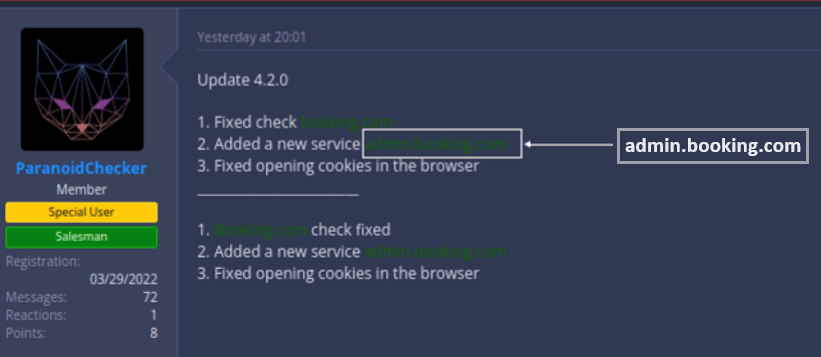
It’s worth mentioning that here, as in almost any other cybercriminal scheme, we see a tendency for narrow specialization. Apparently, some criminals collect hacked Booking.com accounts, while others exploit these accounts to deceive hotel clients. In any case, advertisements offering substantial sums for logins and passwords from admin.booking.com accounts can be found on hacker forums.

Listing on an underground forum, where the authors are willing to pay generously for hacked Booking.com hotel accounts. Source

Another listing offering decent money for hacked admin.booking.com accounts. Source

Yet another group of criminals, providing subscription-based services to search for stolen credentials in stealer malware databases, have recently added admin.booking.com to their list of searchable data.

One of the services offering paid searches across databases of stolen passwords has learned to function with admin.booking.com accounts. Source

All of this suggests that the popularity of this criminal scheme is only growing; therefore, there’ll likely be more hacks of hotel accounts on Booking.com and more affected clients in the future.

How to protect against theft of admin.booking.com accounts

Even though these attacks directly threaten hotel clients rather than the hotels themselves, the hotels still have to deal with the backlash and somehow compensate the affected parties to avoid any reputational damage. And in general, hotel computers getting infected is bad news — today, cybercriminals are hijacking Booking.com accounts; tomorrow they’ll come up with another way to monetize this infection. Therefore, it’s absolutely necessary to protect against this threat. Here’s what to keep in mind:

Storing passwords in your browser is not safe — that’s where stealer malware always looks for them.
To store passwords well, use a specialized application — a password manager — that will take care of their security.
It’s essential to install reliable protection on all your devices used for business.
And take particular care of the security of those computers that employees might use to communicate with strangers — they’re the ones more likely to become the target of an attack.

Kaspersky official blog – ​Read More

25th December – Threat Intelligence Report

For the latest discoveries in cyber research for the week of 25th December, please download our Threat_Intelligence Bulletin.

TOP ATTACKS AND BREACHES

Australia’s largest non-profit healthcare provider, St. Vincent’s Health Australia, experienced a cyberattack resulting in data theft from its networks. Vincent’s operates public and private hospitals, as well as elderly care facilities across New South Wales, Victoria, and Queensland, employing over 20,000 staff.
Xfinity, a major American cable TV and internet service provider, announced a data breach impacting nearly 36M people due to a Citrix vulnerability known as “Citrix Bleed” (CVE-2023-4966). The breach has occurred in mid-October.

Check Point IPS provides protection against this threat (Citrix NetScaler Information Disclosure (CVE-2023-4966))

A cyberattack has purportedly disabled the majority of gas stations across Iran, taking out of use about 70% of gas stations nationwide. Hacktivist group Predatory Sparrow, Gonjeshke Darande in Persian, has claimed responsibility for the wide attack.
First American, a prominent title insurance company with reported revenues of $7.6 billion in 2022, has recently encountered a cyberattack, resulting in operational disruptions after shutting down systems. This development has led to a 2.6% decline in First American’s stock price.
ESO solutions, a US company which provides software for healthcare organizations, has disclosed that a ransomware attack had affected its network. According to the company, data of 2.7 million patients from 15 healthcare facilities across the United States has been exfiltrated by the attackers.
Indian IT giant HCLTech reported that it was hit by a ransomware attack. According to the company’s report, the attack was an isolated event in a specific project’s cloud environment, and it did not affect HCL’s network. The tech giant has over 225K employees and operated across 52 countries.
The U.S. based mortgage company, Mr. Cooper, disclosed that nearly 14.7 million individuals had their information exposed during a cyberattack in October. The breach involved unauthorized access to systems, potentially compromising personal details like names, addresses, phone numbers, Social Security numbers, dates of birth, and bank account numbers.
VF Corporation, a major global apparel company known for brands like North Face and Vans, reported a substantial cyberattack that included unauthorized activity on its IT systems, which resulted in disruptions due to encrypted systems and data theft, including personal information.

VULNERABILITIES AND PATCHES

Google has released a security patch for Google Chrome, addressing the vulnerability CVE-2023-7024. The vulnerability is a heap overflow vulnerability affecting WebRTC, a real time communication browser feature. Google claims to be aware of active exploitation of this vulnerability in the wild.
Mozilla has published Firefox version 121, which includes fixes for multiple security vulnerabilities. One of the vulnerabilities, CVE-2023-6856, allowed remote code execution and sandbox escape when used on systems with the Mesa VM driver.
Ivanti has shared a security patch addressing 13 critical vulnerabilities affecting the company’s Avalanche MDM (mobile device management) product. The vulnerabilities were caused by buffer overflows, and could allow remote code execution.

THREAT INTELLIGENCE REPORTS

Check Point Research has revealed an alarming increase in advanced phishing schemes targeting a variety of Blockchain networks, employing wallet-draining techniques. Unique in their approach, these threats are targeting a wide range of Blockchain networks, from Ethereum and Binance Smart Chain to Polygon, Avalanche, and almost 20 other networks by using a crypto wallet-draining technique.
The FBI, CISA, and ASD’s ACSC have jointly released a #StopRansomware Cybersecurity Advisory for Play Ransomware, providing insights into the TTPs of the Play ransomware group, along with indicators of compromise identified through FBI investigations as of October 2023. The Play ransomware employs a double-extortion model impacting businesses and critical infrastructure organizations across North America, South America, Europe, and Australia.

Check Point Harmony Endpoint and Threat Emulation provide protection against this threat (Ransomware.Win.Play.B, Ransomware.Wins.PLAY.A)

Researchers have identified the Iranian cyber-espionage group APT33 employing a new backdoor malware called FalseFont to target defense contractors globally. FalseFont has been observed in early November, facilitating remote access, file execution, and transfer to command-and-control servers.
A coordinated international law enforcement effort, led by the FBI and involving agencies from the United Kingdom, Denmark, Germany, Spain, and Australia, successfully seized the dark web leak site of the notorious ALPHV (BlackCat) ransomware gang. This followed the sharing of a decryption tool, and a countering announcement on AlphV’s site, claiming it had been “unseized”.

Check Point Harmony Endpoint and Threat Emulation provide protection against this threat (Ransomware.Win.BlackCat, Ransomware_Linux_BlackCat, Ransomware_Linux_BlackCat)

The post 25th December – Threat Intelligence Report appeared first on Check Point Research.

Check Point Research – ​Read More

The Rising Threat of Phishing Attacks with Crypto Drainers

By Oded Vanunu, Dikla Barda, Roman Zaikin

Unmasking Deceptive Tactics: A recent investigation by Check Point Research exposes a troubling trend in the cryptocurrency landscape. The cryptocurrency community has been witnessing an alarming increase in sophisticated phishing attacks.

These threats are unique in their approach, targeting a wide range of blockchain networks, from Ethereum and Binance Smart Chain to Polygon, Avalanche, and almost 20 other networks by using a crypto wallet-draining technique.

Check Point’s Threat Intel blockchain system identified and alerted us on such phishing attacks:

During our investigation into some of the attacks, we came across a reoccurring address: 0x412f10aad96fd78da6736387e2c84931ac20313f and 0x0000d38a234679F88dd6343d34E26DCB50C30000 which are familiar by the names Angel Drainer address.

“Angel Drainer” refers to a notorious phishing group involved in cyberattacks, particularly in the cryptocurrency space. This group has been linked to various malicious activities, including the draining of cryptocurrency wallets through sophisticated phishing schemes.

Despite the shutdown of similar groups like Inferno Drainer, which assisted in stealing over $80 million in cryptocurrency, Angel Drainer continues its operations. These wallet drainers charge a percentage of the stolen amount from hackers in exchange for providing wallet-draining scripts and other services. The persistence of such scam-as-a-service entities poses significant challenges to the cryptocurrency market and emphasizes the importance of robust security measures to protect users and their assets.

Looking into the Angel Drainer kit in the wild, we came across a forum that gave us information about Angel Drainer service:

Before we start our deep dive into some of the techniques Angel drainer uses, let us explain what a crypto drainer is:

A crypto draining kit is crafted to facilitate cyber theft by draining funds from digital wallets. It operates primarily through phishing scams, luring victims to enter their wallet details on counterfeit websites.

Crypto drainers, also known as cryptocurrency stealers, are malicious programs or scripts designed to illegally transfer cryptocurrency from victims’ wallets without their consent.

The way most crypto drainers work is relatively straightforward:

Launch of a Malicious Campaign: Attackers create fake airdrop or phishing campaigns, often promoted on social media or via email, offering free tokens to lure users.

Deceptive Website: Users attempting to claim these tokens are directed to a fraudulent website that mimics a genuine token distribution platform.

Wallet Connection: Users are asked to connect their wallets to the website, preparing for the subsequent attack phase without immediate compromise.

Smart Contract Interaction: The user is induced to interact with a malicious smart contract under the guise of claiming the airdrop, which stealthily increases the attacker’s allowance through functions like approve or permit.

Asset Transfer and Obfuscation: Unknowingly, the user grants the attacker access to their funds, enabling token theft without further user interaction. Attackers then use methods like mixers or multiple transfers to obscure their tracks and liquidate the stolen assets.

Permit in the context of ERC-20 tokens is a feature that allows token holders to approve a spender (such as a smart contract) to transfer tokens on their behalf without conducting an on-chain transaction for each approval.

This can be done by signing a message off-chain with the token holder’s private key, which includes details like the spender’s address, the amount they are allowed to spend, and a validity period. This signed message can then be used by the spender or a contract to set the allowance on-chain. The permit function enhances user experience by reducing transaction costs and streamlines interactions in decentralized applications (dApps), especially in the DeFi sector. If the user is tricked and signs such a function, the attacker will be able to transfer his funds.

What is even more interesting in such behavior is that no trace will be logged to the blockchain because the sign is happening off-chain via communication between the wallet and the phishing DeFi website.

Deep Dive

Let’s start by examining one of the transactions used by Angel Drainer technique: 0xb60c32fb28aa6160df6f472f494f162b997aa49fb06776dce250aff80602a8a3

If we analyze the transaction logs, we can see a few main events:

Ownership transfer event

Approval event

Transfer and Transfer events

To fully understand the sequence of events in the attack, an in-depth analysis of the smart contract at address 0x47cbbfee58e6a134d00ea3a8f1ddfff60a8d94d6 is necessary, this includes examining the specific function that was triggered, which is identified by the code 0x095838d2.

By exploring the data involved in this function call, we can uncover the particular actions executed by the smart contract and how these actions played a role in the attack, so let’s look at the data that was sent to the scammer contract:

0x095838d2000000000000000000000000c55b8ebf5ec4c76fb9182e86cb2a29eb363d919c000000000000000000000000000000000000000000000000000000000000006000000000000000000000000000000000000000000000000000000000000000e00000000000000000000000000000000000000000000000000000000000000003000000000000000000000000ae7ab96520de3a18e5e111b5eaab095312d7fe84000000000000000000000000ae7ab96520de3a18e5e111b5eaab095312d7fe84000000000000000000000000ae7ab96520de3a18e5e111b5eaab095312d7fe84000000000000000000000000000000000000000000000000000000000000000300000000000000000000000000000000000000000000000000000000000000600000000000000000000000000000000000000000000000000000000000000180000000000000000000000000000000000000000000000000000000000000022000000000000000000000000000000000000000000000000000000000000000e4d505accf0000000000000000000000009a875f6ce282e8009aa9432784f8124067032c99000000000000000000000000c55b8ebf5ec4c76fb9182e86cb2a29eb363d919c00000000000000b88e282822ab5ed106947c1c60af583c1741a38e858de0000000000000000000000000000000000000000000000000000000000193870b574e000000000000000000000000000000000000000000000000000000000000001ca361b0da886b37585d06e3ef06b22a1c328c949d7f6e412df12c19e2821e57935fb0f4948df32c52b17cabd6c7753129cad97e95edb1113ba181c83df0849f4200000000000000000000000000000000000000000000000000000000000000000000000000000000000000000000000000000000000000000000006423b872dd0000000000000000000000009a875f6ce282e8009aa9432784f8124067032c99000000000000000000000000fbcbc1dc95eec0ecec3051fb55a8921cf5157f2800000000000000000000000000000000000000000000000083ffc624afcd500000000000000000000000000000000000000000000000000000000000000000000000000000000000000000000000000000000000000000000000006423b872dd0000000000000000000000009a875f6ce282e8009aa9432784f8124067032c99000000000000000000000000412f10aad96fd78da6736387e2c84931ac20313f000000000000000000000000000000000000000000000000174b4115886f87cc00000000000000000000000000000000000000000000000000000000

The function selector 0x095838d2, extracted from the initial 4 bytes of the input, clarifies that the function with this selector was executed. The parameters passed to this function were:

Param1: An Ethereum address: 0xc55b8ebf5ec4c76fb9182e86cb2a29eb363d919c.

Param2: An array consisting of three identical Ethereum addresses: 0xae7ab96520de3a18e5e111b5eaab095312d7fe84 for each entry.

Param3: an array of 3 long elements.

These parameters provide insights into the nature of the transaction initiated by the contract, helping to understand the methodology of the operation within the scam.

For clarity and ease of reference, let’s label the aforementioned address with an alias:

0xc55b8ebf5ec4c76fb9182e86cb2a29eb363d919c – scammer_contract_1

0xae7ab96520de3a18e5e111b5eaab095312d7fe84 – stEth_token_contract

0x9a875f6ce282e8009aa9432784f8124067032c99 – victim_address

0x412f10aad96fd78da6736387e2c84931ac20313f – angel_drainer_wallet

0x47cbbfee58e6a134d00ea3a8f1ddfff60a8d94d6 – scammer_contract_2

Function 0x095838d2(): executed by scammer_contract_2

The initial action executed involved the creation of a contract at the scammer_contract_1 address, which is referred to as Param1 in the process data.

In the screenshot below we can see:

The scammer’s strategy involves verifying the existence of a contract at the address provided in scammer_contract_1 by checking the code size at that address. If the code size is greater than zero, indicating a contract exists, the scammer proceeds to execute the multicall function on this existing contract. Subsequently, if the multicall operation is successful, a new contract is deployed.

On the other hand, if there is no existing contract at the scammer_contract_1 address (i.e., the code size is zero), the scammer’s approach changes. In this case, the first step is to deploy new contract addresses with no transaction history, enabling them to bypass wallet security alerts, followed by invoking the multicall function on this newly created contract.

In the situation we’re analyzing, the sequence of actions chosen involves first deploying a new contract, followed by the execution of the multicall function to the deployed address (scammer_contract_1) as can be seen in the screenshot below. This method highlights a particular approach to orchestrating contract interactions. Let’s proceed to examine the details of this procedure.

Function multicall(): executed by scammer_contract_1

The multicall function in question, executed on the contract at address scammer_contract_1, involves the use of two additional arrays (referred to as param2 and param3) as parameters. In this specific operation, the function is directed to carry out three distinct actions as can be seen in the screenshot below. All these actions target the same contract address, stEth_token_contract, which is associated with the stETH token and corresponds to param2 in the function call data.

In the execution of the multicall function on the contract at scammer_contract_1, the signatures for all operations were included as parameters. Analyzing the data reveals the specific function signatures that were utilized in these operations. These signatures effectively outline the set of actions to be performed by the multicall function:

0xd505accf – Permit function

0x23b872dd – TransferFrom X2

Function Call(): executed by stEth_token_contract

Let’s examine the initial transaction involving the Permit function. When we analyze the data that was submitted for this function call, we can identify the Permit signature in the first four bytes.

Breaking down the Permit function data, we note that it typically requires the following parameters:

Owner, spender, value, deadline, and V, R, S.

Understanding these parameters and their implications is key to recognizing how such functions can be exploited in scams, and why vigilance is necessary when dealing with token permissions, so let’s look at the data:

Owner: This is the address of the token owner, essentially the victim in this scenario. In our case, it’s:0x9a875f6ce282e8009aa9432784f8124067032c99.

Spender: The address that is authorized to spend the tokens, controlled by the scammer.

In our case, it’s 0xc55b8ebf5ec4c76fb9182e86cb2a29eb363d919c.

Value: The specified amount of tokens the spender is permitted to use. In our case is: 83476733574422399944877753435006670731032001850387113967616000000000000000000, This extraordinarily large number typically indicates permission for an unlimited amount of tokens.

Deadline: The expiration time for the permit’s validity. In our case is: 1733137487694.

V, R, S: These are the components of the cryptographic signature, essential for verifying the authenticity of the transaction.

From this data, it’s evident that if the victim signs this permit, the scammer’s contract address would gain access to a potentially unlimited amount of the victim’s stETH tokens. This highlights the critical importance of understanding and verifying transaction details, especially in the context of token permissions and transfers.

Upon executing the Permit call with the victim’s signature, the scammer would then use the transferFrom function from scammer_contract_1 to move tokens on behalf of the victim.

Following this, another transfer is arranged from the scammer’s address to the address Angel_drainer_wallet, often referred to as the Angel drainer address, as part of a presumed agreement to distribute the stolen funds.

Upon completion of these transfers, the victim would be deprived of all their stETH tokens. Subsequently, the scammer would change the ownership of the contract address they used for the attack, scammer_contract_1, transferring it from one contract address to another scammer controlled address. This final step would effectively complete the scam operation, leaving the victim without their tokens and the scammer in control of the new contract.

Looking at the “Angel Drainer” wallet address, it seems that he earns significant amounts of money not just through direct activities but also from others using its drain kit.

Safeguarding Your Assets

The risks involved in these scams are manifold. First and foremost is the risk of unsolicited emails and messages, which are a common starting point for these phishing attacks. Users must be extremely cautious with such communications, especially when they lead to external links. Another significant risk is the use of URLs that closely mimic legitimate ones, designed to deceive even the most vigilant eye. The most critical risk, however, is embedded in the approval of transactions that seem innocuous but are, in fact, malicious.

The key to safeguarding against these phishing attacks lies in a combination of vigilance and the use of technological safeguards. Users are advised to:

Be skeptical of airdrop claims, especially those requiring wallet interaction.

Understand the implications of approving transactions or signing messages in their wallets.

Verify the legitimacy of smart contracts before interacting with them.

Limit the use of high allowances or regularly review and revoke them using blockchain explorers or wallet interfaces.

Employ hardware wallets for enhanced security, especially for substantial holdings.

Conclusion

The threat posed by these phishing attacks cannot be overstated. In the dynamic and ever-evolving world of cryptocurrency, staying informed and cautious is not just advisable; it’s essential. The community needs to collectively work towards building a more secure and aware environment, where each member is equipped with the knowledge and tools to protect their digital assets. Remember, in the realm of cybersecurity, it’s always better to err on the side of caution. Let’s spread the word and help keep our community safe.

The Threat Intel Blockchain system, developed by Check Point, continues to accumulate valuable information on emerging threats, and this intelligence will be shared in the future. In this collaborative effort, we aim to empower investors with the knowledge needed to navigate the crypto space securely and protect themselves from potential pitfalls. For more information contact us at: blockchain@checkpoint.com

The post The Rising Threat of Phishing Attacks with Crypto Drainers appeared first on Check Point Research.

Check Point Research – ​Read More

5 common data security pitfalls — and how to avoid them

Data protection has come a long way. In previous years, it was considered a “nice to have” and a line item on the budget further down the page. Today, it’s top of mind for almost every CIO or CISO across all industries.

Yet many organizations are caught in the crosshairs of cybersecurity challenges, often due to common oversights and misconceptions about data security. It’s not surprising due to the rising complexity of threats along with the TTP (tactics, techniques and procedures) of bad actors.

From the pitfalls of decentralized data security strategies to the challenges of neglecting known vulnerabilities and managing compliance, this article will explore each obstacle, provide actionable solutions and shine the light on a real-world example that brings it all together.

Pitfall 1: Failing to move beyond compliance

While regulations like GDPR and SOX set standards for data security, they are merely starting points and should be considered table stakes for protecting data. Compliance should not be mistaken for complete data security, as robust security involves going beyond compliance checks.

The fact is that many large data breaches have occurred in organizations that were fully compliant on paper.

Moving beyond compliance requires actively (and proactively) identifying and mitigating risks rather than just ticking boxes during audits.

Solution: Recognize compliance as a starting point

Organizations must go beyond compliance by adopting a strategic, proactive approach to protect critical data. The strategy should include discovering and classifying sensitive data, using analytics for risk assessment, enforcing data protection through encryption and access controls, monitoring for unusual activity, responding to threats quickly and streamlining compliance reporting. Understanding the broader implications of data breaches (such as legal liabilities and potential losses) is essential in developing robust data security measures.

Pitfall 2: Not recognizing the need for centralized data security

As businesses grow, data gets stored across various platforms, much of it unstructured. Data sprawl is real, underscoring the importance of centralized security oversight.

While their data sources expand further into the cloud, leaders of companies with growing IT infrastructures can become overwhelmed by this expansive attack surface. Without enough visibility and control of their sensitive data, a unified approach is challenging — and opens up gaps in security protocols and new vulnerabilities.

Solution: Know where your sensitive data resides

Effective data security involves knowing where and how sensitive data is stored and accessed, and integrating that knowledge into the broader cybersecurity program to ensure smooth communication between different technologies. Using a data security solution that operates across various environments and platforms is crucial for effective data protection and cybersecurity integration.

Pitfall 3: Unclear responsibility for ownership of data

Data is one of the most valuable assets for any organization. And yet, the question, “Who owns the data?” often leads to ambiguity within organizations.

Clear delineation of data ownership and responsibility is crucial for effective data governance. Each team or employee must understand their role in protecting data to create a culture of security. Because if nobody knows who is responsible for what data, how can you protect sensitive data?

Solution: Hiring a CDO or DPO

Hiring a Chief Data Officer (CDO) or Data Protection Officer (DPO) is a great start for effective data management and security, especially for GDPR compliance. These roles require technical knowledge, business acumen, risk assessment skills and an ability to direct strategic data security implementations. They should also manage compliance, monitor program effectiveness, negotiate with cloud providers and lead data breach response planning. Their role is key in promoting organization-wide collaboration on data security.

Pitfall 4: Failure to address known vulnerabilities

Unpatched vulnerabilities are one of the easiest targets for cyber criminals. This means that organizations face significant risks when they can’t address public vulnerabilities quickly. Despite the availability of patches, many enterprises delay deployment for various reasons, which leaves sensitive data vulnerable.

The challenge in patch management stems from the difficulty in coordinating efforts across IT, security and operational teams, alongside the need to test patches to avoid new issues. In cloud environments, the uncertainty about patching responsibilities and lack of control over third-party service providers only complicates the issue.

Solution: Implement a vulnerability management program

A thorough vulnerability management program is paramount to cybersecurity and involves regular scans and assessments of all data assets (including cloud-based). Making vulnerability remediation a priority and basing it on potential exploits and business impact is essential. Protective measures should also include data obfuscation techniques like encryption and tokenization, as well as robust key management.

Pitfall 5: Insufficient data activity monitoring

In the era of big data, monitoring data activity is inarguably difficult. What was once considered a purely IT decision has transcended into the boardroom and up and down the corporate hierarchy.

For effective data security, leaders must be vigilant about who accesses data, how they access it and when. This includes ensuring appropriate access levels and assessing associated risks — especially since privileged users often pose significant insider threats.

A key element in data protection is real-time monitoring to detect suspicious or unauthorized activities by privileged accounts. The challenge here intensifies with the need to monitor, capture, filter and process an overwhelming volume of data from diverse sources like databases, file systems and cloud environments.

Solution: Develop a comprehensive data security and compliance strategy

Starting a data security initiative requires the alignment of monitoring efforts with specific risks and business goals, and adopting a phased approach for implementing best practices. Priority should be given to monitoring the most sensitive data sources with clear policies and investing in automated monitoring solutions with advanced analytics for detecting risks and unusual activity — particularly among privileged users.

Equifax data breach: Takeaways from a real-world example

One of the most notable examples of a data breach that reflects the failure to address known vulnerabilities is the Equifax data breach of 2017, which exposed the personal information of approximately 147 million people. The breach happened due to a known vulnerability in the Apache Struts web framework, which Equifax had failed to patch promptly.

To address the far-reaching consequences of the breach, Equifax undertook monumental changes, some of which are outlined above.

According to their CIO, the company:

Invested heavily in cybersecurity (over $200 million in the year following the breach)
Boosted resources
Gained buy-in from the entire executive leadership team
Hired a new CTO with proven leadership during tenure at IBM
Implemented built-in incentives for security awareness throughout the organization tied to the annual bonus structure and even bonus deductions if specific security goals aren’t reached.

The Equifax breach serves as a stark reminder of the importance of moving beyond compliance to a more comprehensive, proactive data security approach and highlights the need for timely response to known vulnerabilities, ongoing investment in security technologies and the importance of skilled cybersecurity personnel.

For a more in-depth look at the top five data security pitfalls and the solutions to address them, check out IBM’s extensive eBook.

The post 5 common data security pitfalls — and how to avoid them appeared first on Security Intelligence.

Security Intelligence – ​Read More